Connect Digistorm to Looker Studio
Connecting Digistorm to Looker Studio helps you build automated performance monitoring dashboards for your school. Using the Windsor.ai codeless connector cuts the time needed for processing and transferring data. With the synchronization, you start analyzing data in minutes.

Why do I need Digistorm and Looker Studio integration?
Integrating Digistorm and Looker Studio is an easy way to start analyzing your school’s data. The integration supports automated reporting. Export Digistorm data using a connector, build your first report template in Looker Studio, and schedule automated data updates for automated reporting. Automated data synchronization cuts the time to insights so you can focus on decision-making.
Prerequisites
To set up the connector, the user should have:
- Digistorm account (Visit our privacy policy and terms of use)
- Google account for Looker Studio integration.
How to connect Digistorm to Looker Studio
1. Register
Register or login if you already have an account.
2. Select your source
You need to select Digistorm as a Data Source and Grant Access to Windsor.ai.
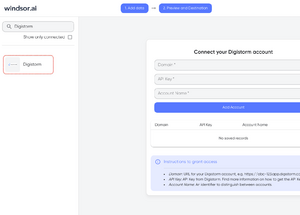
3. Select the fields on the right.
Select the fields on the right to later use in your data source.
4. Select Destination
Go to “Select Destination” and Choose Looker Studio.
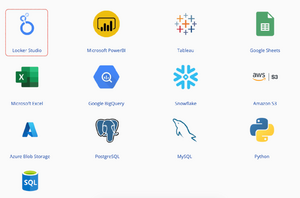
5. Sync and authorize data
Select “connect” and authorize access to your data source.
FAQs
What is Digistorm?
Digistorm is a software solution designed to help K-12 schools build technologies for the management of school activities. Digistorm collects ample data across the different applications used in the school. Analyzing Digistorm data can enhance how your organization makes operational and strategic decisions.
What is Looker Studio?
Looker Studio is a web-based data analytics solution. It helps businesses analyze large datasets from any business application. With Looker Studio, you can build report templates and express dashboards for real-time monitoring.

Try Windsor.ai today
Access all your data from your favorite sources in one place.
Get started for free with a 30 - day trial.
Extract Digistorm data to Looker Studio with Windsor.ai
See the value and return on every marketing touchpoint

Providing 50+ marketing data streams, we make sure that all the data we integrate is fresh and accessible by marketers, whenever they want.

Spend less time on manual data loading and spreadsheets. Focus on delighting your customers.