Connect Everhour to Looker Studio
Let Windsor.ai no-code connector automate Everhour and Looker Studio data integration. Enjoy a seamless data pipeline that exports your Everhour data to the BI tool in minutes. Leverage data analytics for enhanced project management.

Why do I need Everhour and Looker Studio integration?
Generate real-time reports that show your project progress, resource allocation, and team productivity. Come up with more efficient ways to ensure timely delivery of projects and build trust among various stakeholders.
Prerequisites
To set up the connector, the user should have:
- Everhour account (Visit our privacy policy and terms of use)
- Google account for Looker Studio integration.
How to connect Everhour to Looker Studio
1. Register
Register or login if you already have an account.
2. Select your source
You need to select Everhour as a Data Source and Grant Access to Windsor.ai.
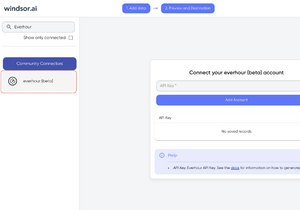
3. Select the fields on the right.
Select the fields on the right to later use in your data source.
4. Select Destination
Go to “Select Destination” and Choose Looker Studio.
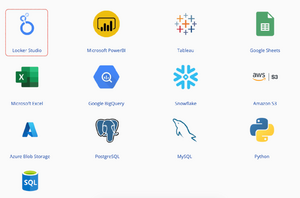
5. Sync and authorize data
Select “connect” and authorize access to your data source.
FAQs
What is Everhour?
Everhour is cloud-based software that enables businesses to track and manage the time taken to complete tasks across different projects. It’s ideal for creating employee timesheets, generating reports, tracking employee attendance, client invoicing, and more.
What is Looker Studio?
Looker Studio is a business intelligence platform by Google that entities can use to automate marketing reporting and visualize data using graphs, charts, tables, etc. With Looker Studio, users can track different performance metrics and leverage the insights to improve their operations.
Try Windsor.ai today
Access all your data from your favorite sources in one place.
Get started for free with a 30 - day trial.
Extract Everhour data to Looker Studio with Windsor.ai
See the value and return on every marketing touchpoint

Providing 50+ marketing data streams, we make sure that all the data we integrate is fresh and accessible by marketers, whenever they want.

Spend less time on manual data loading and spreadsheets. Focus on delighting your customers.