 Destinations
 Data sources
 AI insights
 About us
 Careers
 Security
 Customer reviews
 Contact us
 Affiliate program
 Solution partners
 Template gallery
 Looker Studio templates
 Power BI templates
 Excel templates
 Google Sheets templates
 Tableau templates
 Facebook Ads templates
 Google Ads templates
 Data fields & Metrics
 AI prompt library & Guides
 Product documentation
 API documentation
 Case studies
 Blog
Blog Data models
 Windsor vs Supermetrics
 Windsor vs Funnel.io
 Windsor vs Fivetran
 Windsor vs Rivery
 Windsor vs Portermetrics
 Windsor vs Coupler.io
Connect BigQuery to Power BI
Windsor.ai no-code connector transfers data from BigQuery to Power BI so that you can visualize your data stored in the warehouse for actionable insights. The connector does not require any maintenance and will extract data in less than five minutes. It can also automate reporting on key metrics in the data.
Forget CSVs. Stop copy/paste. Connect data in 2 minutes. No code required.
 Sign up with Google
 Free forever plan
No credit card needed
Free forever plan
No credit card needed










Why do I need BigQuery and Power BI integration?
By integrating Power BI with BigQuery, you make use of the robust visualization tools to tabulate and analyze your data. Here are a few benefits of the move.

Visualize data with ease
You can turn raw data into interactive and visually appealing dashboards and reports using the drag-and-drop feature. It allows you to create customized graphs, tables, and charts without any technical expertise. This makes it easy to make decisions based on the data you collect.

Automate reporting
With Power BI, you can automate reporting on specific variables to the teams that need the information for decision-making. Power BI has inbuilt reporting tools and report templates that allow you to create your reports with a few clicks. Additionally, it connects to emails and collaboration tools where you can send the reports to teams to analyze them together.

Update your reports in real-time
You can update your reports in real-time. Power BI connects to BigQuery and can update reports as soon as new data comes in. It means that you do not need to manually update your information to create a new report. You may also automate your reports to get information as soon as new data gets into BigQuery.

Use AI to analyze data
Power BI has built-in machine learning and AI tools that you can use to perform predictive analysis. You can use its Q&A feature to query your data in natural language and derive deep insights without technical knowledge of data query. With the information, you can make accurate predictions and plans to counter the market needs.
Using Windsor.ai connector to import data from BigQuery into Power BI
Import BigQuery data into Power BI and measure what matters. The connector does not require any maintenance and will extract data in less than five minutes.















How to connect BigQuery to Power BI with Windsor.ai
Follow the steps below to transfer your BigQuery data to Power BI with the Windsor.ai no-code connector.
For more detail, see our Power BI documentation.
Register
Register or login if you already have an account.

Select your source
You need to select BigQuery as a Data Source and Grant Access to Windsor.ai.

Select Destination
Choose Power BI as the destination.
Sync your Data
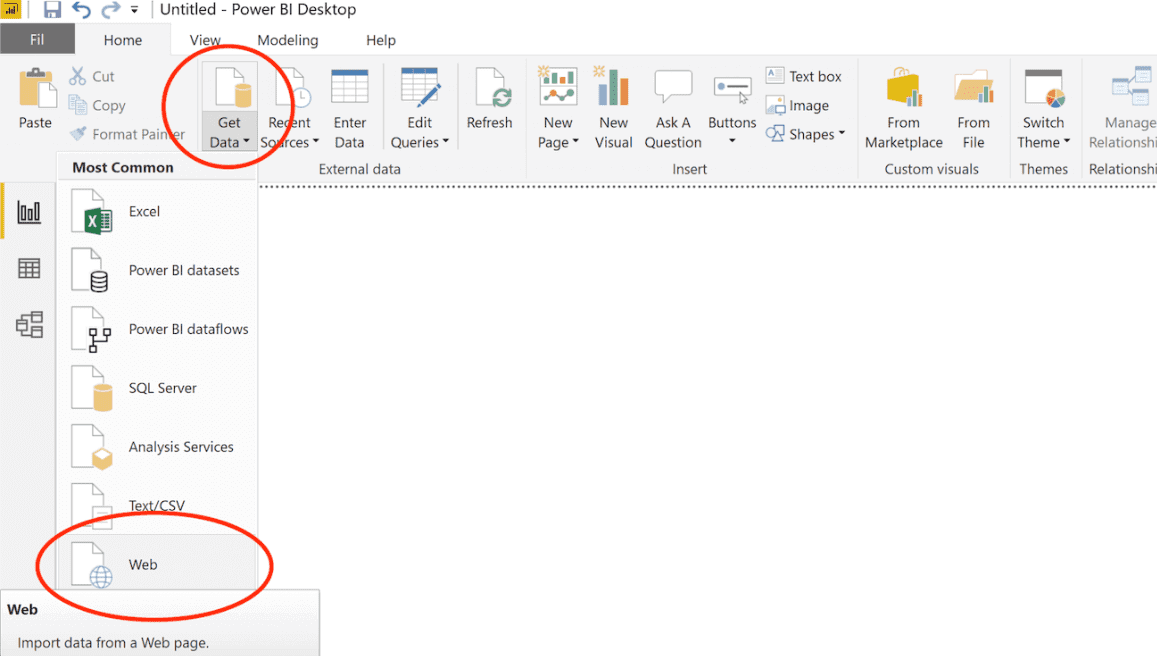
Select the fields on the right, and click on “Get data” from the WEB in Power BI.
Then, copy the URL in the box below.
FAQs
What is Power BI?
Power BI is a business analytics and visualization software offered by Microsoft. It transforms your data into rich interactive visualizations that you can understand without extensive analytics. This way, you can use data to make decisions conveniently. Its reporting tools include pre-made templates and the ability to automate reporting on key aspects of your data. You can connect several data sources to Power BI and pick the exact metrics you wish to track.
Tired of manual BigQuery data exports? Get started with Windsor.ai today to automate your reporting


