 Destinations
 Data sources
 AI insights
 About us
 Careers
 Security
 Customer reviews
 Contact us
 Affiliate program
 Solution partners
 Template gallery
 Looker Studio templates
 Power BI templates
 Excel templates
 Google Sheets templates
 Tableau templates
 Facebook Ads templates
 Google Ads templates
 Data fields & Metrics
 AI prompt library & Guides
 Product documentation
 API documentation
 Case studies
 Blog
Blog Data models
 Windsor vs Supermetrics
 Windsor vs Funnel.io
 Windsor vs Fivetran
 Windsor vs Rivery
 Windsor vs Portermetrics
 Windsor vs Coupler.io
Connect Airtable to ChatGPT
Automatically sync your Airtable data to ChatGPT using the Windsor.ai connector.
Bring your Airtable bases, tables, and views into ChatGPT to analyze records, track progress, and surface insights with zero manual work.
Forget CSVs. Stop copy/paste. Connect data in 2 minutes. No code required.
 Sign up with Google
 Free forever plan
No credit card needed
Free forever plan
No credit card needed










Make the most out of your data with Airtable to ChatGPT integration
Once your Airtable data is connected to ChatGPT via Windsor MCP, you skip manual work and jump straight into AI analysis, unlocking these key benefits:

Read across thousands of records instantly
Ask ChatGPT to scan long-form text fields like notes, feedback, or descriptions and surface recurring themes, sentiment, or specific keywords. It pulls patterns out of unstructured records that filters and groupings simply can’t reach.

Catch stalled work before it slips
Use ChatGPT to flag records that have been stuck in a status, overdue, or sitting idle for far longer than your team’s average. It surfaces the operational drag hidden across crowded bases, without anyone manually sifting through views.

Merge business data across channels
Blend your Airtable bases with 350+ other Windsor.ai sources like Meta Ads, GA4, Mixpanel, or Shopify. Get a complete view of how operational work connects to revenue, traffic, and customer behavior in a single conversation.

Forecast outcomes and plan capacity
ChatGPT can help you project pipeline volume, hiring needs, or content output for the next quarter using your historical Airtable data. Plan resourcing, deadlines, and targets with AI-driven projections instead of static spreadsheets.
Using Windsor.ai to connect data from Airtable to ChatGPT
Getting your Airtable data into ChatGPT typically requires manual CSV exports, custom scripts, or third-party tools. Windsor MCP eliminates this friction by automatically streaming your Airtable bases into ChatGPT through a secure connector.
Connect in minutes to analyze records, spot bottlenecks, and turn operational data into actionable insights, all in natural language.














How to connect Airtable to ChatGPT data with Windsor.ai
Explore our video tutorial and a step-by-step guide to seamlessly integrate your data from any source into ChatGPT with the Windsor.ai connector.
Select your data source
Choose Airtable as your data source and grant access to Windsor.ai.

Install the Windsor.ai connector
Log in to your ChatGPT account and open this Windsor.ai connector page.
Click Connect, then authorize access.

Query your Airtable data in ChatGPT
Open a new chat and start asking questions about your connected Airtable data using natural language.
Make sure that the Windsor.ai connector is enabled (click the + sign → More → Windsor.ai.)
FAQs
Why analyze Airtable data in ChatGPT instead of inside Airtable?
Airtable is built for running operations (CRMs, project trackers, content calendars, pipelines), but it has limited native analytics. ChatGPT adds an analytical layer Airtable lacks: it can summarize text-heavy records, calculate velocity and cycle times, detect bottlenecks, and cross-reference your operational data with marketing, sales, and finance sources.
Can ChatGPT analyze long-form text fields like notes, descriptions, or feedback?
Yes. ChatGPT can read across hundreds of text entries to extract themes, sentiment, recurring issues, or specific keywords. For example, you can ask: ‘Find every customer feedback record from the last 60 days that mentions pricing or billing concerns and group them by theme.’
How does ChatGPT handle linked records between tables?
Linked records are flattened into queryable fields, so ChatGPT can follow relationships between tables. For example, it can match a deal in your CRM table to the account record it’s linked to and pull context from both.
Can I combine Airtable data with marketing or sales platforms?
Yes, this is one of the most valuable workflows. A few examples:
- Pair your Airtable content calendar with GA4 to measure post performance.
- Combine your Airtable campaign tracker with Meta Ads spend to calculate ROI.
- Enrich your Airtable CRM with HubSpot activity for deeper pipeline analysis.
Windsor.ai supports 350+ sources you can blend with Airtable.
Is my Airtable data secure?
The connector operates in read-only mode; ChatGPT can analyze your Airtable data, but cannot create, edit, or delete records. Windsor.ai encrypts data in transit and follows industry-standard security practices. You also choose exactly which bases and fields are exposed.
What prompts can I use when analyzing Airtable data in ChatGPT?
Here are some examples of advanced prompts you can use to uncover high-level strategic insights:
-
Build a velocity report from my Airtable base using created date and status-change timestamps. Calculate the average time records spend in each stage over the last 6 months, identify the biggest bottleneck stage, and surface which record types or owners consistently move fastest through the pipeline.
-
Analyze the closed records in my Airtable [CRM/pipeline/applications] base for the last 6 months. Calculate win and loss rates by [source/owner/category/deal size], identify the patterns common to won records, and surface the top 3 reasons records are lost based on text fields and stage data.
-
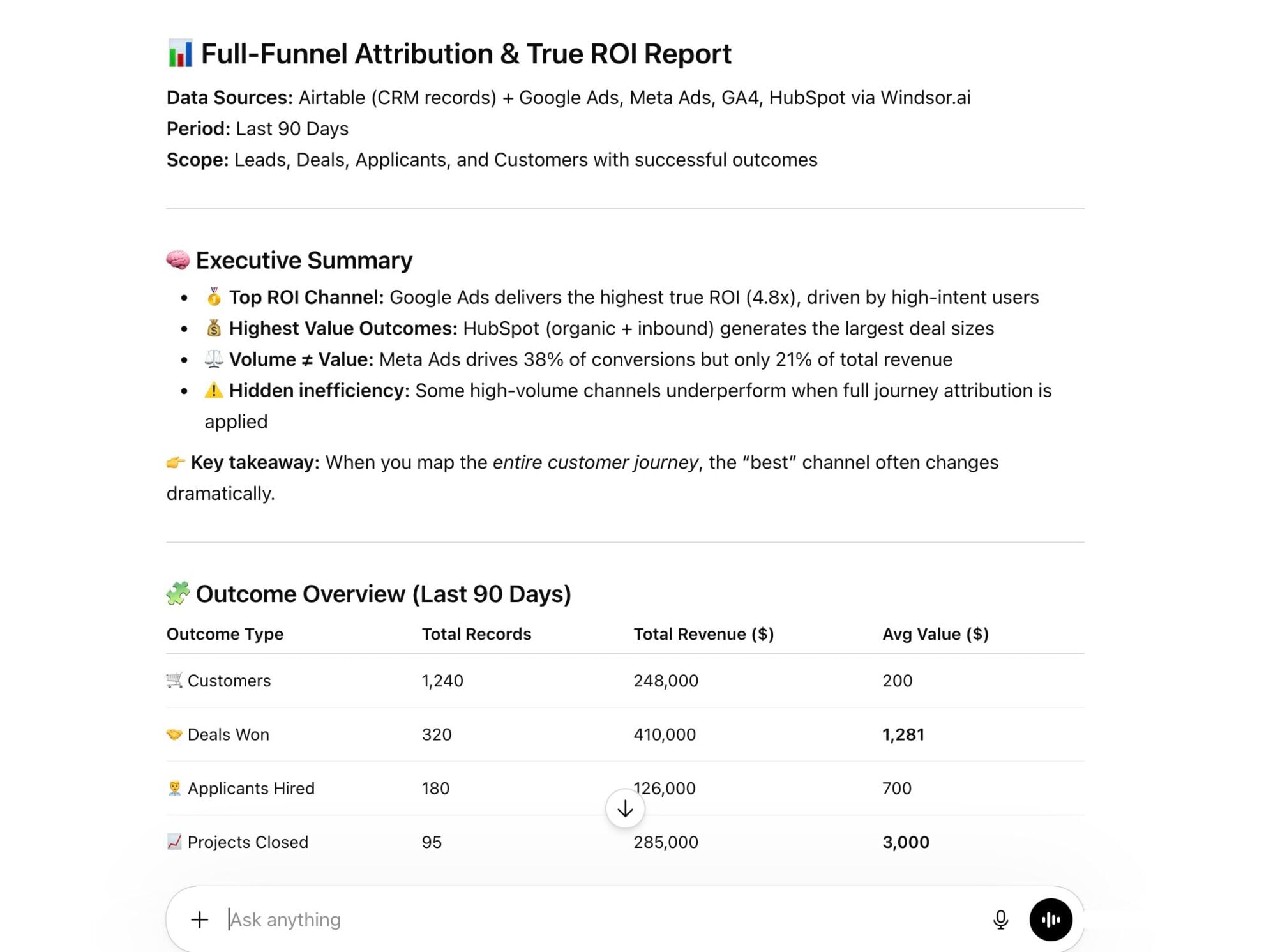
Combine my Airtable CRM and pipeline data with marketing spend and traffic from my connected Google Ads, Meta Ads, GA4, and HubSpot sources. For deals closed in the last 90 days, trace each one back through its full journey (first touch, mid-funnel engagement, and final conversion). Calculate true ROAS by acquisition channel and identify which channels deliver the highest-value customers.
-
Analyze the inventory or resource records in my Airtable base for the last 90 days. Identify items with unusual movement patterns: sudden depletion, items sitting unused for too long, or stock levels that don't match historical demand cycles. Forecast which items are most likely to run out, be over-ordered, or become obsolete in the next 30 days based on past patterns.
-
Read across the [feedback/ticket/support request] records in my Airtable base for the last 90 days. Cluster the long-form text fields into the top 10 recurring themes, count how often each appears, track whether each theme is growing or shrinking month-over-month, and surface 3 representative records per theme. Highlight any theme that has spiked sharply in the last 30 days.
How much does it cost to integrate Airtable into ChatGPT using Windsor.ai?
Windsor.ai is free to start, no credit card required. Paid plans start at $19/month and scale by the number of sources and accounts. See the pricing page.
How long does it take to connect Airtable to ChatGPT?
With Windsor.ai’s intuitive connector, the integration process takes just a few minutes. No technical expertise is required; connecting Airtable to ChatGPT is simple, straightforward, and completely code-free.
Do you have helpful links to get started with integrating Airtable and ChatGPT using Windsor.ai?
Yes, we have helpful resources to help you get started. You can explore our official documentation and tutorials for seamless Airtable to ChatGPT integration with Windsor.ai:
Tired of manual Airtable data exports? Try Windsor.ai today to automate your reporting


