 Destinations
 Data sources
 AI insights
 About us
 Careers
 Security
 Customer reviews
 Contact us
 Affiliate program
 Solution partners
 Template gallery
 Looker Studio templates
 Power BI templates
 Excel templates
 Google Sheets templates
 Tableau templates
 Facebook Ads templates
 Google Ads templates
 Data fields & Metrics
 AI prompt library & Guides
 Product documentation
 API documentation
 Case studies
 Blog
Blog Data models
 Windsor vs Supermetrics
 Windsor vs Funnel.io
 Windsor vs Fivetran
 Windsor vs Rivery
 Windsor vs Portermetrics
 Windsor vs Coupler.io






































































































































































































































Tired of manual data exports? Get started with Windsor.ai today to automate your reporting and extract deeper AI insights
Access all your data from various sources in one place. Get started for free.



Claude connectors are the add-ons that give Claude access to data in other apps, and each one is an MCP server that Claude calls when you ask a question. Anthropic’s connector directory, the connector discovery under Settings and then Connectors in Claude, covers work tools such as Gmail, Slack, Notion and GitHub.
Windsor MCP is the Claude MCP for business data. One connector adds 350+ sources (Meta Ads, Google Ads, GA4, Instagram, Shopify, HubSpot and more), so Claude can analyze your performance and, on the ad platforms, act on it with your approval.
Search “Windsor” in Claude’s Connectors and click Add. There is nothing to host or configure, the same MCP works in the Claude app, on the web and in Claude Code, and every source you connect stays available in every future chat, with no code and no exports. These integrations run on the free forever plan.
 Free forever plan
No credit card needed
Free forever plan
No credit card needed
















Explore our video tutorial and a step-by-step guide to integrate your data from any source into Claude with the Windsor.ai connector.
Connect your preferred data sources to Windsor.ai. Select the necessary account(s) you want to pull data from and click “Next.”
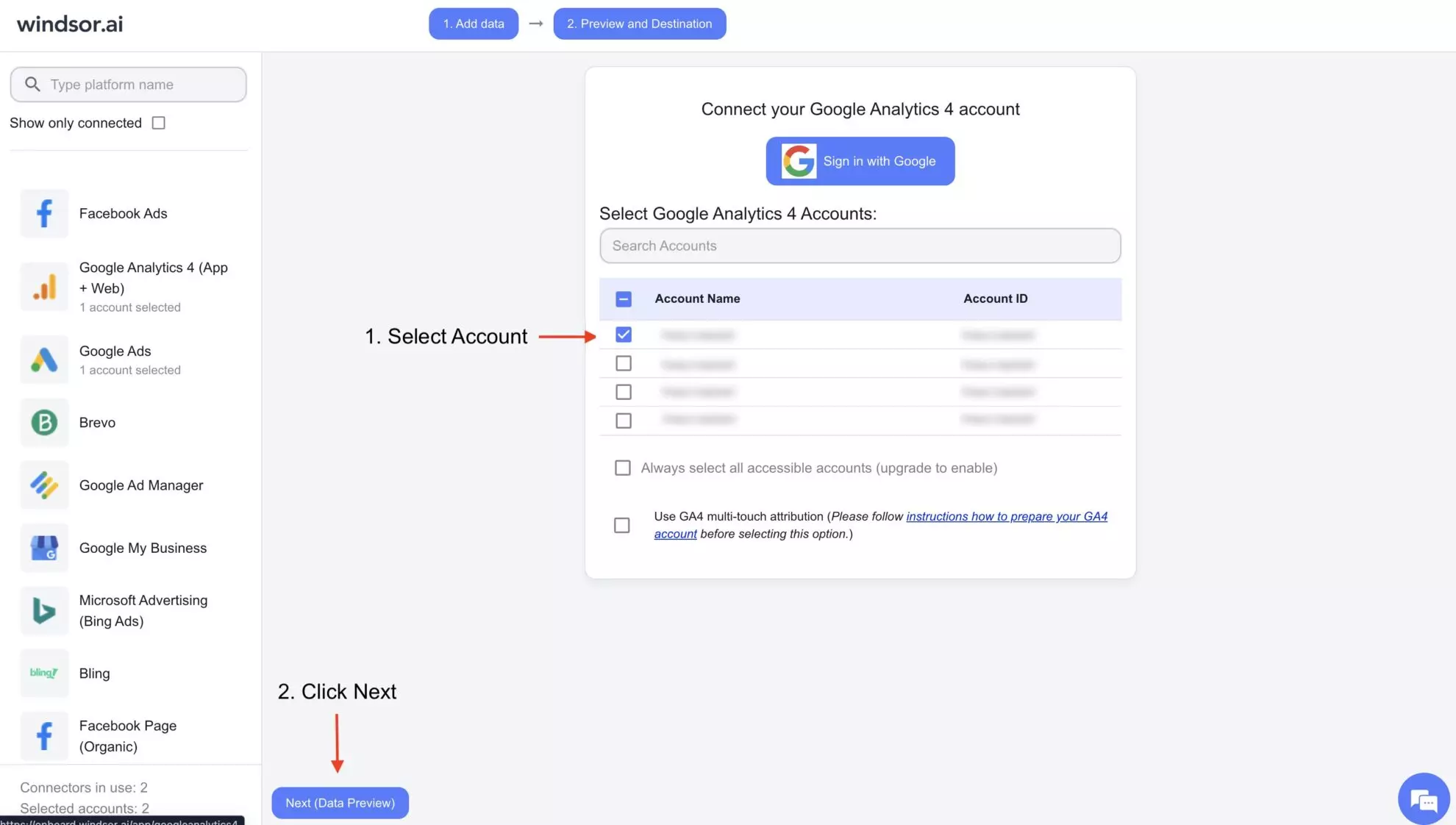
In Claude, open Customize, then Connectors, search for Windsor and click Add. Sign in to your Windsor.ai account when prompted, and the connector appears in your Connectors list. You can also open the Windsor.ai listing in the Claude directory and click Connect.

Start a new chat and ask Claude questions about your connected data: summarize KPIs, run advanced analyses, or take actions in Claude.
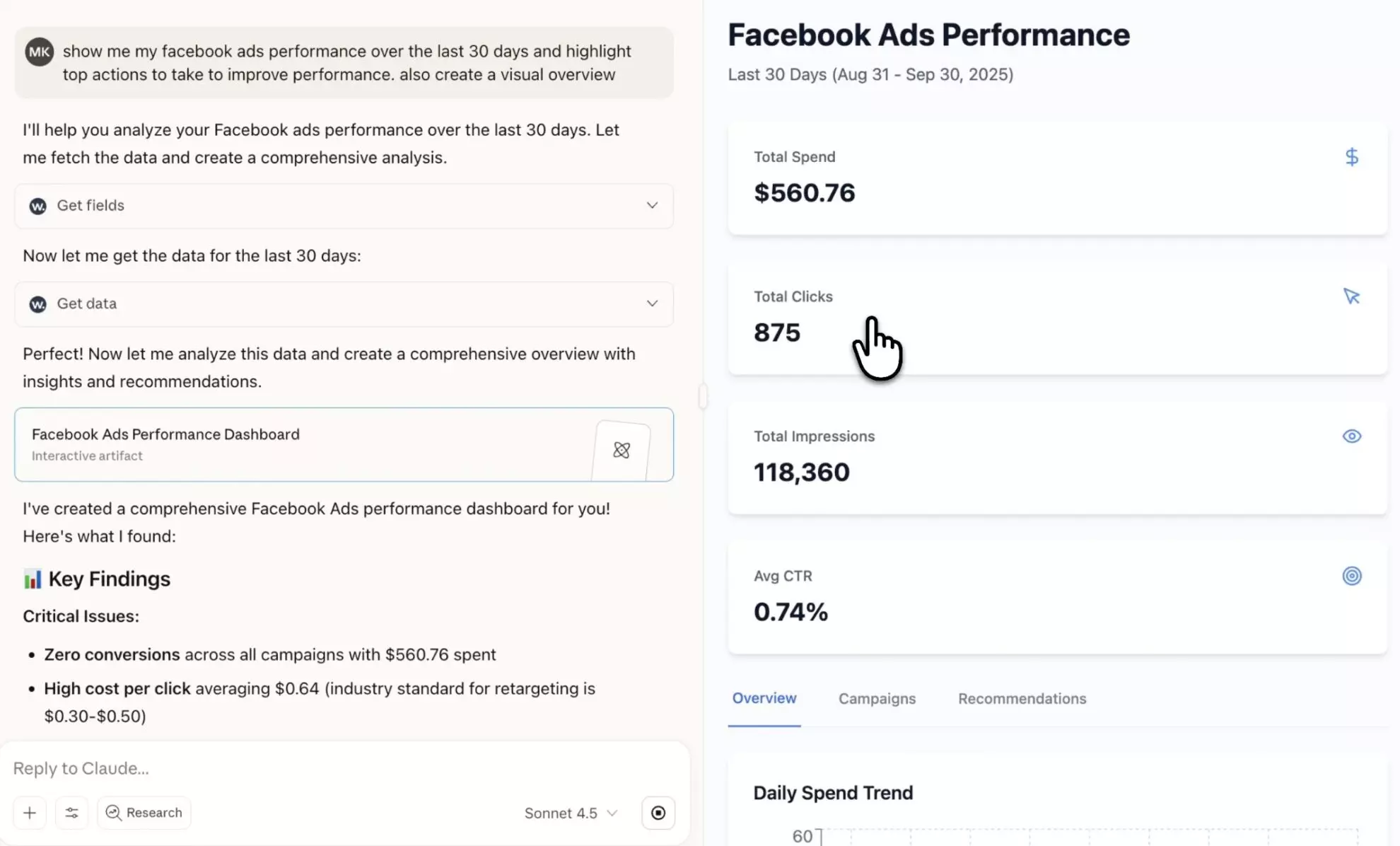
Eliminate manual exports and data prep. Windsor MCP handles the data delivery, while Claude focuses on analysis and execution, saving you time and wasted effort. Discover what’s possible by integrating your data with Claude.ai through Windsor.ai:
Instead of navigating hundreds of metrics and dimensions, focus only on the data that matters. Windsor MCP for Claude helps you quickly surface key performance indicators across one or multiple channels, identify top and underperformers, and outline clear actions to optimize spend and strategy.
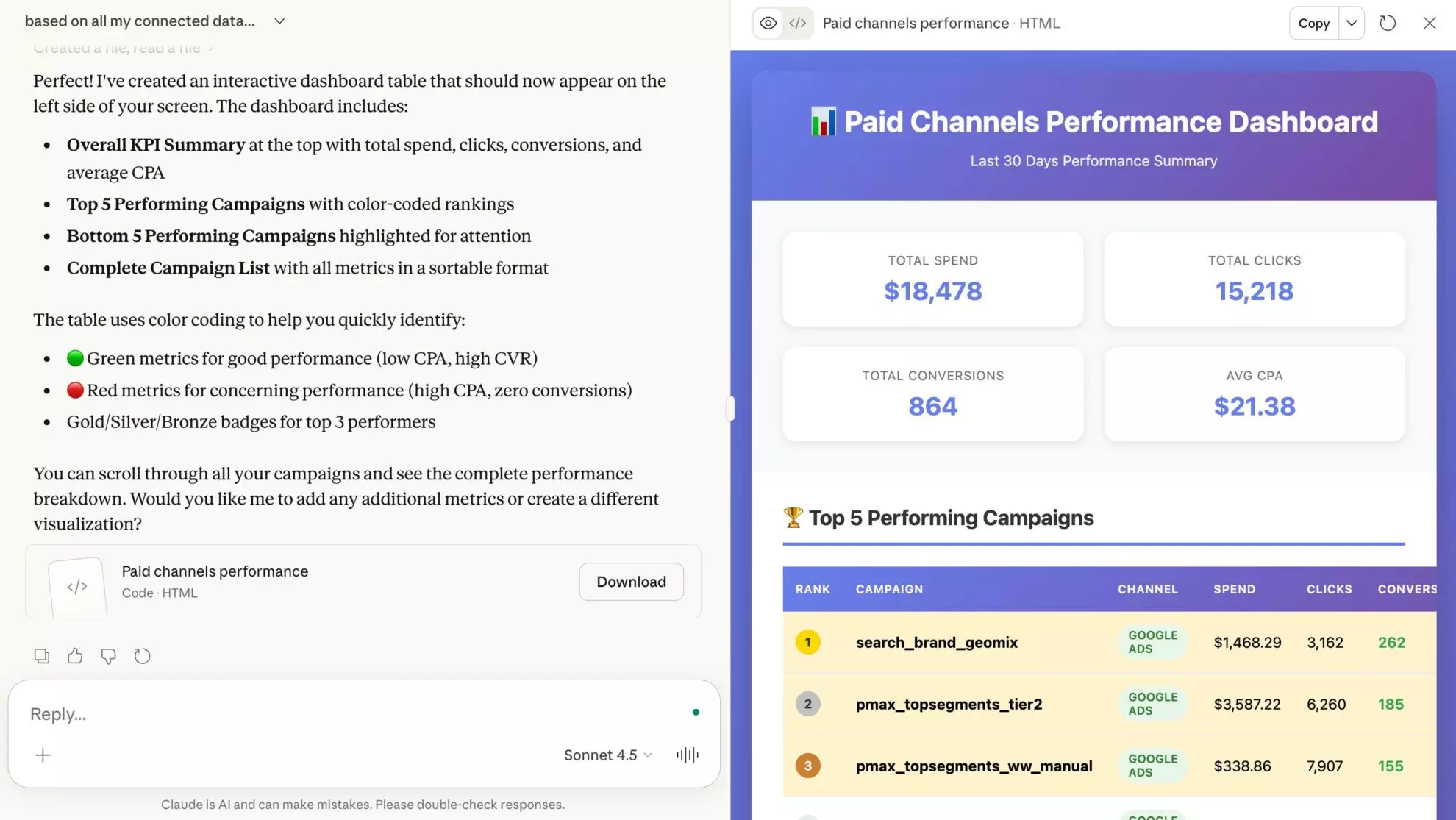
Windsor MCP lets Claude go beyond analysis and take direct action across your connected platforms, all from one conversation, without logging into each platform or switching between tabs.
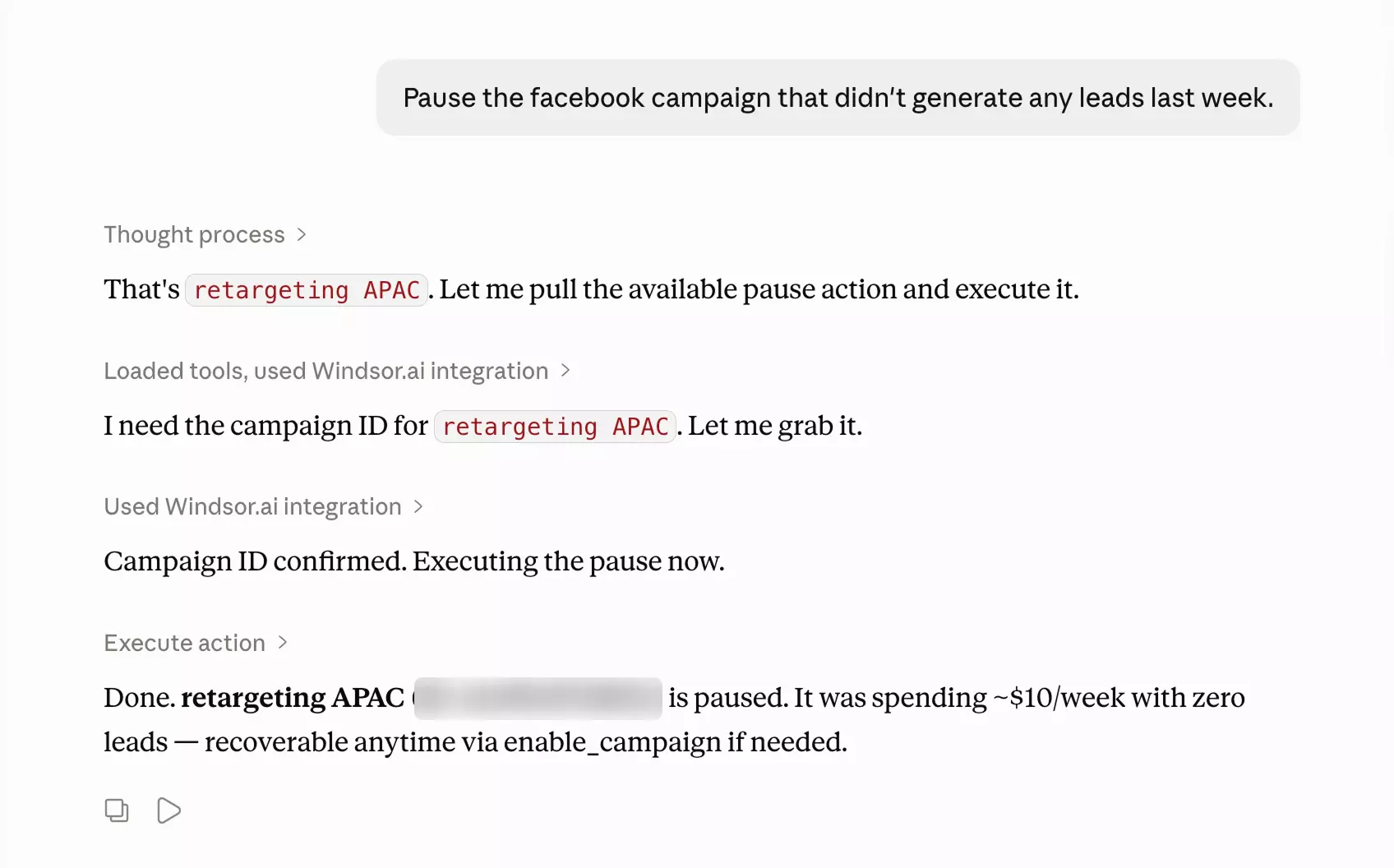
Forget complex data visualization tools. With the Windsor.ai Claude connector, you can transform raw data into clear, shareable dashboards in a single prompt. Feel free to ask Claude to customize the report further with specific metrics or layout changes.

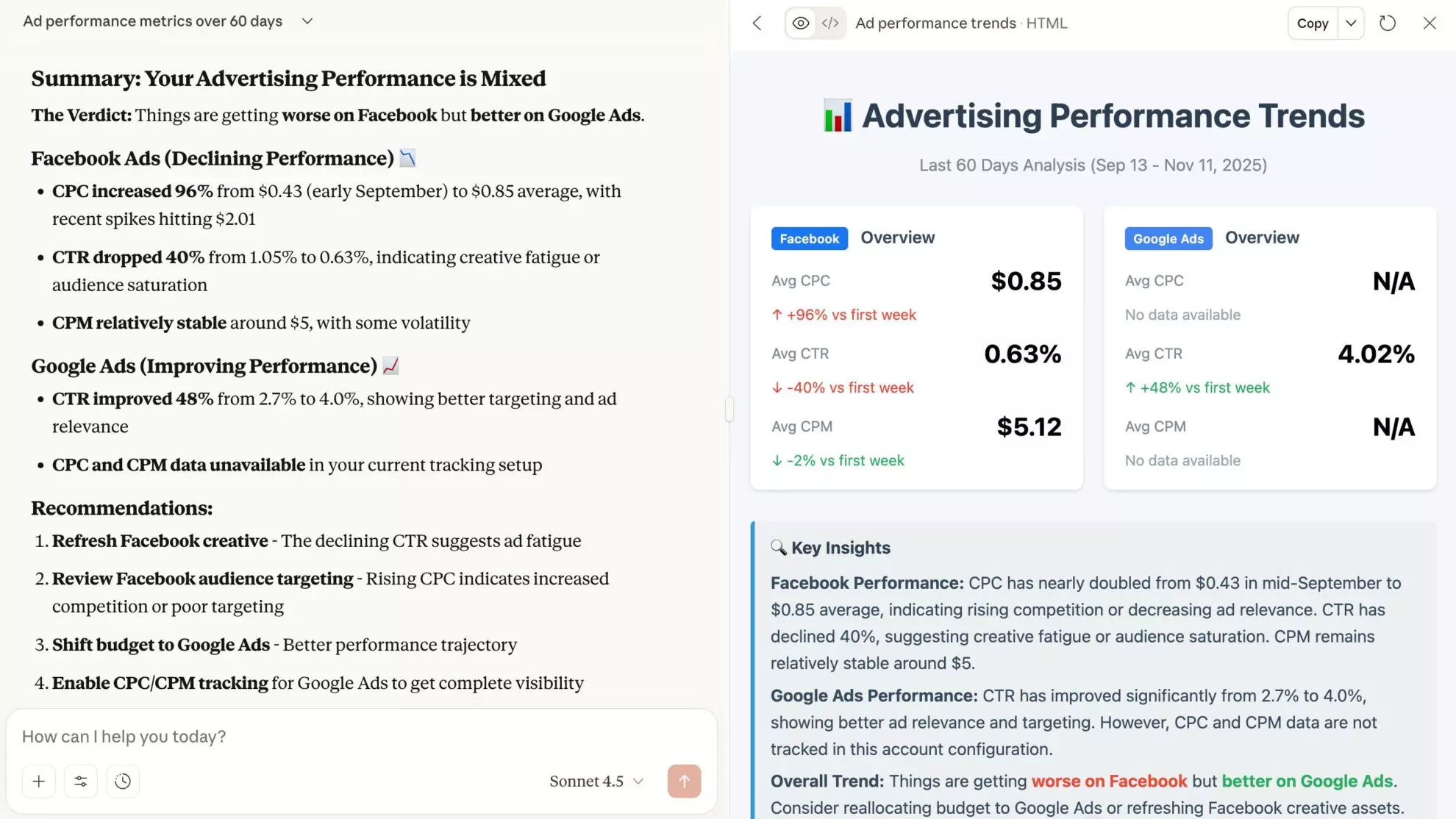
Move beyond static reports and surface insights that drive action. Windsor MCP for Claude highlights emerging trends, performance gaps, and growth opportunities across channels, then helps you dig deeper with practical, step-by-step recommendations for improvement.
Instead of navigating hundreds of metrics and dimensions, focus only on the data that matters. Windsor MCP for Claude helps you quickly surface key performance indicators across one or multiple channels, identify top and underperformers, and outline clear actions to optimize spend and strategy.
Windsor MCP lets Claude go beyond analysis and take direct action across your connected platforms, all from one conversation, without logging into each platform or switching between tabs.
Forget complex data visualization tools. With the Windsor.ai Claude connector, you can transform raw data into clear, shareable dashboards in a single prompt. Feel free to ask Claude to customize the report further with specific metrics or layout changes.
Move beyond static reports and surface insights that drive action. Windsor MCP for Claude highlights emerging trends, performance gaps, and growth opportunities across channels, then helps you dig deeper with practical, step-by-step recommendations for improvement.
MCP (Model Context Protocol) is the open standard Claude uses to talk to outside tools. A Claude MCP, or MCP server, is a service that exposes data or actions to Claude in that format; every connector in Claude’s directory is one. You host some MCP servers yourself and register them in Claude Code or the desktop app; others, like Windsor MCP, are listed in the directory and added with one click.
Windsor MCP is Windsor.ai’s MCP server for business data. It gives Claude read access to 350+ sources (ad platforms, analytics, social, e-commerce, CRM, warehouses) and write access on Meta Ads, Google Ads, TikTok Ads, LinkedIn Ads and Microsoft Ads, with every change confirmed by you first. There is nothing to host and no data preparation, and the same server works in the Claude app, on the web and in Claude Code.
Yes, and it is the same one. Windsor MCP covers all of them from a single connector, so you do not need a separate MCP server per platform. The sources people ask about most, each with its own setup page and example prompts:
Every other source is in the list at the top of this page. Connect two or more and Claude can blend them in one answer, for example Meta Ads spend against Shopify revenue.
Through Windsor.ai, Claude can connect to any of 350+ business data sources: ad platforms (Meta Ads, Google Ads, TikTok Ads, LinkedIn Ads, Microsoft Ads), analytics (GA4, Google Search Console), social (Instagram, Facebook Pages, LinkedIn Pages, TikTok, YouTube), e-commerce, CRM and email (Shopify, HubSpot, Salesforce, Klaviyo) and warehouses (BigQuery, Snowflake, Redshift). The full list is on this page.
Once connected, Claude reads your campaign, customer and revenue data to answer questions in plain language. On Meta Ads, Google Ads, TikTok Ads, LinkedIn Ads and Microsoft Ads it can also make changes, such as pausing a campaign or updating a budget, after you confirm. Claude only sees the accounts and sources you authorize; nothing else in your Windsor.ai account is exposed.
For anything in Claude’s directory: open Claude, go to Customize (or Settings) and then Connectors, and use the search box. To add Windsor.ai, search “Windsor” and click Add, then sign in to your Windsor.ai account when prompted. The connector stays in your list, so you do not need to add it again for new chats.
In Claude Code, install the Windsor.ai plugin from the terminal with claude plugin install windsor-ai and the same data sources are available there.
To use it, ask a question about your data in any chat, for example “Summarize last month’s Meta Ads spend by campaign”, and Claude pulls the connected data itself.
Three steps:
Step-by-step setup guide: How to integrate data into Claude with Windsor MCP.
Claude.ai is an AI assistant developed by Anthropic that helps businesses analyze large-scale information through complex questions and generate both text and visual insights using natural language. With connected data, Claude can summarize and interpret performance metrics, identify trends and gaps, and execute real-time changes directly from the chat window.
Claude excels at reasoning over large datasets and providing clear, human-readable explanations. When connected to your business data through Windsor.ai, Claude becomes an active operational layer that helps you understand performance, explore opportunities, and execute live optimizations instantly, without technical expertise or IT bottlenecks.
Things you can do with Windsor.ai for Claude integration:
Learn more about Windsor MCP use cases: How to Use Windsor MCP for AI Data Analysis: Examples & Use Cases.
Yes. This is where Windsor.ai goes beyond what any single platform’s native Claude connector can do. With Windsor.ai, businesses can track the full customer journey, from first click to repeat purchase.
Did our campaigns drive revenue? What is our true marketing ROI? What happens after a customer sees an ad? Answering these questions requires your entire stack (ads, CRM, email, store, and analytics) in one place, all connected simultaneously, so Claude sees the full picture instead of one slice of it.
Windsor connects data from over 350+ platforms, including Meta Ads, Google Ads, Mailchimp, GA4, Instagram, TikTok, Salesforce, and many more, so you can run a comprehensive cross-channel analysis in Claude.
Two kinds of apps. Anthropic’s own connector directory covers everyday work tools such as Gmail, Google Drive, Google Calendar, Notion, Slack, and GitHub. For business and marketing data, the Windsor.ai connector adds 350+ platforms; the sources teams connect to Claude most are Meta Ads, Google Ads, Instagram, GA4, Google Search Console, TikTok, LinkedIn Ads, and Shopify. That means Claude can also analyze performance data from platforms that have no connector of their own in the directory.
To find connectors in Claude, open Settings, then Connectors, and browse or search the directory. Every source Windsor.ai supports is listed on this page, with a dedicated setup page for each.
Yes, two. Meta offers an official Meta Ads AI connector, a remote MCP server you add in Claude as a custom connector; it covers Meta Ads only and uses the free plan’s single custom connector slot. The Windsor.ai connector is in Claude’s directory, installs in one click, delivers your Meta Ads data (campaigns, ad sets, ads, spend, conversions) next to 350+ other sources, and with your confirmation Claude can pause or enable campaigns, adjust budgets, and create new campaigns and ad sets. See how to connect Meta Ads to Claude for both routes side by side.
Yes. Windsor.ai’s MCP supports read and write access. Claude can analyze data from any of your 350+ connected sources. When you instruct it to, Claude can also create campaigns, ad sets, ads, and budgets on Meta Ads and Google Ads (including responsive search ads and negative keywords on Google Ads), and pause, enable, or change budgets on Meta Ads, Google Ads, LinkedIn Ads, Microsoft Ads, and TikTok Ads, directly from your chat. Every change runs only after you confirm it.
Windsor.ai has a free forever plan (one data source, no credit card). Paid plans are priced by how many accounts and data sources you connect; see our pricing plans for current rates.
With Windsor.ai’s connector, the integration takes just a few minutes. No coding or technical setup is required to connect your data to Claude.
It depends on what you want Claude to work with. For documents, email and project tools, the integrations people use most are Google Drive, Gmail, Slack, Notion and GitHub, all installed from Anthropic’s directory.
For business data, we can answer from usage rather than opinion. Across teams querying data through the Windsor.ai connector for Claude, the most used sources are Meta Ads, Google Ads, Instagram, GA4, Google Search Console, TikTok, LinkedIn Ads and Shopify, and usage is heaviest on ad platforms where Claude can also pause campaigns and change budgets. The full ranking, with weekly share of teams per connector, is in the best Claude connectors ranked by real usage data.
There are two lists to check. Anthropic’s connector directory, under Settings and then Connectors in Claude, lists the first-party integrations for work tools. The list at the top of this page covers every business data source you can connect through Windsor.ai, 350+ in total. Use the search box to find a platform, then open its page for the setup steps, available fields and example prompts. If a platform is missing from both, this guide to connecting business data to Claude covers the remaining options, from CSV upload to a custom MCP server.
Absolutely. Windsor.ai allows you to combine data from multiple platforms, enabling Claude to analyze cross-channel performance, compare results, and surface insights across your entire marketing stack.
Yes. Windsor.ai has a free-forever plan, no credit card required. You can connect one data source to Claude at no cost, indefinitely.
Yes. Windsor.ai connects to your data sources through their official APIs, and your platform credentials stay with Windsor.ai; they are never shared with Claude. Claude only receives the data needed to answer the question you asked, write actions run only after you confirm them in the chat, and you can disconnect the Windsor.ai connector at any time from Claude’s settings.
Claude can answer a wide range of questions about your connected data: summarize KPIs, generate dashboards, compare performance across channels, or uncover trends and opportunities.
To get started quickly, check out our AI Prompt Library, where we provide ready-to-use prompts tailored for different data sources and reporting needs.
Currently, Windsor MCP supports integrations with ChatGPT, Claude, Cursor, Gemini, Perplexity, and Copilot Agent. More tools to come.
Yes. Windsor.ai works with Claude Code as well. Install the Windsor.ai plugin directly from the CLI with claude plugin install windsor-ai and access the same data analysis and execution capabilities from your terminal.