 Destinations
 Data sources
 AI insights
 About us
 Careers
 Security
 Customer reviews
 Contact us
 Affiliate program
 Solution partners
 Template gallery
 Looker Studio templates
 Power BI templates
 Excel templates
 Google Sheets templates
 Tableau templates
 Facebook Ads templates
 Google Ads templates
 Data fields & Metrics
 AI prompt library & Guides
 Product documentation
 API documentation
 Case studies
 Blog
 Data models
 Windsor vs Supermetrics
 Windsor vs Funnel.io
 Windsor vs Fivetran
 Windsor vs Rivery
 Windsor vs Portermetrics
 Windsor vs Coupler.io
Connect Amazon Redshift to Claude
Connect Amazon Redshift to Claude with the Windsor.ai connector and ask about the tables you choose in plain English.
Total revenue by week, rank products, check a table for missing values, or put warehouse revenue next to your ad spend, without writing SQL.
Add a Redshift table to Windsor.ai, connect Windsor.ai in Claude, ask your first question.
 Sign up with Google
 Free forever plan









What you can do with Redshift data in Claude
Claude reads the Redshift tables you connect in Windsor.ai, one table per connection. Four common uses:

Report on a table
Connect an orders, events or spend table. Claude totals, filters and groups its columns, such as revenue by week or orders by country.

Compare tables side by side
Connect each table as its own entry. Claude reads them separately and puts the results next to each other, such as spend from one table and orders from another for the same weeks. It does not run SQL joins inside Redshift.

Put warehouse data next to ad platforms
With Google Ads or Meta Ads in the same Windsor.ai account, Claude can compare ad spend with the revenue in your Redshift table for the same period.

Check data quality
Claude can list rows with missing values, duplicates or amounts outside the range you expect, before the table feeds a report.
Using Windsor.ai to connect data from Redshift to Claude
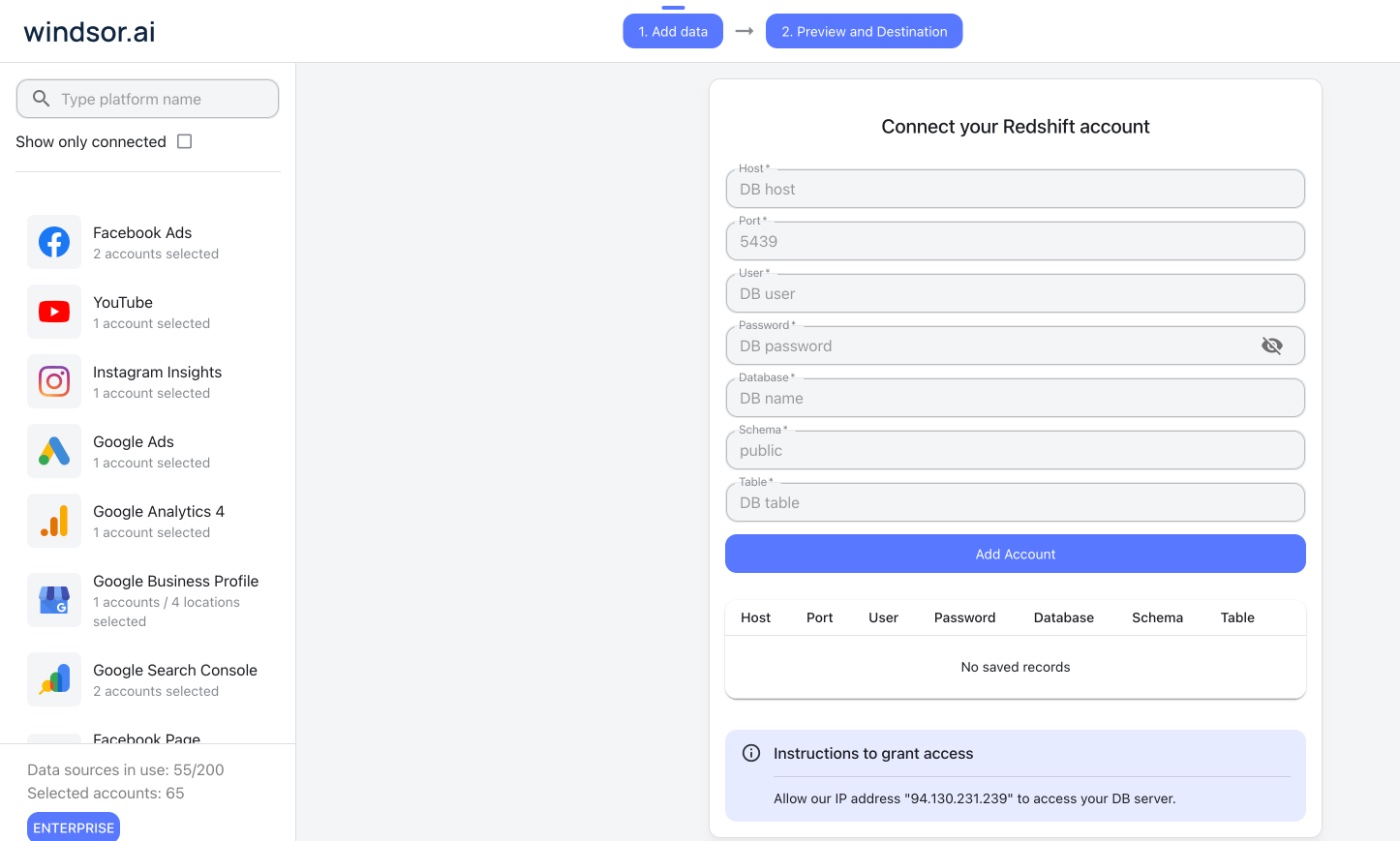
Windsor.ai connects Claude to Amazon Redshift one table at a time. You enter the host, port, database, schema, user, password and table, and allow Windsor.ai’s IP address on your cluster. Claude then reads the columns of that table. Add each further table as its own connection. The connection is read-only: Redshift has no write actions in Windsor.ai (checked on 24 November 2026). Claude cannot insert, update or delete rows.
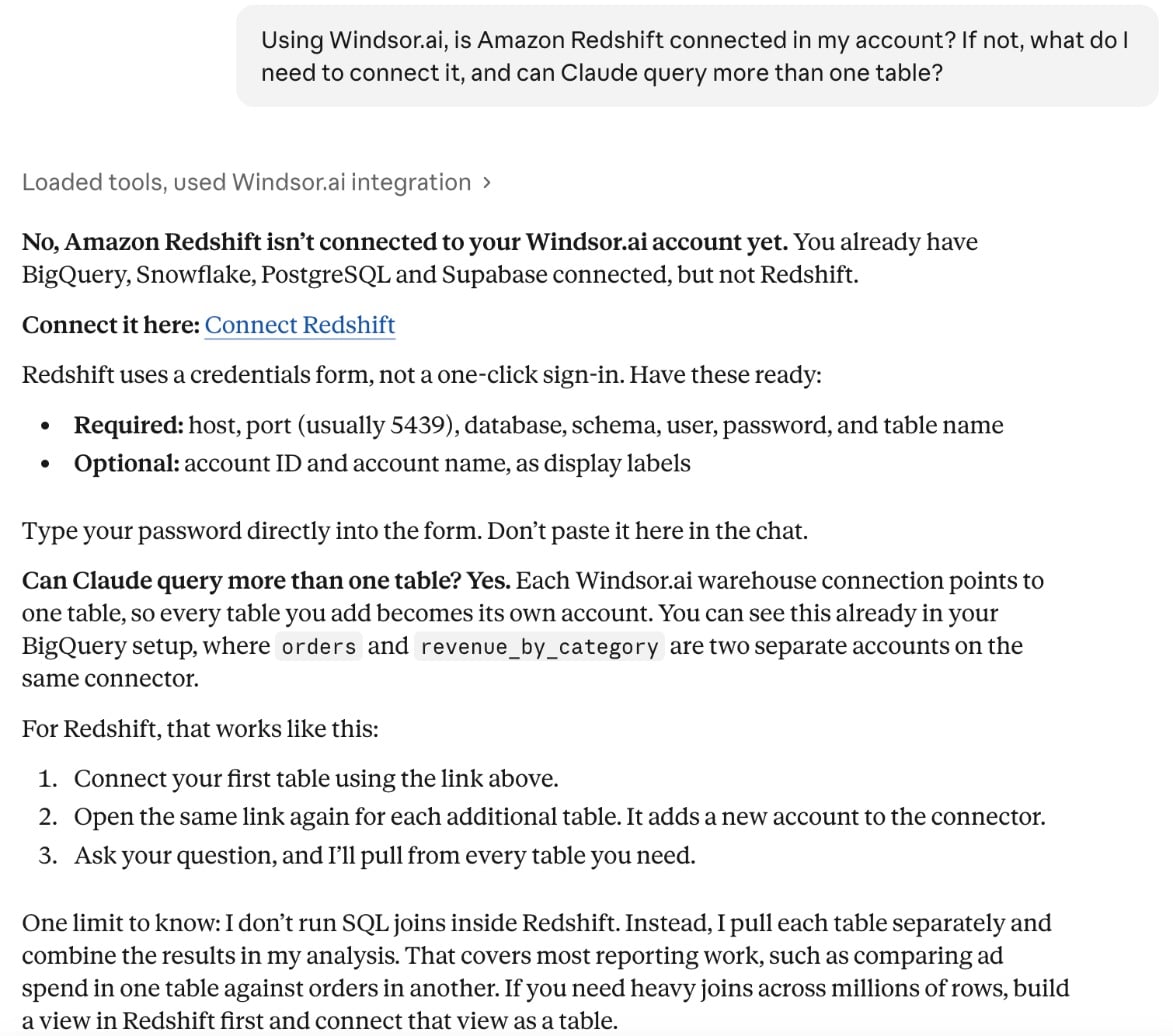
On 24 November 2026 we asked Claude, through Windsor.ai, whether Redshift was connected in our account. It was not. This page has no data example until we connect a Redshift table. Claude listed the same details as the Windsor.ai form. It said each table is its own connection and that it does not run SQL joins inside Redshift. To use the same data in ChatGPT, see the guide to connecting Amazon Redshift to ChatGPT.






How to connect Redshift to Claude with Windsor.ai
Watch the video, or read the guide to connecting Amazon Redshift to ChatGPT, which uses the same Windsor.ai connection and the same form. For ways to use the connection once it is set up, see how to use Windsor MCP for data analysis.
Connect Windsor.ai in Claude
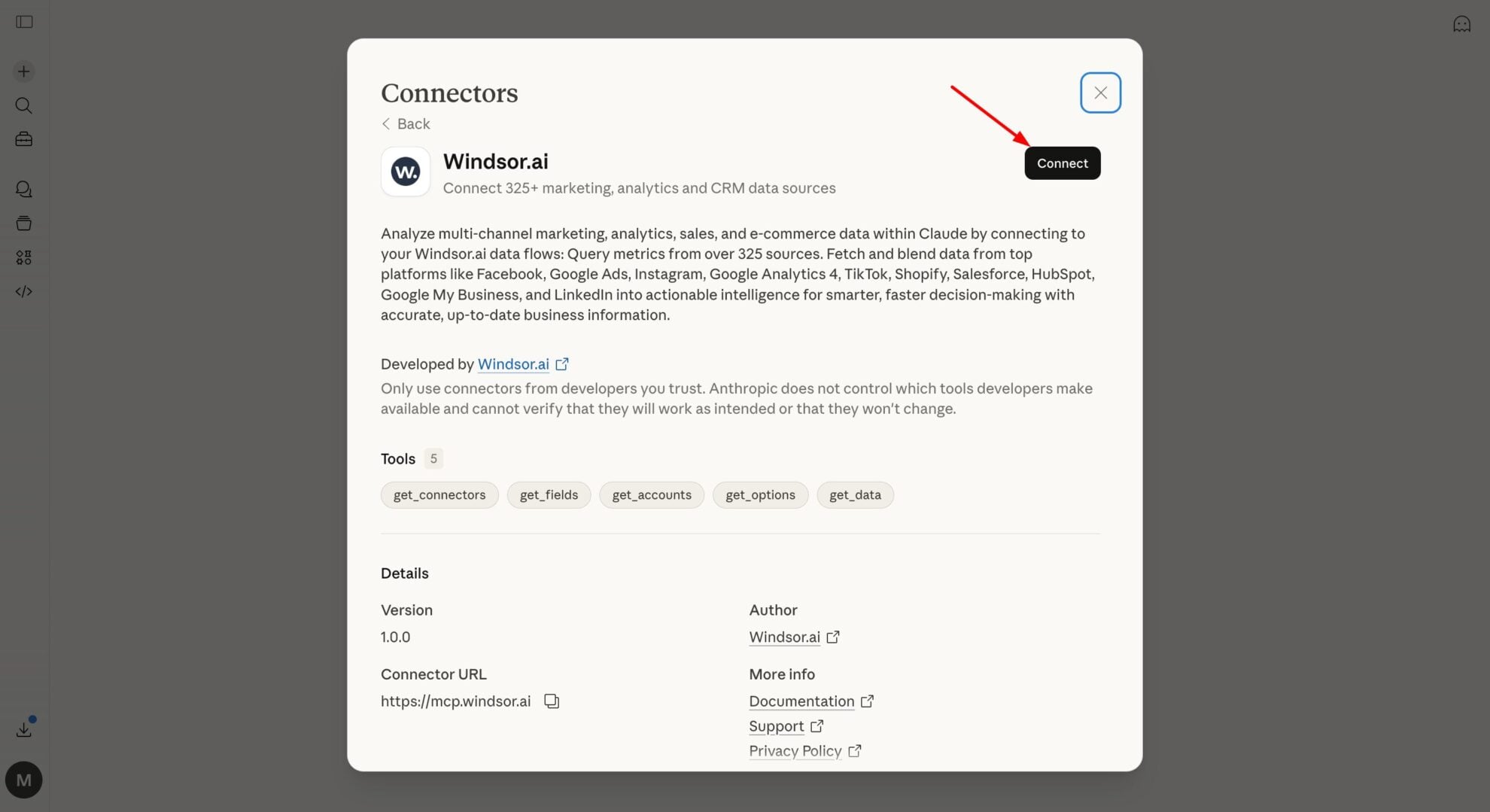
In Claude, open Customize in the sidebar, then Connectors. Search for Windsor.ai, click Connect and sign in with the Windsor.ai account you added Redshift to. You can also open the Windsor.ai listing in the Claude directory.
Ask Claude about your Redshift data
Open a new chat, start with “Using Windsor.ai” and ask about a table you connected, such as total revenue by week from your orders table for the last 30 days.

FAQs
Can Claude query several tables or join them?
Each Windsor.ai connection reads one table. Add more tables as more connections. Claude reads each table and combines the results in its answer. It does not run SQL joins inside Redshift.
Can Claude change data in Redshift?
No. The Windsor.ai connection is read-only: Redshift has no write actions in Windsor.ai (write actions list, checked on 24 November 2026). Claude reads your tables. It cannot insert, update or delete rows.
How is this different from AWS's own Redshift MCP server?
AWS Labs publishes the Amazon Redshift MCP server. It runs locally with Python and your AWS credentials and can browse every schema and run SQL queries. It is read-only by default. Windsor.ai needs no install. You connect the tables you choose from Claude’s Connectors. Claude can use them next to other Windsor.ai sources such as Google Ads or GA4.
How much does it cost to connect Redshift to Claude?
Windsor.ai has a free forever plan with 1 data source and the last 30 days of data, no credit card needed. Paid plans start at $19/month for 3 sources, billed annually. See the pricing page.
Tired of manual Redshift data exports? Try Windsor.ai today to automate your reporting


