 Destinations
 Data sources
 AI insights
 About us
 Careers
 Security
 Customer reviews
 Contact us
 Affiliate program
 Solution partners
 Template gallery
 Looker Studio templates
 Power BI templates
 Excel templates
 Google Sheets templates
 Tableau templates
 Facebook Ads templates
 Google Ads templates
 Data fields & Metrics
 AI prompt library & Guides
 Product documentation
 API documentation
 Case studies
 Blog
Blog Data models
 Windsor vs Supermetrics
 Windsor vs Funnel.io
 Windsor vs Fivetran
 Windsor vs Rivery
 Windsor vs Portermetrics
 Windsor vs Coupler.io
 Last updated: 1 October 2026




Modern LLM tools allow you to extract actionable insights from your business data much more quickly and easily than through the use of BI tools or SQL scripts.
Instead of figuring out relationships between metrics yourself, you can get instant answers in your preferred AI chat, whether it’s Claude, ChatGPT, or another.
What’s more, LLMs like Claude can turn raw data into compelling visual summaries, eliminating the need to build custom reporting dashboards from scratch, all in seconds and with no code.
But here’s the challenge: how do you integrate large-scale, fragmented data from multiple sources into the LLM? Manual CSV uploads usually become time-consuming and messy. That’s where Windsor MCP (Model Context Protocol) is a solution.
What is MCP? Introducing Windsor MCP
The Model Context Protocol is an open standard developed by Anthropic for connecting AI models to external tools and data in a consistent way.
At Windsor, we’ve built a custom MCP server that acts as a bridge, linking your data from various sources (e.g., Meta Ads, GA4, Shopify, databases, etc.) to AI tools so you can instantly use the normalized data for analysis and reports.
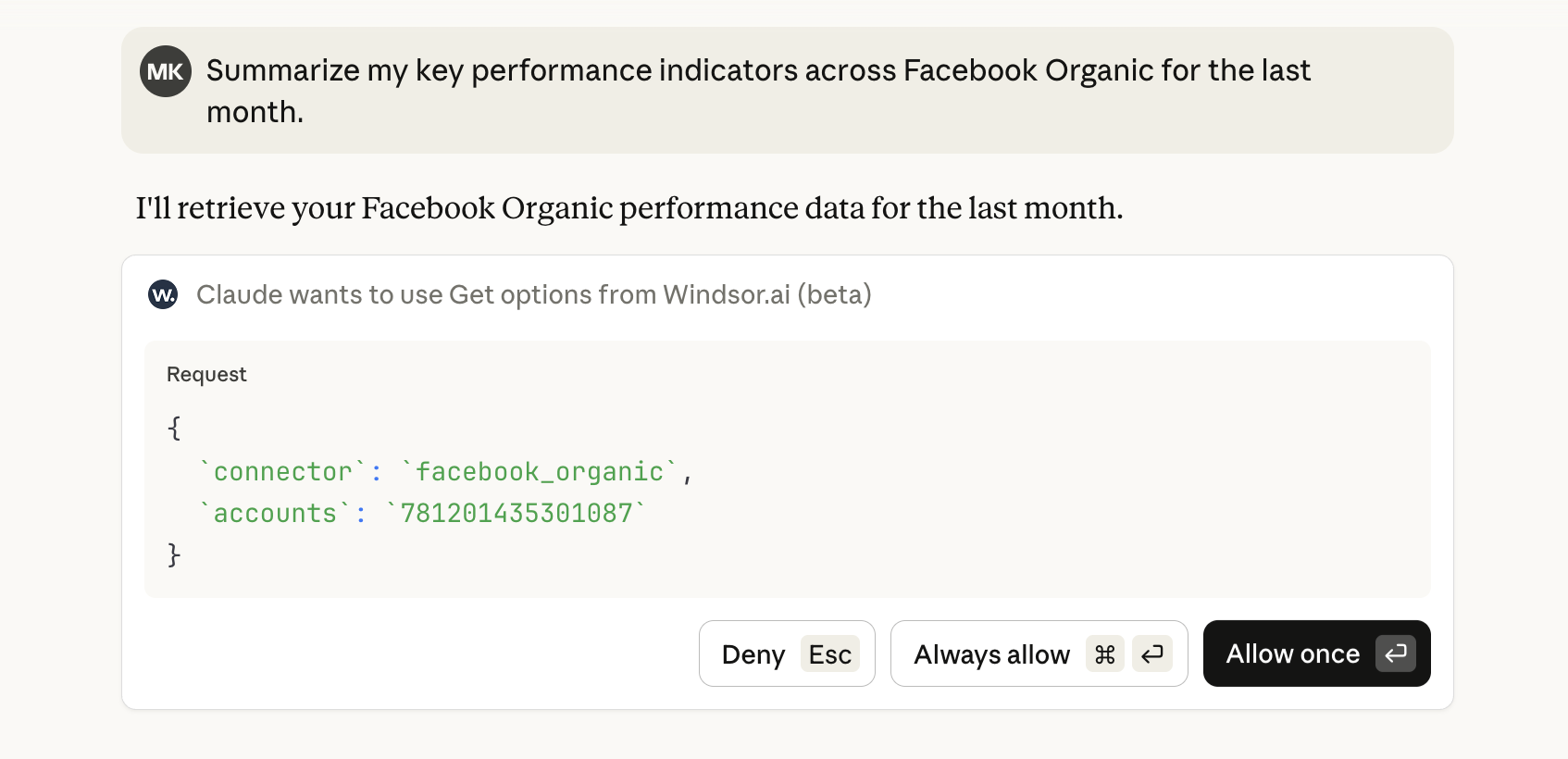
All you need is to connect your platforms to windsor.ai → our system automatically retrieves data from your connected accounts → sync this data to your preferred LLM through the Windsor MCP connector (setup guides).
Once your data is connected to the LLM, you can do the following things:
- Summarize key metrics across different business platforms
- Analyze performance and sales trends across channels
- Generate reports or SQL queries
- Explain outliers or shifts in your business performance
- Get recommendations and tips for optimizing your strategy, campaigns, and budget
- Get help with troubleshooting issues in your Windsor account
In fact, you can ask AI about everything related to your data, with no manual formatting or technical overhead.
How to get started with Windsor MCP
Prerequisites:
- Windsor.ai account (free or paid)
- AI service subscription (optional)
First, you need to sign up for a windsor.ai account.
Create your free Windsor.ai account: https://onboard.windsor.ai/.
Windsor MCP is available on the free plan. You can connect up to 10 data sources, 15 accounts, and retrieve data from the past 30 days. For greater limits, consider upgrading to a paid plan, starting at just $19/month (see our pricing).
Also, keep in mind that some LLMs (like ChatGPT) require a paid subscription to add external connectors like Windsor MCP.
Before proceeding with data sync to AI chats, make sure that you have connected at least one data source in your windsor account.
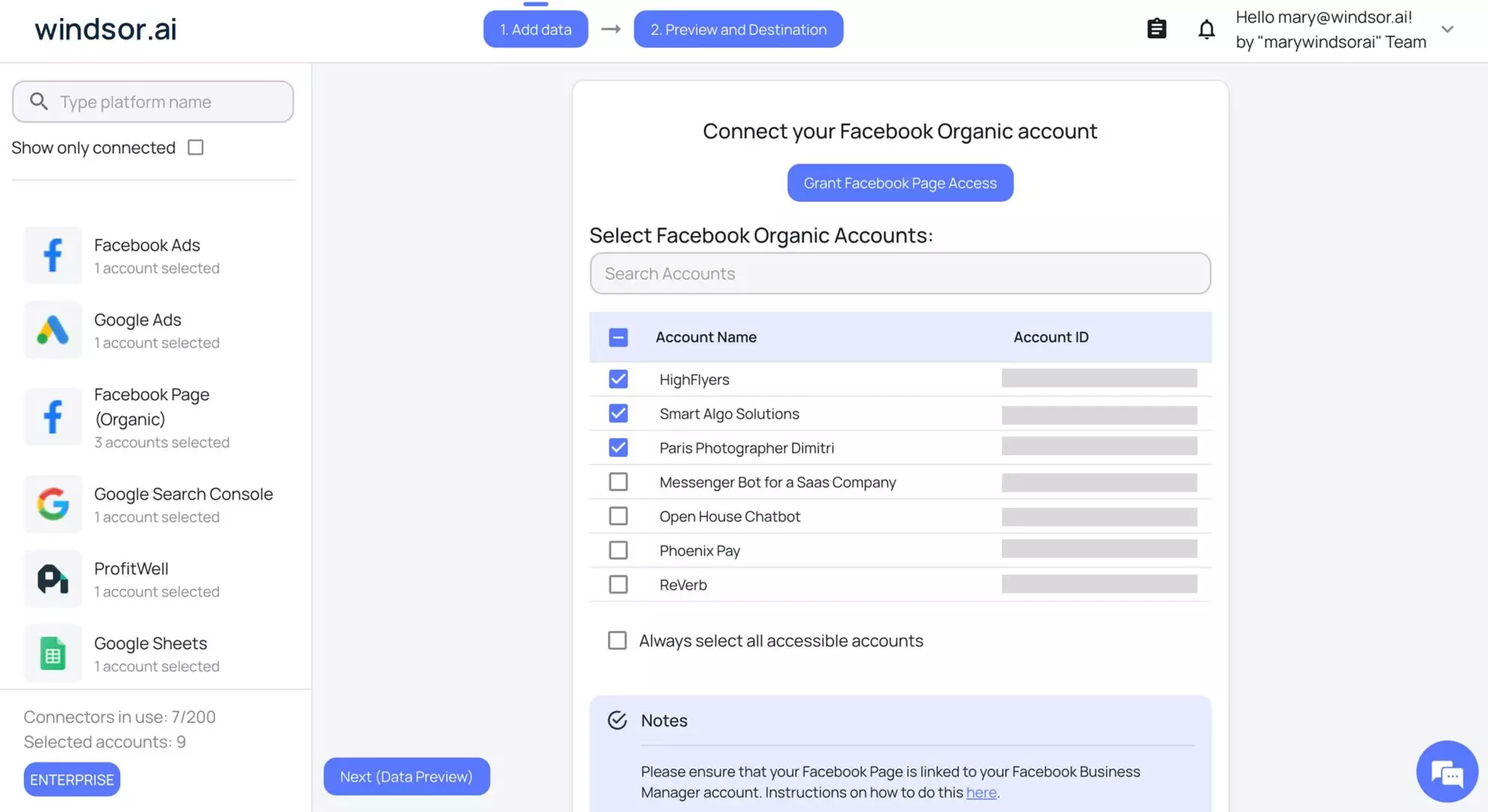
Depending on the LLM platform you choose, the setup steps might differ. Follow these detailed guides to install Windsor MCP in your desired environment:
- How to connect Windsor MCP to ChatGPT
- How to connect Windsor MCP to Claude
- How to connect Windsor MCP to Cursor
- How to connect Windsor MCP to Gemini
- How to connect Windsor MCP to Perplexity
- How to connect Windsor MCP to Copilot Agent
We’re continuously working on extending the list of supported LLMs. Stay tuned for our product updates.
Connected Windsor MCP to your AI chat? Great! Now you can open a new chat and start a conversation about your data.
Start with a quick check to ensure that the connection was successful and the platform can retrieve your data. For this, you can simply ask:
Let me know what data sources are connected to my Windsor account.
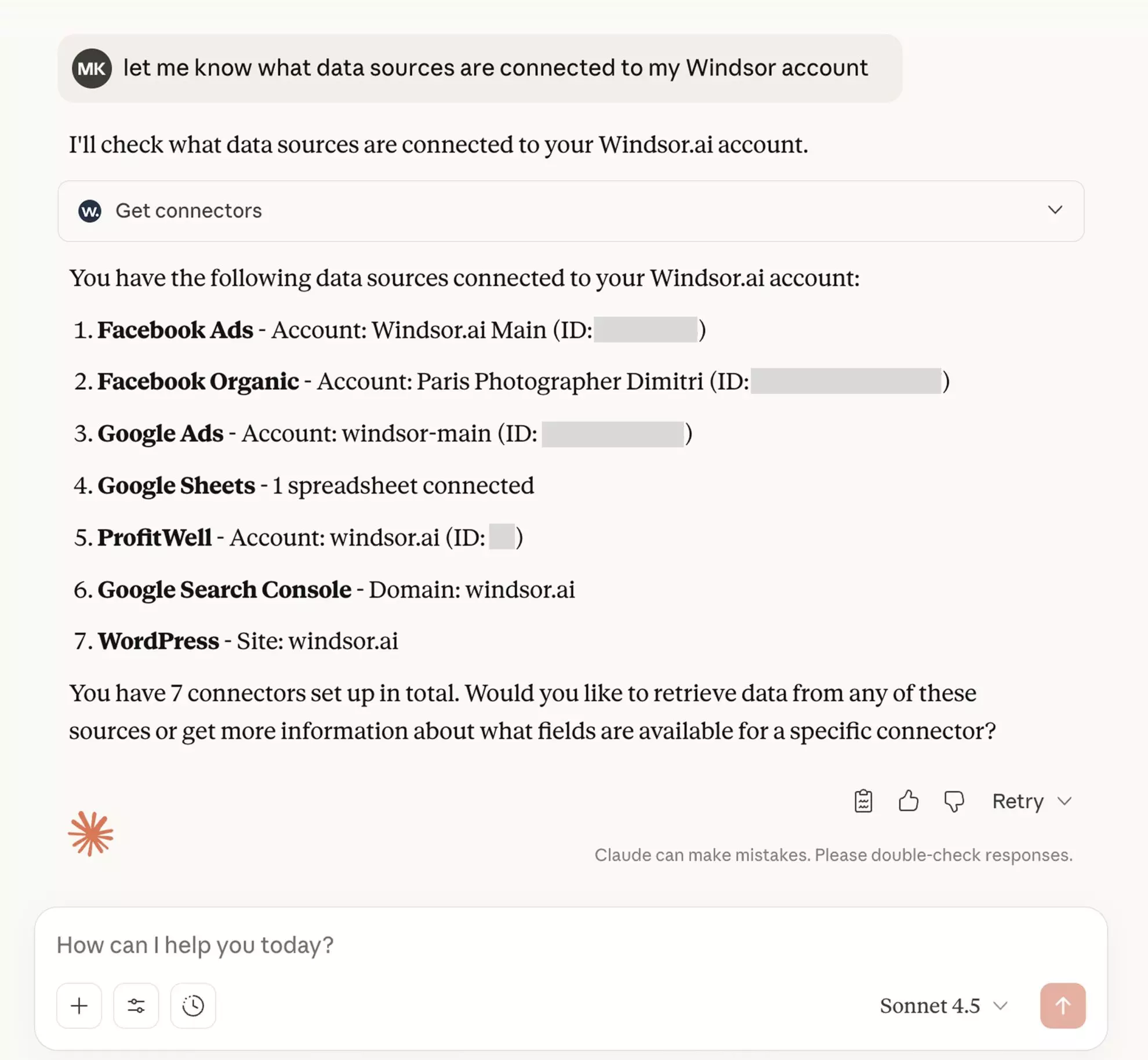
In case you don’t see all your accounts listed here, double-check the sync in your windsor.ai dashboard and select all the accounts from which you want to pull data.
Then you’re good to proceed with specific questions about your data.
If you don’t know what to ask or are looking for advanced Windsor MCP use cases, read the next section with a batch of practical examples and useful prompts to make your data analysis even more effective and deeper.
Top Windsor MCP examples and use cases for marketers, business owners, and data teams
Windsor MCP gives you clarity across all your data with AI-powered analysis. From marketing and sales to accounting and partnerships, it allows you to spot trends and extract insights from all business areas in seconds.
The following prompts and use cases will help you understand how you can interact with your data through Windsor MCP to identify growth opportunities, cut inefficiencies, and make smarter decisions.
Use case 1: Summarize the KPIs that matter most
Instead of looking through hundreds of metrics to estimate your business results, Windsor MCP allows you to narrow down your focus to the most important data points.
You can use this prompt to get a high-level view of your performance across one or multiple data sources:
Summarize my key performance indicators across Facebook Organic for the last month.
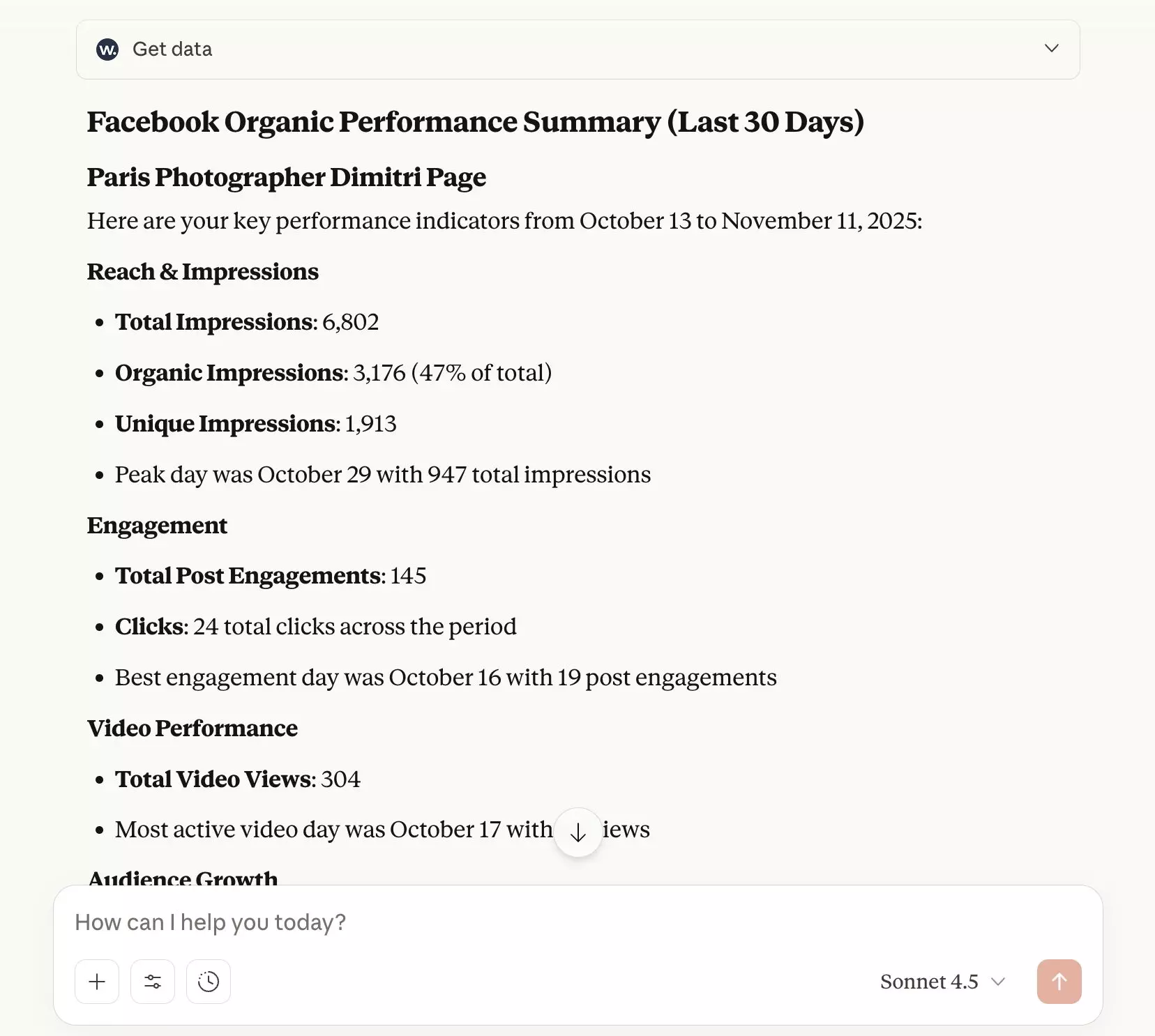
You can then ask the LLM (Claude) to turn these stats into a visual summary:
Create a visual summary of these stats to highlight trends.
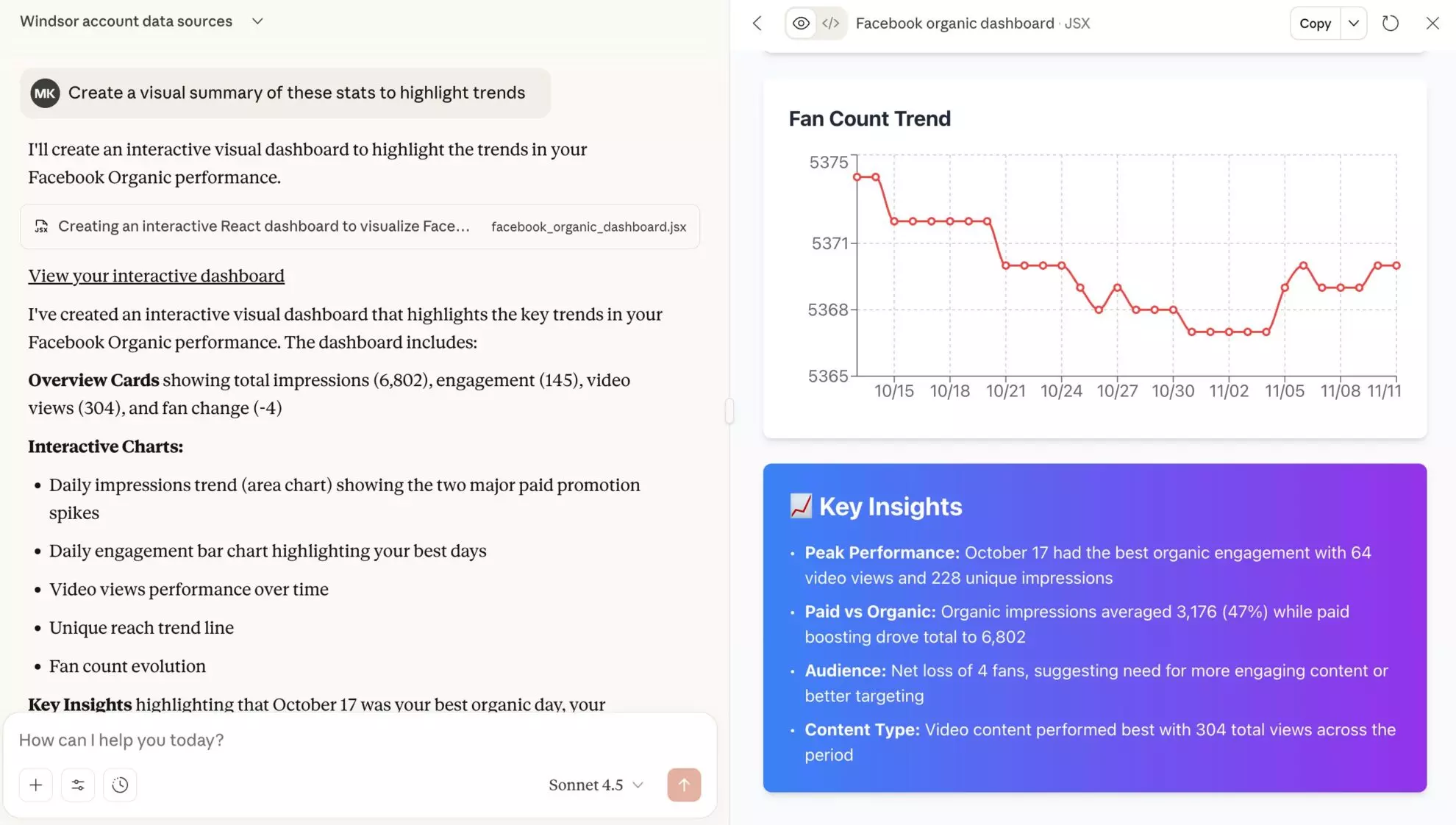
Say goodbye to building custom reporting dashboards using data visualization tools. With Windsor MCP, you can turn raw data into impactful summaries in one click and share them with your team or stakeholders.
Use case 2: Identify top and worst performers (campaigns, products, posts)
No more sorting through comparison tables; Windsor MCP gives you an instant view into your best-performing items and those in the weakest position.
Whether you want to analyze your top and worst Google Ads campaigns, best-selling and low-demand Shopify products, or most and least active TikTok audiences, Windsor MCP handles all of this.
Depending on your data source and analytical needs, you can use a similar prompt:
Analyze my Google Ads performance for the last 30 days; identify my best and worst performing campaigns.
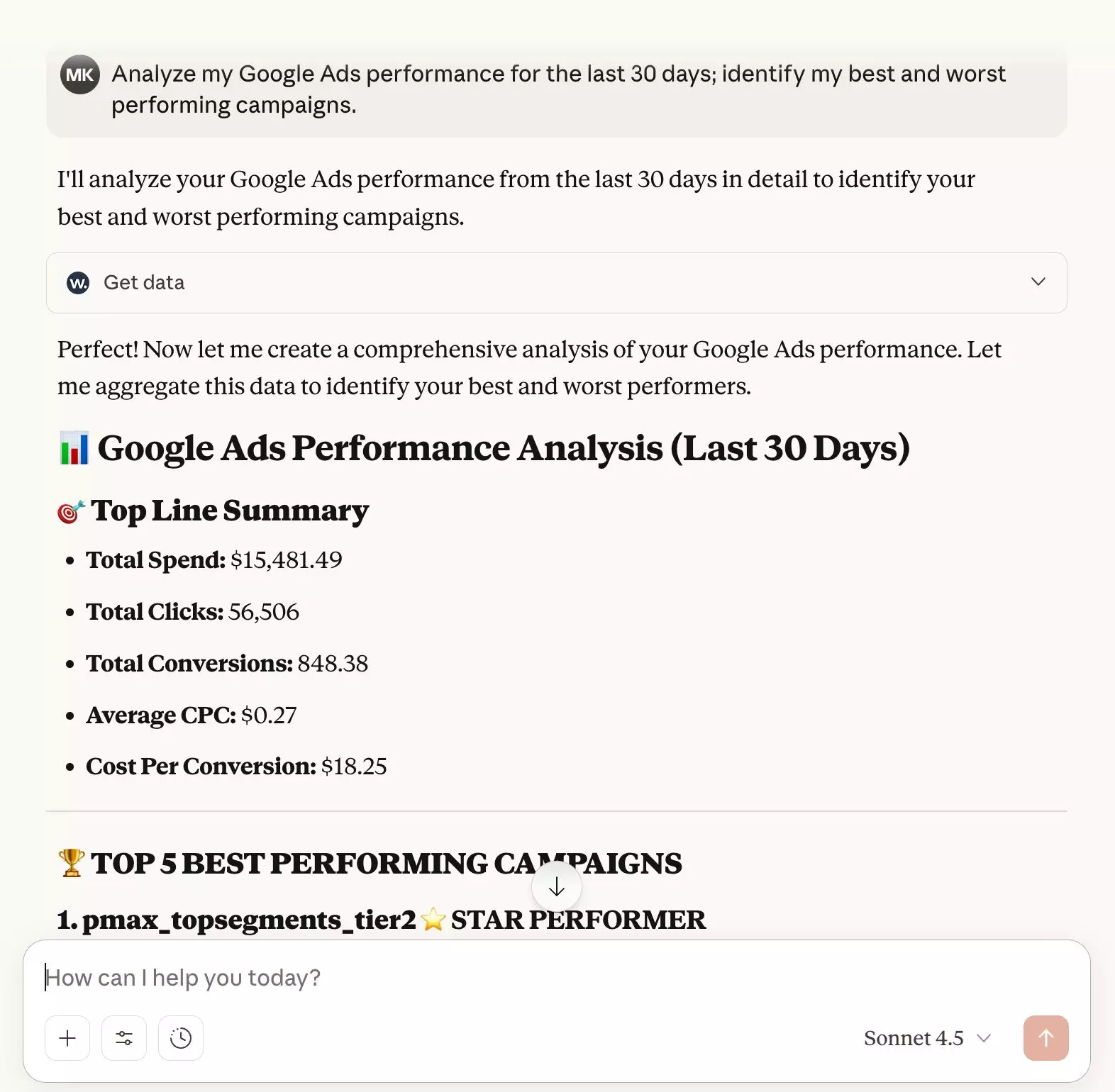
Not just highlighting the best and worst performers in your dataset, Windsor MCP helps you understand what to do with this information by suggesting optimizations towards your strategy and budget decisions.
For example, you can get recommendations for improvement with the following prompt:
Suggest specific actions I should take this week to improve this situation.
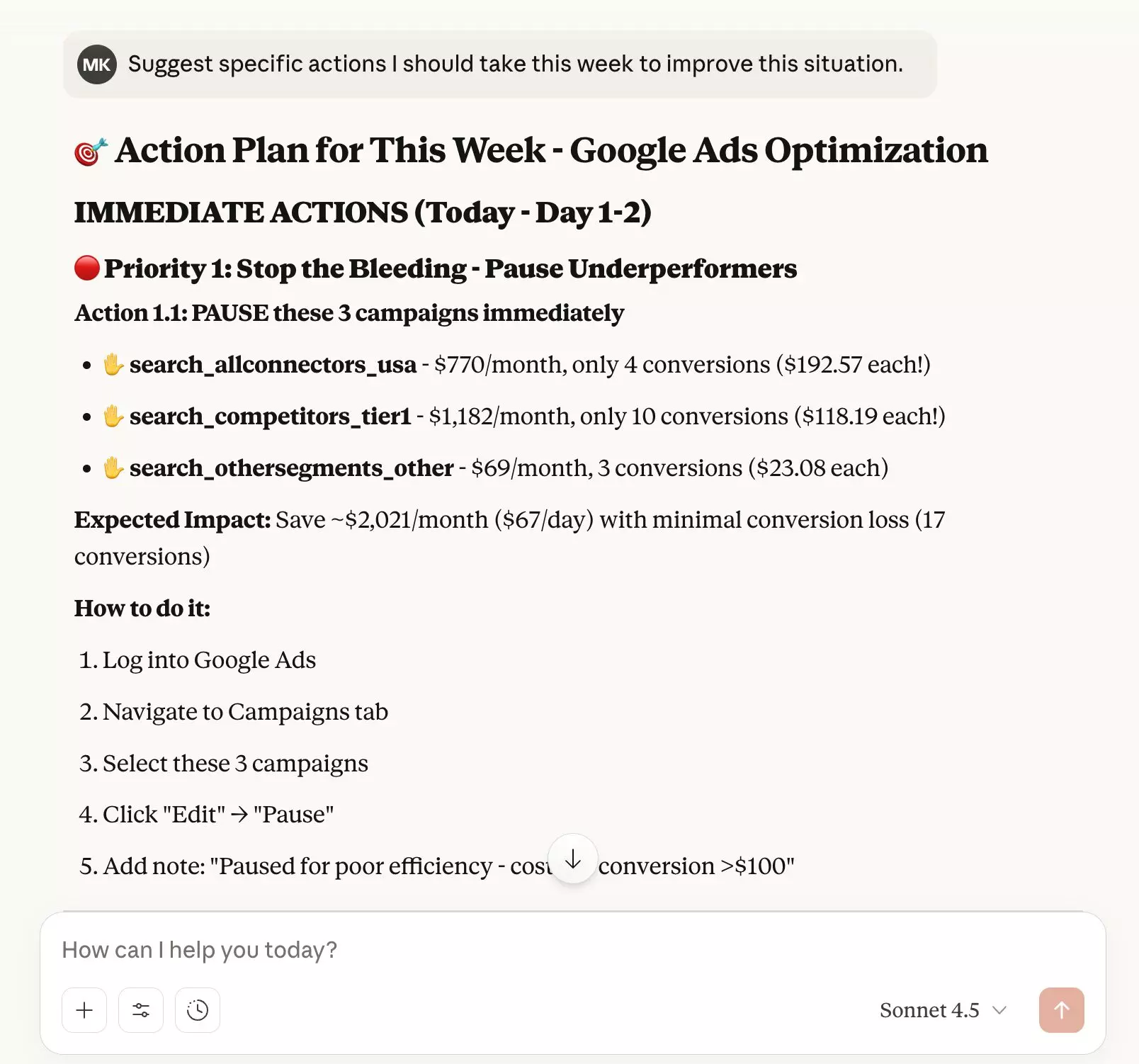
Advanced analysis paired with an actionable to-do plan, all in just a few clicks, with no engineering and BI bottlenecks. Isn’t it a level up?
Use case 3: Create and customize client reports
I can’t help but admire how cool this feature is…
You can ask the LLM to visualize any retrieved data in the preferred format: general marketing report, comparison to the previous period, table of the top posts, recommendation plan, etc. This is the next-level approach to client reporting, as you can generate complete marketing dashboards without specialized data visualization tools.
And you can easily share these professional-looking reports with anyone via a link. Just imagine how many hours of data analysts’ work you save this way!
Here’s a sample prompt:
Create a visual dashboard showing all my key Facebook Organic metrics for the last month with comparisons to the previous month.
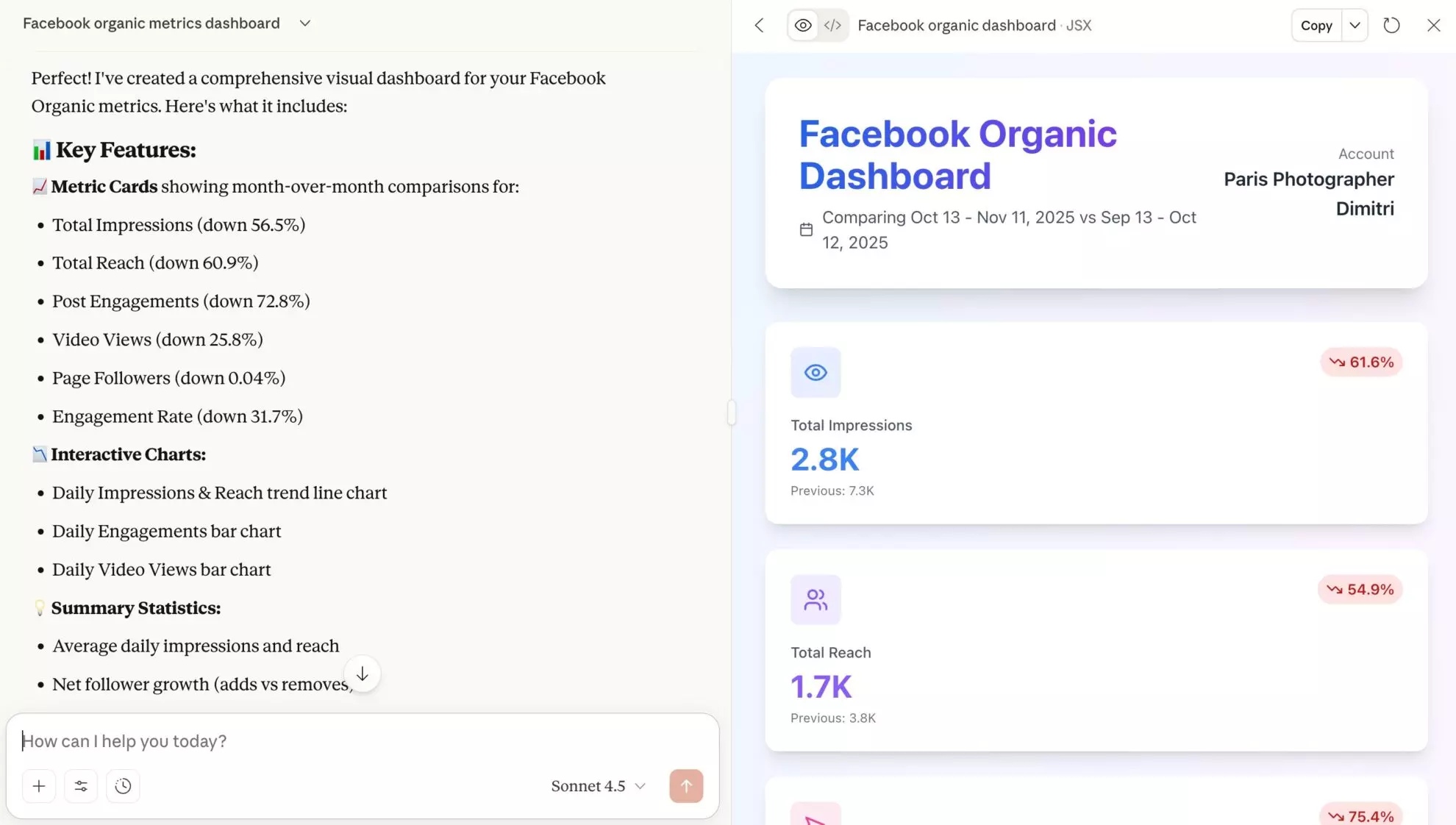
You can dive deeper with your visual analysis and, for example, ask to compare campaigns/posts side by side:
Create a table of the posts over the last month with their stats.

Finally, you can apply custom branding to these reports to match your agency’s or client’s guidelines.
Prompt example to customize the report:
Please, apply custom branding to this report.

Company name: Windsor.ai

The main colors should be: * 0E2640 * B3E2FF

And add the logo (attached).

Experiment with prompts as you wish; the capabilities are very flexible.
Use case 4: Optimize your budget allocation strategy
We all (or almost everyone) love using LLMs to get practical recommendations and tips across various areas of life, including business. So double down on Windsor MCP capabilities and get a piece of advice from your favorite AI chat about how you can improve your financial decisions.
Are you thinking about ways to improve your advertising spend? Consider using a prompt like:
Based on my historical Google Ads data, propose a new budget allocation strategy and show me the expected impact.
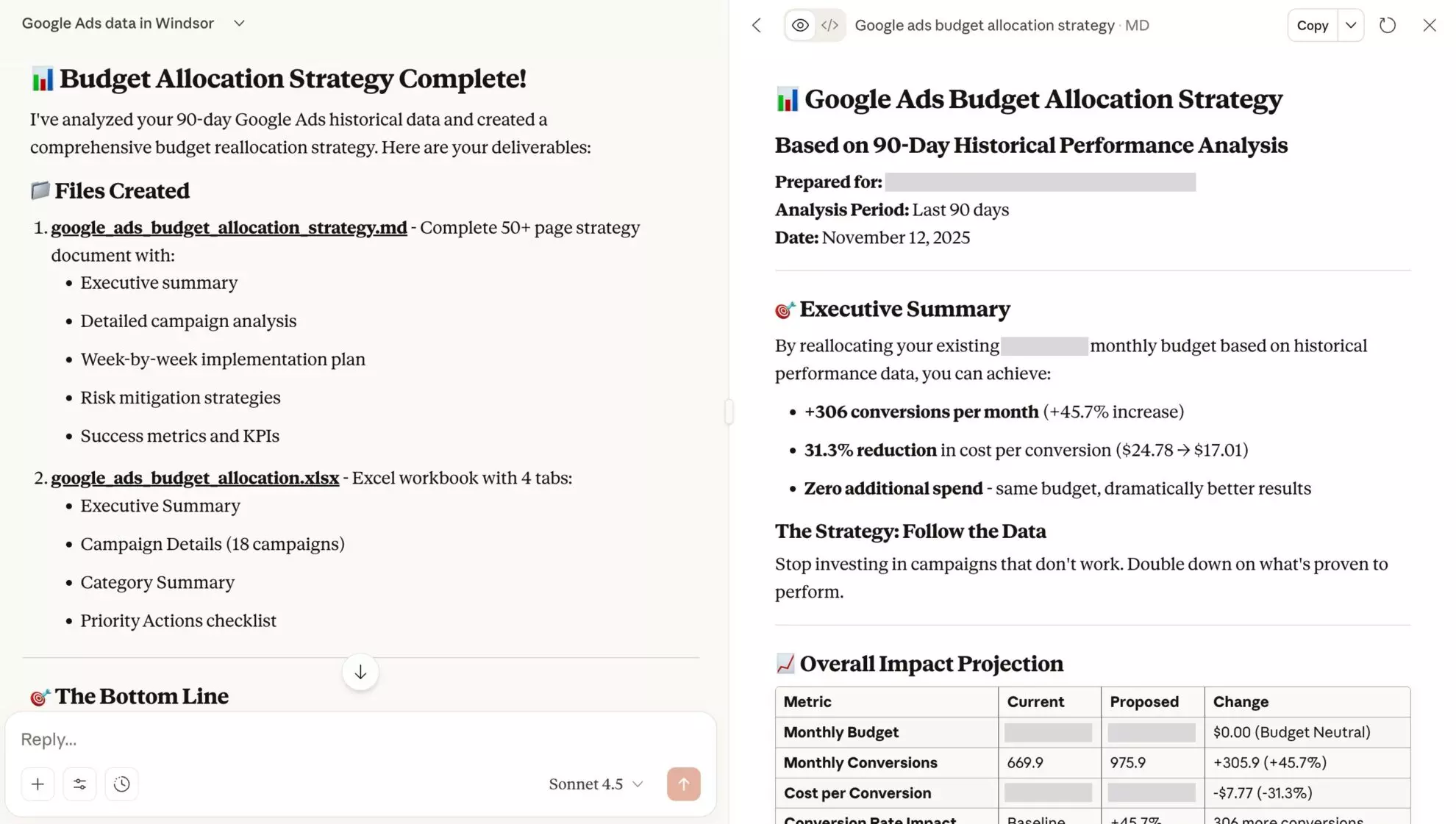
What we’ve got is a 50+ page strategy document along with a workbook, wow! Here’s how Windsor MCP enables you to cut not only the data analyst’s but also the PPC manager’s and financial bottlenecks. All with one tool and in a matter of minutes.
Use case 5: Highlight your business trends, opportunities, and gaps
Get actionable insights at your fingertips without drowning in raw data or fragmented reports.
Windsor MCP helps you unlock the most essential information, such as specific trends, opportunities, and gaps across different channels with just one prompt:
Show me trends in my CPC, CTR, and CPM across all channels over the last 60 days - are things getting better or worse?
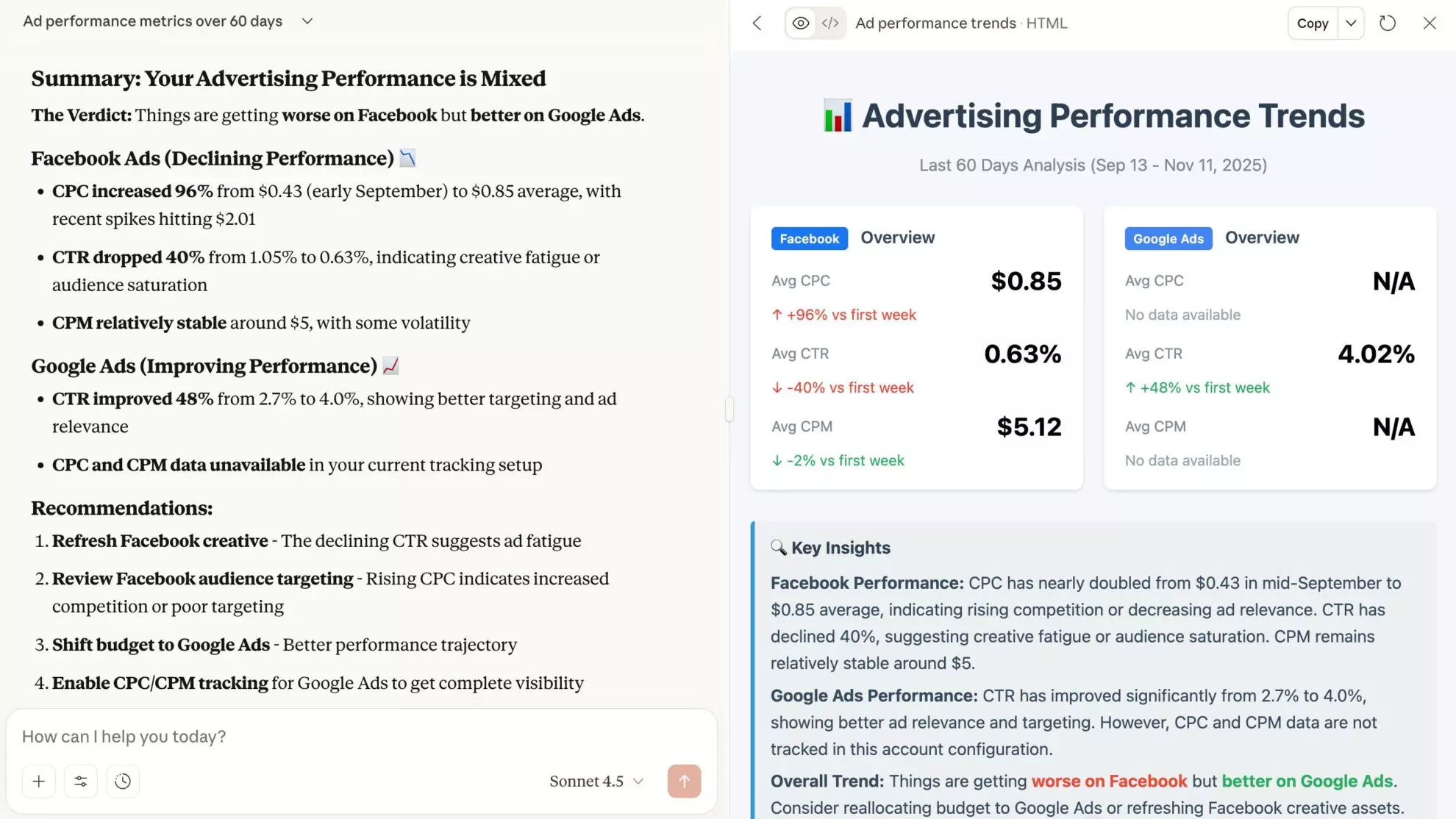
Feel free to go deeper into this analysis and define all the areas for improvement, along with the practical tips and step-by-step guidance.
Use case 6: Troubleshoot issues in your windsor.ai account
Besides AI insights, you can rely on Windsor MCP for some technical support with your windsor.ai account.
Do you have failed tasks? Can’t authorize an account? Got a vague error? Just write down the issue details or the exact error message in the LLM or ask the platform to scan your account for any existing errors and receive troubleshooting guidance.
💡Quick tip: Just copy-paste the exact error message from your windsor.ai dashboard (you can find it in the “Notifications”).
Prompt example:
I've got this error recently "Failed Power BI request. Connector URL: https://connectors.windsor.ai/… Error: The following fields are now deprecated: page_consumptions. Info: https://developers.facebook.com/docs/pages-api/changelog/'

Can you explain it to me and help to resolve?

Use case 7: Optimize queries to reduce data warehousing costs
Useful not only for creative experts and business owners, Windsor MCP is also a reliable assistant for data teams.
If you’ve connected to BigQuery/Snowflake or another warehouse, the LLM can help you draft cost-effective queries and destination task settings.
Just share your task details in the prompt (the more details and rules you provide, the better):
Help me create a well-optimized query for BigQuery to report on my Facebook Ads performance over the last week. Also, help me set partitioning and/or clustering and columns to match in the destination task to optimize costs.

Deliver: optimized connector URL and 3 cost-reduction tips.
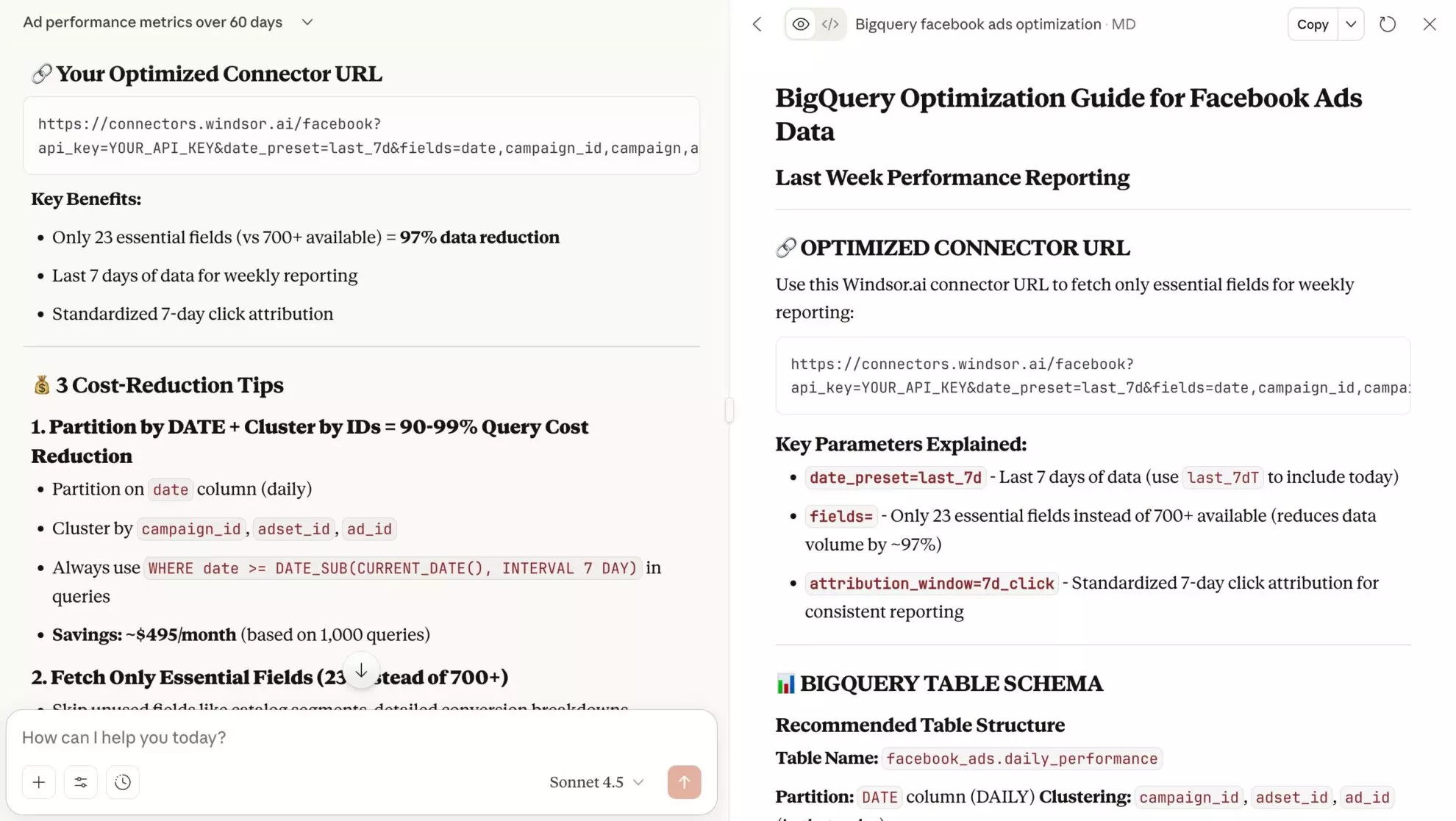
Here’s a great starting point, which you can use as a template for all your other reporting needs. For example, you can apply the same settings to other Meta Ads data models.
Bonus: 15+ use cases and prompts for advanced analysis with Windsor MCP
1) Cross-channel ROAS/blended CAC (unify paid + organic + revenue to see true efficiency):
Calculate ROAS and blended CAC by week for the last 90 days across Meta Ads, TikTok Ads, GA4, and Shopify.
2) Customer funnel & path analysis (ad → web → CRM to track performance from impression to revenue, spotting drop-off):
Visualize a funnel from ad click to signup using all connected channels. Identify the largest drop-off stage and suspected reasons.
3) Budget pacing (track planned vs. actual spend to avoid over/underspend):
Show budget pacing for this month by every connected channel and campaign: planned vs. actual vs. forecasted spend, variance %, and risk level. Recommend reallocations to stay on target, with expected impact on conversions/ROAS.
4) Link ad spend to offline conversions (leads → SQLs → sales to estimate marginal impact/diminishing returns):
Analyze how paid media spend affected offline conversions over the last 90 days (based on Google Ads → GA4 → CRM). Report cost per SQL/opportunity, conversion rates by stage, and incremental lift by channel. Flag diminishing returns and propose the next best $ allocation.
5) Multi-channel insights for e-commerce (to find the top and low performers by ROAS and revenue contribution):
Summarize our Shopify performance stats for the last 2 weeks: ROAS, revenue share, and top/bottom 5 campaigns across Meta, Google, and TikTok. Include product/category breakouts, flag anomalies, and suggest 5 actions to improve ROAS.
6) Inventory forecasting (to predict stockouts, track sales velocity, and prioritize reorders):
Identify which products are selling fastest and flag any SKUs likely to run out of stock soon based on recent sales trends.
6) Multi-channel insights for leadgen (to understand lead quality across channels, campaigns, and audiences based on CPA):
Create a lead generation report for November 2025 based on CPA, qualified rate, and cost per qualified lead by channel, campaign, and audience. Highlight top/bottom 5, diagnose causes (creative, geo, device, or other factors), and suggest an action plan to lower CPA without affecting lead volume.
7) Agency audit templates (to generate standardized weekly/monthly reports with KPIs, insights, and actions):
Create a client-ready campaign performance report for the last 2 weeks across Google Ads, account ID 245622567. Include: KPI summary (spend, revenue, leads, ROAS, CPA, CVR), trends vs. prior period, and top/bottom 5 campaigns. Deliver in the format of a one-page executive summary with such branded guidelines (colors: #05030, #57779, #01020; add the attached logo).
8) Anomaly detection & alerting (to spot sudden spend spikes, tracking crashes, or conversion drops):
Scan the last 30 days across all channels for anomalies in spend, CPA, and conversion rate by channel. Explain likely reasons.
9) Revenue forecasting (for quick scenario planning and strategy optimizations):
For Meta Ads, forecast the next 3 months of revenue based on the last 6 months of performance. How can we improve our strategy to achieve the best outcomes?
10) Cohorts, LTV, and payback (to move beyond last-click to long-term value):
Create cohorts by first purchase month from Shopify, estimate 6- and 12-month LTV, and calculate channel-level payback periods.
11) Ad content optimization (to enhance ad message, asset, or keywords):
Rank my Google Ads assets by ROAS and save a table including the headline and primary text. Recommend 10 new ideas based on the top patterns.
12) Content plan brainstorming (to create engaging content ideas for different channels and audiences):
Identify top posts on my LinkedIn Page and suggest new content ideas to achieve the same level of engagement. Do the same for my YouTube channel and website blog (based on GA4+GSC data).
13) Targeting/segmentation (to understand who converts best and how to adjust targeting):
Segment performance by geo, device, gender, and age for Meta Ads + Google Ads. Identify 3 high-potential segments and 3 to deprioritize.
14) Data hygiene & governance (to fix UTM issues, de-dupe, map schemas, and document fields):
Audit UTM parameters across all connected channels for consistency. Show missing/invalid tags and propose a standardized taxonomy with regex fixes.
15) Prevent churn (to define the accounts at risk and take timely churn prevention measures):
Which accounts are at risk of churn based on Salesforce and Profitwell data?
16) General business advice (to make better, data-driven decisions):
Based on our performance across all connected channels, where can we cut costs without slowing growth?
Best practices to make the most out of Windsor MCP
These simple tips will help you create the most effective prompts:
- Start with a basic prompt → dive deeper next: first, provide the general context and ask a probing question. When you get a clear answer from the LLM and make sure it retrieves the proper data, feel free to proceed with more sophisticated prompts.
- Keep your prompts simple and concise: to get the most accurate responses, try not to overwhelm the LLM within a single prompt. It’s better to divide different questions or requests into a few prompts.
- Ask specific questions: LLMs do better with clear frames, so instead of using some general prompts like: “Analyze my Meta results,” better provide specific bounds: “Collect and analyze my most essential Meta Ads KPIs (CAC, ROAS, CPC, clicks, impressions, etc.) over the last 30 days.”
- Tailor the conversation to your business persona: to get more tailored answers, start by introducing your business persona. For example: “Suppose you’re a PPC manager at a SaaS data company. Provide replies aligned with this persona’s goals and tone of voice, pointing out things that matter most to PPC managers.”
- Turn stats into visual summaries: why not get visual representations of the reported stats and share them with your team, if it’s done in just one click and absolutely free?
- Request the output format: don’t spend time on refining prompts and instantly guide the LLM to respond in the preferred format, such as tables, bullet lists, charts, PDF, one-pager, etc.
- Reinforce the obtained insights with an action plan: to better understand what to do next with the provided data, ask the LLM to share specific recommendations for improvement with an action plan for the next week/month/year.
- Save and reuse prompt templates: get insights across all data sources that matter quickly by using a universal template with ready-to-use prompts.
- Filter your datasets: limit the data the model pulls to keep the output tightly focused. You can also conduct an analysis across specific datasets by naming exact data sources, account IDs, or dataset names in prompts.
How to filter accounts in Windsor MCP for multi-client setups
When connecting Windsor MCP through a single account, you might face a challenge of managing multiple client accounts, so it’s important to limit data access to the specific accounts within each prompt.
By explicitly filtering account IDs or dataset names, you ensure each client’s data remains isolated, preventing cross-account visibility while using a unified account.
To add specific account or property IDs in your MCP query, try the following sample prompt (replace with your account details):
Use the Windsor.ai MCP to analyze how paid social impacts conversions in August 2025.

Only use the following accounts:
- facebook_ads_account_id: 1234567890
- ga4_property_id: 9876543210
- search_console_site_id: abc123
- bigquery_project_id: offline_conv_project_001

The channel grouping for Facebook Ads data in GA4 is "Paid Social".

Provide insights into causation and correlation across these datasets.
This ensures Windsor MCP retrieves and analyzes data only from the specified accounts, even when other clients share the same API key.
Best practices:
- Always specify account IDs or dataset names in prompts.
- For sensitive enterprise environments, consider separate Windsor.ai accounts per client for maximum isolation.
Windsor MCP integrations for 350+ data sources
Let Windsor MCP automatically collect data from over 350+ sources and sync it with any LLM tool for in-depth analysis in seconds.
Access performance insights from the following channels (find the full list of Windsor MCP integrations on this page):
Advertising platforms
Analytics & marketing platforms
- Google Analytics MCP
- Klaviyo MCP
- Google Search Console MCP
- Facebook Organic MCP
- Instagram MCP
- LinkedIn Organic MCP
CRM platforms
E-commerce platforms
🚀 Get started with Windsor MCP today for free: https://onboard.windsor.ai/ and experience the power of AI-driven analytics.
FAQs
How is MCP different from uploading CSVs into AI chats?
CSV uploads are manual and messy at scale. With Windsor MCP, you automatically connect large-scale, normalized data from multiple sources into AI tools, eliminating the need for reformatting, and you can start querying them right away.
Which AI tools does Windsor MCP integrates with?
Currently, we support integrations with ChatGPT, Claude, Cursor, Gemini, Perplexity, and Copilot Agent. More tools to come.
What do I need to get started with Windsor MCP?
Make sure you have an active Windsor.ai account (free or paid) and, for some AI tools, a paid subscription is required to enable external connectors. Connect at least one data source in https://onboard.windsor.ai/ first.
Is Windsor MCP free to use?
Windsor MCP is available on the free plan. You can connect up to 10 data sources, 15 accounts, and retrieve data from the past 30 days. For greater limits, consider upgrading to a paid plan, starting at just $19/month (see our pricing).
In what ways can I interact with my data through Windsor MCP?
You can use Windsor MCP to create per-channel or cross-channel summaries and visuals, spot trends, highlight top/bottom performers, generate cost-efficient queries, check anomalies, ask for budget optimization tips, troubleshoot your account issues, and more.
How do I safely handle multi-client Windsor MCP setups through one connected account?
You can filter your datasets by account ID in each prompt so only the intended client’s data is used.
Example: “Only use facebook_ads_account_id: 123…, ga4_property_id: 987….”
Does Windsor MCP support cross-channel metrics like ROAS or blended CAC?
Yes. You can combine paid & organic spend and revenue to compute ROAS and blended CAC, compare results by periods, spot trends, and flag anomalies.
What data sources are supported in Windsor MCP?
Windsor MCP supports over 350 integrations, including major ad & marketing, sales, analytics, e-commerce, accounting, and CRM platforms (e.g., Meta/Google/TikTok Ads, GA4, GSC, Shopify, HubSpot, Salesforce). Visit the destination page for the full list.
Does Windsor MCP replace BI tools?
Not necessarily. It streamlines exploratory analysis, visual reporting, and ad-hoc questions. Many teams still keep Windsor integrations with BI tools (Looker Studio, Power BI, Tableau) for governed reporting and always up-to-date dashboards.


