 Destinations
 Data sources
 AI insights
 About us
 Careers
 Security
 Customer reviews
 Contact us
 Affiliate program
 Solution partners
 Template gallery
 Looker Studio templates
 Power BI templates
 Excel templates
 Google Sheets templates
 Tableau templates
 Facebook Ads templates
 Google Ads templates
 Data fields & Metrics
 AI prompt library & Guides
 Product documentation
 API documentation
 Case studies
 Blog
Blog Data models
 Windsor vs Supermetrics
 Windsor vs Funnel.io
 Windsor vs Fivetran
 Windsor vs Rivery
 Windsor vs Portermetrics
 Windsor vs Coupler.io
Salesforce MCP for AI Insights
Send your Salesforce data to leading LLMs with Windsor MCP.
Connect Salesforce to ChatGPT, Claude, Copilot, Gemini, and more to analyze pipeline performance, optimize sales strategy, and accelerate revenue growth with AI-driven insights.
Forget CSVs. Stop copy/paste. Connect data in 2 minutes. No code required.
 Sign up with Google
 Free forever plan









Streamline Salesforce analysis through AI with Windsor MCP
Connecting Salesforce to AI tools through Windsor MCP transforms CRM data into smart, conversational analytics, delivering instant clarity and insight across your sales performance. Here’s what you gain from this connection:

Get instant AI answers
Send your Salesforce data into your favorite LLMs in seconds, without coding or setup complexity. Receive AI-generated summaries, performance breakdowns, and pipeline forecasts instantly, no manual dashboards or queries required.

Analyze data in natural language
Chat with your data to analyze leads, opportunities, revenue trends, and conversion rates, all explained in natural language. Windsor MCP simplifies CRM analysis, giving sales teams clear guidance for better decision-making.

Unify data across channels
Blend Salesforce data with insights from 350+ marketing, ad, and support platforms to gain a unified view of your customer journey. Track how marketing efforts generate qualified leads and deals, and how post-sale engagement drives retention and growth.

Boost sales and revenue
Ask questions like “Which reps close deals fastest?”, “Which accounts show the highest churn risk?”, or “What pipeline segments need more focus this quarter?”. Use these AI-driven insights to refine your sales process, forecast revenue accurately, and drive business growth.
Using Windsor.ai MCP to connect data from Salesforce to LLMs
Getting your Salesforce data into AI tools often requires manual exports, CSV cleanup, or costly software. Windsor MCP eliminates these barriers with a connector that automatically collects, normalizes, and streams your Salesforce data to your preferred AI platforms.
Connect your CRM data in minutes and start asking questions in natural language to uncover AI-driven insights across leads, pipeline, and sales performance.
Available actions
Update Object Update field values on a Salesforce record of any object type (Opportunity, Lead, Contact, Account, Case, custom objects, ...). Only the provided fields are changed. Use field API names (e.g. StageName, Amount, My_Field__c) and pass null as a value to clear a field.
Update field values on a Salesforce record of any object type (Opportunity, Lead, Contact, Account, Case, custom objects, ...). Only the provided fields are changed. Use field API names (e.g. StageName, Amount, My_Field__c) and pass null as a value to clear a field.
Create Object Create a new Salesforce record of any object type (Opportunity, Lead, Contact, Account, Case, custom objects, ...). Use field API names (e.g. LastName, Company, Amount, My_Field__c); the required fields depend on the object type. Returns the id of the new record, which update_object and delete_object can then use.
Create a new Salesforce record of any object type (Opportunity, Lead, Contact, Account, Case, custom objects, ...). Use field API names (e.g. LastName, Company, Amount, My_Field__c); the required fields depend on the object type. Returns the id of the new record, which update_object and delete_object can then use.
Delete Object Permanently delete a Salesforce record of any object type (Opportunity, Lead, Contact, Account, Case, custom objects, ...) by id. Salesforce moves the record to the Recycle Bin for 15 days, from where a user can restore it in the Salesforce UI but not through Windsor. Tell the user this is permanent before you ask them to confirm.
Permanently delete a Salesforce record of any object type (Opportunity, Lead, Contact, Account, Case, custom objects, ...) by id. Salesforce moves the record to the Recycle Bin for 15 days, from where a user can restore it in the Salesforce UI but not through Windsor. Tell the user this is permanent before you ask them to confirm.














How to connect Salesforce MCP by Windsor.ai
Follow this quick setup guide to connect your Salesforce data to your preferred AI chat.
Register and log in to Windsor.ai
Create a new Windsor.ai account or log in if you already have one.

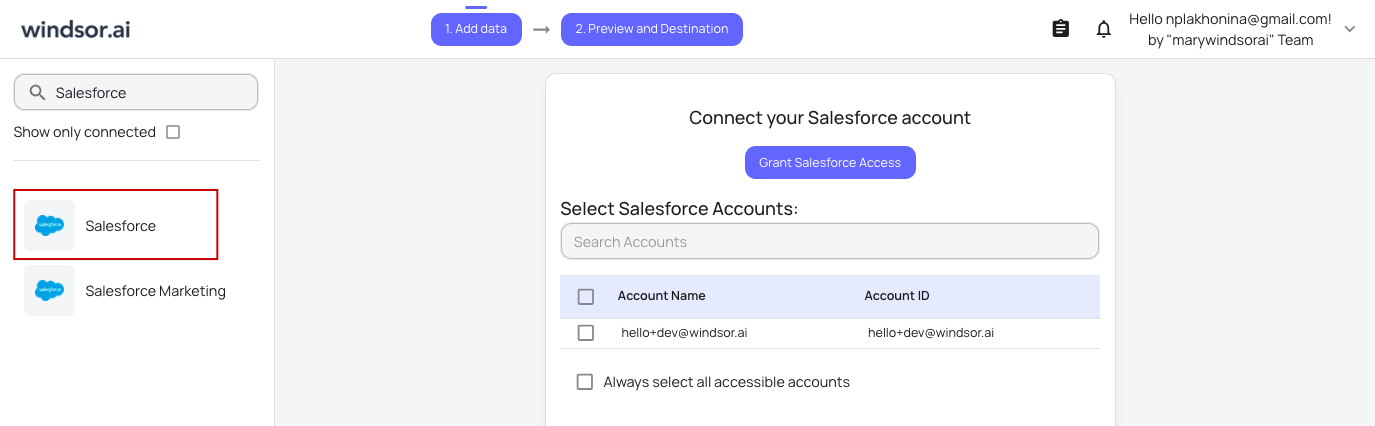
Select your data source
Choose Salesforce as your data source and grant access to Windsor.ai.
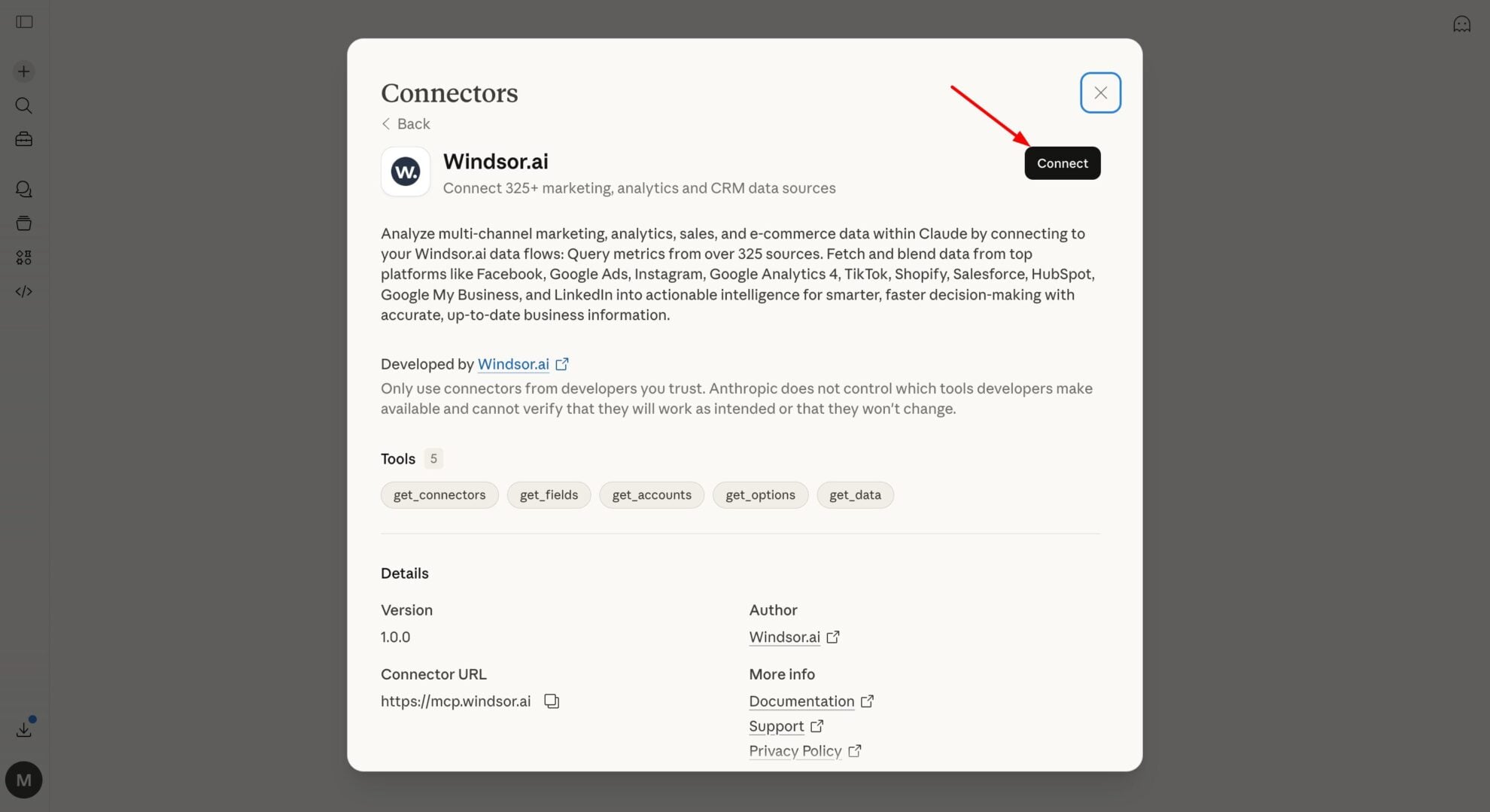
Connect Windsor MCP to your favorite LLM
If a native connector is available for your platform, connect in one click. Otherwise, visit this guide and follow the instructions for your platform of choice.
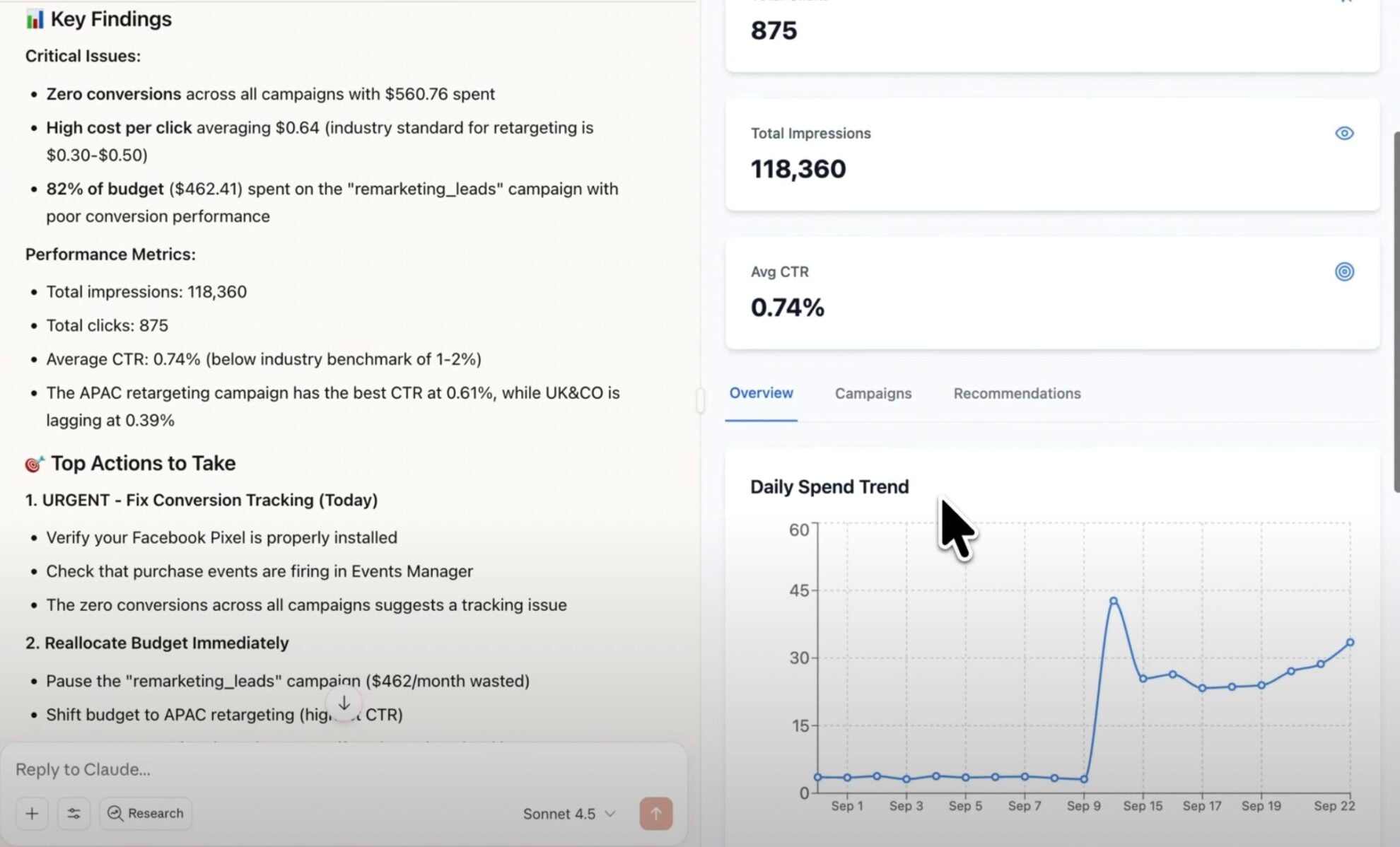
Start analyzing your data in the LLM
Now, you are ready to go with any questions about your data.
FAQs
What is Windsor MCP?
Windsor MCP (Model Context Protocol) is an AI-powered tool that connects your integrated Windsor.ai data with LLM platforms like Claude, Cursor, Gemini, and others. It allows you to ask natural language questions about your data and receive actionable insights without writing SQL or building dashboards from scratch.
What can I do with Windsor MCP?
Windsor MCP lets you interact with your business data directly in your favorite LLM tools. Instead of writing SQL queries, you can simply ask questions like “How many new leads were created this week, and from which sources?” or “Which sales reps are closing the most deals this quarter?”.
MCP automatically collects and normalizes data from all sources connected to your Windsor account, generating instant summaries, deep insights, and optimization recommendations.
Can I update Salesforce records directly from AI chats?
Yes. Windsor MCP gives any MCP-compatible AI assistant, such as Claude, ChatGPT, Copilot, and others, write access to Salesforce. You can:
- Create records of any object type, including Opportunities, Leads, Contacts, Accounts, Cases, and custom objects
- Update field values on existing records
- Delete records (Salesforce keeps them in the Recycle Bin for 15 days)
In Gemini Enterprise, turn on Execute Action and Write actions during setup.
Is Windsor MCP free to use?
Yes. Windsor MCP is included in every Windsor.ai plan, including the free forever plan with no credit card. The free plan covers 1 connected data source; combining several sources needs a paid plan, from $19/month for 3 sources. See the pricing page.
What agents does it work with?
You can connect Windsor MCP to any AI agent compatible with MCP, including Claude Desktop, ChatGPT, Perplexity, Cursor, Gemini, etc.
Tired of manual Salesforce data exports? Try Windsor.ai today to automate your reporting


