Destinations
 Data sources
 AI insights
 About us
 Careers
 Security
 Customer reviews
 Contact us
 Affiliate program
 Solution partners
 Template gallery
 Looker Studio templates
 Power BI templates
 Excel templates
 Google Sheets templates
 Tableau templates
 Facebook Ads templates
 Google Ads templates
 Data fields & Metrics
 AI prompt library & Guides
 Product documentation
 API documentation
 Case studies
 Blog
 Data models
 Windsor vs Supermetrics
 Windsor vs Funnel.io
 Windsor vs Fivetran
 Windsor vs Rivery
 Windsor vs Portermetrics
 Windsor vs Coupler.io
Facebook Ads (Meta) MCP for AI Insights
Ask Claude, ChatGPT, Microsoft Copilot, Gemini Enterprise or another MCP client about your Meta Ads spend, leads, purchases and ROAS on Facebook and Instagram, next to Google Ads, GA4 and Shopify. Through Windsor MCP, the assistant can also create campaigns, ad sets and ads, pause or enable them, set budgets and edit ad copy after you approve each change.
No CSV exports and no code. Set up in a few minutes.
 Sign up with Google
 Free forever plan








What a Meta Ads MCP server lets your AI assistant do
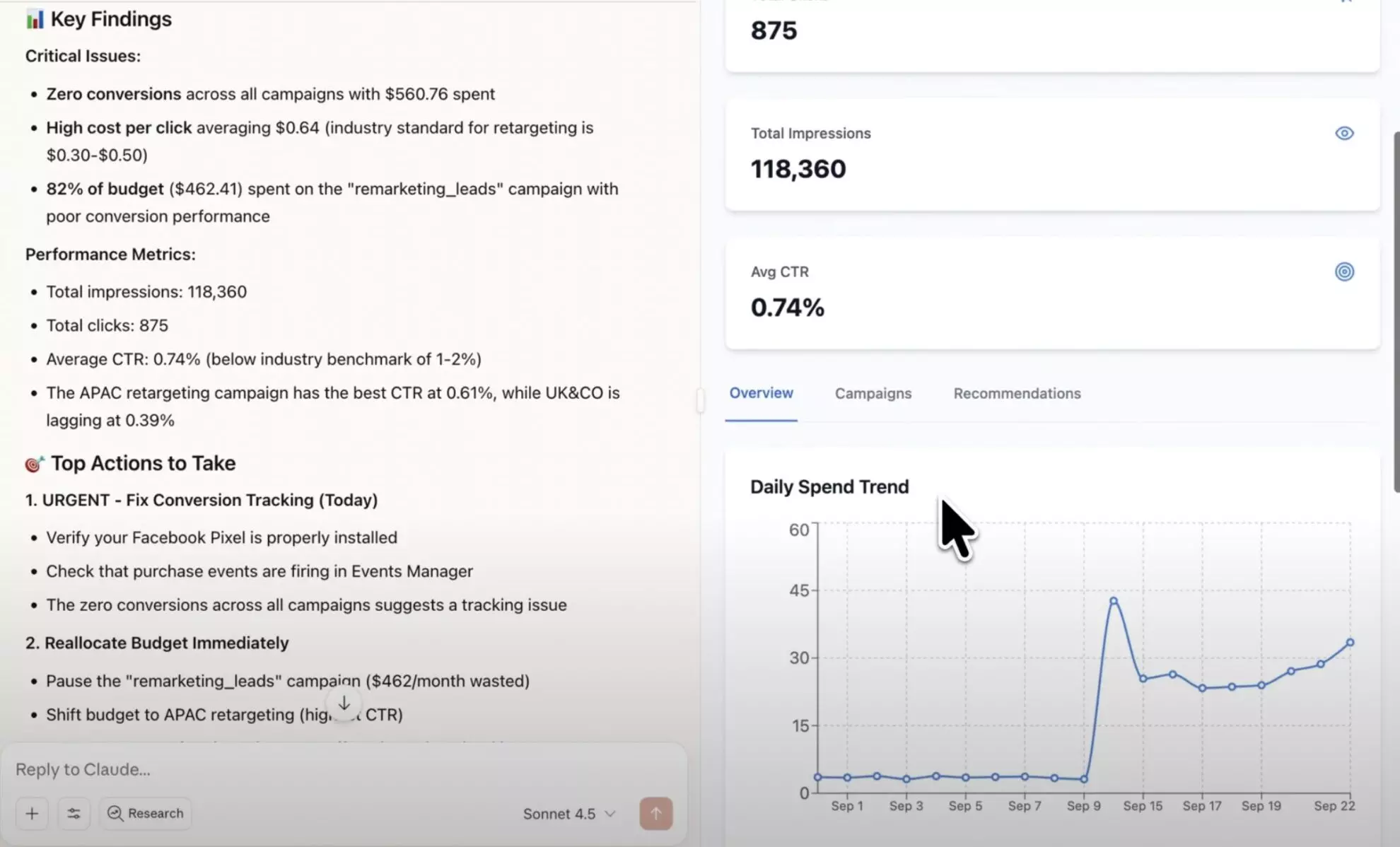
The assistant picks the Meta Ads fields, runs the query through Windsor MCP and explains the result in the same chat.

Read Meta Ads by name
Fields such as spend, actions_lead, actions_offsite_conversion_fb_pixel_purchase, website_purchase_roas_offsite_conversion_fb_pixel_purchase, frequency and video_thruplay_watched_actions_video_view, by campaign, ad set, ad, platform, placement, country, age and gender.

Creative and fatigue checks
Read ad copy, titles and thumbnail URLs next to CTR, frequency and cost per result, so the assistant can say which ads are wearing out and what they have in common.

Create, pause and set budgets
24 write actions: create campaigns, ad sets and ads (created paused), pause or enable them, set campaign and ad set budgets, edit ad copy and links, upload images and videos or reuse an Instagram Reel, boost a post, create lead forms, and look up targeting by name. The assistant shows each change and runs it after you approve it.

Meta Ads next to your other sources
Compare Meta Ads with Google Ads and TikTok Ads in one answer, or check Meta-reported purchases against GA4, Shopify or a CRM such as HubSpot.
Using Windsor.ai MCP to connect data from Facebook Ads to LLMs
Windsor MCP is Windsor.ai’s MCP server. You connect your Meta ad accounts to Windsor.ai once, then add Windsor.ai to your AI assistant: in Claude it is a one-click connector in the directory, in ChatGPT an app, and in other clients a remote MCP server. The same connection serves 350+ other sources.
Each question runs as a query on the Meta Marketing API when you ask it, and Windsor.ai keeps the result of an identical query for up to 6 hours. New campaigns, ad sets and ads are created paused, so nothing spends until you enable it. The assistant cannot delete campaigns or ads, or manage catalogs, custom audiences and pixels (see the write actions documentation).
Available actions
Create Ad Set
Create a new ad set in an existing Meta Ads campaign (Facebook or Instagram). Created paused by default so it does not spend until enabled. Budget amounts are in the account currency minor unit (e.g. cents: 5000 means 50.00). Currencies without cents (CLP, COP, CRC, HUF, IDR, ISK, JPY, KRW, PYG, TWD, VND) use whole units: 300000 means 300000 COP. Provide at most one of daily_budget or lifetime_budget; omit both only when the campaign uses campaign budget optimization. lifetime_budget requires end_time. Some optimization goals require promoted_object, a Meta spec naming what is optimized (e.g. {"pixel_id": "<id>", "custom_event_type": "PURCHASE"} for conversions, or {"page_id": "<id>"} for page likes). destination_type sets where the ad sends people; for boosting an existing post (boost_post) use ON_POST with optimization_goal POST_ENGAGEMENT to keep engagement on the post (no call to action needed). A website or undefined destination instead makes Meta require a website URL and call to action in the creative. start_time and end_time are ISO 8601 timestamps (e.g. 2027-01-01T00:00:00-0800); start_time defaults to now and cannot be changed once the ad set has started, even while paused. An ad set with its own budget is created with bid_strategy LOWEST_COST_WITHOUT_CAP (highest volume) unless bid_strategy or bid_amount is given; pass bid_amount with a capped strategy (LOWEST_COST_WITH_BID_CAP or COST_CAP). Under campaign budget optimization the campaign's bid strategy applies and none is sent. advantage_audience controls Meta's Advantage+ audience, which treats the given targeting as a suggestion and expands beyond it; it defaults to false, so the age, gender, geo and audience targeting is applied exactly as given. Meta requires the flag on every new ad set, so it is always sent. Set it once: either as this parameter or as targeting.targeting_automation.advantage_audience (0 or 1). With true, Meta fixes age_max at 65 and allows age_min from 18 to 25; give the preferred ages as targeting.age_range (e.g. [25, 35]). Ads delivered to the EU require dsa_beneficiary and dsa_payor, naming who benefits from and who pays for the ad. Ads delivered to Taiwan, Singapore, Thailand, Brazil, Australia, Malaysia or India require regional_regulated_categories (e.g. SINGAPORE_UNIVERSAL) together with regional_regulation_identities holding the matching beneficiary and payer ids (e.g. {"singapore_universal_beneficiary": "<id>", "singapore_universal_payer": "<id>"}; THAILAND_UNIVERSAL, BRAZIL_REGULATION, AUSTRALIA_UNIVERSAL and MALAYSIA_UNIVERSAL use "universal_beneficiary" and "universal_payer"; financial service ads in Australia also declare AUSTRALIA_FINSERV with "australia_finserv_beneficiary" and "australia_finserv_payer"). These are verified identity ids from Meta Business settings > Verified identities (not page or business ids); ad account defaults are not inherited by ad sets created through the API. Meta also asks some accounts for a verified advertiser on any ad set ("Advertiser is missing"); then pass regional_regulation_identities with "universal_beneficiary" and "universal_payer" and add regional_regulated_categories only when the targeted country has a value listed above. extra_params passes further Meta ad set fields straight to the Graph API for anything this action does not model yet. Prefer the named parameters where they exist: a key that repeats one already set is rejected, since only one of the two values could win. For example, extra_params {"attribution_spec": [{"event_type": "CLICK_THROUGH", "window_days": 7}]} sets the attribution setting. Meta can reject later changes to it.
Create Campaign
Create a new Meta Ads campaign (Facebook or Instagram). Created paused by default so it does not spend until enabled. objective is a Meta campaign objective (e.g. OUTCOME_TRAFFIC, OUTCOME_LEADS, OUTCOME_SALES). special_ad_categories must list any regulated categories the ads fall under (e.g. HOUSING, EMPLOYMENT, CREDIT) or be empty; country declarations such as SINGAPORE_UNIVERSAL or TAIWAN_UNIVERSAL belong to regional_regulated_categories on the ad set instead. Setting a campaign budget enables campaign budget optimization; amounts are in the account currency minor unit (e.g. cents: 5000 means 50.00). Currencies without cents (CLP, COP, CRC, HUF, IDR, ISK, JPY, KRW, PYG, TWD, VND) use whole units: 300000 means 300000 COP. Provide at most one of daily_budget or lifetime_budget. A campaign with a budget (or with ad set budget sharing enabled) is created with bid_strategy LOWEST_COST_WITHOUT_CAP (highest volume) unless bid_strategy is given; its ad sets inherit it and cannot override it. Without a campaign budget leave bid_strategy unset and choose it per ad set in create_adset. When no campaign budget is set, some accounts require is_adset_budget_sharing_enabled to be specified.
Create Ad
Create a new ad in an existing Meta Ads ad set (Facebook or Instagram). Created paused by default so it does not spend until enabled. The simplest way is to provide page_id and link plus optional text (message, headline, description), image_url or image_hash (from create_ad_image) and call_to_action_type; these build a single-image link ad creative automatically. For a Click-to-Message ad, set messaging_destination (MESSENGER or INSTAGRAM_DIRECT) instead of link; the message opens a conversation with the page. When the ad set sends people to several messaging apps (destination_type MESSAGING_*), the creative gets the multi-destination structure Meta requires automatically; an Instagram destination uses the page's connected Instagram account unless instagram_user_id is set. For a video ad, upload the video first with create_ad_video and pass its video_id here with page_id and a required thumbnail image_url or image_hash; message becomes the primary text, headline the title, description the caption, and call_to_action_type (with link) adds a button. For advanced cases, pass a full Meta creative spec via creative instead (e.g. {"creative_id": "<id>"} to reuse an existing creative, or {"object_story_spec": {...}}). Provide either the individual creative fields or creative, not both. A degrees_of_freedom_spec or creative_features_spec anywhere in creative can only turn Advantage+ creative features off: each feature in it needs enroll_status OPT_OUT.
Update Campaign
Update editable attributes of a Meta Ads campaign (Facebook or Instagram). Provide only the fields to change; at least one is required. spend_cap is a lifetime spend limit in the account currency minor unit (e.g. cents: 5000 means 50.00). Currencies without cents (CLP, COP, CRC, HUF, IDR, ISK, JPY, KRW, PYG, TWD, VND) use whole units: 300000 means 300000 COP. special_ad_categories lists the regulated categories the ads fall under (e.g. HOUSING, EMPLOYMENT, CREDIT) or is empty; country declarations such as SINGAPORE_UNIVERSAL or TAIWAN_UNIVERSAL belong to regional_regulated_categories on the ad set (update_adset) instead. Use pause_campaign/enable_campaign to change status and set_campaign_budget to change the budget. objective is fixed at creation and cannot be updated.
Update Ad Set
Update editable attributes of a Meta Ads ad set (Facebook or Instagram). Provide only the fields to change; at least one is required. bid_amount is in the account currency minor unit (e.g. cents: 500 means 5.00). Currencies without cents (CLP, COP, CRC, HUF, IDR, ISK, JPY, KRW, PYG, TWD, VND) use whole units: 300000 means 300000 COP. Switching bid_strategy to a capped strategy (LOWEST_COST_WITH_BID_CAP or COST_CAP) requires bid_amount in the same call. start_time and end_time are ISO 8601 timestamps (e.g. 2027-01-01T00:00:00-0800); end_time less than one year ahead. Use pause_adset/enable_adset to change status and set_adset_budget to change the budget. Ads delivered to the EU require dsa_beneficiary and dsa_payor, naming who benefits from and who pays for the ad. Ads delivered to Taiwan, Singapore, Thailand, Brazil, Australia, Malaysia or India require regional_regulated_categories (e.g. SINGAPORE_UNIVERSAL) together with regional_regulation_identities holding the matching beneficiary and payer ids (e.g. {"singapore_universal_beneficiary": "<id>", "singapore_universal_payer": "<id>"}; THAILAND_UNIVERSAL, BRAZIL_REGULATION, AUSTRALIA_UNIVERSAL and MALAYSIA_UNIVERSAL use "universal_beneficiary" and "universal_payer"; financial service ads in Australia also declare AUSTRALIA_FINSERV with "australia_finserv_beneficiary" and "australia_finserv_payer"). These are verified identity ids from Meta Business settings > Verified identities (not page or business ids); ad account defaults are not inherited by ad sets created through the API. Meta also asks some accounts for a verified advertiser on any ad set ("Advertiser is missing"); then pass regional_regulation_identities with "universal_beneficiary" and "universal_payer" and add regional_regulated_categories only when the targeted country has a value listed above. extra_params passes further Meta ad set fields straight to the Graph API for anything this action does not model yet. Prefer the named parameters where they exist: a key that repeats one already set is rejected, since only one of the two values could win. Meta can reject attribution_spec on an existing ad set (error subcode 1504040). To change the attribution setting, create a new ad set with create_adset.
Pause Campaign
Pause an active Meta Ads campaign (Facebook or Instagram). Reversible via enable_campaign.
Set Campaign Budget
Set the daily or lifetime budget of a Meta Ads campaign (Facebook or Instagram). The amount is in the account currency minor unit (e.g. cents: 5000 means 50.00). Currencies without cents (CLP, COP, CRC, HUF, IDR, ISK, JPY, KRW, PYG, TWD, VND) use whole units: 300000 means 300000 COP. Pass daily_budget or lifetime_budget (the names and unit that create_adset and create_campaign use), or amount with budget_type. Only one budget type applies at a time; setting one replaces the other. Meta rejects frequent budget changes on the same campaign; space out repeated changes instead of adjusting in rapid succession.
Enable Campaign
Activate a paused Meta Ads campaign (Facebook or Instagram). Reversible via pause_campaign.
Enable Ad
Activate a paused Meta Ads ad (Facebook or Instagram). Reversible via pause_ad.
Enable Ad Set
Activate a paused Meta Ads ad set (Facebook or Instagram). Reversible via pause_adset.
Pause Ad
Pause an active Meta Ads ad (Facebook or Instagram). Reversible via enable_ad.
Update Ad Creative
Edit the creative of an existing Meta Ads ad (Facebook or Instagram): ad copy (message), headline, description, destination link, image, call-to-action button, URL tracking tags and Advantage+ enhancement settings. Meta treats ad creatives as immutable, so this copies the ad's current creative (keeping its name, url_tags, degrees_of_freedom_spec and the multi-destination click-to-message structure, adding the latter when the ad set requires it and the creative is not post-based), applies the changes, creates the result as a new creative and re-points the ad at it; the ad keeps its id, but the returned creative id is new. Provide ad_id plus at least one field to change. Editable content fields depend on the creative's media type: link ads support all of them; video ads support message, headline, description, image_url (thumbnail), link and call_to_action_type (the link lives on the button, so adding a link to a video ad without a button also requires call_to_action_type); photo ads only message (the caption) and image_url; text ads only message. For carousel ads (link ads with cards), message edits the text above the cards; headline, description, link, image_url and call_to_action_type live on the cards, so also pass card_index (0-based) to edit one specific card. url_tags (e.g. 'utm_source=x&utm_medium=y') and degrees_of_freedom_spec (a raw Meta spec) can be edited on any creative, including ads that promote an existing organic post (e.g. boosted posts) — but content fields on those ads cannot be edited; edit the post itself instead. Dynamic/catalog creatives cannot be edited at all. Omitted fields keep their current values; to clear url_tags pass an empty string. A passed degrees_of_freedom_spec can only turn Advantage+ creative features off: each feature in its creative_features_spec needs enroll_status OPT_OUT. Listed features replace their current setting, and features it omits keep theirs. An empty spec is not accepted. A deprecated standard_enhancements bundle inside the spec (passed or cloned) is translated into the individual enhancement features at the bundle's enroll_status, since Meta rejects the bundle on creation. To swap the ad to a different existing creative, use update_ad instead.
Pause Ad Set
Pause an active Meta Ads ad set (Facebook or Instagram). Reversible via enable_adset.
Set Ad Set Budget
Set the daily or lifetime budget of a Meta Ads ad set (Facebook or Instagram). The amount is in the account currency minor unit (e.g. cents: 5000 means 50.00). Currencies without cents (CLP, COP, CRC, HUF, IDR, ISK, JPY, KRW, PYG, TWD, VND) use whole units: 300000 means 300000 COP. Pass daily_budget or lifetime_budget (the names and unit that create_adset and create_campaign use), or amount with budget_type. Only one budget type applies at a time; setting one replaces the other. Meta allows at most 4 budget changes per ad set per hour; further changes are rejected until the hour passes.
Update Ad
Update editable attributes of a Meta Ads ad (Facebook or Instagram). Provide only the fields to change; at least one is required. creative swaps the ad to a different creative and is a Meta creative reference (e.g. {"creative_id": "<id>"}). conversion_domain is the registrable domain the ad drives conversions to (e.g. example.com), used for conversion attribution. display_sequence orders the ad within a sequenced campaign. Use pause_ad/enable_ad to change status.
Boost Post
Boost (promote) an existing organic Facebook or Instagram post by creating a paid ad for it in an existing Meta Ads ad set. Provide the full post id (in '{page_id}_{post_id}' form, as it appears in the connector data) and the ad set to place the ad in. The ad reuses the published post as its creative via object_story_id, so no new copy or media is created. The target ad set MUST belong to an engagement campaign (objective OUTCOME_ENGAGEMENT) and name the post's page in its promoted_object; build it with create_campaign and create_adset first if needed. Two ad set shapes work: an ON_POST destination with optimization_goal POST_ENGAGEMENT (engagement on the post itself, no call-to-action needed), or a FACEBOOK_PAGE destination with optimization_goal PROFILE_AND_PAGE_ENGAGEMENT, which additionally requires a call-to-action button on the ad — pass call_to_action_type (e.g. VISIT_PROFILE) for that case, otherwise Meta rejects the ad with a 'call-to-action required' error. The page promoted by the ad set and the post's page must match, and the access token must have ads permission on that page. Created paused by default so it does not spend until enabled; use enable_ad to activate it.
Set Page Welcome Message
Set or update the automated welcome message (greeting / ice breaker) shown when a user opens the conversation from a Meta Ads Click-to-Message ad (Messenger or Instagram, OUTCOME_ENGAGEMENT / CONVERSATIONS). The welcome message lives on the ad creative, which Meta treats as immutable, so this builds a new creative that copies the ad's existing creative and only swaps the welcome message, then re-points the ad at it. Provide ad_id plus either welcome_message (plain greeting text, the common case) or welcome_message_spec (a full page_welcome_message structure for ice breakers / quick replies), not both. The change is verified by reading the new creative back; the action fails if Meta did not persist the value.
Create Ad Video
Upload a video to a Meta Ads ad account from a public URL so it can be used in a video ad. Meta fetches the file from video_url and transcodes it; the action waits until the video is ready and returns its video_id. Pass that video_id to create_ad together with page_id and a thumbnail image_url to build the video ad. To advertise an existing Instagram video or Reel, pass its source_instagram_media_id instead of video_url: Meta copies it to the ad account, and create_ad then accepts a creative {"source_instagram_media_id": "<id>", "object_id": "<page_id>", "instagram_user_id": "<id>"} that keeps the original post. The upload cannot be undone via an action.
Archive Campaign
Archive a Meta Ads campaign (Facebook or Instagram). This also archives every ad set and ad in the campaign. This cannot be undone: an archived campaign cannot be resumed or paused again, only deleted with delete_campaign. To stop the campaign and keep the option to resume it, use pause_campaign.
Archive Ad Set
Archive a Meta Ads ad set (Facebook or Instagram). This also archives every ad in the ad set. This cannot be undone: an archived ad set cannot be resumed or paused again, only deleted with delete_adset. To stop the ad set and keep the option to resume it, use pause_adset.
Archive Ad
Archive a Meta Ads ad (Facebook or Instagram). This cannot be undone: an archived ad cannot be resumed or paused again, only deleted with delete_ad. To stop the ad and keep the option to resume it, use pause_ad.
Delete Campaign
Permanently delete a Meta Ads campaign (Facebook or Instagram). This also deletes every ad set and ad in the campaign. This cannot be undone; use pause_campaign to stop the campaign reversibly.
Delete Ad Set
Permanently delete a Meta Ads ad set (Facebook or Instagram). This also deletes every ad in the ad set. This cannot be undone; use pause_adset to stop the ad set reversibly.
Delete Ad
Permanently delete a Meta Ads ad (Facebook or Instagram). This cannot be undone; use pause_ad to stop the ad reversibly.
Duplicate Ad Set
Duplicate an existing Meta Ads ad set (Facebook or Instagram). The copy keeps the source targeting, budget, schedule and attribution setting. Copied paused by default so it does not spend until enabled. Set status_option to active to launch it, or inherited to keep the source status. Set campaign_id to move the copy to another campaign, or omit it to keep the copy in the source campaign. Set deep_copy to also duplicate the ads in the ad set. Meta's own deep copy copies fewer than 3 objects at once, the ad set included, and refuses creatives that still carry its retired standard-enhancements setting; in both cases the ads (up to 3) are then copied one by one, each keeping its creative's enhancement settings with that setting translated into the individual enhancement features; that copy is created paused and activated last. If copying an ad fails the partial copy is removed again; if only that final activation fails the complete copy is kept paused and named in the error, so do not run the copy again. There is no delete action, so pausing the copy does not remove it.
Create Ad Image
Upload one or more images (JPEG, PNG or GIF, up to 30 MB each, at most 20 images and 100 MB per request) to a Meta Ads ad account and return one image_hash per image, in the order the files were sent. The images are sent as files uploaded with the request, not as params or URLs; Meta's image endpoint has no URL option. Each image appears in the account's image library under its filename. Use each image_hash in create_ad via the creative field, e.g. object_story_spec.link_data.child_attachments[].image_hash for carousel cards. Meta deduplicates images by content, so re-uploading the same file returns the same image_hash. The upload cannot be undone via an action.
Create Lead Form
Create a Meta Instant Form (lead form) on a Facebook Page, for lead ads. questions is a list of Meta lead form question objects: each has a type (e.g. FULL_NAME, EMAIL, PHONE, CUSTOM); a CUSTOM question also needs a key and a label, plus options ([{"key": ..., "value": ...}]) for multiple choice. privacy_policy_url links the advertiser's privacy policy. follow_up_action_url is the website that the button on the form's end screen opens. is_optimized_for_quality adds Meta's 'Higher intent' review step before submit. context_card is the optional intro screen ({"title": ..., "content": [...], "style": "PARAGRAPH_STYLE" or "LIST_STYLE"}). locale is the form language, e.g. EN_US or AR_AR. The connected Facebook user needs the Advertise task on the page. Attach the form to an ad with create_ad through object_story_spec.link_data.call_to_action.value.lead_gen_form_id, in an ad set with destination_type ON_AD of an OUTCOME_LEADS campaign. Meta does not allow editing or deleting a form: to change one, create a new form and archive the old one with set_lead_form_status.
Set Lead Form Status
Archive a Meta Instant Form (lead form), so that it cannot be attached to new ads, or make an archived form active again. The status is the only thing Meta allows changing on an existing form, and Meta does not allow deleting one; to change its questions or texts, create a new form with create_lead_form. The connected Facebook user needs the Advertise task on the form's page.
Search Targeting
Read-only: search the ad account's detailed targeting options (interests, behaviors, job titles, life events and other demographics) by keyword and return their ids. Put each id under its type key in create_adset or update_adset targeting.flexible_spec, e.g. type interests, id 6003341627396 -> {"flexible_spec": [{"interests": [{"id": "6003341627396"}]}]}. Types relationship_statuses, education_statuses and college_years take bare numbers instead, e.g. type relationship_statuses, id 3 -> {"relationship_statuses": [3]}; Meta rejects {"id": "3"} for them. Meta returns broad suggestions when nothing matches the query, so check that each name fits. Meta ranks the best matches first. Use search_locations for geo_locations.
Search Locations
Read-only: search Meta's targeting locations by name and return their keys. Put each key in create_adset or update_adset targeting.geo_locations under the plural of its type, e.g. city 313087 -> {"cities": [{"key": "313087"}]}, country FR -> {"countries": ["FR"]}. location_types narrows the search, e.g. ["city"]; common types are country, region, city, zip, geo_market, neighborhood and subcity. Meta returns no results for an unknown type. country_code (ISO 3166-1 alpha-2, e.g. GB, not UK) limits the search to one country. The result says when Meta has more locations than it returned; then raise limit or narrow the query.






How to connect Facebook Ads MCP by Windsor.ai
Follow these quick setup guides to connect your Facebook Ads data to your preferred AI chat.
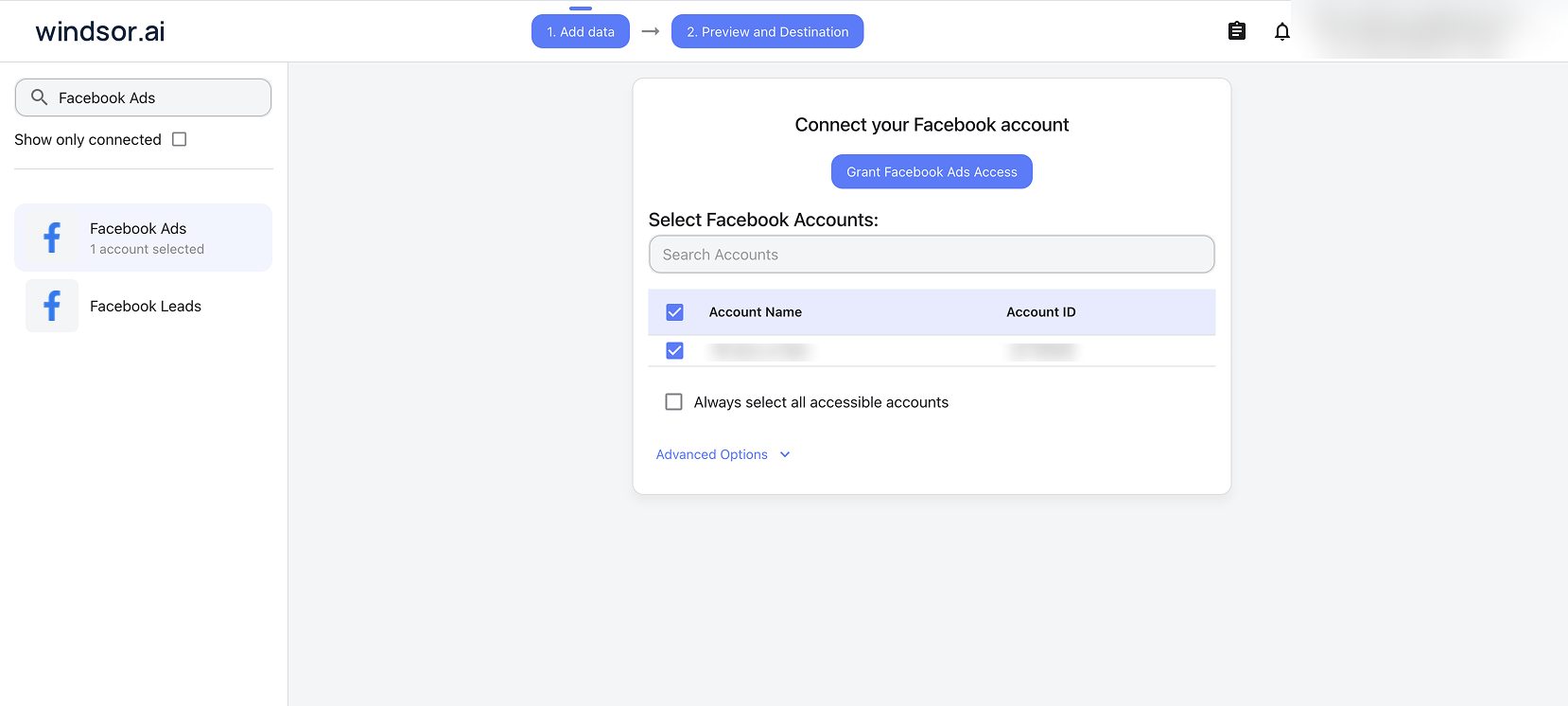
Select your data source
Choose Facebook Ads as your data source and grant access to Windsor.ai.
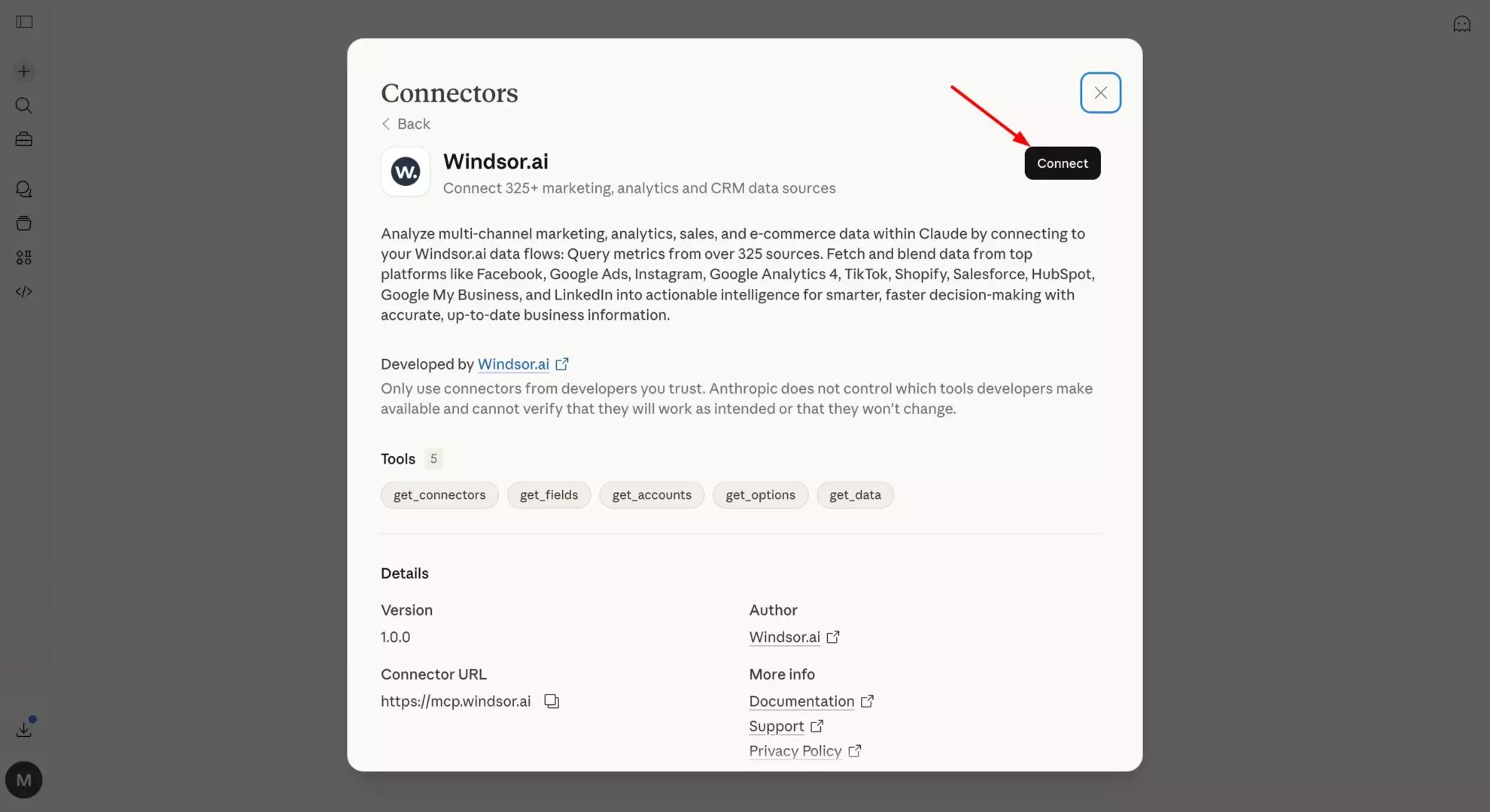
Connect Windsor MCP to your favorite LLM
If a native connector is available for your platform, connect in one click. Otherwise, visit this guide and follow the instructions for your required platform.
Start analyzing your data in the LLM
Now, you are good to go with any questions related to your data. For Meta Ads, your AI assistant can also make changes directly from the chat.
Meta Ads MCP servers compared
Three Meta Ads MCP servers are in common use. We checked each one’s own pages on 6 November 2026:
-
Meta’s ads MCP server: Meta’s own, at
mcp.facebook.com/ads, launched in open beta on 29 April 2026. It covers reporting, creating and editing campaigns, ad sets and ads, catalogs, pixel and dataset health, A/B and lift tests, and the activity log (Meta’s overview). Most guides still quote 29 tools; when we connected it to Claude on 6 November 2026 it listed 104. Since a July 2026 update, anyone with full control of a business portfolio can set rules on what AI agents may change, from budgets to catalogs. Meta Ads only. - Pipeboard Meta Ads MCP: a hosted server with 30+ tools that read reports and create, duplicate and bulk-edit campaigns, ad sets, ads, creatives and targeting. It has a free plan; you add it as a custom connector after creating a Pipeboard account. We have not tested it.
- Windsor MCP: Meta Ads next to Google Ads, TikTok Ads, GA4, Shopify, HubSpot and 350+ other sources in one connection, with 24 write actions. In Claude it is added from Plugins in the sidebar with one click.
For catalogs, pixel diagnostics, lift tests or Meta’s benchmarks, Meta’s server has the tools. For Meta Ads next to your other channels, or results checked against GA4 or Shopify, use Windsor MCP. Both can sit in the same Claude account.
What we checked in our own account
Windsor.ai’s Meta ad account is run by Dmytro Pieikov, our PPC specialist. We asked both servers the same question about it on 6 November 2026: spend, clicks and leads by campaign for the last 30 days.
- Both returned the same numbers for the one campaign with spend, a lead remarketing campaign: $59.14, 92 clicks and 82 leads.
- Meta’s server listed every campaign in the account, more than 80 of them paused with no spend. Windsor MCP returned only the rows with data. Ask for campaigns with spend above zero if you want Meta’s list short.
- Over the last two years the same campaign spent $5,206 for 1,290 leads. On our site the pixel’s Lead event fires when a new user connects their first data source, not at signup, so a lead here is an account that started using the product. Check what fires Lead in your own account before you compare cost per lead with anyone else’s.
- We then asked Claude, through Windsor MCP, to enable a paused test campaign and pause it again. Because enabling a campaign can start spend, Windsor.ai first showed the change and waited for our approval. After we approved, both changes went through. Meta’s activity log lists them under the Windsor app, a minute apart, and the campaign spent $0.
Setup for Claude, with prompts: how to connect Meta Ads to Claude. A side-by-side test of both servers: Windsor.ai vs Meta Ads MCP.
FAQs
What is Windsor MCP?
Windsor MCP is Windsor.ai’s MCP server. It gives an AI assistant read access to the sources you connect to Windsor.ai and write actions on the ad platforms that support them, including Meta Ads, Google Ads, TikTok Ads and Microsoft Ads.
Which AI assistants work with it?
Claude (web, Desktop and Code, from the connector directory), ChatGPT (as an app), Microsoft Copilot, Gemini Enterprise, Perplexity and other clients that support remote MCP servers. In Gemini Enterprise, turn on Execute Action and Write actions during setup.
Can I manage Meta Ads campaigns from an AI chat?
Yes, after you approve each change. Through Windsor MCP, the assistant can create campaigns, ad sets and ads (created paused), pause or enable them, set campaign and ad set budgets, edit ad copy, links and URL tags, upload images and videos, and boost an organic post. It cannot delete campaigns or ads. Meta allows at most 4 budget changes per ad set per hour.
Does it read Facebook and Instagram separately?
Yes. Ask for publisher_platform to split results by Facebook, Instagram, Messenger and Audience Network, and platform_position for placements such as Feed, Stories and Reels.
Is Windsor MCP free to use?
Yes, to start. It is included in every Windsor.ai plan, including the free forever plan with no credit card, which covers 1 source and the last 30 days. Combining sources needs a paid plan, from $19 a month for 3 sources. See the pricing page.
Tired of manual Facebook Ads data exports? Try Windsor.ai today to automate your reporting