 Destinations
 Data sources
 AI insights
 About us
 Careers
 Security
 Customer reviews
 Contact us
 Affiliate program
 Solution partners
 Template gallery
 Looker Studio templates
 Power BI templates
 Excel templates
 Google Sheets templates
 Tableau templates
 Facebook Ads templates
 Google Ads templates
 Data fields & Metrics
 AI prompt library & Guides
 Product documentation
 API documentation
 Case studies
 Blog
 Data models
 Windsor vs Supermetrics
 Windsor vs Funnel.io
 Windsor vs Fivetran
 Windsor vs Rivery
 Windsor vs Portermetrics
 Windsor vs Coupler.io
TikTok Ads MCP for AI Insights
Ask Claude, ChatGPT, Microsoft Copilot, Gemini Enterprise or another MCP client about your TikTok Ads spend, reach, video plays and conversions, next to Meta Ads, GA4 and your CRM. Through Windsor MCP, the assistant can also pause or enable campaigns, ad groups and ads and set budgets after you approve each change.
No CSV exports and no code. Set up in a few minutes.
 Sign up with Google
 Free forever plan









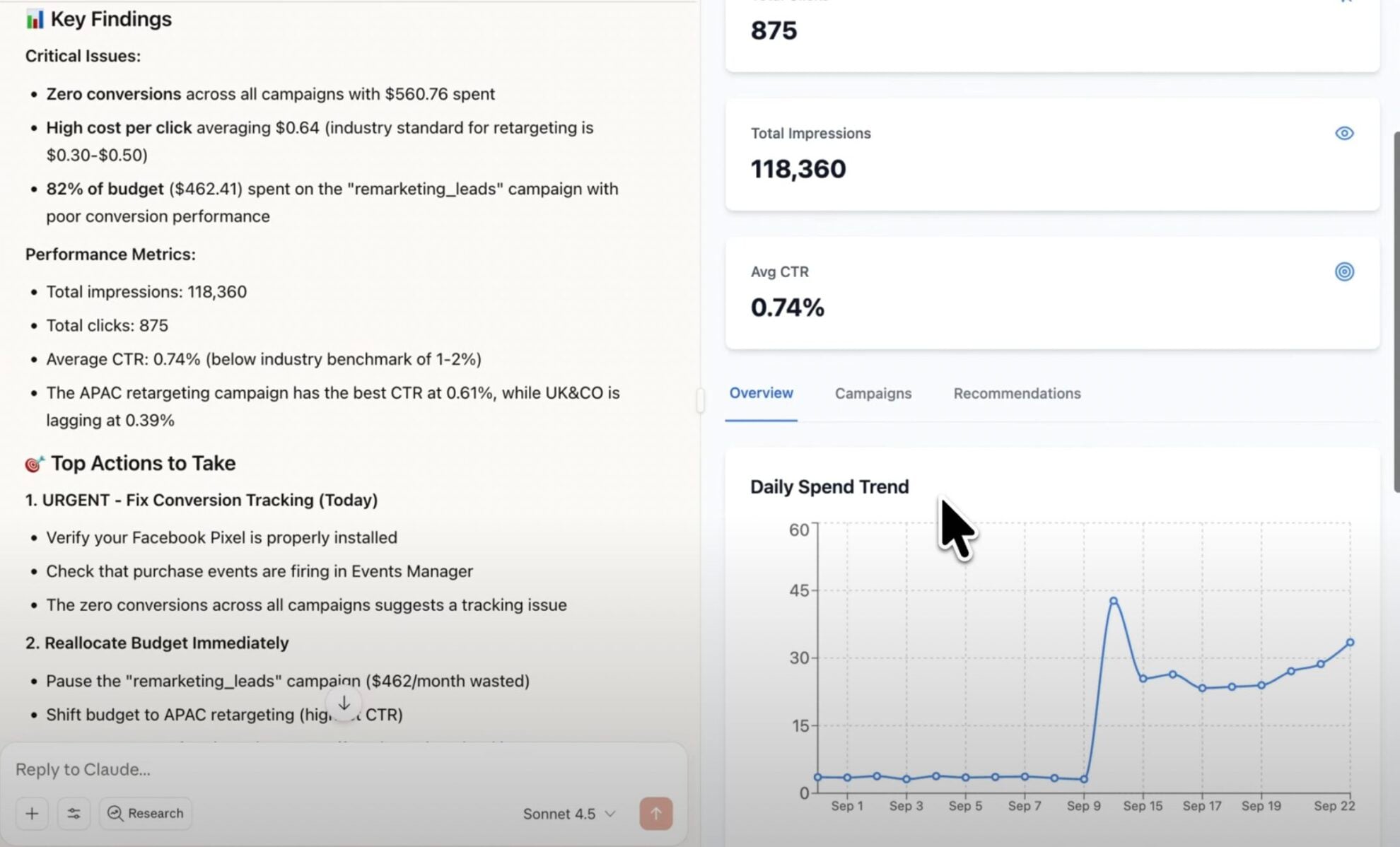
What a TikTok Ads MCP server lets your AI assistant do
The assistant picks the TikTok Ads fields, runs the query through Windsor MCP and explains the result in the same chat.

Read TikTok Ads by name
954 TikTok Ads fields, from spend, reach and frequency to play_duration_2s, play_first_quartile to play_over and complete_payment_roas, by campaign, ad group, ad, video, placement, country, age and gender.

Ask with formulas you control
Name the formula and the assistant uses it every time, for example hook rate as play_duration_2s divided by impressions, or completion as play_over divided by play_duration_2s.

Pause, enable and set budgets
Eight write actions: pause or enable a campaign, ad group or ad, and set a campaign or ad group budget. The assistant shows each change and runs it after you approve it.

TikTok Ads next to your other sources
Compare TikTok Ads with Meta Ads in one answer, or check TikTok-reported conversions against GA4, BigQuery or a CRM such as HubSpot.
Using Windsor.ai MCP to connect data from TikTok Ads to LLMs
Windsor MCP is Windsor.ai’s MCP server. You connect your TikTok advertiser accounts to Windsor.ai once, then add Windsor.ai to your AI assistant: in Claude it is a one-click connector in the directory, in ChatGPT an app, and in other clients a remote MCP server. The same connection serves 350+ other sources.
Each question runs as a query on TikTok Ads when you ask it, and Windsor.ai keeps the result of an identical query for up to 6 hours. The assistant can pause or enable campaigns, ad groups and ads and set budgets. It cannot create campaigns or ads, or change targeting, bids or creatives (see the write actions documentation).
Available actions
Pause Ad
Pause an active TikTok Ads ad. Reversible via enable_ad.
Pause Ad Group
Pause an active TikTok Ads ad group. Reversible via enable_ad_group.
Pause Campaign
Pause an active TikTok Ads campaign. Reversible via enable_campaign.
Enable Ad
Enable a paused TikTok Ads ad. Reversible via pause_ad.
Enable Ad Group
Enable a paused TikTok Ads ad group. Reversible via pause_ad_group.
Enable Campaign
Enable a paused TikTok Ads campaign. Reversible via pause_campaign.
Set Campaign Budget
Set the budget of a TikTok Ads campaign. The amount is given in the account currency major unit (e.g. 100 means one hundred). The budget mode is fixed when the campaign is created and cannot be changed here: a campaign whose budget is unlimited (BUDGET_MODE_INFINITE) or managed at the ad group level has no campaign budget to update, and this action will report that the budget could not be changed. Use the ad group budget action for those campaigns.
Set Ad Group Budget
Set the budget of a TikTok Ads ad group. The amount is in the account currency major unit (e.g. 100.00 means one hundred). The budget type (daily or lifetime) is fixed when the ad group is created and cannot be changed here; the existing type is detected automatically and its amount is updated. Ad groups whose budget is managed at the campaign level (Campaign Budget Optimization) have no ad group budget to set. Ad groups in Upgraded Smart+ campaigns are not supported by this action; change their budget in TikTok Ads Manager.
Create Campaign
Create a TikTok Ads campaign. It is created paused, so it does not spend until enable_campaign turns it on. objective_type is a TikTok objective, for example TRAFFIC, WEB_CONVERSIONS, LEAD_GENERATION, REACH, VIDEO_VIEWS, ENGAGEMENT, APP_PROMOTION or PRODUCT_SALES, and it cannot be changed later. budget_mode BUDGET_MODE_INFINITE (the default) leaves the budget to the ad groups. BUDGET_MODE_DAY or BUDGET_MODE_TOTAL caps the campaign at budget, in the account currency major unit (e.g. 57.5). Add ad groups with create_ad_group.
Create Ad Group
Create an ad group in an existing TikTok Ads campaign. It is created paused, so it does not spend until enable_ad_group turns it on. optimization_goal and billing_event must fit together and cannot be changed later: CLICK with CPC, CONVERT with OCPM (needs pixel_id and optimization_event), SHOW or REACH with CPM. promotion_type is required for most objectives, WEBSITE for a landing page. placements and location_ids (TikTok location ids) are required. budget_mode and budget set the ad group budget, in the account currency major unit (e.g. 57.5). Leave both out when the campaign uses Campaign Budget Optimization. schedule_start_time and schedule_end_time are UTC, as "YYYY-MM-DD HH:MM:SS". The start defaults to now, and BUDGET_MODE_TOTAL needs an end. bid_type BID_TYPE_CUSTOM needs bid_price (CPC, CPM) or conversion_bid_price (OCPM). Add ads with create_ad.
Create Ad
Create a single-video ad in an existing TikTok Ads ad group. It is created paused, so it does not spend until enable_ad turns it on. identity_id and identity_type name the account that the ad shows as. TikTok placements need a TikTok account identity, TT_USER or BC_AUTH_TT (with identity_authorized_bc_id). CUSTOMIZED_USER works only outside TikTok placements. Give the creative either as video_id with a cover image_id (ids that the video_id and image_id fields return, or uploads in TikTok Ads Manager), or as tiktok_item_id of an existing TikTok post. ad_text (up to 100 characters), call_to_action (for example LEARN_MORE or SHOP_NOW), landing_page_url and display_name complete a landing page ad.
Update Campaign
Rename a TikTok Ads campaign. The objective cannot be changed after creation. Use set_campaign_budget for the budget and pause_campaign or enable_campaign for the status.
Update Ad Group
Update the name, targeting or bid of a TikTok Ads ad group. Provide only the fields to change, and at least one. location_ids, age_groups and languages replace the current lists. bid_price (CPC, CPM) and conversion_bid_price (OCPM) are in the account currency major unit (e.g. 57.5). The optimization goal, billing event and placements cannot be changed after creation: create a new ad group with create_ad_group instead. Use set_ad_group_budget for the budget and pause_ad_group or enable_ad_group for the status.
Update Ad
Update the name, ad text, call to action, landing page or creative of a TikTok Ads ad. Provide only the fields to change, and at least one. ad_text has up to 100 characters. call_to_action is a TikTok call to action, for example LEARN_MORE or SHOP_NOW. To change the creative, give video_id with its cover image_id, or tiktok_item_id of an existing TikTok post; it replaces the current video or post. image_id alone changes the cover of the current video. Use pause_ad or enable_ad for the status.






How to connect TikTok Ads MCP by Windsor.ai
Follow this quick setup guide to connect your TikTok Ads data to your preferred AI chat.
Select your data source
Choose TikTok Ads as your data source and grant access to Windsor.ai.
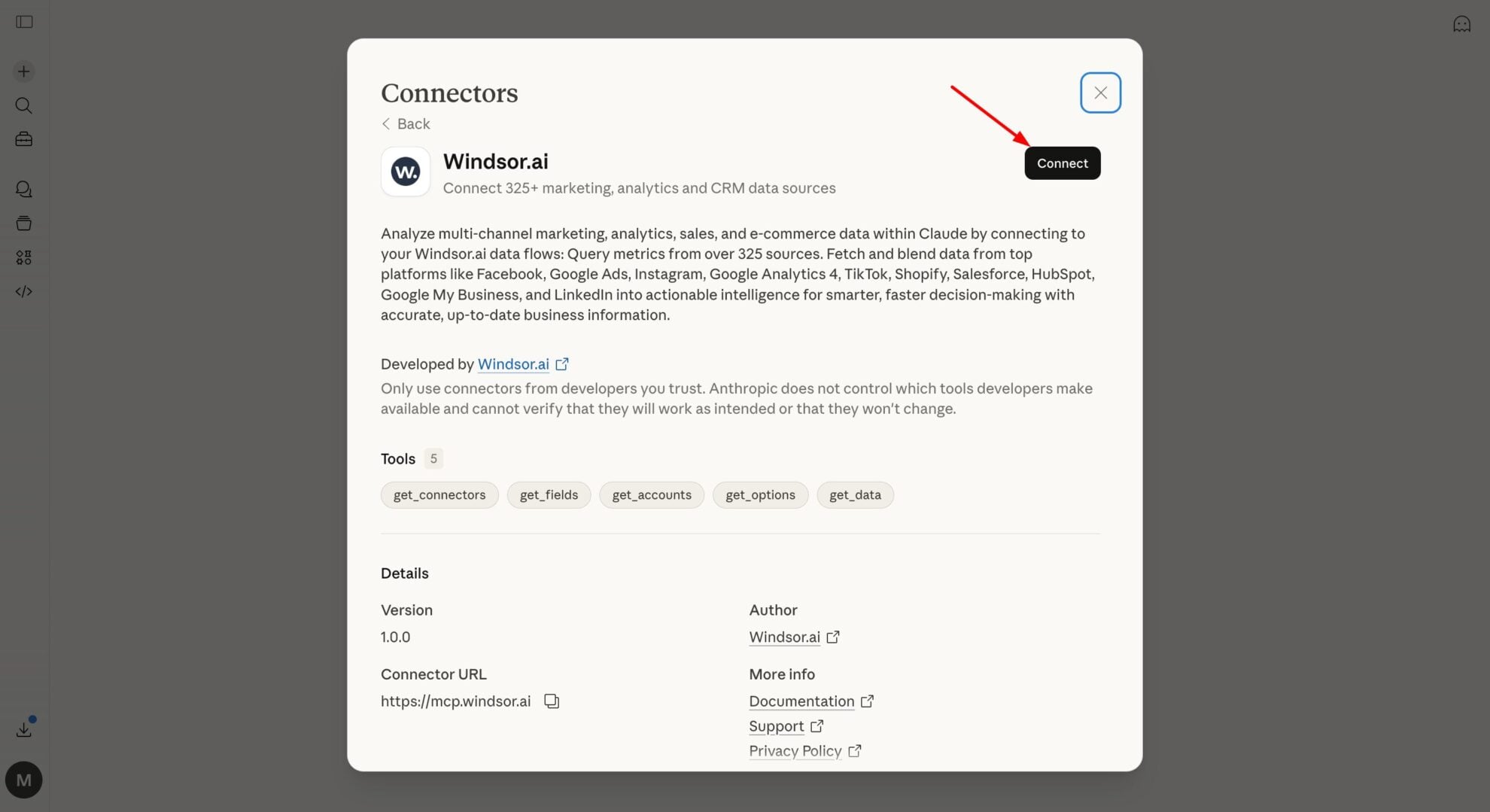
Connect Windsor MCP to your favorite LLM
If a native connector is available for your platform, connect in one click. Otherwise, visit this guide and follow the instructions for your platform of choice.
Start analyzing your data in the LLM
Now, you are good to go with any questions related to your data.

TikTok Ads MCP servers compared
Three TikTok Ads MCP servers are in common use. We checked each one’s own pages on 5 November 2026:
- TikTok for Business MCP server: TikTok’s own, free, with no developer credentials. TikTok’s help article says it loads about 40 core tools at first and reaches about 400; its Claude listing names tools that create, edit, pause and set budgets for Smart+ campaigns. TikTok lists it on Claude, Kimi, Manus, Perplexity, Replit and Snowflake. TikTok Ads only.
- Pipeboard TikTok Ads MCP: a hosted server with 20+ tools that read reports, create and update campaigns, ad groups and ads, upload creatives and change targeting, bids and budgets. You add it as a custom connector after creating a Pipeboard account. We have not tested it.
- Windsor MCP: TikTok Ads next to Meta Ads, Google Ads, GA4, BigQuery, HubSpot and 350+ other sources in one connection, with eight write actions (pause, enable, budgets). In Claude it is added from the directory with one click.
To build TikTok campaigns from a chat, use TikTok’s server or Pipeboard. To compare TikTok Ads with Meta Ads, or check its results against GA4, BigQuery or a CRM, use Windsor MCP.
What we checked on our test accounts
Windsor.ai has two TikTok advertiser accounts set up to test the connector; they have not run real campaigns. On 5 November 2026 we read them through Windsor MCP and ran one write action round trip:
- The one campaign with spend, a traffic test, had $14.34 of spend, 13,610 impressions, 10,166 people reached and 35 clicks ($0.41 per click).
- The
ctrfield came back as a fraction: 0.0026 is 0.26%. Ask for CTR as a percentage. - The video fields, including
play_duration_2sandplay_first_quartiletoplay_over, all returned 0 for that campaign despite its impressions. Check in Ads Manager that ads ran as video before you read a zero as a weak hook. - We enabled the paused test campaign and paused it again. The status read
CAMPAIGN_STATUS_ENABLE, thenCAMPAIGN_STATUS_DISABLE, with no spend in between.
Setup for Claude, with prompts: how to connect TikTok Ads to Claude. For ChatGPT: how to connect TikTok Ads to ChatGPT.
FAQs
What is Windsor MCP?
Windsor MCP is Windsor.ai’s MCP server. It gives an AI assistant read access to the sources you connect to Windsor.ai and write actions on the ad platforms that support them, including TikTok Ads, Meta Ads, Google Ads and Microsoft Ads.
Which AI assistants work with it?
Claude (web, Desktop and Code, from the connector directory), ChatGPT (as an app), Microsoft Copilot, Gemini Enterprise, Perplexity and other clients that support remote MCP servers. In Gemini Enterprise, turn on Execute Action and Write actions during setup.
Can I manage TikTok Ads campaigns from an AI chat?
Partly. Through Windsor MCP, the assistant can pause or enable campaigns, ad groups and ads and set campaign or ad group budgets, after you approve each change. It cannot create campaigns or ads, or change targeting, bids or creatives.
Does it read TikTok video quartiles?
Yes. Ask for play_first_quartile, play_midpoint, play_third_quartile and play_over for plays at 25%, 50%, 75% and 100% of a video, and play_duration_2s and play_duration_6s for the first seconds.
Is Windsor MCP free to use?
Yes, to start. It is included in every Windsor.ai plan, including the free forever plan with no credit card, which covers 1 source and the last 30 days. Combining sources needs a paid plan, from $19 a month for 3 sources. See the pricing page.
Tired of manual TikTok Ads data exports? Try Windsor.ai today to automate your reporting


