Destinations
 Data sources
 AI insights
 About us
 Careers
 Security
 Customer reviews
 Contact us
 Affiliate program
 Solution partners
 Template gallery
 Looker Studio templates
 Power BI templates
 Excel templates
 Google Sheets templates
 Tableau templates
 Facebook Ads templates
 Google Ads templates
 Data fields & Metrics
 AI prompt library & Guides
 Product documentation
 API documentation
 Case studies
 Blog
 Data models
 Windsor vs Supermetrics
 Windsor vs Funnel.io
 Windsor vs Fivetran
 Windsor vs Rivery
 Windsor vs Portermetrics
 Windsor vs Coupler.io
 Last updated: 18 November 2026




You can connect TikTok Ads to ChatGPT in two no-code steps using the Windsor.ai plugin: authorize your TikTok Ads account once in Windsor.ai, then add the Windsor.ai plugin in ChatGPT. ChatGPT then pulls your campaign, ad group and ad data when you ask. It can also pause or enable campaigns, ad groups and ads, and set campaign and ad group budgets, after you confirm each change.
TikTok has no plugin of its own in ChatGPT. The section “Is there an official TikTok Ads app for ChatGPT?” below compares the Windsor.ai plugin with TikTok’s own MCP server and the other routes.
With your TikTok Ads data in ChatGPT, you can ask across all your ads at once:
- Which hooks drive performance, from the 2-second and 6-second views of each ad.
- Which creatives are wearing out, from frequency and CTR week by week.
- Which campaigns to scale or pause today, and make the change in the same chat.
🚀 Connect your TikTok Ads data to ChatGPT now. Try it free → onboard.windsor.ai/app/tiktok.
Watch: Connect TikTok Ads to ChatGPT
Connecting TikTok Ads to ChatGPT with the Windsor.ai plugin: 2 steps
The whole setup takes about a minute. You connect TikTok Ads to Windsor.ai once, then add the Windsor.ai plugin in ChatGPT. No code required. For the short overview, see the TikTok Ads to ChatGPT integration page.
📖 Full documentation: windsor.ai/documentation/windsor-mcp/how-to-integrate-data-into-chatgpt/.
Before you start
Make sure you have the following prerequisites in place:
- A TikTok Ads Manager account (with at least one active or historical campaign). The TikTok login you use needs at least Ad account analyst access to the ad account; Owner, Admin and Operator also work.
- A Windsor.ai account. The free forever plan covers 1 user, 1 data source and 1 account with the last 30 days of data, and needs no credit card. Paid plans start at $19/month for 3 sources, billed annually (pricing).
- A ChatGPT account. We used ChatGPT’s Free plan for the steps on this page. In a Business, Enterprise or Edu workspace, an admin can turn plugins on or off.
Step 1. Connect TikTok Ads to Windsor.ai
Go to onboard.windsor.ai/app/tiktok and connect TikTok Ads as your data source. Sign in to your TikTok Ads Manager account and authorize Windsor.ai’s access.
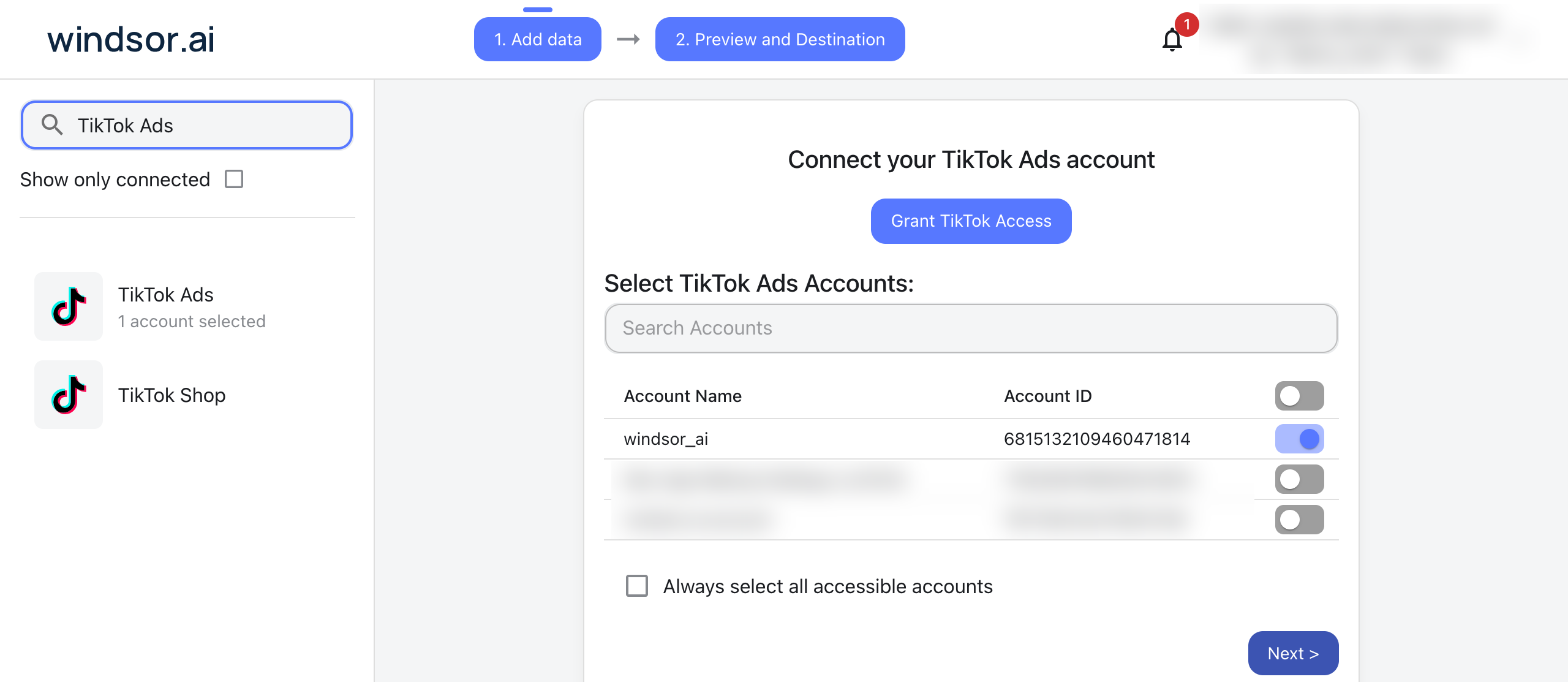
Select the ad account(s) you want to pull data from. You can choose multiple accounts, including client accounts, and analyze and manage them all in a single ChatGPT conversation. Tracking more than one account needs a paid plan. The free forever plan includes 1 account.
Step 2. Add the Windsor.ai plugin in ChatGPT
Open the Windsor.ai plugin page in ChatGPT and click Install plugin. You can also click Plugins in the ChatGPT sidebar and search for Windsor.ai. Grant access to your Windsor.ai account. To disconnect later, open Settings, then Plugins.
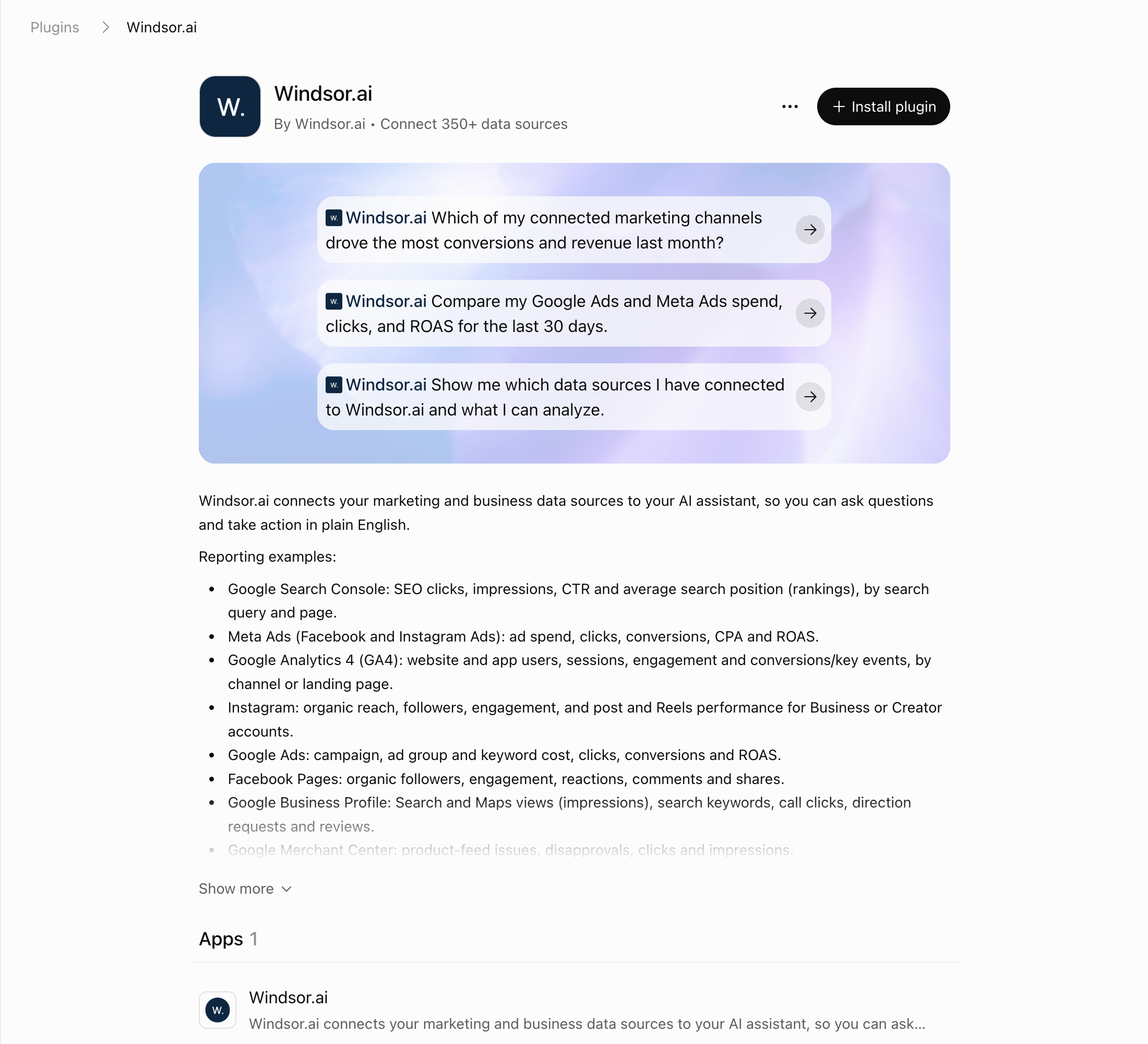
In a new chat, click + and choose Windsor.ai, or type @Windsor.ai and pick it from the list. Then check the connection with this prompt.
Which TikTok Ads accounts are connected to my Windsor account? List each account name and its ID.
Windsor.ai pulls your TikTok Ads data when you ask. Currently available write actions: pause or enable a campaign, ad group, or ad; and set a campaign or ad group budget (write actions list).
Example: our TikTok Ads campaigns and budgets in ChatGPT
We asked ChatGPT, through the Windsor.ai plugin: “For my TikTok Ads account windsor_ai, list each campaign with its status, objective, budget type, budget and spend in the last 30 days. Which campaigns have a budget set at campaign level?”
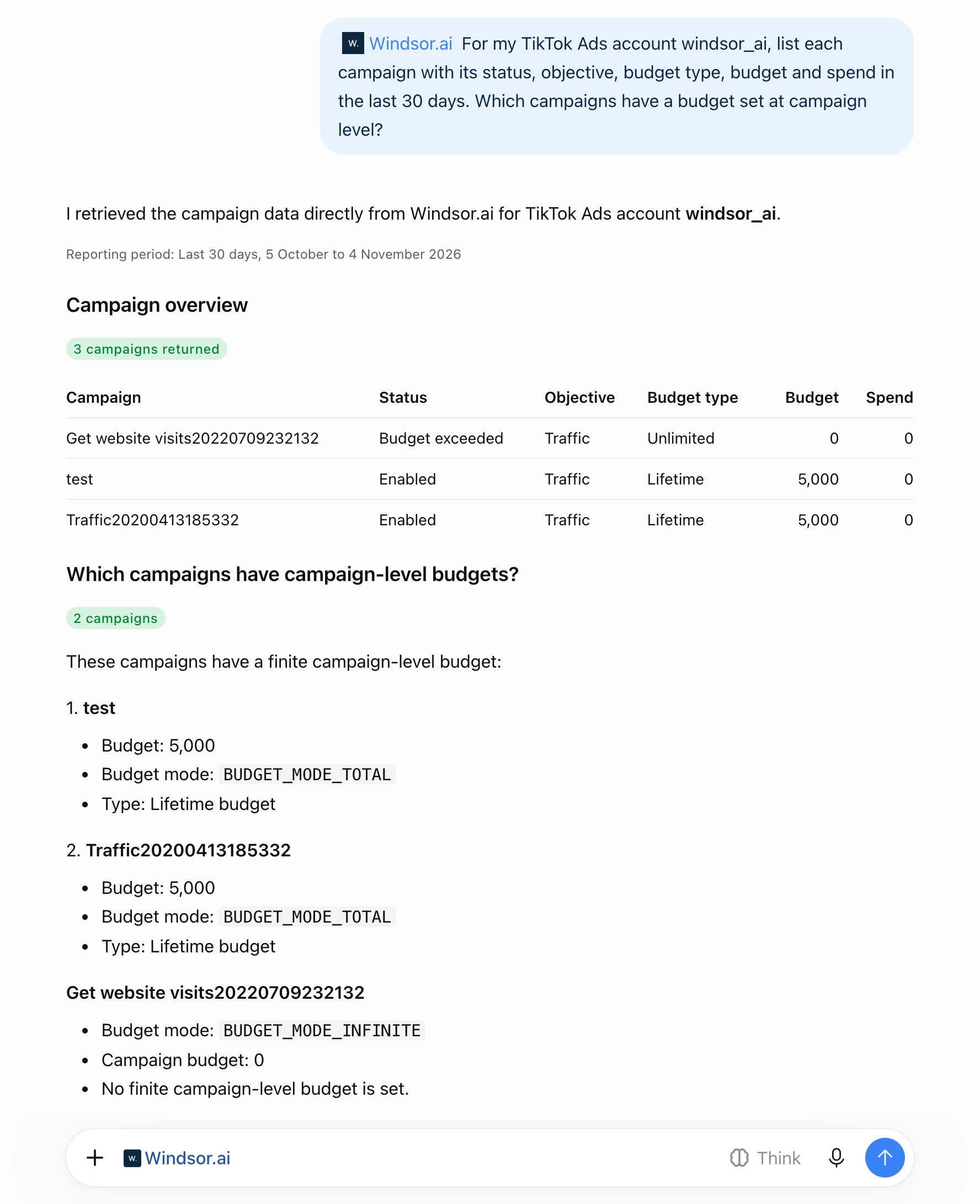
- Campaigns: three, all with the Traffic objective: “test”, “Traffic20200413185332” and “Get website visits20220709232132”.
- Campaign budgets: “test” and “Traffic20200413185332” are enabled, each with a lifetime budget of 5,000 (the account currency is Japanese yen, JPY). “Get website visits20220709232132” has an unlimited campaign budget, and its status is “budget exceeded”.
- Spend: 0 on all three in the last 30 days. Our demo account has not run ads since 2022. The example shows the campaign settings, which are current.
The budget type decides which write action you can use. A lifetime or daily campaign budget can be changed with Set campaign budget. A campaign with an unlimited budget has no campaign budget to set. For “Get website visits20220709232132”, you would change its ad group’s budget instead. We checked each value in a second question in the same chat, which listed the raw rows, and against the same data pulled from Windsor.ai directly. Nothing on the account was changed.
Is there an official TikTok Ads app for ChatGPT?
No. ChatGPT’s Plugins directory has no TikTok plugin published by TikTok (checked 4 November 2026). TikTok for Business publishes an MCP server for AI agents. These are the routes that work, and when each fits:
- Windsor.ai plugin: reads your campaign, ad group and ad data when you ask, and runs the 8 TikTok Ads write actions (write actions list). Use it for ongoing questions, for budget and status changes from the chat, or to ask about TikTok Ads together with other sources. The steps above cover this route. Windsor.ai also publishes a separate “Windsor.ai TikTok Ads” plugin (“Analyze TikTok Ads”) in the directory; the steps on this page use the Windsor.ai plugin, which covers all your connected sources.
- TikTok for Business MCP Server: TikTok’s own server, with around 400 tools for campaign creation, reporting, audiences and creatives (TikTok’s help article, updated August 2026). TikTok’s article recommends one of its server URLs for Claude and does not mention ChatGPT. In ChatGPT, a custom MCP server is added from Plugins. Full support, including tools that change data, is limited to Business, Enterprise and Edu workspaces; Pro gets read and fetch tools only. It fits teams on those plans that want to create campaigns or edit targeting from the chat, which the Windsor.ai plugin’s 8 actions do not cover.
- Third-party plugins: other developers publish TikTok Ads plugins in ChatGPT’s Plugins directory, for example Adzviser TikTok Ads and InsightfulPipe.
- Google Sheets: send TikTok Ads data to a sheet on a schedule with Windsor.ai (TikTok Ads to Google Sheets), and point ChatGPT or a dashboard at that copy. It fits shared reports that keep their own history.
The metrics that explain TikTok Ads performance
Windsor.ai gives ChatGPT access to 801 TikTok Ads metrics and 153 dimensions. Here’s the full list.
Below are the data fields that matter most, and what each one shows about your creative and campaign performance.
The video retention stack
These metrics show where viewers drop off in each video.
- 2-second video views (play_duration_2s): Number of plays of at least 2 seconds. Shows whether the first frame kept viewers watching.
- 6-second video views (play_duration_6s): Number of plays of at least 6 seconds. Shows whether the hook held attention past the opening.
- Video views at 25% (play_first_quartile): First quarter drop-off
- Video views at 50% (play_midpoint): Halfway drop-off
- Video views at 75% (play_third_quartile): Three-quarters drop-off
- Video views at 100% (play_over): Completion count
- Average play time per video view (average_video_play): Mean seconds watched per video view, including replays
- Hook rate (play_duration_2s divided by impressions): The percentage of impressions that turned into 2-second views. There is no separate hook rate field; ChatGPT calculates it from these two.
Spend and efficiency: what each result costs
These metrics track how much you pay to reach a viewer, earn a click, or generate a sale.
- Spend (spend): Total amount spent
- CPM (cpm): Cost per 1,000 impressions
- CPC (cpc): Cost per click
- Video views (total_play): Number of times your video started to play
- CTR (ctr): Click-through rate
- CPA (cost_per_conversion): Cost per conversion
- ROAS (complete_payment_roas): Return on ad spend from website purchases
Dimensions: how to slice it all
Dimensions allow you to break down performance by creative, audience, and time to identify what is driving your results.
- campaign: Campaign name
- ad_group_name: Ad group name
- ad_name: Ad name
- ad_id: Creative-level identity
- placement: Where the ad appeared
- country: Geographic performance (country code)
- platform: Operating system (iOS vs. Android)
- age / gender: Demographic performance
- date: Day of performance
What to ask ChatGPT about your TikTok Ads data: Prompt ideas
TikTok Ads analysis in ChatGPT has two goals: understanding performance (what’s working and what’s not) and improving creatives (what to make next and how to write it).
Use the prompts below for both.
Creative diagnosis: find which openings hold viewers
The creative-level video retention data, specifically the 2-second and 6-second view rates across all your active ads, shows which openings hold viewers. ChatGPT can rank and compare them.
🎯 Good to know: Hook rate is the share of impressions that turned into 2-second views (play_duration_2s divided by impressions). CTR, CPA and ROAS all come after those first two seconds.
Rank your creatives by hook strength
For all active ads in the last 30 days, rank by 2-second video view rate.

Which creatives have the strongest hook: the highest % watching past 2 seconds?

What do the top 5 have in common (ad name, ad text, call to action)?
Find ads that hook but don’t convert
Which ads have a high 2-second view rate but a low conversion rate?

The hook is working, but conversions stay low.

What might be causing the drop-off between attention and action?
Identify where you are losing viewers
For my top 5 ads by spend, show the view rate at each stage: 2 seconds, 6 seconds, 25%, 50%, 75%, and 100%.

At which point does each video lose the most viewers?

Is there a pattern across ads where the drop-off happens at the same stage?
Creative fatigue: catch it before your ROAS drops
When the same users keep seeing the same video, CTR drops and CPM rises. ChatGPT can flag the ads where frequency rises while CTR falls.
Spot creatives that are entering fatigue right now
For all active ads, show frequency and CTR for the last 7 days vs. the 7 days before.

Which creatives have rising frequency paired with falling CTR?

These are our fatigue candidates: flag the ones to rotate or replace.
Frequency alert: which ads have been shown too many times?
Which ads currently have a frequency above 3.5 in the last 7 days?

For those ads, how has CTR trended over the same period?

Which ones should be paused immediately based on declining engagement?
Estimate when to rotate a creative
For our best-performing creative, show CTR and frequency week by week for the last 4 weeks.

Is there a trend that suggests when performance will start declining?

Based on the current trajectory, when should we plan to rotate it?
Creative strategy: from data to script
Once ChatGPT has ranked your ads by hook rate, completion and conversions, you can ask it to produce the next round of creative directly, including writing scripts, iterating on captions, and generating briefs for UGC creators. ChatGPT reads the ad name, ad text and call to action of each ad. It does not see the videos: describe the opening of your best ads in the chat when the script should follow it.
Extract the creative formula from your best ads
Look at my top 10 ads by ROAS over the last 60 days.

What do they have in common: ad text, call to action, placement, 2-second view rate?

Summarise the creative formula that's consistently working for this account.
Prompts that cover more than 30 days need a paid plan. The free forever plan includes the last 30 days.
Write new video scripts based on what’s already working
Based on the ad text and retention of my best-performing ads, write 3 new 30-second video scripts for [product/offer].

Keep the tone of the best ad texts but try different angles.
Generate a UGC creator brief
Based on our top-converting ad formats and messaging, write a brief for a UGC creator to film a new ad.

Include: hook style, key talking points, CTA, and what to avoid based on our lowest-performing creatives.
Refine underperforming ad copy
Find the ads that have a strong hook rate but low CTR.

Based on our best-performing ads, rewrite the caption and CTA to be more action-oriented. Give me 3 variations.
Build a creative test plan
We want to test 3 new hooks for our hero product.

Based on our historical 2-second view rate data and the ad text of each ad, which ad texts tend to go with the highest 2-second view rate on this account?

Write one script for each of the top 3.
Budget and ROAS: spending on what works, cutting what doesn’t
It’s easy to keep spending on a video that once converted because it still looks good in aggregate, even while its daily performance has dropped.
ChatGPT can separate the total from the recent days and tell you where to move the budget today.
Find where your budget is being wasted
Which campaigns or ad groups have the highest spend but the lowest ROAS in the last 14 days?

Is the poor performance consistent, or did it decline recently?
Identify where to scale
Which ad groups have a CPA below our target and are currently underspending their daily budget?

These are the strongest candidates for budget increase.
CPA by audience segment
Break down CPA by age group and gender for the last 30 days.

Which demographic segments are converting most efficiently?

Are we allocating budget proportionally to those segments?
Day-of-week performance pattern
Show me CPA and ROAS by day of week for the last 4 weeks.

Are there consistent days where performance is significantly better or worse?

Should we adjust our daily budget schedule based on this?
Spark Ads vs. standard in-feed: which format performs for your brand
Spark Ads use an organic TikTok post, from your brand’s TikTok account or a creator’s, as the ad. Standard in-feed ads use a custom identity (CUSTOMIZED_USER). Windsor.ai marks each ad’s identity type (identity_type): any value other than CUSTOMIZED_USER is a Spark Ad.
ChatGPT can compare the two formats for your account.
Compare Spark Ads against standard creatives
Compare performance of Spark Ads vs. standard in-feed ads over the last 60 days.

For each format: average CTR, completion rate, CPA, and ROAS.

Which format performs better for our account, and for which objective?
Prompts that cover more than 30 days need a paid plan. The free forever plan includes the last 30 days.
Identify top Spark Ad identities
Which TikTok identities (identity_id) are driving the best results through Spark Ads? Rank by CPA and ROAS.

What do the ad texts of their top ads have in common?
Bonus: Analyze TikTok Ads alongside your full marketing stack
TikTok counts conversions through its pixel. Your store, GA4 and other ad platforms record the orders, sessions and spend outside TikTok.
🔗 Windsor.ai brings all your marketing and business data into one ChatGPT conversation, offering 350+ data sources.
Here are a few data blending combinations you can try:
- TikTok Ads + Shopify or WooCommerce: Your store records completed orders, including refunds. Connect both and ask ChatGPT: How does daily TikTok Ads spend compare with store revenue after refunds? On which days did TikTok report conversions that the store does not show as orders?
- TikTok Ads + TikTok Shop: If you’re running ads to drive TikTok Shop purchases, connect both and ask ChatGPT to calculate blended ROAS (total shop revenue divided by total TikTok Ads spend) by day, and compare it with the GMV Max ROI TikTok reports for your GMV Max campaigns.
- TikTok Ads + Meta Ads: If you run TikTok and Meta at the same time, connect both and ask ChatGPT: Which age and gender groups have a lower CPA on TikTok than on Meta, and vice versa? How should the budget shift between platforms based on the last 30 days’ efficiency?
- TikTok Ads + GA4: TikTok drives traffic to your website. GA4 records what happens after the click. Connect both and ask ChatGPT: Which TikTok campaigns produce the highest post-click engagement on site? Are there campaigns with strong TikTok CTR but high GA4 bounce rates, meaning a landing page mismatch problem?
- TikTok Ads + TikTok Organic: Your best organic videos are your best creative research. Windsor.ai has a separate TikTok Organic connector. Connect both and ask ChatGPT: Which organic videos have the highest full-watch rate, and are we testing similar captions in paid ads?
Combining sources needs a paid plan. The free forever plan includes 1 data source.
More ways to plan paid budgets across platforms are in how to use Windsor.ai for paid media.
Manage TikTok Ads directly from ChatGPT
After you find an ad to stop or a budget to change, you can make the change in the same chat.
The Windsor.ai plugin supports 8 TikTok Ads write actions (write actions list):
- Pause campaign. “Pause the campaign called [name].”
- Enable campaign. “Turn the [name] campaign back on.”
- Pause ad group. “Pause ad group [name].”
- Enable ad group. “Re-enable the [name] ad group.”
- Pause ad. “Pause ad [name], it’s underperforming.”
- Enable ad. “Turn ad [name] back on.”
- Set campaign budget. “Set the [name] campaign’s budget to 500.”
- Set ad group budget. “Cut the [name] ad group’s budget by 20%.”
Budgets are in your ad account’s currency. The budget type (daily or lifetime) is set when the campaign or ad group is created and stays the same; a campaign with an unlimited budget, or with its budget managed at ad group level, has no campaign budget to set. For those, change the ad group budget.
ChatGPT asks you to confirm the exact change before it runs. More examples, from pausing ads to moving budget, are in how to manage TikTok Ads campaigns with an AI assistant.
If something does not work
- A TikTok Ads account is missing: connect again in Windsor.ai and switch that ad account on in the account list. The TikTok login needs at least Ad account analyst access to it. Tracking more than one account needs a paid plan. The free forever plan includes 1 account.
- ChatGPT answers without your TikTok Ads data: choose Windsor.ai under + or type @Windsor.ai in that chat, then ask again.
- Windsor.ai shows “Disabled by admin”: your ChatGPT workspace admin has turned the plugin off. Ask them to enable it.
- A campaign budget change is refused: the campaign has an unlimited budget or a budget managed at ad group level. Set the ad group budget instead.
- A prompt returns 0 for every metric: the campaigns had no delivery in that period. Ask for a period in which they ran, within the period your plan covers.
The TikTok Ads to ChatGPT integration page gives the short answers and a second example, ad groups and their budgets. The same Windsor.ai connection also works in Claude, as described in how to connect TikTok Ads to Claude.
Conclusion
With TikTok Ads connected to ChatGPT through the Windsor.ai plugin, you can rank your ads by hook rate and completion, spot rising frequency next to falling CTR, compare Spark Ads with standard ads, and pause, enable or rebudget campaigns, ad groups and ads in the same chat. Start with the check prompt in Step 2, then ask for your campaigns and budgets as in the example. For budget planning across platforms, see how to use Windsor.ai for paid media.
🚀 Connect your TikTok Ads to ChatGPT. Start free now.
Available actions
Pause Ad
Pause an active TikTok Ads ad. Reversible via enable_ad.
Pause Ad Group
Pause an active TikTok Ads ad group. Reversible via enable_ad_group.
Pause Campaign
Pause an active TikTok Ads campaign. Reversible via enable_campaign.
Enable Ad
Enable a paused TikTok Ads ad. Reversible via pause_ad.
Enable Ad Group
Enable a paused TikTok Ads ad group. Reversible via pause_ad_group.
Enable Campaign
Enable a paused TikTok Ads campaign. Reversible via pause_campaign.
Set Campaign Budget
Set the budget of a TikTok Ads campaign. The amount is given in the account currency major unit (e.g. 100 means one hundred). The budget mode is fixed when the campaign is created and cannot be changed here: a campaign whose budget is unlimited (BUDGET_MODE_INFINITE) or managed at the ad group level has no campaign budget to update, and this action will report that the budget could not be changed. Use the ad group budget action for those campaigns.
Set Ad Group Budget
Set the budget of a TikTok Ads ad group. The amount is in the account currency major unit (e.g. 100.00 means one hundred). The budget type (daily or lifetime) is fixed when the ad group is created and cannot be changed here; the existing type is detected automatically and its amount is updated. Ad groups whose budget is managed at the campaign level (Campaign Budget Optimization) have no ad group budget to set. Ad groups in Upgraded Smart+ campaigns are not supported by this action; change their budget in TikTok Ads Manager.
Create Campaign
Create a TikTok Ads campaign. It is created paused, so it does not spend until enable_campaign turns it on. objective_type is a TikTok objective, for example TRAFFIC, WEB_CONVERSIONS, LEAD_GENERATION, REACH, VIDEO_VIEWS, ENGAGEMENT, APP_PROMOTION or PRODUCT_SALES, and it cannot be changed later. budget_mode BUDGET_MODE_INFINITE (the default) leaves the budget to the ad groups. BUDGET_MODE_DAY or BUDGET_MODE_TOTAL caps the campaign at budget, in the account currency major unit (e.g. 57.5). Add ad groups with create_ad_group.
Create Ad Group
Create an ad group in an existing TikTok Ads campaign. It is created paused, so it does not spend until enable_ad_group turns it on. optimization_goal and billing_event must fit together and cannot be changed later: CLICK with CPC, CONVERT with OCPM (needs pixel_id and optimization_event), SHOW or REACH with CPM. promotion_type is required for most objectives, WEBSITE for a landing page. placements and location_ids (TikTok location ids) are required. budget_mode and budget set the ad group budget, in the account currency major unit (e.g. 57.5). Leave both out when the campaign uses Campaign Budget Optimization. schedule_start_time and schedule_end_time are UTC, as "YYYY-MM-DD HH:MM:SS". The start defaults to now, and BUDGET_MODE_TOTAL needs an end. bid_type BID_TYPE_CUSTOM needs bid_price (CPC, CPM) or conversion_bid_price (OCPM). Add ads with create_ad.
Create Ad
Create a single-video ad in an existing TikTok Ads ad group. It is created paused, so it does not spend until enable_ad turns it on. identity_id and identity_type name the account that the ad shows as. TikTok placements need a TikTok account identity, TT_USER or BC_AUTH_TT (with identity_authorized_bc_id). CUSTOMIZED_USER works only outside TikTok placements. Give the creative either as video_id with a cover image_id (ids that the video_id and image_id fields return, or uploads in TikTok Ads Manager), or as tiktok_item_id of an existing TikTok post. ad_text (up to 100 characters), call_to_action (for example LEARN_MORE or SHOP_NOW), landing_page_url and display_name complete a landing page ad.
Update Campaign
Rename a TikTok Ads campaign. The objective cannot be changed after creation. Use set_campaign_budget for the budget and pause_campaign or enable_campaign for the status.
Update Ad Group
Update the name, targeting or bid of a TikTok Ads ad group. Provide only the fields to change, and at least one. location_ids, age_groups and languages replace the current lists. bid_price (CPC, CPM) and conversion_bid_price (OCPM) are in the account currency major unit (e.g. 57.5). The optimization goal, billing event and placements cannot be changed after creation: create a new ad group with create_ad_group instead. Use set_ad_group_budget for the budget and pause_ad_group or enable_ad_group for the status.
Update Ad
Update the name, ad text, call to action, landing page or creative of a TikTok Ads ad. Provide only the fields to change, and at least one. ad_text has up to 100 characters. call_to_action is a TikTok call to action, for example LEARN_MORE or SHOP_NOW. To change the creative, give video_id with its cover image_id, or tiktok_item_id of an existing TikTok post; it replaces the current video or post. image_id alone changes the cover of the current video. Use pause_ad or enable_ad for the status.
FAQs
What is the fastest way to connect TikTok Ads to ChatGPT?
With the Windsor.ai plugin, the setup takes about a minute and needs no code: authorize TikTok Ads in Windsor.ai, add the plugin in ChatGPT, and ask. Windsor.ai pulls your campaign data from TikTok’s Marketing API when you ask. You can ask questions, compare creatives, and generate new ad ideas in one conversation.
What TikTok Ads data does Windsor.ai pull into ChatGPT?
Windsor.ai gives ChatGPT access to 801 TikTok Ads metrics and 153 dimensions via TikTok’s Marketing API. This covers campaign, ad group, and ad-level data including: spend, CPM, CPC, CPA, ROAS, impressions, reach, frequency, CTR, clicks, video views at 2 seconds, 6 seconds, 25%, 50%, 75% and 100%, average play time, likes, comments, shares, conversions, conversion rate, and cost per conversion. Dimensions include campaign name, ad group, ad and video ID, placement, country, operating system, age, gender, and date. See the full field list.
Can I manage my TikTok Ads campaigns from ChatGPT?
Yes. The Windsor.ai plugin gives ChatGPT read access to your campaign, ad group, and ad-level performance, plus write access to act on it. You can instruct ChatGPT to pause or enable a campaign, an ad group, or an ad, and to set budgets at the campaign or ad group level.
Can ChatGPT help write new TikTok ad scripts based on my performance data?
Yes. ChatGPT can rank your ads by hook rate, completion and CPA, read their ad names, ad text and call to action, and then write new scripts, caption variations, and creator briefs that follow the patterns of your best ads. It does not see the videos themselves. Describe the opening of your top ads in the chat if the script should copy it.
What is the hook rate, and why does it matter?
Hook rate is the 2-second video view rate: the share of impressions in which your ad played for at least two seconds (play_duration_2s divided by impressions). It shows whether the opening kept viewers watching. A low hook rate, even if the rest of the video is strong, means most viewers never see your offer. Windsor.ai returns both fields for every ad. ChatGPT can calculate hook rate for all your ads, rank them, and compare what your best-performing hooks have in common.
Can Windsor.ai detect creative fatigue automatically?
No. Windsor.ai does not flag fatigue by itself. It makes the relevant signals available (frequency, CTR and CPM by day), and ChatGPT can analyze them when you ask. You can ask ChatGPT to flag all creatives where frequency is rising alongside declining CTR, which is the standard fatigue pattern, and you can run this check daily.
Does this connector cover TikTok Shop ads as well?
Yes, for the ads. Windsor.ai’s TikTok Ads connector covers campaigns run through TikTok Ads Manager, including campaigns driving traffic to TikTok Shop, and it reports GMV Max campaigns with their gross revenue, orders and ROI. For TikTok Shop commerce data (orders, GMV, affiliate commissions, settlements), there is a separate Windsor.ai connector. You can connect both to Windsor.ai and blend them in the same ChatGPT conversation, calculating blended ROAS by comparing TikTok Ads spend against TikTok Shop revenue. Combining sources needs a paid plan. The free forever plan includes 1 data source.
Can I connect multiple TikTok Ads accounts, for example, for agency clients?
Yes. Connect each TikTok Advertiser ID to Windsor.ai, and all accounts are available in the same ChatGPT conversation. Tracking more than one account needs a paid plan. The free forever plan includes 1 account. You can ask ChatGPT to compare CPA performance across all accounts, flag which clients’ campaigns show rising frequency with falling CTR, and generate client-specific performance summaries in a single prompt.
What's the difference between Spark Ads and standard in-feed ads in Windsor.ai's data?
Windsor.ai returns each ad’s identity type (identity_type), which distinguishes Spark Ads (ads that use an organic TikTok post, from your brand’s account or a creator’s, as the creative) from standard in-feed video ads: any value other than CUSTOMIZED_USER is a Spark Ad. You can compare performance metrics (CTR, completion rate, CPA, ROAS) between the two formats for your account. Ranking the TikTok identities (identity_id) within Spark Ads shows whether creator posts or your brand’s own posts bring the best results.