 Destinations
 Data sources
 AI insights
 About us
 Careers
 Security
 Customer reviews
 Contact us
 Affiliate program
 Solution partners
 Template gallery
 Looker Studio templates
 Power BI templates
 Excel templates
 Google Sheets templates
 Tableau templates
 Facebook Ads templates
 Google Ads templates
 Data fields & Metrics
 AI prompt library & Guides
 Product documentation
 API documentation
 Case studies
 Blog
Blog Data models
 Windsor vs Supermetrics
 Windsor vs Funnel.io
 Windsor vs Fivetran
 Windsor vs Rivery
 Windsor vs Portermetrics
 Windsor vs Coupler.io
Connect Lemlist to Claude
Automatically sync your Lemlist outreach and engagement data to Claude using the Windsor.ai connector.
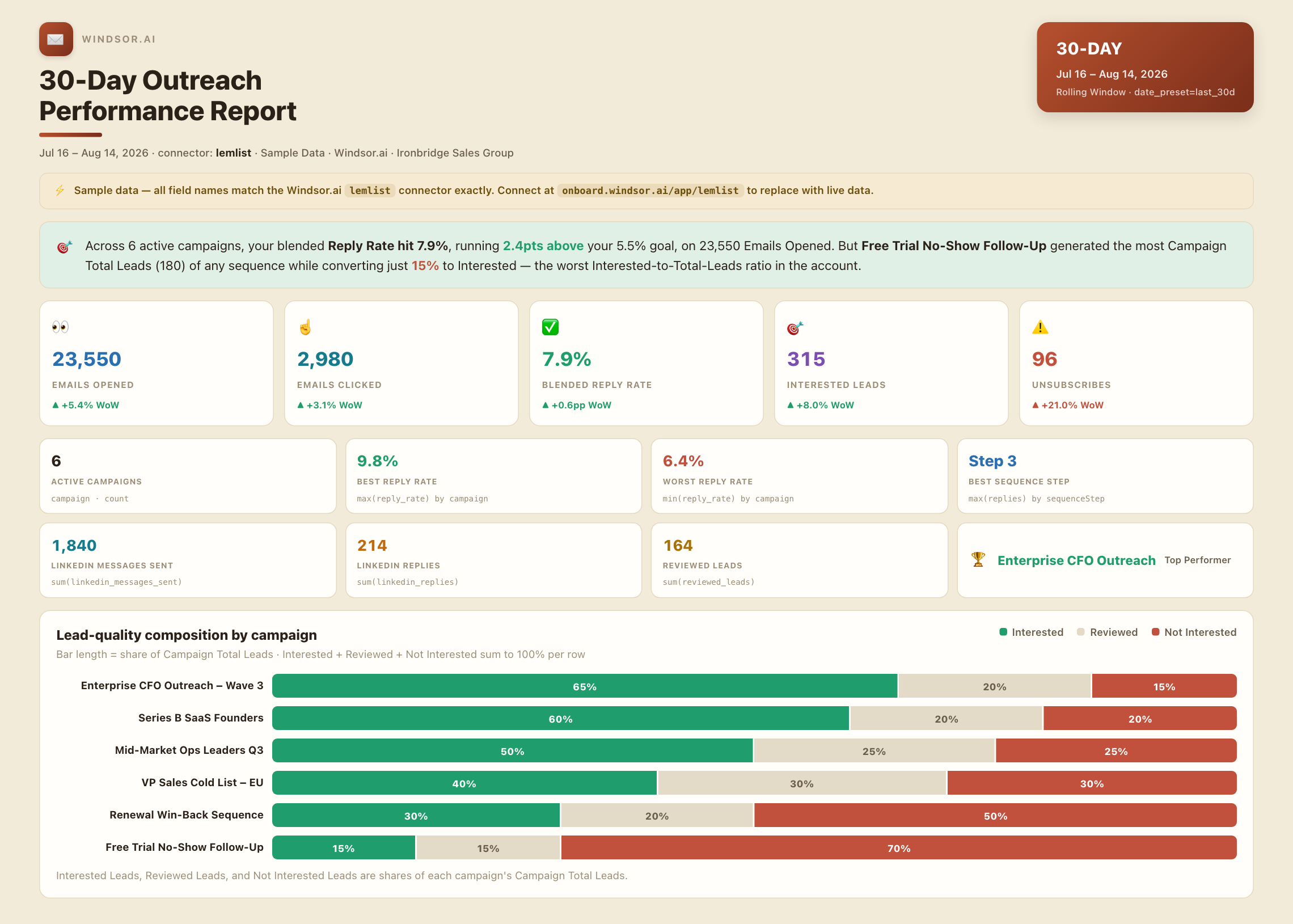
Chat with your Lemlist data in plain language to see what’s actually driving replies, with AI-driven insights on sequence performance, lead quality, and multi-channel outreach instead of manual sequence tracking.
Forget CSVs. Stop copy/paste. Connect in minutes. No code required.
 Sign up with Google
 Free forever plan
No credit card needed
Free forever plan
No credit card needed










Get instant outreach insights with Lemlist to Claude integration
Windsor MCP streams your live Lemlist data into Claude, so you skip the manual sequence-by-sequence tracking and go straight to what converts. Explore key use cases:

Find your best-performing outreach step
Ask Claude to compare replies by sequence step to see which touch actually drives the conversation.

Separate real interest from noise
Compare interested versus not-interested leads by campaign to focus follow-up effort where it counts.

Measure multi-channel outreach lift
Compare LinkedIn messages and replies against email performance to see if multi-channel sequences actually convert better.

Connect outreach to your CRM pipeline
Pair Lemlist engagement data with your CRM to see which sequences turn into real pipeline, not just replies.
Using Windsor.ai to connect data from Lemlist to Claude
Pinpointing which step in a multi-touch outreach sequence actually drives replies, not just opens, means tracking sequence-step activity against reply data campaign by campaign. Windsor MCP streams your full activity and campaign-report data directly into Claude so that breakdown takes one prompt.
Connect once and start asking questions about sequence performance, lead quality, and multi-channel outreach in plain English.














How to connect Lemlist to Claude with Windsor.ai
Explore a step-by-step guide to integrate your Lemlist data into Claude with the Windsor.ai connector.
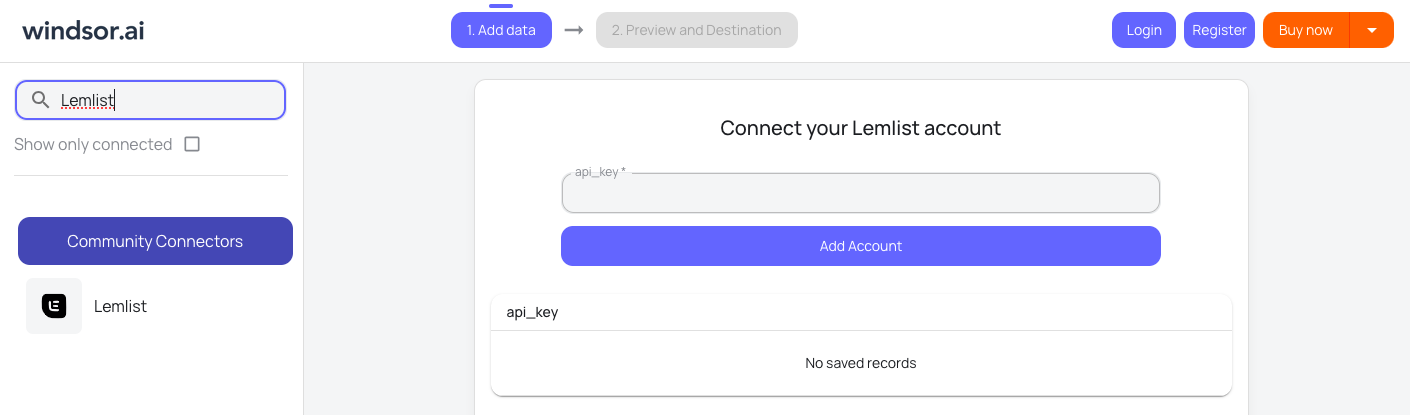
Connect Lemlist in the Windsor.ai dashboard
Choose Lemlist as your data source and grant access to Windsor.ai.
Install the Windsor.ai connector
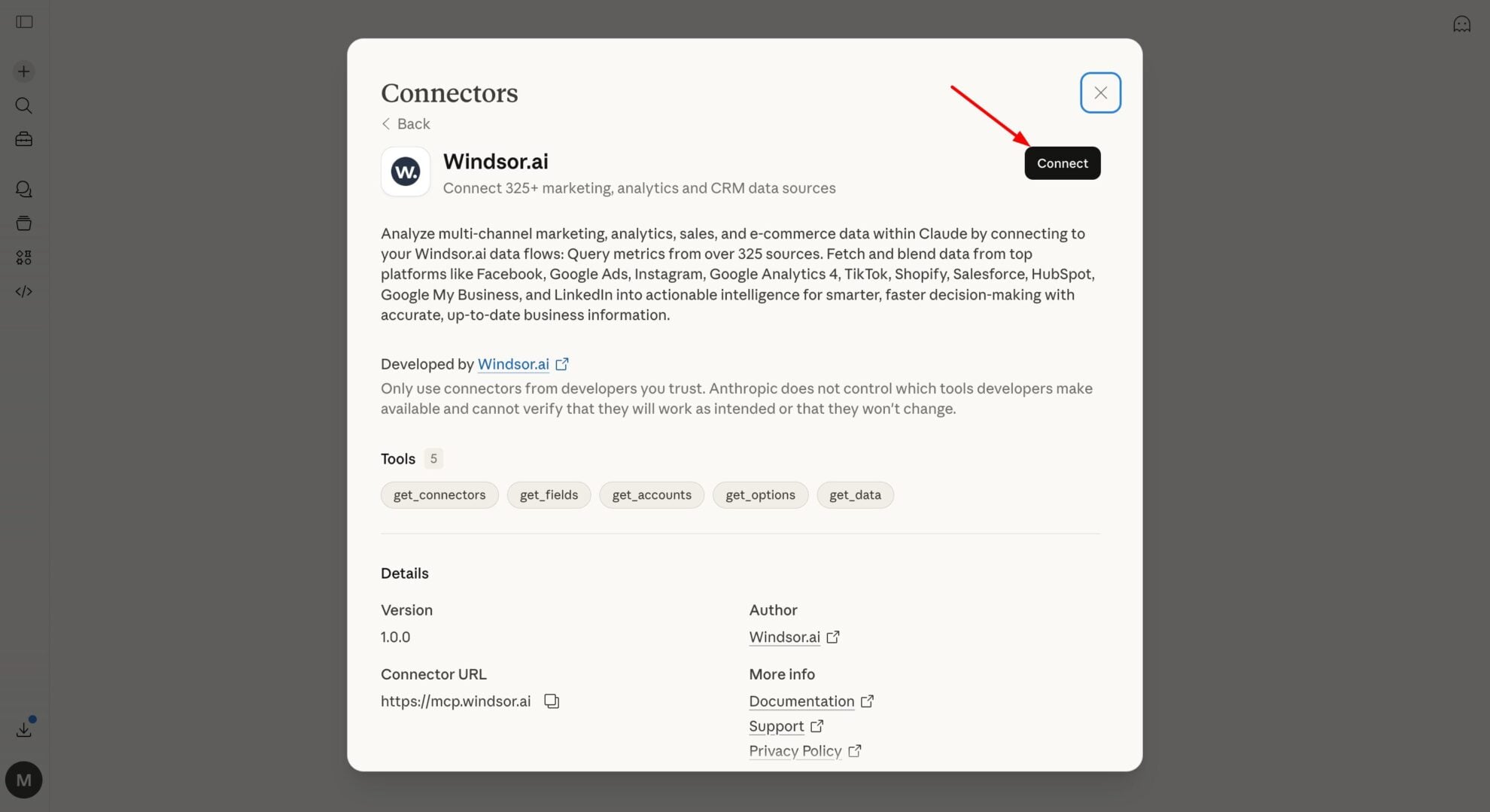
In Claude, open Customize, then Connectors, search for Windsor and click Add. Sign in to your Windsor.ai account when prompted, and the connector appears in your Connectors list. You can also open the Windsor.ai listing in the Claude directory and click Connect.
Query your Lemlist data in Claude
Start a new chat and ask Claude about your Lemlist data: find your best-performing sequence step, separate real interest from noise, or run advanced analyses.
FAQs
What Lemlist data can I analyze in Claude?
Windsor.ai gives Claude access to all 70 Lemlist fields (15 metrics, 50 dimensions), organized into groups such as:
- Activities (25 fields): sequence step, click/open/reply events.
- Campaign reports (20 fields): Open Rate, Reply Rate, Click Rate, Interested Leads, Not Interested Leads.
- Team (15 fields): per-user activity.
- Campaigns and unsubscribes (5 fields).
Can Claude tell me which step in my outreach sequence gets the most replies?
Yes. Windsor.ai streams sequenceStep alongside reply and open events, so Claude can show which touch in a multi-step sequence actually converts into a reply.
Can Claude separate genuinely interested leads from the rest?
Yes. Interested Leads, Not Interested Leads, and Reviewed Leads stream per campaign, so Claude can show your real qualified-lead rate instead of raw reply counts.
What prompts can I use to analyze Lemlist data in Claude?
-
Which sequence step generates the most replies across all campaigns in the last 30 days? Should later steps be cut?
-
Compare Emails Clicked against Emails Opened by campaign this month. Which campaigns have strong opens but weak click-through?
-
Break down unsubscribe activity by campaign over the last quarter. Are certain sequences driving people to opt out?
-
Compare team-level activity (messages sent, replies) across the last 60 days to see who's driving the most engagement.
How much does it cost to integrate Lemlist into Claude using Windsor.ai?
Windsor.ai is free to start, no credit card required. Paid plans start at $19/month and scale by the number of sources and accounts. See the pricing page.
Can I combine Lemlist data with other tools in Claude?
Yes, though Lemlist’s most useful pairing is narrower than most connectors: your CRM, to see which outreach sequences actually turn into pipeline and closed deals rather than just replies. Windsor.ai supports both alongside Lemlist.
Do you have helpful links to get started with integrating Lemlist and Claude using Windsor.ai?
Yes, we have helpful resources to help you get started. You can explore our official documentation for seamless Lemlist to Claude integration with Windsor.ai:
Tired of manual Lemlist data exports? Try Windsor.ai today to automate your reporting


