 Destinations
 Data sources
 AI insights
 About us
 Careers
 Security
 Customer reviews
 Contact us
 Affiliate program
 Solution partners
 Template gallery
 Looker Studio templates
 Power BI templates
 Excel templates
 Google Sheets templates
 Tableau templates
 Facebook Ads templates
 Google Ads templates
 Data fields & Metrics
 AI prompt library & Guides
 Product documentation
 API documentation
 Case studies
 Blog
Blog Data models
 Windsor vs Supermetrics
 Windsor vs Funnel.io
 Windsor vs Fivetran
 Windsor vs Rivery
 Windsor vs Portermetrics
 Windsor vs Coupler.io
Connect Mailchimp to Claude
Automatically sync your Mailchimp data to Claude using the Windsor.ai connector.
Ask Claude which campaigns drive the most revenue, which segments convert best, and where subscribers drop off, eliminating manual exports and complex dashboards.
Forget CSVs. Stop copy/paste. Connect data in minutes. No code required.
 Sign up with Google
 Free forever plan
No credit card needed
Free forever plan
No credit card needed










Optimize email performance with Mailchimp to Claude integration
Easily connect Mailchimp to Claude via Windsor.ai and leverage AI to strengthen your email marketing strategy. Explore key benefits and use cases:

Analyze data in seconds
Get instant AI-powered insights from your Mailchimp data without manual analysis or complex dashboards. Type simple prompts to uncover trends, performance drivers, and opportunities, and receive answers in seconds.

Personalize content
Claude can interpret list_name and click_rate metrics to highlight which content formats resonate with specific audience segments. With these insights, you can move beyond one-size-fits-all emails and generate tailored messaging for each group.

Measure email marketing impact
Connect Mailchimp to your Shopify or e-commerce data in Claude, then ask: ‘Which campaign drove the most revenue last month?’ or ‘What’s my revenue per email by segment?’ See exactly how much revenue your email program drives, not just opens and clicks.

Prevent subscriber churn
Track unsubscribe trends and last-open activity by list and audience segment. Claude flags at-risk subscribers before they impact deliverability and suggests re-engagement campaigns to win them back.
Using Windsor.ai to connect data from Mailchimp to Claude
Sending Mailchimp data to Claude usually requires manual CSV exports, tedious data cleaning, or costly software. Windsor.ai makes the process effortless with a connector that collects, organizes, and streams your email marketing metrics directly into Claude.
Connect in just 3 simple steps and start querying your Mailchimp data via natural language prompts.















How to connect Mailchimp to Claude with Windsor.ai
Explore our video tutorial and a step-by-step guide to integrate your data from any source into Claude with the Windsor.ai connector.
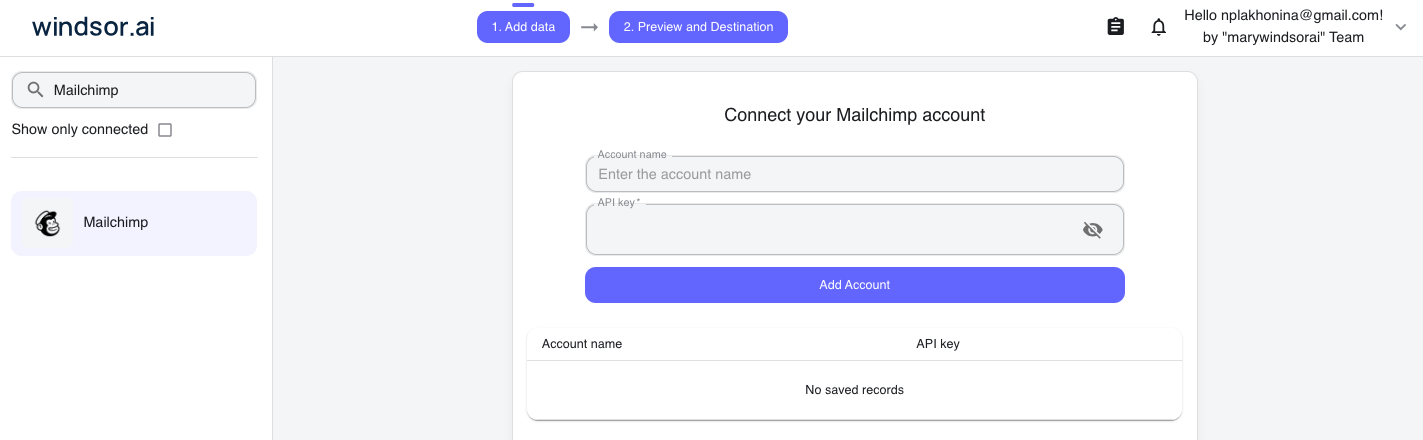
Select your data source
Choose Mailchimp as your data source and grant access to Windsor.ai.
Install the Windsor.ai connector in Claude
In Claude, open Customize, then Connectors, search for Windsor and click Add. Sign in to your Windsor.ai account when prompted, and the connector appears in your Connectors list. You can also open the Windsor.ai listing in the Claude directory and click Connect.

Query your data in Claude
Start a new chat and ask Claude questions about your connected data: summarize KPIs, create client reporting dashboards, or run advanced analyses.

FAQs
How do I connect Mailchimp to Claude?
Connecting Mailchimp to Claude with Windsor.ai takes about a minute.
- Choose Mailchimp as your data source in Windsor.ai.
- In Claude, open the Windsor.ai connector’s page and click ‘Connect’. It’s a native one-click install.
- Authorize access, start a new chat, and ask questions about your Mailchimp data.
What Mailchimp data can I analyze in Claude with Windsor MCP?
Windsor.ai gives you access to the key Mailchimp metrics and dimensions, including:
- Campaign performance: open rate, click rate, bounce rate (hard and soft), unsubscribe rate, total and unique opens/clicks, and deliveries (per campaign, per list, or over time).
- Revenue and orders: revenue and total orders attributed to each campaign, so you can tie sends directly to sales.
- List health: total contacts, subscribe/unsubscribe rates, cleaned counts, and Mailchimp’s list rating (its built-in engagement score).
- Content and timing: subject lines, preview text, campaign type, and send time.
- Link-level clicks: which specific links drove clicks, including unique click percentage per URL.
How much historical Mailchimp data can I sync?
You can sync as much historical data as available in your Mailchimp account, with no limits on Windsor.ai’s side. This enables Claude to analyze years of campaign history, delivering accurate benchmarking, long-term trend analysis, and insights into seasonal patterns.
Who is the Mailchimp to Claude integration for?
Windsor.ai’s Mailchimp Claude integration is built for e-commerce store owners, email, and digital marketers who run campaigns in Mailchimp and want to get quick answers on their data in plain language instead of dashboards. It’s especially useful for Shopify merchants who want to connect email performance directly to store revenue.
What can I do with Mailchimp data in Claude?
Once your Mailchimp data is available in Claude, you can:
- Monitor campaign performance. Claude enables multi-dimensional analysis by cross-referencing campaign attributes with audience segments, helping you identify which topics and messages perform best without building manual reports or pivot tables.
- Identify trends. With long-term historical data, Claude detects patterns and quantifies trends, such as seasonal dips, so you can set more accurate benchmarks and expectations.
- Optimize email content and timing. Let Claude analyze subject lines using semantic classification and correlate them with open and click rates to uncover what messaging drives engagement.
- Detect deliverability and quality issues.By tracking bounce rates, abuse reports, and list cleaning, Claude flags anomalies and significant changes before they impact deliverability.
Find more details about Windsor MCP for Claude use cases in this guide: https://windsor.ai/how-to-use-windsor-mcp-examples-use-cases/.
What prompts can I use when analyzing Mailchimp data in Claude?
Use more specific prompts to extract deeper insights from your email marketing data. For example:
-
Examine campaigns over the last 6 months. Identify if repeated use of similar
subject_linethemes orcampaign_typeis leading to a 'decay' in open rate over time, and suggest a strategy for creative refreshment. -
Analyze the relationship between
list_avg_unsub_rateandlist_campaign_count. Identify if sending more frequent campaigns is leading to a statistically significant increase in churn across different audience lists. -
Using data grouped by
year_month, establish a 2-year performance benchmark forclick_rate. Which months consistently over-perform the others? Compare performance to our current period. -
Identify lists with above-average click_rate but below-average list_total_contacts. Quantify their relative engagement efficiency and prioritize segments with the highest engagement per subscriber.
How much does it cost to integrate Mailchimp into Claude using Windsor.ai?
Windsor.ai’s pricing for Claude data integration varies depending on the number of connected accounts and data sources. We offer absolutely transparent pricing plans for diversified business needs and budgets.
How long does it take to connect Mailchimp to Claude?
With Windsor.ai’s easy-to-use connector, the integration process takes just a few minutes. No technical expertise is needed; syncing Mailchimp to Claude is simple, straightforward, and completely code-free.
Do you have helpful links to get started with integrating Mailchimp and Claude using Windsor.ai?
Yes, we have helpful resources to help you get started. You can explore our official documentation and tutorials for seamless Mailchimp to Claude integration with Windsor.ai:
Can I run cross-channel analysis with Mailchimp and other data sources?
Absolutely. You can combine Mailchimp metrics with data from Google Analytics 4, Shopify, or CRM platforms within the same Claude chat. This allows you to track the full customer journey from an email click to a final purchase on your website.
How do Shopify store owners analyze Mailchimp email performance in Claude?
Mailchimp’s revenue numbers only count orders that its own attribution model links to a campaign. Connect your full Shopify data alongside it in Claude, and you see the rest: total store revenue as context for what email actually contributed, which products different segments buy, true customer lifetime value across every order, and how email stacks up against your other channels, all in one conversation.
Tired of manual Mailchimp data exports? Try Windsor.ai today to automate your reporting


