 Destinations
 Data sources
 AI insights
 About us
 Careers
 Security
 Customer reviews
 Contact us
 Affiliate program
 Solution partners
 Template gallery
 Looker Studio templates
 Power BI templates
 Excel templates
 Google Sheets templates
 Tableau templates
 Facebook Ads templates
 Google Ads templates
 Data fields & Metrics
 AI prompt library & Guides
 Product documentation
 API documentation
 Case studies
 Blog
Blog Data models
 Windsor vs Supermetrics
 Windsor vs Funnel.io
 Windsor vs Fivetran
 Windsor vs Rivery
 Windsor vs Portermetrics
 Windsor vs Coupler.io
Connect WordPress to Claude
Get your WordPress traffic, content, and comment data straight into Claude with Windsor MCP.
Ask which blog posts drive leads, which pages have gone stale, or how your organic content stacks up against paid campaigns, then act on the answer without leaving the chat.
Forget CSVs. Stop copy/paste. Connect data in minutes. No code required.
 Sign up with Google
 Free forever plan









Improve your content with WordPress to Claude integration
Let Claude analyze your existing WordPress content, uncover insights, and identify optimization opportunities. Explore the key benefits and use cases:

Monitor comment sentiment
Process the comments__content and comments__status fields to determine the general sentiment of your readers toward specific post types. Claude can summarize the most frequent questions or pain points expressed by users, providing you with a list of ‘FAQ’ ideas for future posts.

Detect thin content
Analyze content length across your posts to identify pages that may lack depth or detail. Claude highlights these pages by URL, helping you decide whether to expand, consolidate, or remove them to improve overall content quality.

Find traffic that converts
Combine WordPress with GA4 data to identify which pages drive not just traffic, but conversions. Use these insights to double down on high-performing content and improve pages that underperform.

Rank content by lead-generating topics
Combine WordPress post and category data with your CRM or GA4 conversion events to rank which topics, not just which pages, generate the most leads. Ask Claude to break it down by month, quarter, or campaign, and get a ranked list back instantly.
Using Windsor.ai to connect data from WordPress to Claude
Integrating WordPress with Claude can be technically complex, requiring manual data exports, cleanup, or costly additional tools. Windsor.ai simplifies this with a connector that automatically collects, cleans, and streams your WordPress data into Claude for advanced AI analysis.
Connect in minutes and start querying your website’s backend data using natural language.
The connection also runs the other way. Claude can write posts, pages, categories and tags back to your site, so a content audit can end in a fixed draft rather than a to-do list. Everything it can currently do is listed below, pulled live from the Windsor.ai API.

Available actions
Create Post Create a blog post on the connected WordPress site. Content is HTML or Gutenberg block markup and is stored as given. Defaults to a draft; pass status 'publish' to publish immediately, or status 'future' with a date to schedule. categories, tags, featured_media and author take numeric IDs, which the Categories, Tags, Media and Users tables provide. Editable afterwards via update_post.
Create a blog post on the connected WordPress site. Content is HTML or Gutenberg block markup and is stored as given. Defaults to a draft; pass status 'publish' to publish immediately, or status 'future' with a date to schedule. categories, tags, featured_media and author take numeric IDs, which the Categories, Tags, Media and Users tables provide. Editable afterwards via update_post.
Update Post Update an existing blog post on the connected WordPress site. post_id is the numeric ID from the Posts table. Only the fields provided are changed; everything else keeps its current value. Set status 'publish' to publish a draft, or 'draft' to unpublish. categories and tags replace the current terms rather than adding to them, and content, title and excerpt are replaced wholesale: send the complete new value, as text is never appended to what is already there. Changing the title, content or excerpt keeps the previous version as a revision in the Post Revisions table, which is the only way back from an accidental overwrite.
Update an existing blog post on the connected WordPress site. post_id is the numeric ID from the Posts table. Only the fields provided are changed; everything else keeps its current value. Set status 'publish' to publish a draft, or 'draft' to unpublish. categories and tags replace the current terms rather than adding to them, and content, title and excerpt are replaced wholesale: send the complete new value, as text is never appended to what is already there. Changing the title, content or excerpt keeps the previous version as a revision in the Post Revisions table, which is the only way back from an accidental overwrite.
Create Page Create a page on the connected WordPress site. Content is HTML or Gutenberg block markup and is stored as given. Defaults to a draft; pass status 'publish' to publish immediately, or status 'future' with a date to schedule. parent takes the ID of another page to nest this one under it, menu_order controls ordering among siblings, and template is a theme template file such as 'templates/full-width.php'. Editable afterwards via update_page.
Create a page on the connected WordPress site. Content is HTML or Gutenberg block markup and is stored as given. Defaults to a draft; pass status 'publish' to publish immediately, or status 'future' with a date to schedule. parent takes the ID of another page to nest this one under it, menu_order controls ordering among siblings, and template is a theme template file such as 'templates/full-width.php'. Editable afterwards via update_page.
Update Page Update an existing page on the connected WordPress site. page_id is the numeric ID from the Pages table. Only the fields provided are changed; everything else keeps its current value. Set status 'publish' to publish a draft, or 'draft' to unpublish. content, title and excerpt are replaced wholesale: send the complete new value, as text is never appended to what is already there. Changing the title, content or excerpt keeps the previous version as a revision in the Page Revisions table, which is the only way back from an accidental overwrite.
Update an existing page on the connected WordPress site. page_id is the numeric ID from the Pages table. Only the fields provided are changed; everything else keeps its current value. Set status 'publish' to publish a draft, or 'draft' to unpublish. content, title and excerpt are replaced wholesale: send the complete new value, as text is never appended to what is already there. Changing the title, content or excerpt keeps the previous version as a revision in the Page Revisions table, which is the only way back from an accidental overwrite.
Create Category Create a post category on the connected WordPress site. name is required; slug is derived from the name when omitted. parent takes another category's ID to nest this one under it. The new category's ID can then be passed to create_post or update_post.
Create a post category on the connected WordPress site. name is required; slug is derived from the name when omitted. parent takes another category's ID to nest this one under it. The new category's ID can then be passed to create_post or update_post.
Update Category Update an existing post category on the connected WordPress site. category_id is the numeric ID from the Categories table. Only the fields provided are changed. Renaming a category does not change its slug unless slug is passed too, so existing links keep working.
Update an existing post category on the connected WordPress site. category_id is the numeric ID from the Categories table. Only the fields provided are changed. Renaming a category does not change its slug unless slug is passed too, so existing links keep working.
Create Tag Create a post tag on the connected WordPress site. name is required; slug is derived from the name when omitted. Tags are flat, so unlike categories they cannot be nested. The new tag's ID can then be passed to create_post or update_post.
Create a post tag on the connected WordPress site. name is required; slug is derived from the name when omitted. Tags are flat, so unlike categories they cannot be nested. The new tag's ID can then be passed to create_post or update_post.
Update Tag Update an existing post tag on the connected WordPress site. tag_id is the numeric ID from the Tags table. Only the fields provided are changed. Renaming a tag does not change its slug unless slug is passed too, so existing links keep working.
Update an existing post tag on the connected WordPress site. tag_id is the numeric ID from the Tags table. Only the fields provided are changed. Renaming a tag does not change its slug unless slug is passed too, so existing links keep working.














How to connect WordPress to Claude with Windsor.ai
Explore our video tutorial and a step-by-step guide to integrate your data from any source into Claude with the Windsor.ai connector.
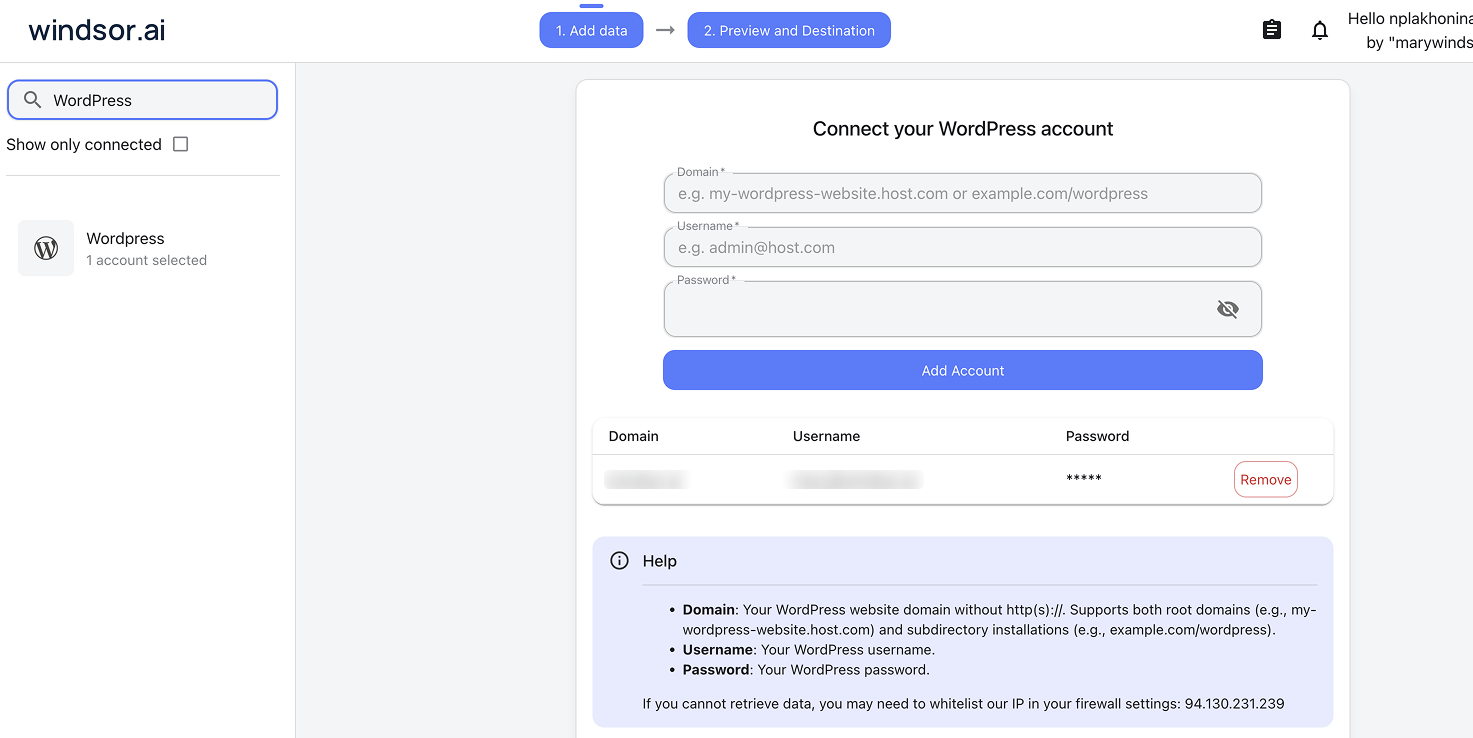
Select your data source
Choose WordPress as your data source and grant access to Windsor.ai.
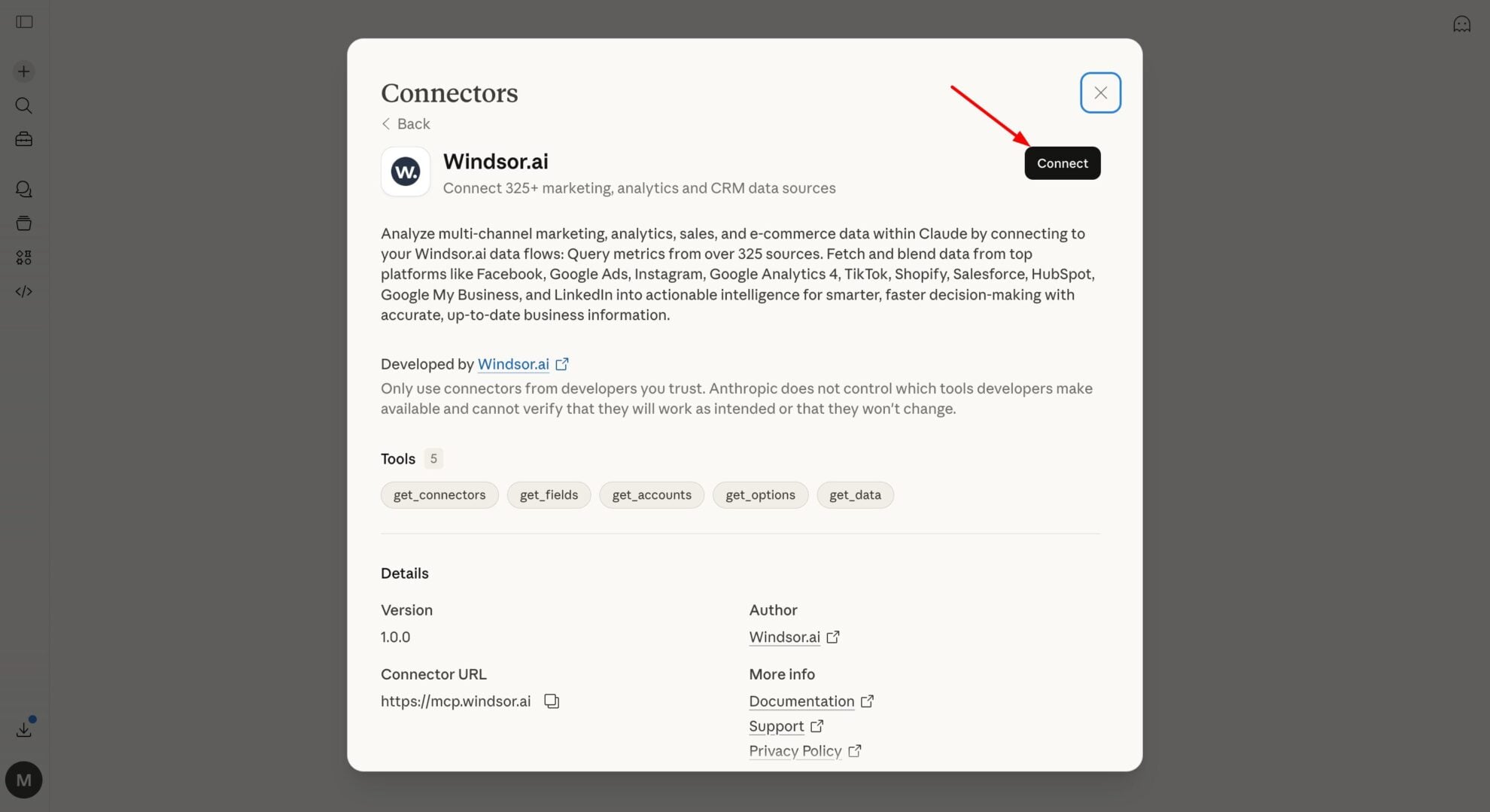
Install the Windsor.ai connector in Claude
In Claude, open Customize, then Connectors, search for Windsor and click Add. Sign in to your Windsor.ai account when prompted, and the connector appears in your Connectors list. You can also open the Windsor.ai listing in the Claude directory and click Connect.
Query your data in Claude
Start a new chat and ask Claude questions about your connected data: summarize KPIs, create client reporting dashboards, or run advanced analyses.

FAQs
What can I do with WordPress data in Claude?
Once your WordPress data is in Claude, you can:
- Automated content audits: Ask Claude to identify outdated content or posts that haven’t been updated in over a year.
- Semantic category mapping: Let Claude analyze your post titles and excerpts to suggest a more intuitive category and tag structure.
- Internal link discovery: Claude can scan your library to find high-authority posts that should link to your newer articles.
- User engagement and behavior analysis: Analyze comment activity, posting frequency, and content updates to understand which topics drive the most interaction and sustained engagement.
- Content performance trend analysis: Track publishing activity over time to identify which types of content, topics, or authors contribute most to consistent output and engagement.
- Cross-channel insights: Merge WordPress content data with analytics and marketing sources (e.g., Google Analytics, Meta, Google Ads) to evaluate how content contributes to traffic, conversions, and overall marketing performance.
Find more details about Windsor MCP for Claude use cases in this guide: https://windsor.ai/how-to-use-windsor-mcp-examples-use-cases/.
Can Claude publish to my WordPress site, or only read it?
Both. Alongside reading your content, Claude can create and update posts and pages, and create and update categories and tags. New posts and pages are created as drafts unless you explicitly ask to publish or schedule them, and an update only changes the fields you name, so a title edit leaves the body, author and publish date untouched. Claude shows you the content before it writes. The Available actions list on this page is pulled live from the Windsor.ai API, so it always reflects what is supported today.
Is my website’s data secure?
Yes. The connection is encrypted, and you authorize it with an application password you generate in your own WordPress dashboard and can revoke at any time. Claude only writes when you ask it to, new posts and pages arrive as drafts, and nothing is ever deleted.
What WordPress data can I analyze in Claude?
Windsor.ai syncs your WordPress data to Claude across 5 metrics and 234 dimensions, including sessions, pageviews, top-performing posts, referral sources, conversion events, and more. Ask which categories get the most engagement, where readers drop off before converting, or how a specific campaign’s landing pages are performing, using data that’s always fresh, not a monthly export.
Can Claude help me rewrite meta descriptions?
Yes, and it can apply them. Claude analyzes your post content, suggests optimized meta descriptions, and can then update the posts directly rather than leaving you to copy each one across by hand.
How often is the data refreshed?
Your data is always up to date. Every time you query data in Claude, Windsor.ai retrieves the latest data directly from your WordPress API.
How to connect WordPress to Claude?
Connect WordPress to Claude in three simple steps using Windsor.ai:
- Select WordPress as your data source in Windsor.ai’s dashboard and grant access
- Install the Windsor.ai connector in Claude from the Claude directory
- Authorize and start asking Claude questions about your WordPress data
Can Claude help me understand which topics perform best?
Yes. By analyzing post titles, categories, and engagement signals like comments, Claude can identify which topics generate the most interaction and sustained interest.
What prompts can I use when analyzing WordPress data in Claude?
Use more specific, advanced prompts to extract deeper insights from your WordPress data. For example:
-
Analyze the titles and excerpts of my last 50 posts. Which high-level topics in my niche (e.g., 'AI Integration') are currently under-represented in my content library?
-
I just published a new post about [Topic]. Scan my existing published content and find 5 relevant articles that should link to this post to improve discoverability and content structure.
-
Review the content of my most commented posts to identify common call-to-action patterns. Suggest alternative phrasing or structures to improve engagement and encourage more user interaction.
-
Based on Google Analytics 4 landing page data, identify pages with high sessions but low conversion rates or high bounce rates. What patterns are associated with poor engagement, and which pages need optimization?
How much does it cost to integrate WordPress into Claude using Windsor.ai?
Windsor.ai’s pricing for Claude data integration varies depending on the number of connected accounts and data sources. We offer absolutely transparent pricing plans for diversified business needs and budgets.
How long does it take to connect WordPress to Claude?
With Windsor.ai’s easy-to-use connector, the integration process takes just a few minutes. No technical expertise is needed; syncing WordPress to Claude is simple, straightforward, and completely code-free.
Do you have helpful links to get started with integrating WordPress and Claude using Windsor.ai?
Yes, we have helpful resources to help you get started. You can explore our official documentation and tutorials for seamless WordPress to Claude integration with Windsor.ai:
Tired of manual WordPress data exports? Try Windsor.ai today to automate your reporting


