 Destinations
 Data sources
 AI insights
 About us
 Careers
 Security
 Customer reviews
 Contact us
 Affiliate program
 Solution partners
 Template gallery
 Looker Studio templates
 Power BI templates
 Excel templates
 Google Sheets templates
 Tableau templates
 Facebook Ads templates
 Google Ads templates
 Data fields & Metrics
 AI prompt library & Guides
 Product documentation
 API documentation
 Case studies
 Blog
Blog Data models
 Windsor vs Supermetrics
 Windsor vs Funnel.io
 Windsor vs Fivetran
 Windsor vs Rivery
 Windsor vs Portermetrics
 Windsor vs Coupler.io
Connect Intercom to Claude
Automatically sync your Intercom data to Claude using the Windsor.ai connector.
Stream Intercom data into Claude and instantly generate AI-driven insights to uncover drop-offs, improve retention, and boost engagement.
Forget CSVs. Stop copy/paste. Connect data in minutes. No code required.
 Sign up with Google
 Free forever plan
No credit card needed
Free forever plan
No credit card needed










Boost engagement with Intercom to Claude integration
Quickly connect Intercom to Claude with Windsor MCP and instantly uncover deeper insights into user engagement and lifecycle behavior. Explore key use cases below:

Segment high-value users
Claude uses ‘Last Seen At’ and ‘Last Replied At’ frequency to segment ‘Power Users’ who are highly active but rarely need help. You can then use this list to recruit participants for beta testing new features or case studies.

Identify retention risks
Let Claude analyze ‘Created At’ and ‘Last Seen At’ metrics to find users who dropped off shortly after signing up. It identifies if these ‘early churners’ share a common Browser or OS, helping you spot technical onboarding blockers.

Convert warm leads
Find contacts who have a recent ‘Last Email Opened At’ or ‘Last Email Clicked At’ timestamp but haven’t officially signed up yet. Claude segments these prospects so you can send timely follow-ups to complete their registration.

Validate acquisition quality
Compare acquisition sources from Google Ads and Meta Ads with Intercom engagement patterns to identify which campaigns drive active users and which lead to early drop-offs, so you can shift budget toward higher-quality growth.
Using Windsor.ai to connect data from Intercom to Claude
Forget manual exports, formatting, and complex setups. Windsor MCP automatically pulls, cleans, and streams your Intercom data into Claude for advanced AI analysis.
Connect in minutes and uncover engagement patterns, activity trends, and churn signals using natural language prompts.















How to connect Intercom to Claude with Windsor.ai
Explore our video tutorial and a step-by-step guide to integrate your data from any source into Claude with the Windsor.ai connector.
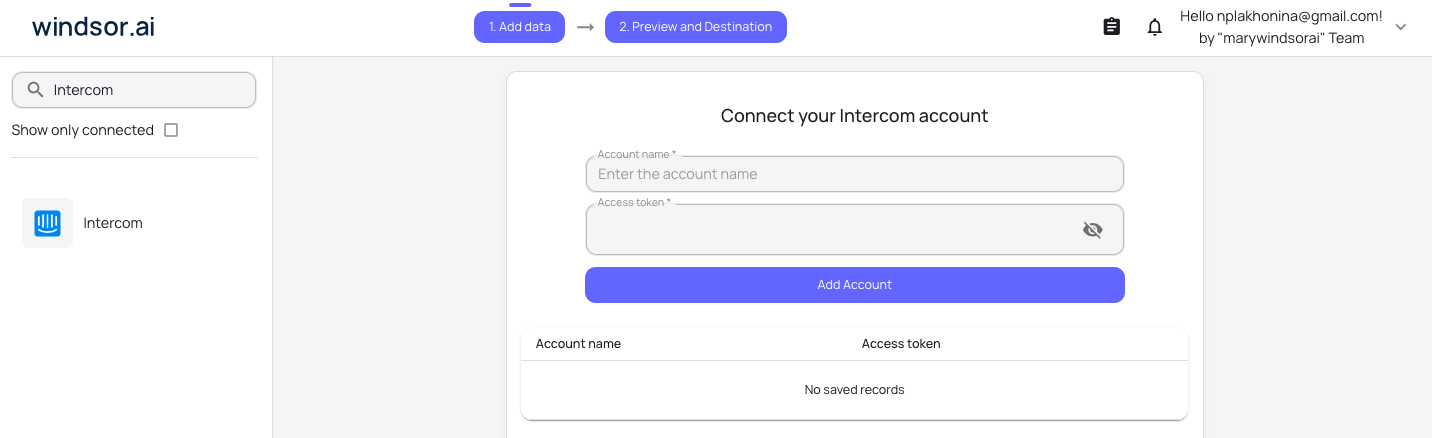
Select your data source
Choose Intercom as your data source and grant access to Windsor.ai.
Install the Windsor.ai connector in Claude
In Claude, open Customize, then Connectors, search for Windsor and click Add. Sign in to your Windsor.ai account when prompted, and the connector appears in your Connectors list. You can also open the Windsor.ai listing in the Claude directory and click Connect.

Query your data in Claude
Start a new chat and ask Claude questions about your connected data: summarize KPIs, create client reporting dashboards, or run advanced analyses.

FAQs
Intercom has its own official connector in Claude. Should I use that or Windsor.ai?
They do different jobs. Intercom’s official connector in Claude reads your conversations, contacts, and Help Center articles directly, and it’s read-only. Windsor.ai reports on conversation-level metrics, reply times, ratings, and reopen rates, and blends them with your marketing, sales, and product data in the same conversation. Use Intercom’s own connector to read individual conversations; use Windsor.ai for cross-channel support reporting.
What can I do with Intercom data in Claude?
Once your Intercom data is in Claude, you can:
- Segment contacts by activity, location, device, and communication preferences to identify high-value and at-risk users.
- Uncover engagement patterns by analyzing replies, email interactions, and last activity timestamps.
- Detect churn signals early by spotting inactive or declining user segments before they disengage completely.
- Optimize messaging, timing, and channel strategy based on real behavior instead of static reports.
- Run cross-channel analysis by combining Intercom with CRM (Salesforce, HubSpot), product analytics (GA4, Mixpanel), and ad platforms (Google Ads, Meta Ads) to connect user engagement and lifecycle data with acquisition and revenue outcomes.
Find more details about Windsor MCP for Claude use cases in this guide: https://windsor.ai/how-to-use-windsor-mcp-examples-use-cases/.
Is my customer data secure?
Yes. Windsor.ai uses Intercom’s official OAuth 2.0 authentication. Access through Windsor.ai is strictly read-only, so Claude can analyze your data but cannot modify records, send messages, or perform any actions in your Intercom account through this route. Intercom also has its own official Claude connector, a separate, read-only connection for reading individual conversations directly.
How can I identify trends or issues in Intercom data?
You can ask Claude to analyze changes in engagement, reply rates, or inactivity across segments to detect unusual patterns, like drops in responses, rising unsubscribes, or declining activity that may indicate underlying issues.
Can I blend Intercom data with Salesforce via Windsor MCP?
Yes. Windsor MCP supports 350+ data sources, allowing you to analyze Intercom and Salesforce data together in Claude. For example, you can compare high-value Salesforce accounts with Intercom activity and engagement patterns to identify valuable customers who may be at risk of churn.
What prompts can I use when analyzing Intercom data in Claude?
Use more advanced, specific prompts to extract deeper insights from your Intercom data. For example:
-
Look at users where the gap between their Created At date and their Last Seen At date is less than 3 days. Filter this list for users who reached out (Last Replied At) within that window. Identify if specific Operating Systems or Browsers are common among these early-churners to find technical setup blockers.
-
Find users who are frequently active (recent Last Seen At) but have not engaged in communication for a long period (e.g., Last Replied At older than 90 days). Suggesting a proactive outreach approach to ensure they are not experiencing unresolved issues or disengaging quietly.
-
Compare the Created At date of users coming from my 'Lead Gen' Google Ads campaigns with their Signed Up At and Last Seen At metrics. Tell me, if the 'cheap' leads from Ads are actually signing up and staying active, or if they are dropping off immediately.
-
Analyze the time gaps between Created At, Signed Up At, and Last Seen At across all users. Identify distinct drop-off patterns (e.g., users who sign up but never return, or users who are active but stop engaging). Segment these patterns by device, location, or acquisition source and explain which groups show the highest churn risk and why.
How much does it cost to integrate Intercom into Claude using Windsor.ai?
Windsor.ai’s pricing for Claude data integration varies depending on the number of connected accounts and data sources. We offer absolutely transparent pricing plans for diversified business needs and budgets.
How long does it take to connect Intercom to Claude?
With Windsor.ai’s easy-to-use connector, the integration process takes just a few minutes. No technical expertise is needed; syncing Intercom to Claude is simple, straightforward, and completely code-free.
Do you have helpful links to get started with integrating Intercom and Claude using Windsor.ai?
Yes, we have helpful resources to help you get started. You can explore our official documentation and tutorials for seamless Intercom to Claude integration with Windsor.ai:
Tired of manual Intercom data exports? Try Windsor.ai today to automate your reporting


