 Destinations
 Data sources
 AI insights
 About us
 Careers
 Security
 Customer reviews
 Contact us
 Affiliate program
 Solution partners
 Template gallery
 Looker Studio templates
 Power BI templates
 Excel templates
 Google Sheets templates
 Tableau templates
 Facebook Ads templates
 Google Ads templates
 Data fields & Metrics
 AI prompt library & Guides
 Product documentation
 API documentation
 Case studies
 Blog
Blog Data models
 Windsor vs Supermetrics
 Windsor vs Funnel.io
 Windsor vs Fivetran
 Windsor vs Rivery
 Windsor vs Portermetrics
 Windsor vs Coupler.io
Connect Facebook Page Insights to Claude
Automatically sync your Facebook Page Insights data to Claude using the Windsor.ai connector.
Find out what boosts engagement and grows your audience, then publish the next post to your Page straight from the chat.
Forget CSVs. Stop copy/paste. Connect data in minutes. No code required.
 Sign up with Google
 Free forever plan









Understand your organic performance better with the Facebook Page Insights to Claude integration
Connect Facebook Page Insights to Claude through Windsor MCP to analyze and optimize your organic performance, with key benefits including:

Get instant answers
Claude instantly processes your Facebook Page Insights data and delivers precise AI summaries and recommendations on the latest data. Skip manual analysis and quickly identify which posts and metrics need attention.

Ask questions in natural language
Query Facebook Page Insights data in plain English and receive actionable insights without writing SQL or building dashboards. Ask questions like ‘Which posts drive the most engagement?’ or ‘When is the best time to publish content?’ to optimize your content and posting strategy.

Optimize video hook efficiency
Claude analyzes video retention metrics to find the exact second where the majority of your audience drops off. This allows you to achieve higher total watch times by refining your video “hooks” and editing style based on proven viewer behavior.

Benchmark organic vs. paid performance
By linking Facebook Page Insights with 350+ data sources, Claude can compare organic content performance with your paid ads. Focus your budget on high-engagement posts or topics to improve ROAS.
Using Windsor.ai to connect data from Facebook Page Insights to Claude
Sending Facebook Page Insights into Claude often requires manual CSV exports, data cleanup, or costly software. Windsor.ai removes these barriers with the MCP server that extracts, standardizes, and streams your organic metrics directly into Claude.
Connect your Facebook data in minutes and analyze it in Claude to uncover AI-powered insights into audience engagement and content trends.

Available actions
Create Photo Post Publish a single image post to a connected Facebook Page. Provide a publicly accessible image URL and an optional caption. For a text/link-only post use create_post instead.
Publish a single image post to a connected Facebook Page. Provide a publicly accessible image URL and an optional caption. For a text/link-only post use create_post instead.
Create Post Publish a post to a connected Facebook Page's feed. Provide a message (post text), a link (shared URL), or both - at least one is required. For an image post use create_photo_post instead.
Publish a post to a connected Facebook Page's feed. Provide a message (post text), a link (shared URL), or both - at least one is required. For an image post use create_photo_post instead.














How to connect Facebook Page Insights to Claude with Windsor.ai
Explore our video tutorial and a step-by-step guide to integrate your data from any source into Claude with the Windsor.ai connector.
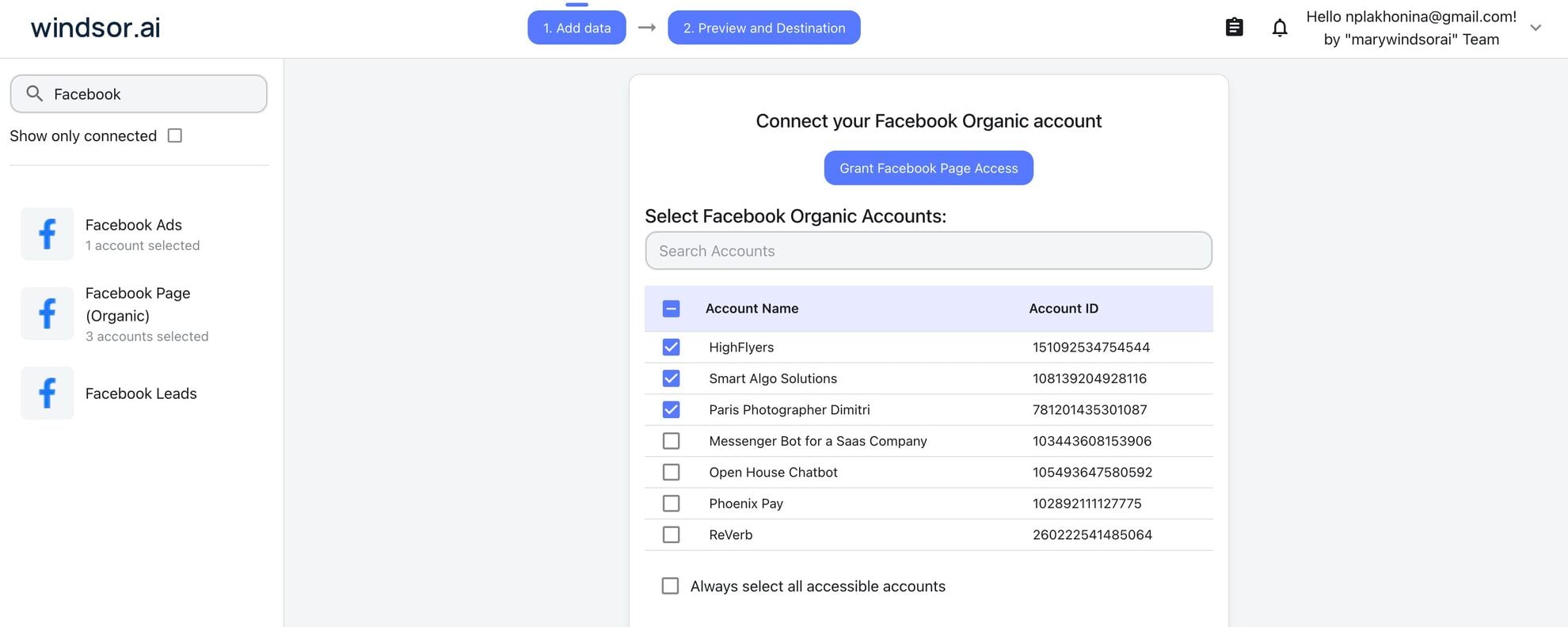
Select your data source
Choose Facebook Page Insights as your data source and grant access to Windsor.ai.
Install the Windsor.ai connector in Claude
In Claude, open Customize, then Connectors, search for Windsor and click Add. Sign in to your Windsor.ai account when prompted, and the connector appears in your Connectors list. You can also open the Windsor.ai listing in the Claude directory and click Connect.

Query your data in Claude
Start a new chat and ask Claude questions about your connected data: summarize KPIs, create client reporting dashboards, or run advanced analyses.

FAQs
Is a connector different from an automation platform for connecting Facebook to Claude?
Yes. The Windsor.ai connector gives Claude read access to your Page Insights inside the chat, so you can ask about reach, engagement, video retention or follower growth and get the numbers back. An automation platform links apps through triggers and actions: a new comment fires a workflow that calls the Claude API and posts a drafted reply. Use the connector for analysis and reporting, and an automation platform for per-event tasks. Both can run on the same Page.
What is Windsor.ai's Facebook Page Insights Claude connector?
Windsor.ai’s Facebook Page Insights Claude connector (powered by Windsor MCP) is a no-code solution that automatically extracts your Meta Page data, normalizes it, and delivers it into Claude as clean, structured, and analysis-ready datasets. Rather than manually exporting files or juggling multiple reports, you can query your live Facebook Page performance metrics across one or multiple pages in Claude using natural-language prompts, and publish back to those Pages when you are ready.
What can I do with Facebook Page Insights data in Claude?
Once your Meta Page Insights data is connected to Claude, you can:
- Generate instant performance reports (daily/weekly/monthly) with engagement rate, reach, impressions, saves, shares, and video views, returned as text summaries, dashboards, or CSV-ready tables.
- Break down results by content type (carousel, video, image, text) to quickly identify which formats drive the highest engagement and reach.
- Publish the next post to your Page, as text, a link, or a photo with a caption, without switching to Meta Business Suite.
- Diagnose engagement drops by comparing periods (week-over-week/month-over-month) and flagging spikes or declines in specific metrics.
- Analyze audience demographics by age, gender, location, and device to understand who engages most with your content.
- Identify top-performing posts and extract common themes (topics, copy length, CTAs, posting times).
- Track audience growth trends and correlate follower changes with specific campaigns, content themes, or external events.
Find more details about Windsor MCP for Claude use cases in this guide: https://windsor.ai/how-to-use-windsor-mcp-examples-use-cases/.
Can Claude post to my Facebook Page, or only read the data?
Both. Claude can publish to the Pages you connect: a text or link post, or a single photo post with an optional caption. That closes the loop between spotting what works and putting the next post out. Claude shows you the exact copy before it publishes, and the Available actions list above is pulled live from the Windsor.ai API, so it always reflects what is supported today.
How much does it cost to integrate Facebook Page Insights into Claude using Windsor.ai?
The Claude connector is included on every Windsor.ai plan, including the free forever plan: one data source, one account, no credit card. Paid plans start from $19/month and add sources and accounts. See the pricing page.
How long does it take to connect Facebook Page Insights to Claude?
With Windsor.ai’s intuitive connector, the integration process takes just a few minutes. No technical expertise is required; connecting Facebook Page Insights to Claude is simple, straightforward, and completely code-free.
Do you have helpful links to get started with integrating Facebook Page Insights and Claude using Windsor.ai?
Yes, we have helpful resources to help you get started. You can explore our official documentation and tutorials for the Facebook Page Insights to Claude integration with Windsor.ai:
Can Claude generate content recommendations based on my top-performing posts?
Yes, and it can publish the winner. Claude can identify your highest-performing posts, extract winning patterns, generate new content ideas tailored to your audience and goals, and then post the one you approve to your Page.
Example prompt:
Using my Facebook Page Insights from the past 30 days, identify the top 15 posts ranked by engagement rate. Analyze these posts by content type, posting time, and common characteristics to determine the key factors driving engagement. Based on these insights, generate 10 new post ideas that vary in format and topic while staying true to the brand voice.
What prompts can I use to analyze Facebook Page Insights in Claude?
Use advanced prompts beyond basic performance summaries to uncover deeper insights into your organic content and audience engagement. Here are some example prompts:
-
Claude, analyze all posts from the last 30 days. Identify the top 10 posts by engagement rate (total_interactions / impressions). For each, summarize the post type, content theme, copy length, and posting day/time. What patterns drive the highest engagement?
-
Analyze my audience demographics (age, gender, location) for the last 14 days. Identify which demographic segment has the highest engagement rate and which has the lowest reach. Recommend content adjustments to improve underperforming segments.
-
Analyze posting frequency and average engagement rate by day of the week. Determine the optimal posting schedule (best days/times) to maximize reach and engagement for my audience.
-
Flag any posts with unusually low engagement (bottom 10%) despite deep impressions. Analyze copy, format, and timing to diagnose why these posts underperformed. Suggest A/B test ideas to improve performance.
How far back can I pull historical Facebook Page Insights data?
In most cases, you can pull Facebook Page Insights data as far back as your Meta Business Account has reporting data available via the Meta Graph API (typically 2 years of historical data). It also may depend on your Windsor.ai plan and specific metrics you’re querying (some metrics have shorter retention windows).
With this data in Claude, you can run year-over-year (YoY) comparisons, analyze seasonal trends, and evaluate long-term content performance.
Tired of manual Facebook Page Insights data exports? Try Windsor.ai today to automate your reporting


