 Destinations
 Data sources
 AI insights
 About us
 Careers
 Security
 Customer reviews
 Contact us
 Affiliate program
 Solution partners
 Template gallery
 Looker Studio templates
 Power BI templates
 Excel templates
 Google Sheets templates
 Tableau templates
 Facebook Ads templates
 Google Ads templates
 Data fields & Metrics
 AI prompt library & Guides
 Product documentation
 API documentation
 Case studies
 Blog
Blog Data models
 Windsor vs Supermetrics
 Windsor vs Funnel.io
 Windsor vs Fivetran
 Windsor vs Rivery
 Windsor vs Portermetrics
 Windsor vs Coupler.io
Connect Matomo to Claude
Automatically sync your Matomo data to Claude using the Windsor.ai connector.
Analyze your Matomo data in Claude to uncover funnel friction, optimize user journeys, and maximize marketing ROI.
Forget CSVs. Stop copy/paste. Connect data in minutes. No code required.
 Sign up with Google
 Free forever plan
No credit card needed
Free forever plan
No credit card needed










Maximize the value of your data with Matomo to Claude integration
Bring your Matomo data into Claude to instantly analyze performance and uncover insights without switching between tools. Explore key benefits and use cases:

Uncover revenue lost
By analyzing the correlation between avg_page_load_time and goal_conversions, Claude calculates how much revenue is being lost to slow performance. It identifies the specific URLs where a one-second speed improvement would yield the highest financial lift.

Reduce cart abandonment
Claude analyzes abandoned_carts and revenue metrics to find patterns in lost sales across different product categories. It suggests specific checkout optimizations or email remarketing triggers based on common exit_page behavior.

Calculate true ROAS
Blends Matomo goal_conversions with your Google Ads spend via Windsor.ai to calculate your true ROAS. Ask Claude to identify specific ad campaigns that look successful in Google but have high bounce rates once the user reaches your Matomo-tracked site.

Get AI insights in seconds
Skip dashboards and manual analysis. Claude interprets your Matomo metrics and generates insights, summaries, and next steps recommendations in seconds, so you can make faster optimization decisions.
Using Windsor.ai to connect data from Matomo to Claude
Integrating Matomo with Claude often requires manual exports, data cleanup, or complex API scripts. Windsor MCP removes this friction with a connector that automatically pulls, cleans, and sends your website analytics data directly into Claude.
Connect in minutes and start getting clear insights instantly: spot conversion leaks, optimize workflows, and increase revenue.















How to connect Matomo to Claude with Windsor.ai
Explore our video tutorial and a step-by-step guide to integrate your data from any source into Claude with the Windsor.ai connector.
Select your data source
Choose Matomo as your data source and grant access to Windsor.ai.
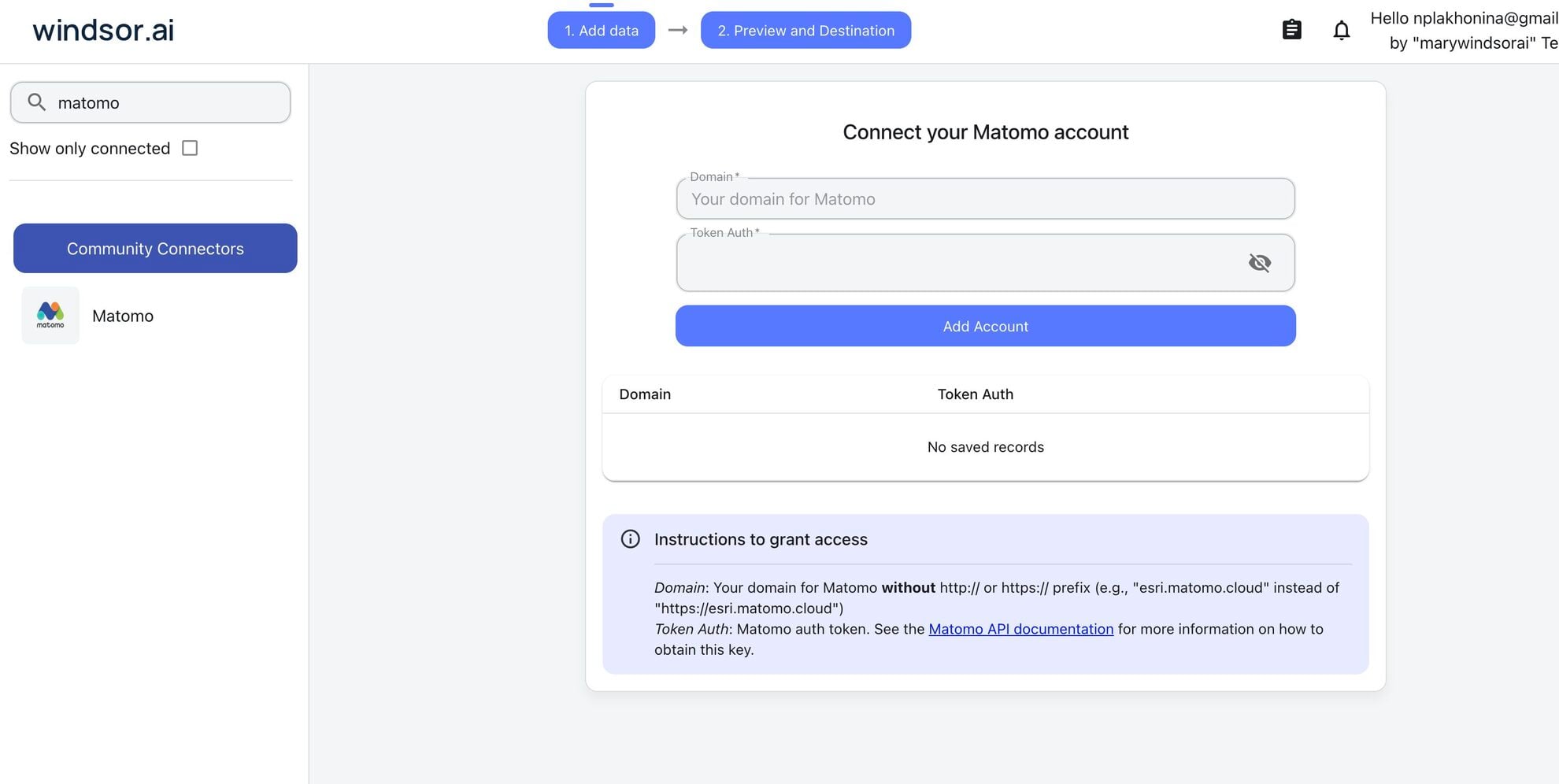
Install the Windsor.ai connector in Claude
In Claude, open Customize, then Connectors, search for Windsor and click Add. Sign in to your Windsor.ai account when prompted, and the connector appears in your Connectors list. You can also open the Windsor.ai listing in the Claude directory and click Connect.

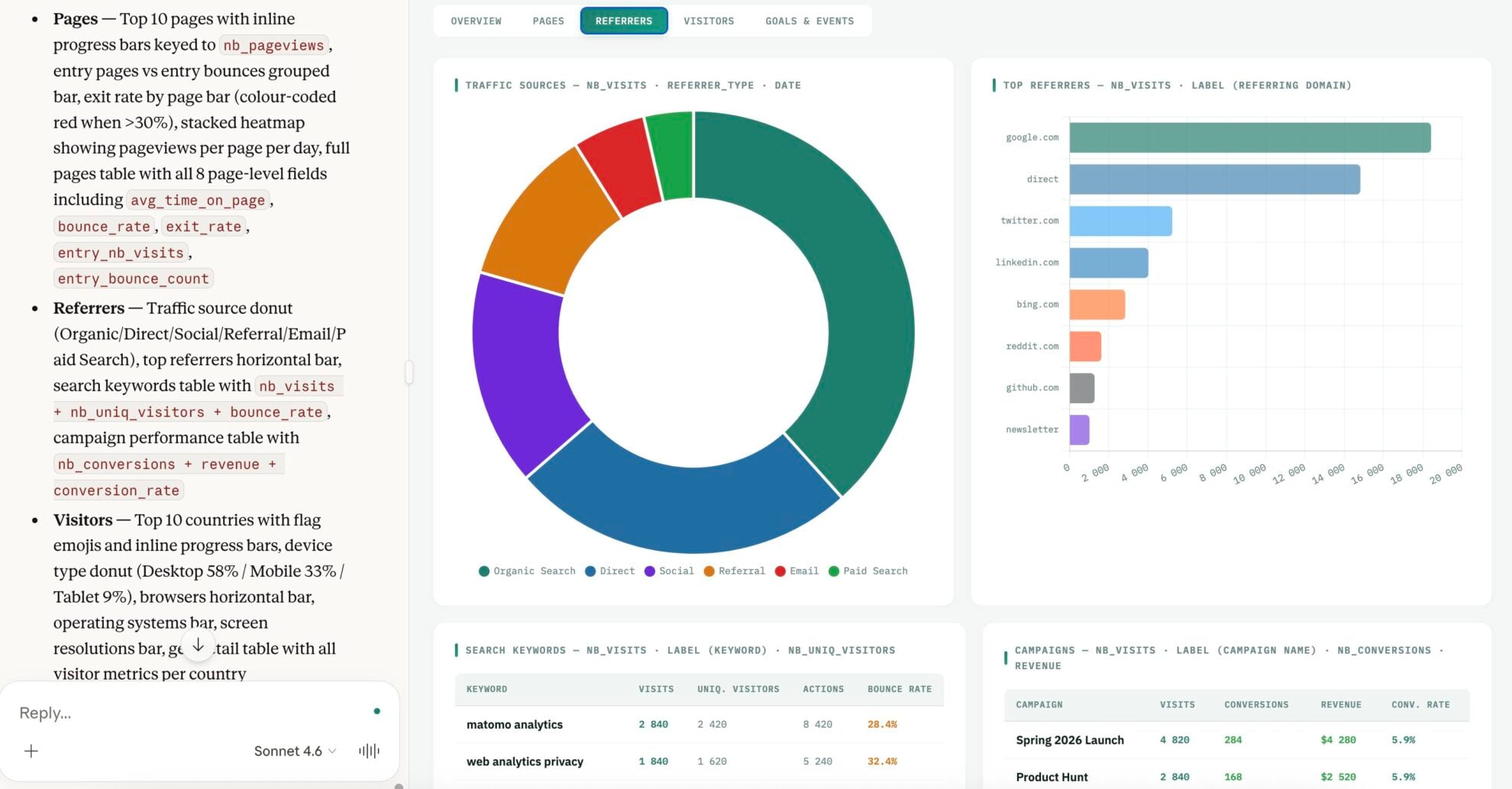
Query your data in Claude
Start a new chat and ask Claude questions about your connected data: summarize KPIs, create client reporting dashboards, or run advanced analyses.
FAQs
What can I do with Matomo data in Claude?
Once your Matomo data is in Claude, you can:
- Understand traffic trends. Analyzing visits, user behavior, and engagement metrics like bounce rate, session duration, and actions per visit
- Identify top-performing pages. See which pages drive the most visits, engagement, or conversions, and which ones need improvement.
- Spot drop-offs and issues early. Detect high bounce rates, exit pages, or slow load times that may be hurting performance.
- Analyze marketing campaign performance. Track which campaigns, sources, or keywords bring the most traffic and conversions.
- Understand your audience. Break down users by location, device, browser, or returning vs new visitors
- Monitor conversions and revenue. Track goal completions, e-commerce performance, and abandoned carts.
- Improve website performance. Identify slow-loading pages and technical issues affecting user experience.
- Run cross-channel analysis. Combine Matomo data with sources like Google Ads, Meta Ads, and HubSpot to see how users move from acquisition to conversion.
Does this integration support Matomo e-commerce tracking?
Yes. With Windsor MCP, you can access metrics such as total_ecommerce_revenue, abandoned_cart, and ecommerce_conversions. Ask Claude to ‘Identify which product categories have the highest drop-off rate in the checkout funnel’ and what steps to take to recover lost revenue.
Can I blend Matomo data with Google Ads or Facebook Ads in Claude?
Absolutely. Windsor.ai supports integration with 350+ data sources, allowing you to combine data across platforms. For example, you can ask Claude:
'Compare my Matomo conversion data with my Facebook Ads spend to calculate the true ROAS for our spring campaign.'
How often is the Matomo data updated in Claude?
The data is refreshed in real-time. Whenever you ask a question in Claude, the Windsor MCP fetches the most recent data available from the Matomo API.
Can Claude help me optimize the user flow?
Yes. Claude can analyze user behavior across your website, including page visits, bounce rates, and drop-offs, to identify where users are leaving or getting stuck.
What prompts can I use when analyzing Matomo data in Claude?
Use more specific, advanced prompts to extract deeper insights from your Matomo data. For example:
-
Analyze the User Flow data. Identify instances where users are 'looping', visiting the same two or three pages repeatedly in a single session. Tell me what information might be missing or confusing on those pages that prevents them from moving forward.
-
Compare Matomo's first-click versus last-click attribution data for our 'Sign-up' goal. Which channels are great at 'opening' the relationship but poor at 'closing' it? Should we shift the budget toward the top of the funnel?
-
Identify users who reached the final step of a Goal funnel but did not trigger the 'Success' event. Analyze their entry pages and device types to determine if there is a technical bug or a specific friction point (like a broken 'Submit' button) stopping them at the finish line.
-
Review the visitor logs for returning users over the last 30 days. Find patterns where the frequency of visits or actions per visit is declining. Flag these segments as being at risk of losing interest in our platform.
How much does it cost to integrate Matomo into Claude using Windsor.ai?
Windsor.ai’s pricing for Claude data integration varies depending on the number of connected accounts and data sources. We offer absolutely transparent pricing plans for diversified business needs and budgets.
How long does it take to connect Matomo to Claude?
With Windsor.ai’s easy-to-use connector, the integration process takes just a few minutes. No technical expertise is needed; syncing Matomo to Claude is simple, straightforward, and completely code-free.
Do you have helpful links to get started with integrating Matomo and Claude using Windsor.ai?
Yes, we have helpful resources to help you get started. You can explore our official documentation and tutorials for seamless Matomo to Claude integration with Windsor.ai:
Tired of manual Matomo data exports? Try Windsor.ai today to automate your reporting


