 Destinations
 Data sources
 AI insights
 About us
 Careers
 Security
 Customer reviews
 Contact us
 Affiliate program
 Solution partners
 Template gallery
 Looker Studio templates
 Power BI templates
 Excel templates
 Google Sheets templates
 Tableau templates
 Facebook Ads templates
 Google Ads templates
 Data fields & Metrics
 AI prompt library & Guides
 Product documentation
 API documentation
 Case studies
 Blog
Blog Data models
 Windsor vs Supermetrics
 Windsor vs Funnel.io
 Windsor vs Fivetran
 Windsor vs Rivery
 Windsor vs Portermetrics
 Windsor vs Coupler.io
Connect GoHighLevel to Claude
Automatically sync your GoHighLevel data to Claude using the Windsor.ai connector.
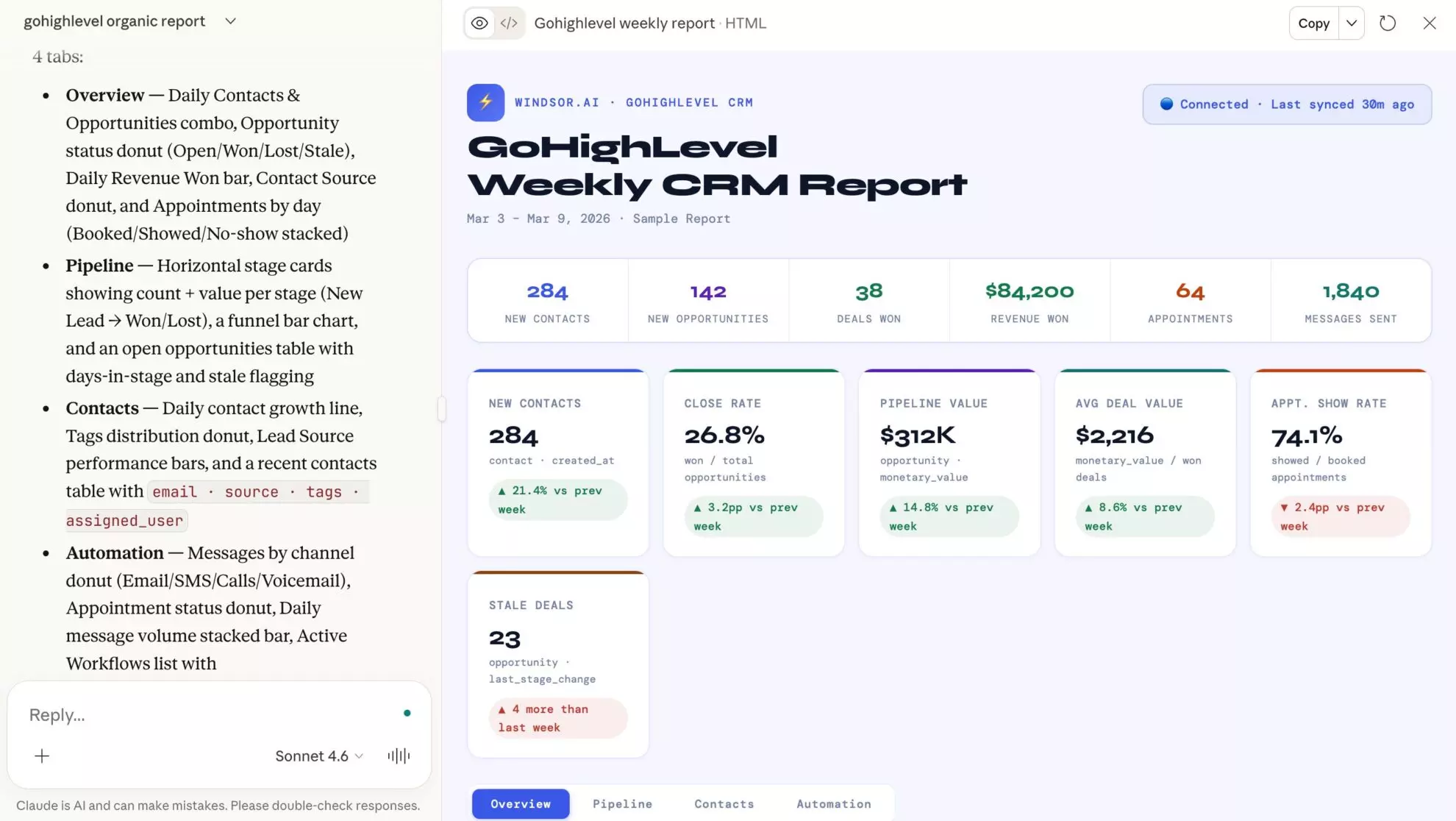
Identify stalled deals, top-performing campaigns, and high-priority leads through natural language, then act: add a contact, update a record, or draft an invoice without leaving the chat.
Forget CSVs. Stop copy/paste. Connect data in minutes. No code required.
 Sign up with Google
 Free forever plan









Make the most out of your data with GoHighLevel to Claude integration
Windsor MCP turns raw CRM and marketing automation data into direct answers in Claude with no dashboards or manual exports. Key benefits include:

Instant AI analysis
Instead of writing SQL queries or building dashboards, Claude analyzes your GoHighLevel data in seconds. It interprets metrics and context, instantly delivering reports, KPI summaries, and insights you need for faster decision-making.

Natural language queries
Ask Claude questions in natural language like “Which campaigns generated the most qualified leads in the last 14 days?” or “Which pipeline stages have the most stalled leads?” Get structured answers and action plans to boost conversions and revenue.

Unified view across channels
Combine GoHighLevel with 350+ sources, including Meta Ads, Google Ads, Mailchimp, and GA4 to uncover gaps and pinpoint optimization opportunities across marketing and sales, all without switching between tools.

Spot high-value opportunities
Usingopportunity_monetary_value and recent activity, Claude identifies your top potential deals. Prioritize these opportunities for sales outreach and maximize revenue impact.

Detect revenue leaks
Ask Claude to evaluate orders, invoices, discounts, and refund metrics to find where revenue is being lost. It can also suggest pricing or process adjustments to protect margins.

Multi-account client management
Skip logging into each client’s GoHighLevel sub-account separately. Windsor.ai connects multiple accounts at once, so you can check any client’s pipeline or campaign performance from a single Claude conversation.
Using Windsor.ai to connect data from GoHighLevel to Claude
Connect GoHighLevel with Claude without manual exports, technical setup, or costly tools. Windsor.ai’s connector automatically pulls, organizes, and delivers GoHighLevel metrics to Claude in minutes.
Connect once and start analyzing leads, pipeline progress, and campaign performance metrics using simple prompts.
Available actions
Create Contact Create a contact in the connected GoHighLevel location. Provide at least one of first_name, last_name, name, email or phone; the rest (company, address, website, timezone, source, tags) are optional. GoHighLevel deduplicates on email/phone within the location, so a matching contact may be updated instead of a new one created. Use update_contact to change an existing contact by id.
Create a contact in the connected GoHighLevel location. Provide at least one of first_name, last_name, name, email or phone; the rest (company, address, website, timezone, source, tags) are optional. GoHighLevel deduplicates on email/phone within the location, so a matching contact may be updated instead of a new one created. Use update_contact to change an existing contact by id.
Update Contact Update an existing GoHighLevel contact by id. Only the fields you provide are changed; omit a field to leave it untouched. Tags replace the contact's existing tags rather than adding to them. The contact_id can be obtained from a GoHighLevel contacts query or the create_contact result.
Update an existing GoHighLevel contact by id. Only the fields you provide are changed; omit a field to leave it untouched. Tags replace the contact's existing tags rather than adding to them. The contact_id can be obtained from a GoHighLevel contacts query or the create_contact result.
Create Invoice Create a draft invoice in the connected GoHighLevel location for an existing contact. Provide the contact_id, a business_name, a currency (ISO code such as USD), issue and due dates (YYYY-MM-DD) and at least one line item (name, amount, optional qty and description). Item amounts are per-unit in the invoice currency. The invoice is created as a draft and is not sent to the contact; send it from the GoHighLevel UI. contact_id comes from a GoHighLevel contacts query or the create_contact result.
Create a draft invoice in the connected GoHighLevel location for an existing contact. Provide the contact_id, a business_name, a currency (ISO code such as USD), issue and due dates (YYYY-MM-DD) and at least one line item (name, amount, optional qty and description). Item amounts are per-unit in the invoice currency. The invoice is created as a draft and is not sent to the contact; send it from the GoHighLevel UI. contact_id comes from a GoHighLevel contacts query or the create_contact result.














How to connect GoHighLevel to Claude with Windsor.ai
Explore our video tutorial and a step-by-step guide to integrate your data from any source into Claude with the Windsor.ai connector.
Select your data source
Choose GoHighLevel as your data source and grant access to Windsor.ai.

Install the Windsor.ai connector in Claude
In Claude, open Customize, then Connectors, search for Windsor and click Add. Sign in to your Windsor.ai account when prompted, and the connector appears in your Connectors list. You can also open the Windsor.ai listing in the Claude directory and click Connect.

Query your data in Claude
Start a new chat and ask Claude questions about your connected data: summarize KPIs, create client reporting dashboards, or run advanced analyses.

FAQs
How to connect GoHighLevel to Claude?
Connect GoHighLevel to Claude in three steps using Windsor.ai:
- Log in to Windsor.ai and connect your GoHighLevel account
- Install the Windsor.ai connector from the Claude directory
- Authorize access and start asking Claude questions about your connected data
Can Claude make changes in GoHighLevel, or only read it?
Both. Alongside reporting, Claude can create a contact, update an existing contact, and raise an invoice in the locations you connect. Invoices are created as drafts for you to review and send, contact updates only change the fields you name, and Claude shows you the record before it writes. The Available actions list above is pulled live from the Windsor.ai API, so it always reflects what is supported today.
What GoHighLevel metrics I can analyze in Claude with Windsor.ai?
With Windsor.ai’s GoHighLevel Claude connector, you can access 200+ metrics and dimensions, including:
- Contacts and conversation metrics: contact info, assigned user, tags, last message, message direction, unread count.
- Sales and opportunities: pipeline stages, monetary value, orders, discounts, payments, invoices, refunds.
- Tasks and users data: task title, task body, due date, completion status, user name, email, phone, and deletion status.
- Location information: business name, address, city/state/country, website, social links, timezone.
How do marketing agencies use GoHighLevel data in Claude?
Agencies running client campaigns in GoHighLevel normally have to log into each client’s sub-account separately and stitch together reports by hand. Windsor.ai connects multiple GoHighLevel accounts, so agencies can ask Claude directly about any client’s pipeline, campaign performance, or lead activity, and then invoice or update contacts in the account that needs it. One interface, every account, no manual roll-up.
What prompts can I use when analyzing GoHighLevel data in Claude?
Beyond basic performance summaries, you can use more advanced, specific prompts to uncover deeper insights. For example:
-
Analyze my [Pipeline Name] for the last 90 days. Identify the stage with the longest 'lead stagnation' and the highest drop-off rate. Suggest three GHL automation triggers, like SMS nudges or internal tasks, to accelerate these bottlenecks.
-
Review conversation logs from all 'Lost' opportunities in the past 6 months. Cluster the top 3 recurring objections and draft a sales team response script specifically designed to overcome these patterns.
-
Compare opportunity_assigned_to with opportunity_status. Rank sales reps based on their 'Lead-to-Won' conversion rate and the average speed of stage changes. Identify the winning habits of the top rep to share with the rest of the team.
How much does it cost to integrate GoHighLevel into Claude using Windsor.ai?
Windsor.ai’s pricing for Claude data integration varies depending on the number of connected accounts and data sources. We offer absolutely transparent pricing plans for diversified business needs and budgets.
How long does it take to connect GoHighLevel to Claude?
With Windsor.ai’s easy-to-use connector, the integration process takes just a few minutes. No technical expertise is needed; connecting GoHighLevel to Claude is simple, straightforward, and completely code-free.
Do you have helpful links to get started with integrating GoHighLevel and Claude using Windsor.ai?
Yes, we have helpful resources to help you get started. You can explore our official documentation and tutorials for seamless GoHighLevel to Claude integration with Windsor.ai:
Can Claude help me identify stalled leads?
Yes. By analyzing the last_activity and opportunity_status fields, Claude can flag stalled leads and suggest re-engagement workflows to bring them back into the sales cycle, then update those contacts so the follow-up is tracked.
Can I combine GoHighLevel data with ad spend from Meta or Google?
Absolutely. Windsor.ai supports integration with 350+ data sources. Merge GoHighLevel data with Meta Ads or Google Ads spend to calculate ROAS from closed deals, and see which channels and campaigns drive the most revenue and leads.
Who is the GoHighLevel to Claude integration for?
Built for marketing agencies and consultants running client campaigns in GoHighLevel who want one place to check on every account. It’s also useful for CMOs using GoHighLevel as their CRM who want pipeline answers without pulling a report.
Tired of manual GoHighLevel data exports? Try Windsor.ai today to automate your reporting


