 Destinations
 Data sources
 AI insights
 About us
 Careers
 Security
 Customer reviews
 Contact us
 Affiliate program
 Solution partners
 Template gallery
 Looker Studio templates
 Power BI templates
 Excel templates
 Google Sheets templates
 Tableau templates
 Facebook Ads templates
 Google Ads templates
 Data fields & Metrics
 AI prompt library & Guides
 Product documentation
 API documentation
 Case studies
 Blog
Blog Data models
 Windsor vs Supermetrics
 Windsor vs Funnel.io
 Windsor vs Fivetran
 Windsor vs Rivery
 Windsor vs Portermetrics
 Windsor vs Coupler.io
Connect Vantage to Claude
Automatically sync your Vantage cloud cost data to Claude using the Windsor.ai connector.
Ask Claude plain-English questions about provider coverage, service mapping, and report freshness, and get instant AI-driven insights on where your cloud cost visibility has gaps.
Forget CSVs. Stop copy/paste. Connect data in minutes. No code required.
 Sign up with Google
 Free forever plan
No credit card needed
Free forever plan
No credit card needed










Get instant AI insights from your Vantage cloud cost data in Claude
Windsor.ai streams your live Vantage provider, service, and report data into Claude, so you skip manual catalog exports and go straight to what needs attention. Explore a few key use cases:

Centralize multi-cloud coverage
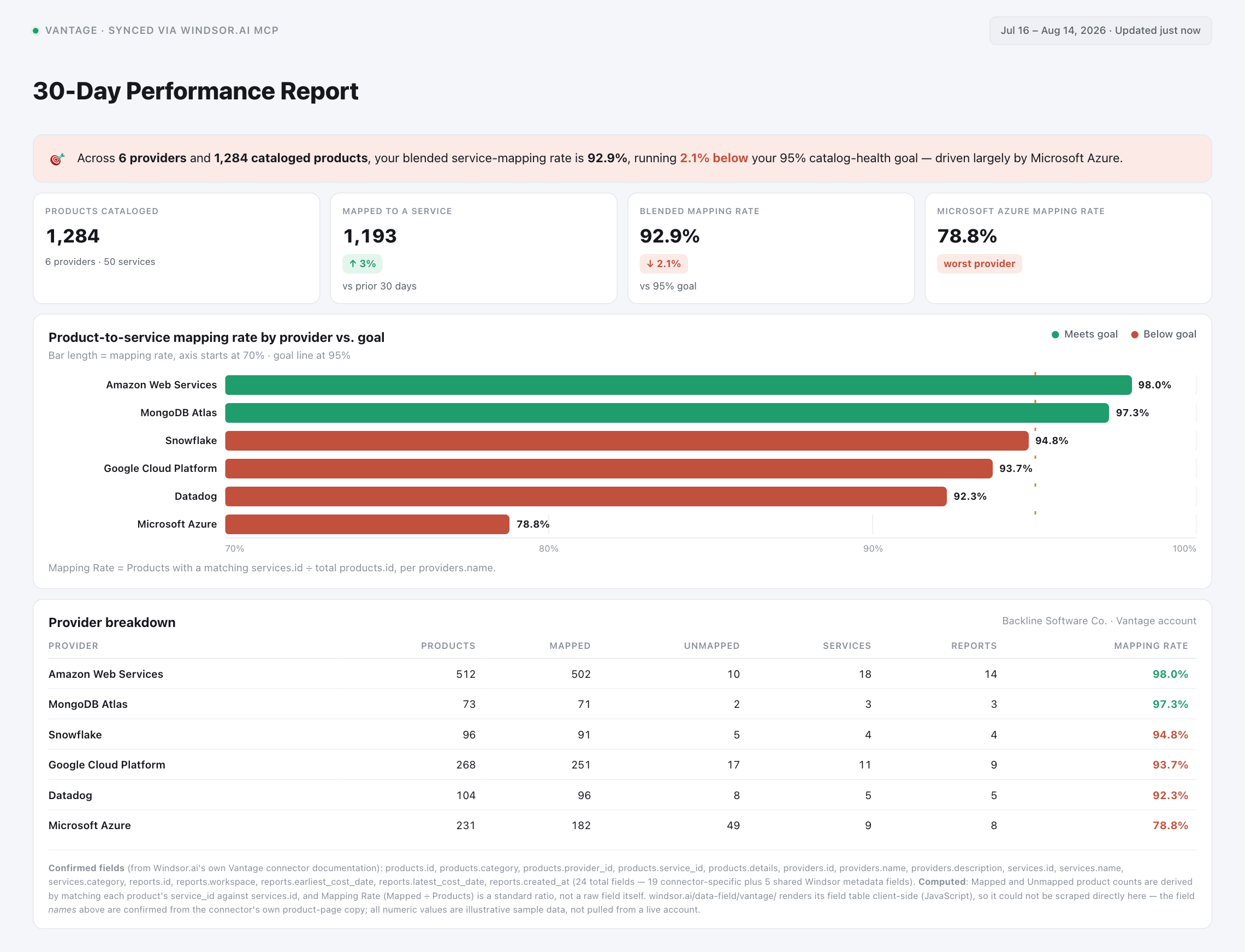
Bring Vantage’s AWS, GCP, and Azure provider and product catalog into one place. Ask Claude for a quick count of products per provider to spot lopsided or thin cataloging at a glance.

Catch stale cost reports early
Compare each report’s latest_cost_date against its created_at timestamp to flag workspaces where cost data hasn’t refreshed recently, before a stale report skews a budget review.

Audit service-to-product mapping
Cross-reference services and products by provider_id and service_id to spot products that aren’t mapped to a service category, a common blind spot in cloud cost catalogs.

Blend cloud coverage with business data
Combine Vantage’s provider and report data with engineering, finance, or business metrics from 350+ other platforms in Claude to see how cloud catalog health lines up with the rest of the business.
Using Windsor.ai to connect data from Vantage to Claude
Feeding Vantage data into Claude usually means manual exports, data prep, or costly cloud-cost management platforms, especially when cross-referencing catalog tables by hand to see where your cost visibility has gaps. Windsor.ai removes that friction with an MCP connector that automatically collects, structures, and streams your Vantage data directly into Claude.
Connect in minutes and start asking Claude natural-language questions about coverage, stale reports, and service mapping.














How to connect Vantage to Claude with Windsor.ai
Explore a step-by-step guide to integrate your Vantage data into Claude with the Windsor.ai connector.
Select your data source
Choose Vantage as your data source and grant access to Windsor.ai.

Install the Windsor.ai connector in Claude
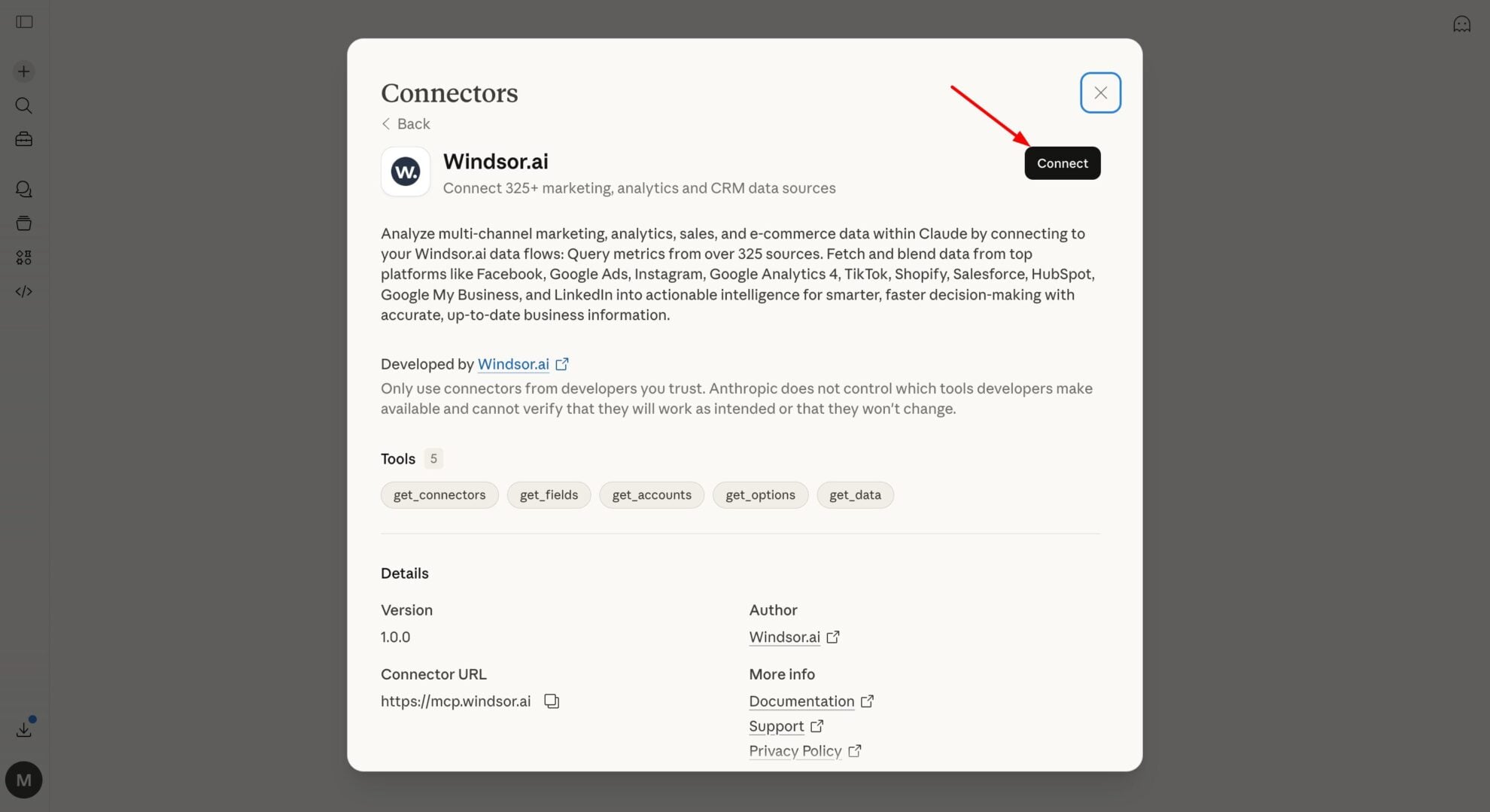
In Claude, open Customize, then Connectors, search for Windsor and click Add. Sign in to your Windsor.ai account when prompted, and the connector appears in your Connectors list. You can also open the Windsor.ai listing in the Claude directory and click Connect.
Query your data in Claude
Start a new chat and ask Claude about your Vantage cloud cost data: audit coverage, check report freshness, or run advanced analyses.
FAQs
What Vantage data can I analyze in Claude?
Windsor.ai gives Claude access to all 24 Vantage fields (19 connector-specific fields plus 5 shared Windsor metadata fields), organized into groups such as:
- Products (6 fields): products.category, products.id, products.name, products.provider_id, products.service_id, products.details.
- Providers (3 fields): providers.id, providers.name, providers.description.
- Services (4 fields): services.id, services.name, services.category, services.description.
- Reports (6 fields): reports.id, reports.title, reports.workspace, reports.earliest_cost_date, reports.latest_cost_date, reports.created_at.
Can Claude compare cost reporting coverage across workspaces?
Yes. Each report includes a workspace name along with earliest_cost_date and latest_cost_date, so Claude can compare how many reports exist per workspace and whether their date ranges overlap or leave gaps.
Can Claude map which cloud provider each product belongs to?
Yes. Every product record includes a provider_id and a service_id, so Claude can join products back to their provider and service names to show exactly which AWS, GCP, or Azure entry each product rolls up to.
What prompts can I use to analyze Vantage data in Claude?
-
Claude, which providers have products without a matching service_id, and what services under providers.description could cover them?
-
Group reports by workspace and show the earliest_cost_date and latest_cost_date range for each. Which workspace has the longest reporting history?
-
List service categories with the highest number of mapped products across all providers.
-
Find reports created in the last 30 days and compare their workspace names against our provider list. Are we tracking cost reports for every connected provider?
How much does it cost to integrate Vantage into Claude using Windsor.ai?
Windsor.ai is free to start, no credit card required. Paid plans start at $19/month and scale by the number of sources and accounts. See the pricing page.
Can I combine Vantage data with other channels in Claude?
Yes. Windsor.ai supports 350+ data sources, so you can connect Vantage alongside engineering or finance tools to see cloud cost catalog health next to the rest of the business.
Do you have helpful links to get started with integrating Vantage and Claude using Windsor.ai?
Yes, we have helpful resources to help you get started. You can explore our official documentation and tutorials for seamless Vantage to Claude integration with Windsor.ai:
Tired of manual Vantage data exports? Try Windsor.ai today to automate your reporting


