Destinations
 Data sources
 AI insights
 About us
 Careers
 Security
 Customer reviews
 Contact us
 Affiliate program
 Solution partners
 Template gallery
 Looker Studio templates
 Power BI templates
 Excel templates
 Google Sheets templates
 Tableau templates
 Facebook Ads templates
 Google Ads templates
 Data fields & Metrics
 AI prompt library & Guides
 Product documentation
 API documentation
 Case studies
 Blog
Blog Data models
 Windsor vs Supermetrics
 Windsor vs Funnel.io
 Windsor vs Fivetran
 Windsor vs Rivery
 Windsor vs Portermetrics
 Windsor vs Coupler.io
 Last updated: 1 October 2026




The Google Analytics MCP server is Google’s open-source server that lets an AI assistant run read-only reports on your GA4 properties. It speaks the Model Context Protocol (MCP), the standard AI assistants use to call outside tools. You install it on your own computer and sign in with your Google account. Then you add it to an MCP client such as Claude Code or Gemini CLI.
There are three ways to get GA4 into an AI assistant through MCP:
- Google’s local server. Free and open source, read-only, and labelled experimental. It needs a Google Cloud project, Python and the Google Cloud CLI.
- Google’s hosted endpoint for the Analytics Data API. Four reporting tools behind Google sign-in, with no install. Its documentation was not public when this was written.
- A hosted connector such as Windsor.ai. Nothing to install, and it works in ChatGPT, which only accepts remote servers. It can also put Search Console, Google Ads and other sources in the same conversation.
Whichever route you pick, GA4’s own data rules still apply. When we ran GA4 through MCP on windsor.ai, three of them changed the answers:
- Hostname is recorded per event, not per session. Adding it to a report raised our Google organic sessions from 122,285 to about 163,000.
- The same page path can exist on two hosts. On one of our commercial pages, a join on the path alone added 27% to its sessions.
- About 19% of our Google organic sessions had no landing page (“(not set)”), which lowered every page-level ratio.
What the Google Analytics MCP server can do
The local server exposes seven tools, listed in its README on GitHub. They read your GA4 configuration and run reports; none of them can change a setting. Google’s developer page for the server states the same: it handles read requests only.
| Tool | What it returns |
|---|---|
| get_account_summaries | Your GA4 accounts and properties |
| get_property_details | Details of one property |
| list_google_ads_links | Google Ads accounts linked to a property |
| get_custom_dimensions_and_metrics | The custom fields defined on a property |
| run_report | A standard report: dimensions, metrics, filters and date ranges |
| run_funnel_report | A funnel report |
| run_realtime_report | Realtime data from the last 30 minutes |
Every report goes through the Google Analytics Data API, so its limits apply (see our GA4 Data API guide). One request takes at most 10 metrics and 9 dimensions, and some dimensions and metrics cannot be combined. When a question needs more, the assistant has to split it into several requests and join the results itself. That join is where most wrong answers come from (see “Check the numbers” below).
The server reads GA4 only. It cannot see Search Console, Google Ads spend beyond what GA4 imports, or your CRM. Questions that need those sources need a second server or a connector that carries them. Google has no MCP server for Search Console; the options are in Google Search Console MCP.
The three routes compared
| Route | Setup | Works in | Sources |
|---|---|---|---|
| Google’s local server | Cloud project, APIs, OAuth client, Python, gcloud | Claude Code, Gemini CLI | GA4 |
| Google’s hosted Data API endpoint | Google sign-in through an OAuth client | Remote-capable MCP clients (not verified end to end) | GA4 reports |
| Hosted connector (Windsor.ai) | Sign in, pick the GA4 property | Claude, ChatGPT, Gemini, Copilot, Claude Code | GA4 plus 350+ sources |
The local server suits a developer who wants Google’s own code and is comfortable with the Cloud console. A hosted connector suits someone who wants the answer in the assistant they already use, or who needs GA4 next to Search Console or ad spend.
How to set up Google’s local server
Before you start
- Python 3.10 or newer, and pipx.
- The Google Cloud CLI (gcloud).
- A Google Cloud project where you can enable APIs.
- A Google account with at least Viewer access to the GA4 property.
Step 1: enable the two Analytics APIs
In the Google Cloud console, open your project and enable the Google Analytics Admin API and the Google Analytics Data API. The server calls the first for account and property details and the second for reports.
Step 2: create credentials
The README’s sign-in command expects an OAuth client file. Create one in the console (APIs and Services, Credentials, Create credentials, OAuth client ID, type Desktop app) and download the JSON. Then run:
gcloud auth application-default login --scopes https://www.googleapis.com/auth/analytics.readonly,https://www.googleapis.com/auth/cloud-platform --client-id-file=YOUR_CLIENT_JSON_FILEA browser window opens for you to sign in. When it finishes, gcloud prints the path of the credentials file it saved. You need that path in the next step. Teams that prefer not to use personal credentials can impersonate a service account instead; the README gives that command too.
Step 3: add the server to your client
Claude Code (one command, from the README):
claude mcp add analytics-mcp --scope user -e "GOOGLE_APPLICATION_CREDENTIALS=PATH_TO_CREDENTIALS_JSON" -e "GOOGLE_PROJECT_ID=YOUR_PROJECT_ID" -- pipx run analytics-mcpGemini CLI: add the server under mcpServers in ~/.gemini/settings.json:
"analytics-mcp": {
  "command": "pipx",
  "args": ["run", "analytics-mcp"],
  "env": {
    "GOOGLE_APPLICATION_CREDENTIALS": "PATH_TO_CREDENTIALS_JSON",
    "GOOGLE_PROJECT_ID": "YOUR_PROJECT_ID"
  }
}
Step 4: check that it works
Restart the client and ask for something with a known answer:
List my Google Analytics accounts and properties, then show sessions for the last 7 full days for [property name], leaving out today.
Compare the number with the GA4 interface for the same dates. Leaving out today matters: GA4’s current day is always incomplete.
Google’s hosted endpoint for the Data API
Google also runs a remote MCP endpoint for the Analytics Data API at https://analyticsdata.googleapis.com/mcp/v1. We tested it on 30 September 2026:
- It answers the MCP handshake.
- It lists four tools: run_report, get_metadata, run_realtime_report and check_compatibility.
- It refuses tool calls without a Google OAuth token. Its sign-in metadata points to accounts.google.com, with the read-only or full Analytics scope.
It is part of Google’s wider move to host MCP servers for its own APIs. For now, its reference page on developers.google.com returns an error, so treat it as unannounced. It has no install, but your MCP client still needs a Google OAuth client to sign in, and we have not yet completed a connection from Claude. We will update this section when Google documents it.
GA4 in ChatGPT
ChatGPT accepts MCP servers only as remote HTTPS connectors in Developer Mode (Plus, Pro, Business, Enterprise and Edu, on the web). It cannot start a local server, so Google’s local server does not work in ChatGPT directly.
Three things do work: a hosted connector, a remote deployment of the open-source server that you run yourself, or Google’s hosted endpoint once it is documented. Windsor.ai is listed in ChatGPT as a plugin: install it, sign in and pick your GA4 property.
The hosted route: Windsor.ai
Windsor.ai’s MCP server runs on our side, so there is no Cloud project or local install. In Claude, open Customize, then Connectors, search for Windsor and click Add. In ChatGPT, install the Windsor plugin. In Claude Code, run claude plugin install windsor-ai. Sign in to Windsor.ai and connect GA4 once; the assistant can then query it.
GA4 through Windsor is read-only, the same as Google’s server. The difference is what else sits in the conversation. Search Console, Google Ads, Meta Ads, your CRM and 350+ other sources go through the same connector, so a question like “which landing pages get Search Console clicks but lose sessions in GA4” is one prompt.
Windsor.ai has a free forever plan with one data source, and no credit card is needed. The first 30 days include more sources for testing. Questions that combine GA4 with a second source need a paid plan after that, from $19 a month (billed annually) for three sources, or $99 a month for seven. See pricing.
Check the numbers before you act on them
These checks apply to every route, because they come from how GA4 records data. I ran GA4, Search Console and Google Ads through Claude on windsor.ai’s own properties in September 2026, and each of them changed an answer.
The figures below come from windsor.ai’s GA4 property and its Search Console domain property, 2 to 29 September 2026, pulled through the Windsor.ai connector in Claude. Sessions are Google organic sessions (session source google, medium organic). I then pulled the same fields for the same dates a second time, outside the chat, and every figure quoted here matched.
Match the host before you join on the page path. GA4’s landing page is a path without the hostname. If one property tracks your site and a subdomain (an app, a help center), the same path on both hosts is added together. Add the hostname dimension and filter to one host. Be aware that hostname is recorded per event, so a session that starts on your site and moves to the subdomain is counted under both. On windsor.ai that raised Google organic sessions from 122,285 to about 163,000.

Claude’s note from our Search Console and GA4 test on windsor.ai, 30 September 2026.
Expect Search Console and GA4 to disagree. Clicks and sessions are different counts. Visitors who decline the cookie banner, ad blockers and visitors who leave before the tag fires all remove sessions. A click can also become no session, or several clicks one session. On our content pages GA4 recorded 0.8 to 0.9 organic sessions per Search Console click. Read the trend in each source separately; the totals will not match.
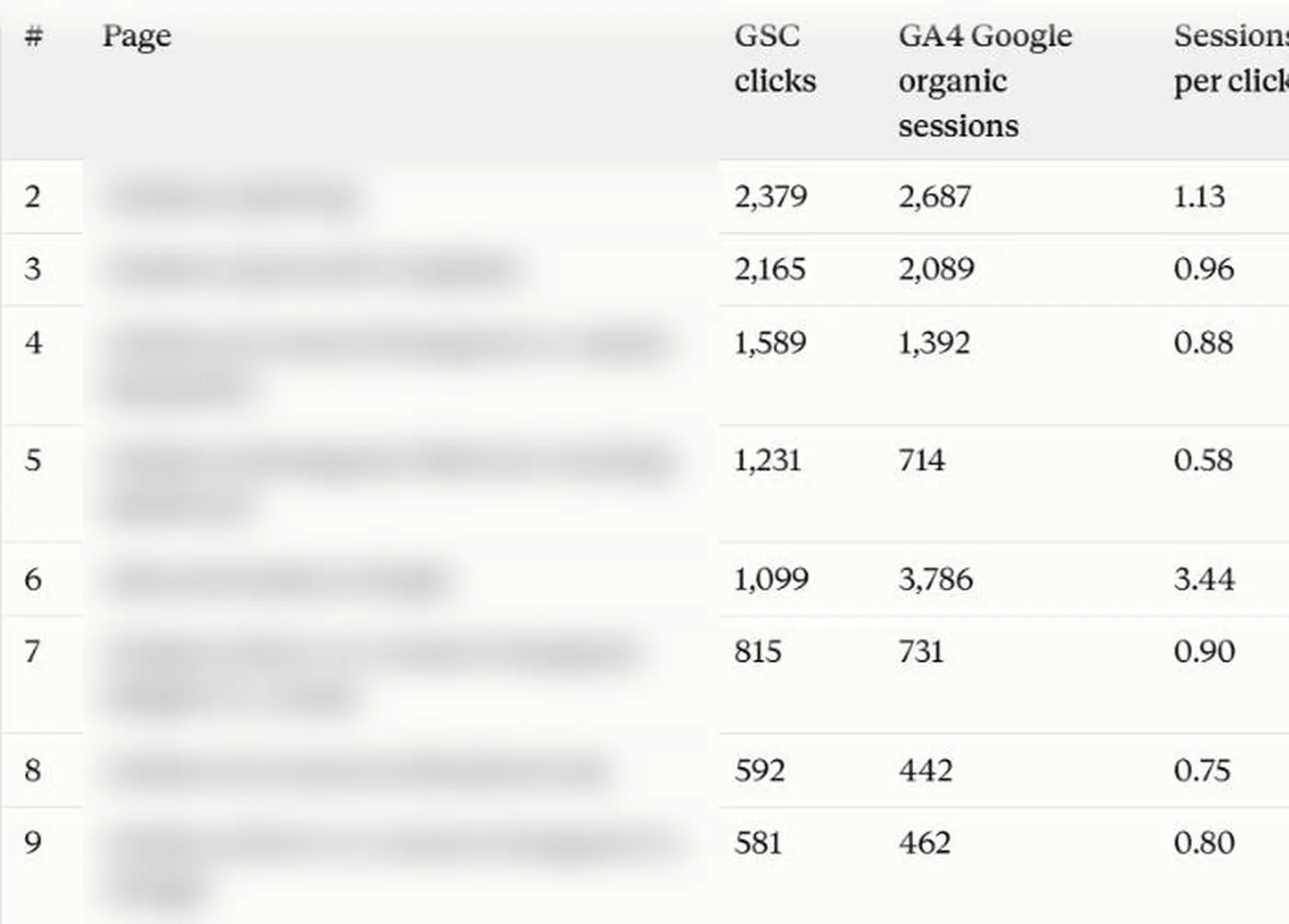
Part of Claude’s answer in the same test, with page names blurred. The 3.44 row is a login page: returning visitors who first came from Google keep that source in GA4.
Look at the “(not set)” landing page before you rank pages. About 19% of our Google organic sessions had none, which usually means a session without a page_view event. Every page-level ratio in a report is lower by that share.

Filter internal traffic before a before-and-after. On one page we updated, GA4 engagement looked much better afterwards. Claude traced it to 10 sessions with 30 to 50 page views each, which was us checking our own page. Without them, the result was flat.
Ask for the session count next to every rate, and ask whether a change is noise. Two sessions a day cannot show a 10-point change in engagement rate. Claude estimated about 400 sessions per period for that.
When a number looks too good or too bad, ask Claude to check it. Paste this into the same chat:
Are you sure [the number]? That looks large. Check it again, return the value after the check, and tell me the exact setup you used: fields, filters, date range and how you matched the data.
In our test Claude re-pulled both sources by day, dropped a filter to see whether it was hiding data, confirmed the figure and listed its setup.
Google Ads conversions and GA4 key events are often different actions. When we compared the two by campaign, the conversion definitions explained most of the gap. Compare the one event both sides share before you read the rest.
Prompts to start with
These use only GA4 fields, so they work on Google’s server and on a hosted connector.
Show sessions, engagement rate and key events by session default channel group for the last 28 full days, leaving out today, next to the 28 days before.
Which landing pages from Organic Search had the most sessions in the last 28 full days? Add engagement rate, average engagement time per session and key events, and give the session count next to every rate.
Compare views per session and engagement time per session for sessions landing on [page] in the 28 days before and after [date]. Tell me which differences are large enough to read.
List the events recorded in the last 7 days with their counts, and mark which ones are key events.
Conclusion
Google’s local server is the free, official way to put GA4 into an MCP client, if you are comfortable with a Cloud project and an OAuth client. A hosted connector skips that setup, works in ChatGPT, and puts GA4 next to your other sources. Either way, check hosts, “(not set)” and internal traffic before you trust a page-level answer.
For Claude specifically, see how to connect GA4 to Claude. For the before-and-after and competing-pages checks, see how I catch keyword cannibalization with Search Console and Claude. For GA4 field names, see the GA4 field reference and the unexpected field error guide.
🚀 Connect GA4 to Claude or ChatGPT with Windsor.ai. Free forever plan, no credit card. Try Windsor.ai.
FAQs
Is the Google Analytics MCP server free?
Yes. The server is free and open source. You need a Google Cloud project to enable the APIs, and the Analytics API requests it makes are subject to Google’s standard quotas.
Can the Google Analytics MCP server change my GA4 settings?
No. Both Google’s local server and its hosted endpoint only read data. Windsor.ai’s GA4 connector is read-only as well.
Does the Google Analytics MCP server work with ChatGPT?
No, not the local server. ChatGPT only connects to remote MCP servers over HTTPS. Use a hosted connector such as the Windsor.ai plugin, or deploy the server remotely yourself.
Can I combine GA4 with Search Console or Google Ads through MCP?
Yes, but not with Google’s GA4 server alone, which reads GA4 only. Add a second server for the other source, or use a connector that carries both. Windsor.ai connects GA4, Search Console, Google Ads and 350+ other sources through one connector.