 Destinations
 Data sources
 AI insights
 About us
 Careers
 Security
 Customer reviews
 Contact us
 Affiliate program
 Solution partners
 Template gallery
 Looker Studio templates
 Power BI templates
 Excel templates
 Google Sheets templates
 Tableau templates
 Facebook Ads templates
 Google Ads templates
 Data fields & Metrics
 AI prompt library & Guides
 Product documentation
 API documentation
 Case studies
 Blog
Blog Data models
 Windsor vs Supermetrics
 Windsor vs Funnel.io
 Windsor vs Fivetran
 Windsor vs Rivery
 Windsor vs Portermetrics
 Windsor vs Coupler.io
Connect Typeform to Claude
Automatically sync your Typeform forms, responses, and workspace data to Claude using the Windsor.ai connector.
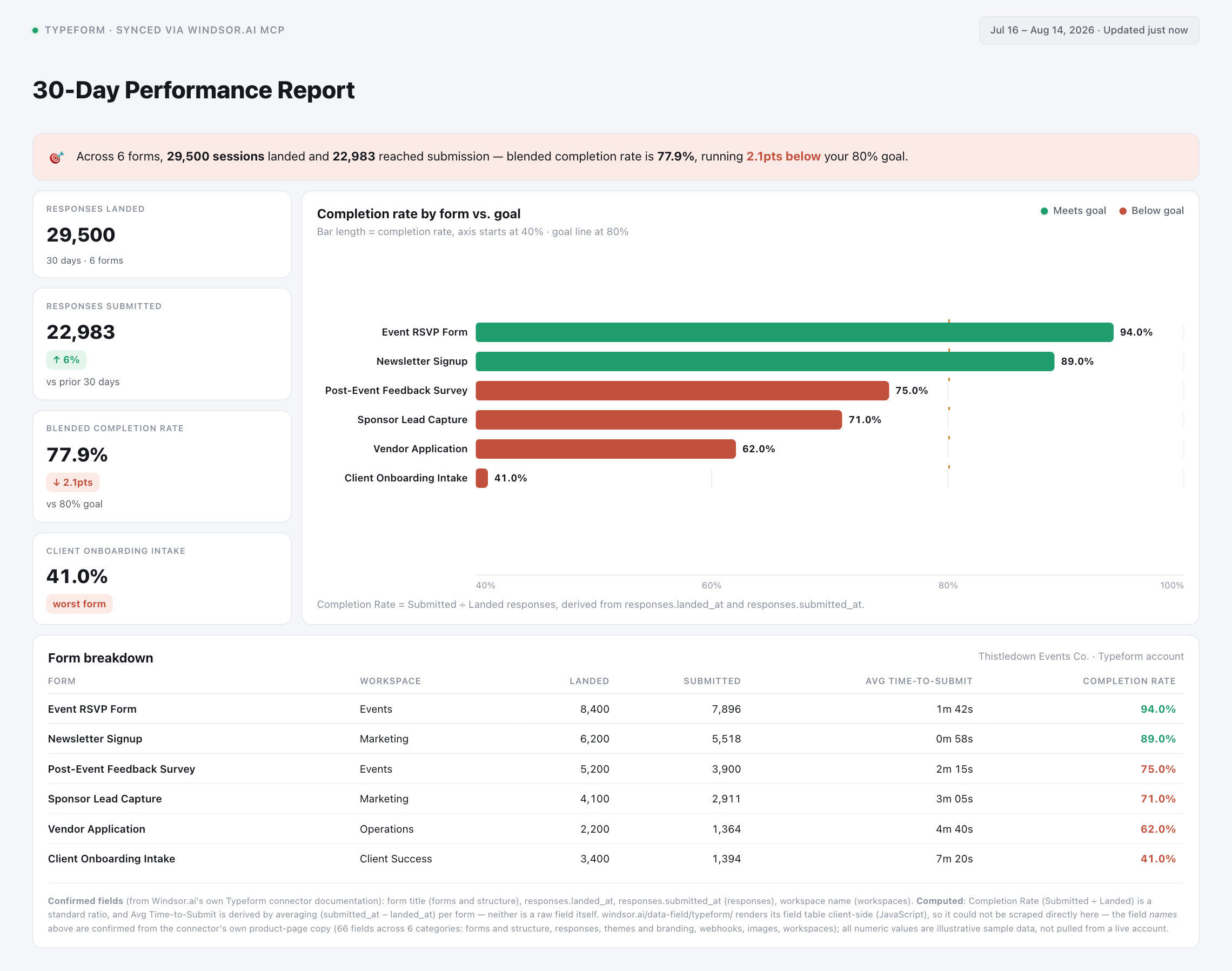
Chat with your Typeform data in plain language to see where respondents drop off, catch webhooks that went stale, and segment responses by hidden fields, without exporting a single CSV.
Forget CSVs. Stop copy/paste. Connect data in minutes. No code required.
 Sign up with Google
 Free forever plan
No credit card needed
Free forever plan
No credit card needed










Get instant form insights from your Typeform data in Claude
Windsor.ai streams your Typeform forms, responses, themes, webhooks, and workspaces directly into Claude, so you can go from a question to an answer without exporting anything. A few ways teams use it:

Spot where respondents abandon your form
Cross-reference each response’s landing time against its submission time to see how many visitors open a form but never finish it.

Catch webhooks that silently went stale
Break down enabled and disabled webhooks by form to catch integrations that stopped firing after a question was edited.

Track how fast new forms go live
Compare a form’s created date against its published and last-updated dates to see how quickly forms move from draft to live across your workspaces.

Segment responses by acquisition source
Pull the hidden fields passed through your form links to group completed responses by campaign, source, or customer segment.
Using Windsor.ai to connect data from Typeform to Claude
Piping Typeform data into Claude usually means manual exports, response cleanup, or costly form-analytics tools, especially when cross-referencing timestamps by hand to spot where respondents abandon a form. Windsor.ai removes that friction with an MCP connector that automatically collects, structures, and streams your Typeform data directly into Claude.
Connect in minutes and start asking Claude natural-language questions about drop-off, webhook health, and response segmentation.














How to connect Typeform to Claude with Windsor.ai
Explore a step-by-step guide to integrate your Typeform data into Claude with the Windsor.ai connector.
Select your data source
In your Windsor.ai dashboard, choose Typeform as your data source and grant access to Windsor.ai.

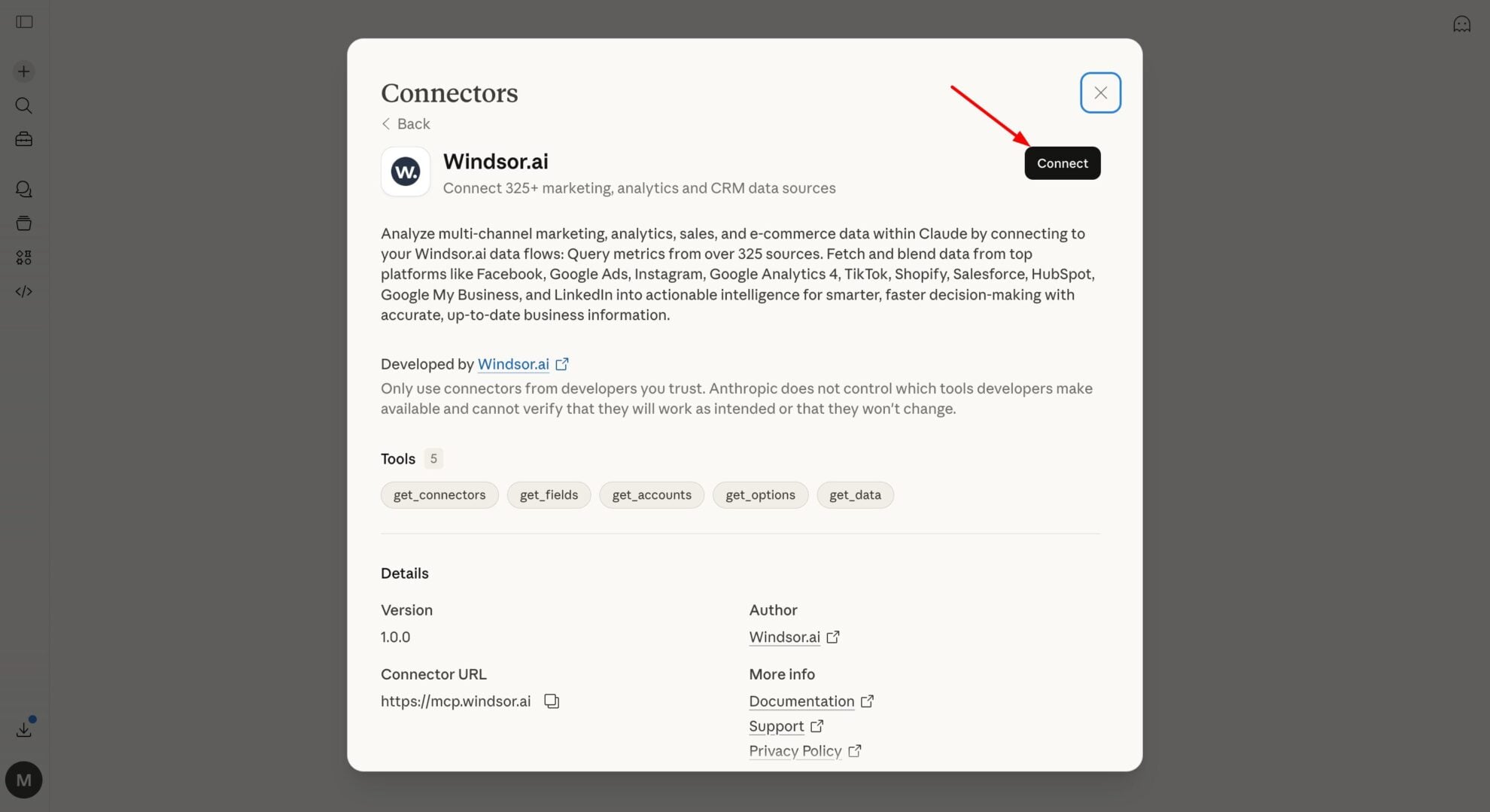
Install the Windsor.ai connector in Claude
In Claude, open Customize, then Connectors, search for Windsor and click Add. Sign in to your Windsor.ai account when prompted, and the connector appears in your Connectors list. You can also open the Windsor.ai listing in the Claude directory and click Connect.
Query your data in Claude
Start a new chat and ask Claude about your Typeform performance: summarize drop-off, audit webhooks, or run advanced analyses.
FAQs
What Typeform data can I analyze in Claude?
Windsor.ai gives Claude access to all 66 Typeform fields, organized by category:
- Forms and structure (14 fields): form title, type, created date, published date, last-updated date, logic, settings, welcome and thank-you screens.
- Responses (12 fields): response ID, landed-at time, submitted-at time, response type, answers, hidden fields, calculated scores, variables.
- Themes and branding (12 fields): theme name, font, colors, background, rounded corners, visibility, created and updated dates.
- Webhooks (8 fields): webhook URL, enabled status, tag, form ID, created and updated dates, SSL verification.
- Images (8 fields): file name, source URL, width, height, media type, average color.
- Workspaces (7 fields) and universal metadata (5 fields): workspace name, account ID, shared status, plus the data source and fetch-time fields Windsor adds to every connector.
Can Claude tell me which form is losing the most respondents mid-survey?
Yes. Windsor streams each response’s landed-at and submitted-at timestamps, so Claude can see exactly how many sessions landed on a form but never reached submission, and group that by form.
Can Claude compare response volume across workspaces?
Yes. Every form and response carries its workspace context, so Claude can total responses per workspace and flag which workspace’s forms are driving the most, or the least, activity.
What prompts can I use to analyze Typeform data in Claude?
-
Claude, compare response_type across forms to see which ones have the highest share of partial versus completed submissions.
-
For forms with a calculated scoring field, is average time-to-submit higher than for forms without one?
-
Which workspace has the most forms that were published but never had a single response?
-
Cross-reference webhook creation dates with form last-updated dates to flag webhooks that predate their form's most recent edit.
How much does it cost to integrate Typeform into Claude using Windsor.ai?
Windsor.ai is free to start, no credit card required. Paid plans start at $19/month and scale by the number of sources and accounts. See the pricing page.
Can I combine Typeform data with other channels in Claude?
Yes. Windsor.ai supports 350+ data sources, so you can connect Typeform alongside your CRM or email platform, such as HubSpot or Klaviyo, to see how form responses turn into pipeline or campaign activity.
Can Claude identify forms with outdated welcome or thank-you screens?
Yes. Each form stores its welcome and thank-you screen configuration alongside its last-updated date, so Claude can flag long-running forms whose screens haven’t changed in a while.
Do you have helpful links to get started with integrating Typeform and Claude using Windsor.ai?
Yes, we have helpful resources to help you get started. You can explore our official documentation and tutorials for seamless Typeform to Claude integration with Windsor.ai:
Tired of manual Typeform data exports? Try Windsor.ai today to automate your reporting


