 Destinations
 Data sources
 AI insights
 About us
 Careers
 Security
 Customer reviews
 Contact us
 Affiliate program
 Solution partners
 Template gallery
 Looker Studio templates
 Power BI templates
 Excel templates
 Google Sheets templates
 Tableau templates
 Facebook Ads templates
 Google Ads templates
 Data fields & Metrics
 AI prompt library & Guides
 Product documentation
 API documentation
 Case studies
 Blog
Blog Data models
 Windsor vs Supermetrics
 Windsor vs Funnel.io
 Windsor vs Fivetran
 Windsor vs Rivery
 Windsor vs Portermetrics
 Windsor vs Coupler.io
Connect AdRoll to Claude
Automatically sync your AdRoll retargeting and display campaign data to Claude using the Windsor.ai connector.
Ask Claude about spend, CPA, CTR, and conversions across every retargeting campaign to catch wasted budget and rising costs before they drain your results.
Forget CSVs. Stop copy/paste. Connect data in minutes. No code required.
 Sign up with Google
 Free forever plan
No credit card needed
Free forever plan
No credit card needed










Get instant AI insights from your AdRoll campaigns in Claude
Windsor.ai streams your live AdRoll retargeting data into Claude, so you skip the dashboard exports and go straight to the analysis. Explore a few key use cases:

Cut wasted retargeting spend
Ask Claude to flag which AdRoll campaigns have the highest CPA or lowest CTR this week, so you can pause underperforming segments before they burn through budget.

Compare campaigns side by side
Get spend, clicks, impressions, and conversions broken down by campaign in one prompt, instead of exporting a report from the AdRoll dashboard for each one.

Track performance trends by week
Break down clicks, impressions, and conversions by week, month, or year to see whether your retargeting campaigns are gaining or losing momentum.

Surface revenue-driving campaigns
Ask Claude which campaigns generate the most ad network revenue relative to total cost, so budget shifts toward what’s actually converting.
Using Windsor.ai to connect data from AdRoll to Claude
Bringing AdRoll data into Claude usually means manual exports, dashboard-hopping, or costly reporting tools, especially when comparing campaign-level CPA and CTR by hand to catch a retargeting segment that’s quietly burning budget. Windsor.ai removes that friction with an MCP connector that automatically collects, structures, and streams your AdRoll data directly into Claude.
Connect in minutes and ask Claude about spend, conversions, and revenue across every retargeting campaign.
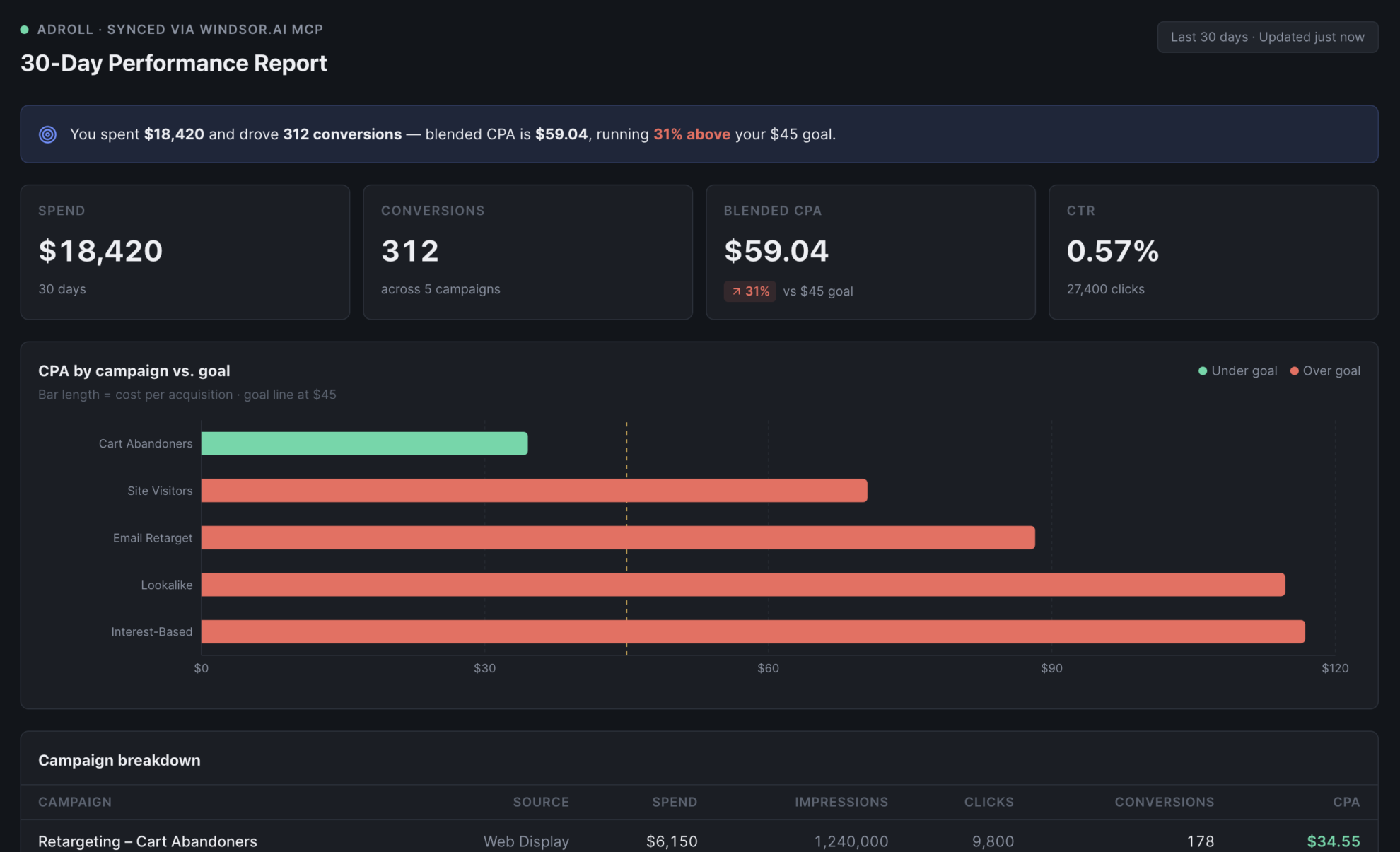














How to connect AdRoll to Claude with Windsor.ai
Explore a step-by-step guide to integrate your AdRoll data into Claude with the Windsor.ai connector.
Select your data source
Choose AdRoll as your data source and grant access to Windsor.ai.

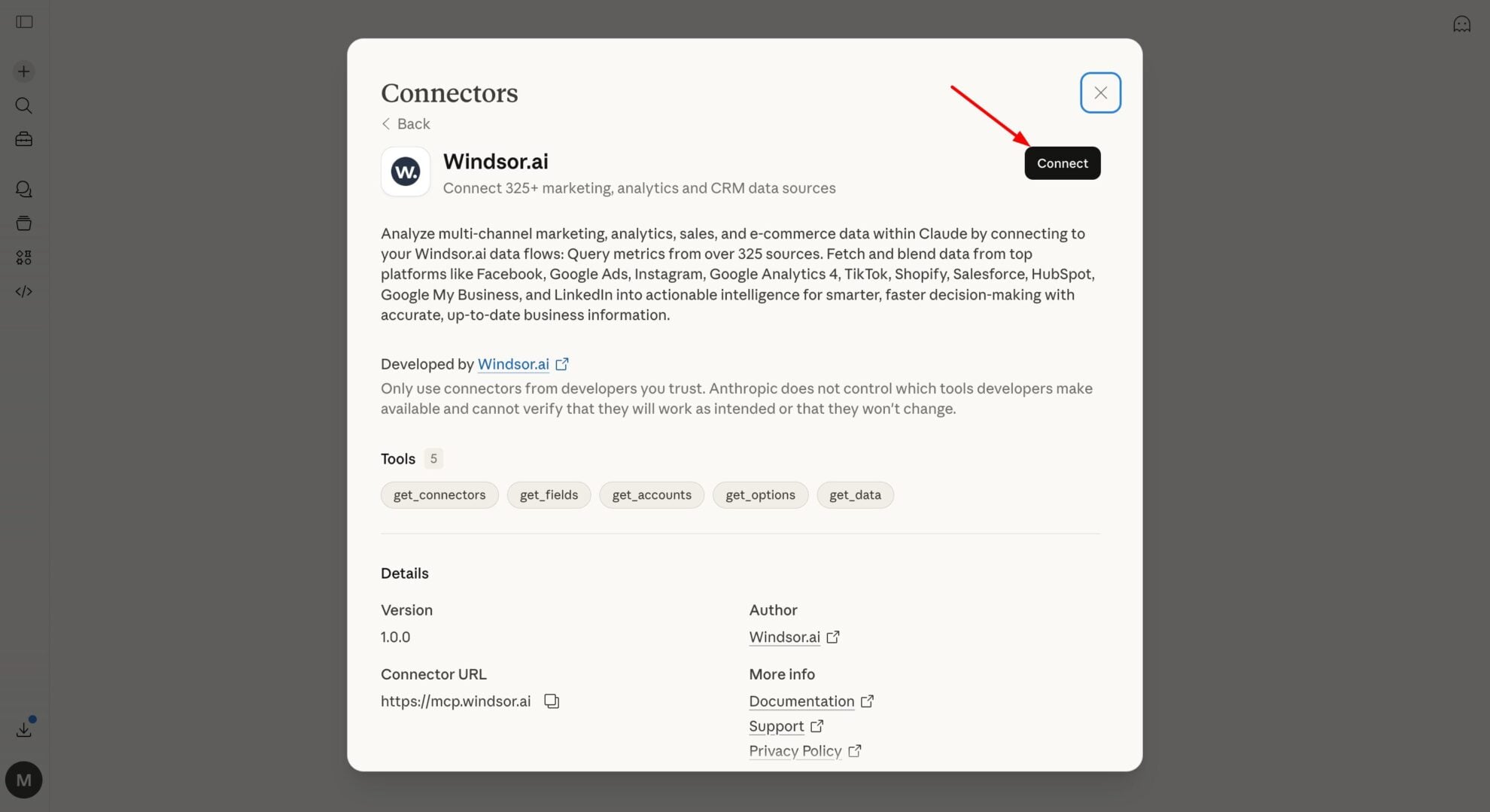
Install the Windsor.ai connector in Claude
In Claude, open Customize, then Connectors, search for Windsor and click Add. Sign in to your Windsor.ai account when prompted, and the connector appears in your Connectors list. You can also open the Windsor.ai listing in the Claude directory and click Connect.
Query your data in Claude
Start a new chat and ask Claude about your AdRoll performance: summarize KPIs, compare campaigns, or run advanced analyses.
FAQs
What AdRoll data can I analyze in Claude?
Windsor.ai gives Claude access to all 31 AdRoll fields (11 metrics, 20 dimensions), organized into groups such as:
- Campaign performance (6 fields): Spend, Clicks, Impressions, CTR, CPC, CPA.
- Conversion & revenue (5 fields): Conversions, Revenue, Ad Network Conversions, Ad Network Revenue, Total Cost.
- Campaign & source identification (3 fields): Campaign, Data Source, Source.
- Date & time breakdowns (17 fields): Date, Week, Month, Year, Day of month, Weekday, Year month name, and more.
Can Claude tell me which AdRoll campaigns are wasting budget?
Yes. Windsor.ai streams spend, CPA, and CTR for every campaign, so Claude can flag the ones with the highest cost per acquisition or the weakest click-through rate.
Can Claude track my AdRoll performance trends over time?
Yes. Windsor.ai streams date, week, month, and year breakdowns alongside every metric, so Claude can show whether spend, conversions, and revenue are trending up or down over any period you ask about.
What prompts can I use when analyzing AdRoll data in Claude?
Beyond basic performance summaries, you can use more advanced prompts to uncover deeper insights. For example:
-
Claude, calculate blended ROAS for my AdRoll campaigns by comparing ad network revenue to total cost over the last 30 days, and rank campaigns from most to least efficient.
-
Review my AdRoll performance by day of week for the last quarter. Which weekdays produce the lowest CPA, and should I shift budget toward them?
-
Compare this month's AdRoll CTR and impressions to last month's. Explain whether reach or engagement is driving any change in conversions.
-
Identify AdRoll campaigns where CPC has increased over the last 60 days without a matching increase in conversions, and suggest what might be causing the inefficiency.
How much does it cost to integrate AdRoll into Claude using Windsor.ai?
Windsor.ai is free to start, no credit card required. Paid plans start at $19/month and scale by the number of sources and accounts. See the pricing page.
How often does the AdRoll data refresh in Claude via Windsor MCP?
Every time you run an analysis in Claude, your AdRoll data is automatically refreshed. Windsor.ai MCP ensures insights are up-to-date and ready for immediate decision-making.
Can I combine AdRoll data with other channels in Claude?
Yes. Windsor.ai supports 350+ data sources, so you can connect AdRoll alongside Meta Ads or Google Ads to see blended retargeting spend and conversions across every channel in one place.
Do you have helpful links to get started with integrating AdRoll and Claude using Windsor.ai?
Yes, we have helpful resources to help you get started. You can explore our official documentation and tutorials for seamless AdRoll to Claude integration with Windsor.ai:
Tired of manual AdRoll data exports? Try Windsor.ai today to automate your reporting


