 Destinations
 Data sources
 AI insights
 About us
 Careers
 Security
 Customer reviews
 Contact us
 Affiliate program
 Solution partners
 Template gallery
 Looker Studio templates
 Power BI templates
 Excel templates
 Google Sheets templates
 Tableau templates
 Facebook Ads templates
 Google Ads templates
 Data fields & Metrics
 AI prompt library & Guides
 Product documentation
 API documentation
 Case studies
 Blog
Blog Data models
 Windsor vs Supermetrics
 Windsor vs Funnel.io
 Windsor vs Fivetran
 Windsor vs Rivery
 Windsor vs Portermetrics
 Windsor vs Coupler.io
Connect PrestaShop to Claude
Automatically sync your PrestaShop store data to Claude using the Windsor.ai connector.
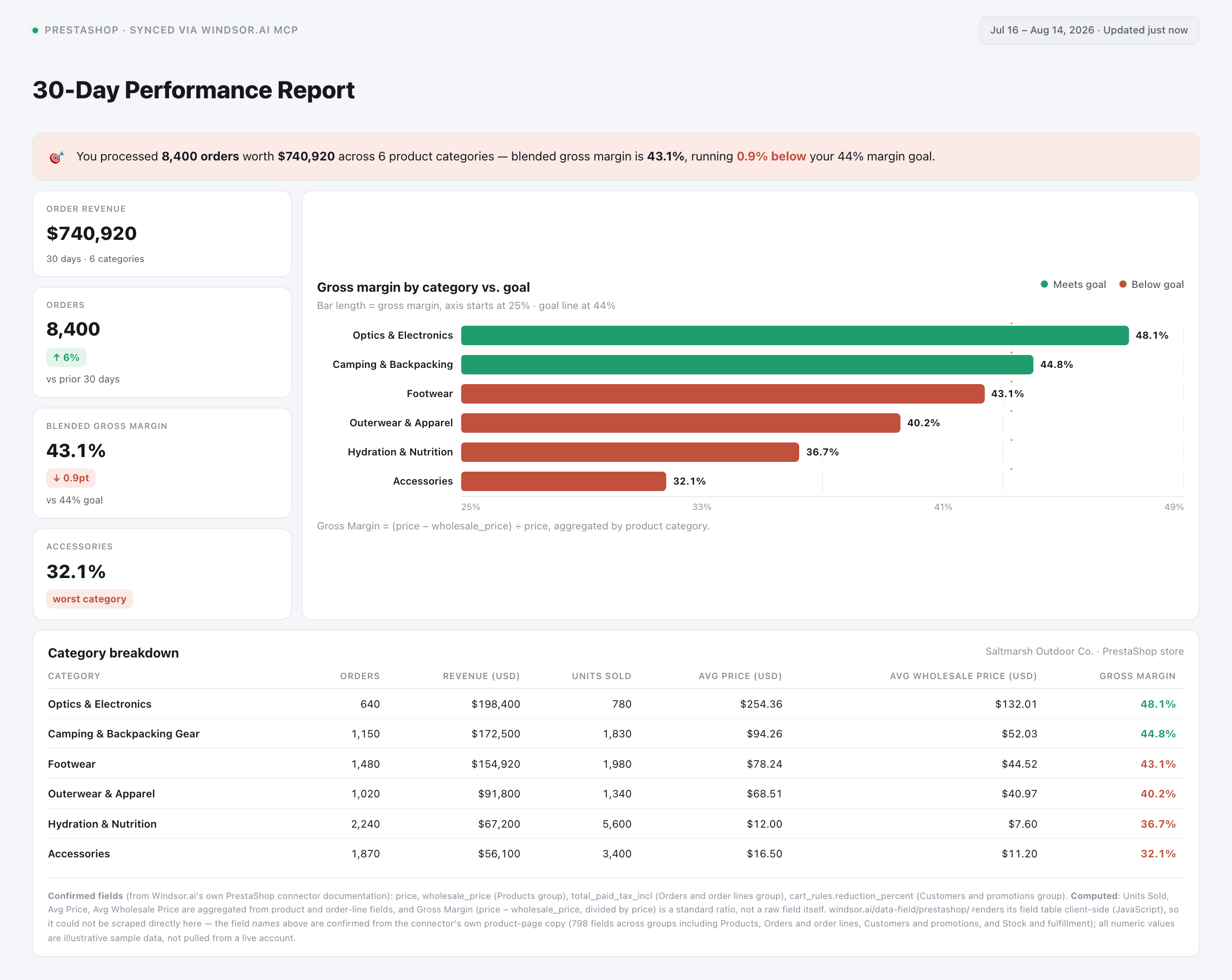
Ask Claude plain-English questions about order margin, stock levels, and cart-rule performance, and get instant AI-driven insights on which products and promotions are actually driving revenue.
Forget CSVs. Stop copy/paste. Connect data in minutes. No code required.
 Sign up with Google
 Free forever plan
No credit card needed
Free forever plan
No credit card needed










Turn store data into product and margin insights with PrestaShop in Claude
Windsor.ai streams your live PrestaShop order, product, and stock data into Claude, so you skip manual database exports and go straight to what’s driving, or draining, revenue. Explore a few key use cases:

Net true order margin
Ask Claude to net product price against ecotax, shipping, and discounts on every order line so you see real margin, not just the order total.

Catch low-stock risk early
Combine live stock quantities with each product’s low-stock threshold so Claude can flag which items are about to sell out before you lose the sale.

Audit cart rule performance
Ask Claude which cart rules and promo codes actually lift order value, and which ones customers redeem once and never come back for.

Blend with other channels
Combine PrestaShop order and customer data with Google Ads, Meta Ads, or GA4 in Claude to see which campaigns actually drive profitable orders, not just clicks.
Using Windsor.ai to connect data from PrestaShop to Claude
Bringing PrestaShop data into Claude usually means manual exports, spreadsheet cleanup, or costly third-party tools, especially when cross-referencing order margin, stock, and cart-rule data by hand. Windsor.ai removes that friction with an MCP connector that automatically collects, structures, and streams your PrestaShop data directly into Claude.
Connect in minutes and start asking Claude natural-language questions about margin, stock risk, and cart-rule performance.














How to connect PrestaShop to Claude with Windsor.ai
Explore a step-by-step guide to integrate your PrestaShop data into Claude with the Windsor.ai connector.
Select your data source
Choose PrestaShop as your data source and grant access to Windsor.ai.

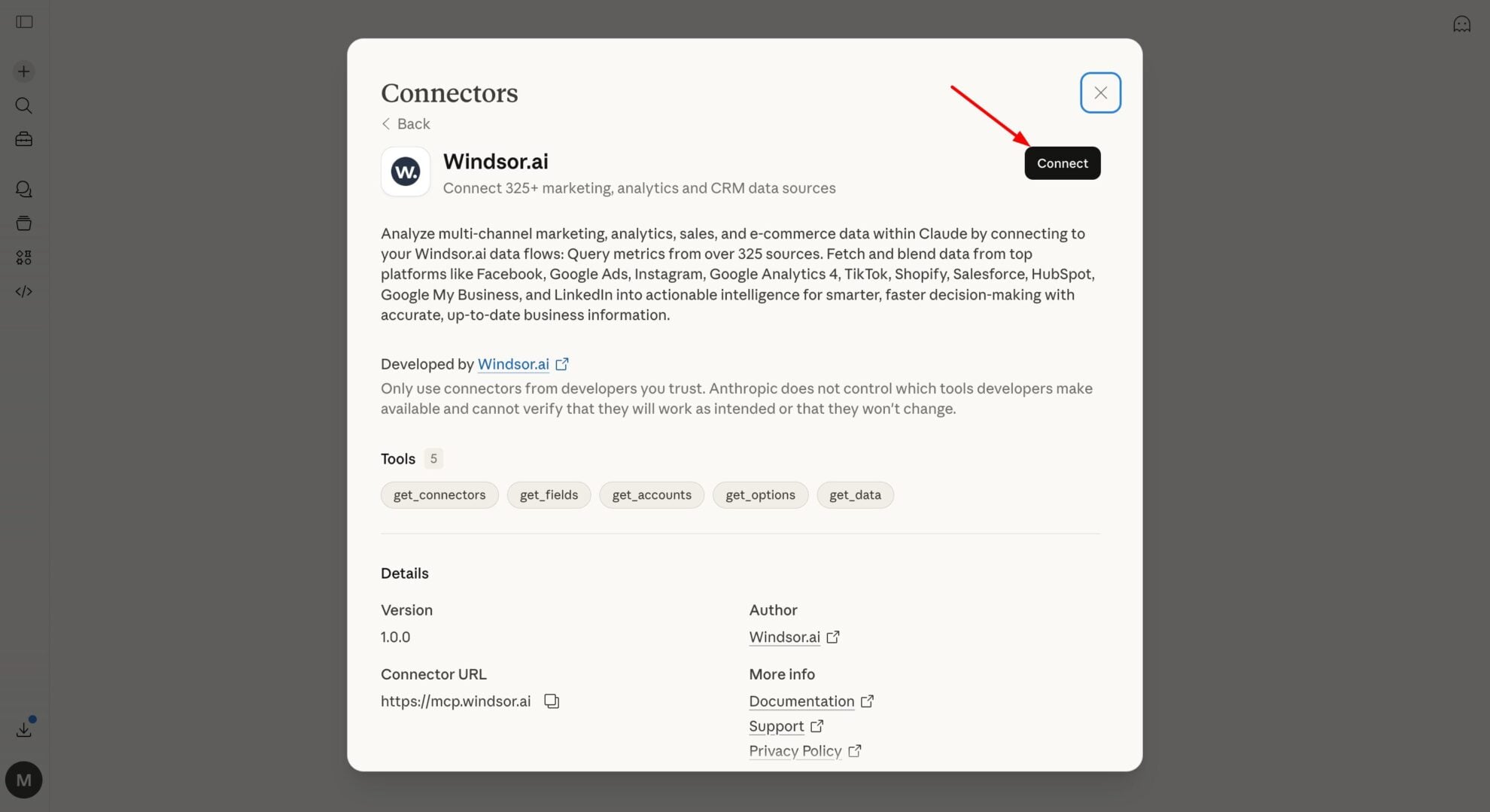
Install the Windsor.ai connector in Claude
In Claude, open Customize, then Connectors, search for Windsor and click Add. Sign in to your Windsor.ai account when prompted, and the connector appears in your Connectors list. You can also open the Windsor.ai listing in the Claude directory and click Connect.
Query your data in Claude
Start a new chat and ask Claude about your PrestaShop performance: summarize margin, audit stock, or run advanced analyses.
FAQs
What PrestaShop data can I analyze in Claude?
Windsor.ai gives Claude access to all 798 PrestaShop fields, organized into groups such as:
- Products: price, wholesale_price, quantity, low_stock_threshold, ean13, condition.
- Orders and order lines: total_paid_tax_incl, total_shipping_tax_incl, current_state, order_details.total_price_tax_incl, order_details.ecotax.
- Customers and promotions: customers.email, customers.newsletter, cart_rules.reduction_percent, cart_rules.minimum_amount.
- Stock and fulfillment: stock_availables.quantity, stock_movements.physical_quantity, carriers.delay.
Can Claude tell me which customers are most valuable over time?
Yes. By joining customers with their order history, Claude can rank customers by lifetime spend (total_paid_real), order frequency, or days since last purchase, so you can spot who to target for a win-back campaign.
Can Claude flag orders where shipping and carrier fees are eating into margin?
Yes. Windsor.ai streams total_shipping_tax_incl and total_paid_tax_incl on every order alongside each carrier’s weight limits and delay fields, so Claude can flag which carrier or weight bracket is quietly eating into your margin.
What prompts can I use to analyze PrestaShop data in Claude?
-
Claude, compare average ecotax against total order line value by product category for the last quarter.
-
Which stock movements show the largest negative quantity swings in the last 7 days, and which products are involved?
-
Break down orders by current status for the last 14 days. How many are stuck in a non-paid, non-shipped status?
-
Track how orders move through paid, shipped, and delivery stages this month, and flag any sitting in an unusual status.
How much does it cost to integrate PrestaShop into Claude using Windsor.ai?
Windsor.ai is free to start, no credit card required. Paid plans start at $19/month and scale by the number of sources and accounts. See the pricing page.
Can I combine PrestaShop data with other channels in Claude?
Yes. Windsor.ai supports 350+ data sources, so you can connect PrestaShop alongside Google Ads, Meta Ads, or GA4 to see which marketing channels are driving your highest-margin orders, not just the most traffic.
Can Claude track how orders move through your fulfillment funnel?
Yes. Order state fields like paid, shipped, and delivery, combined with each order’s current status and order history, let Claude show how long orders sit in each stage and flag ones stuck in an unusual status.
Do you have helpful links to get started with integrating PrestaShop and Claude using Windsor.ai?
Yes, we have helpful resources to help you get started. You can explore our official documentation and tutorials for seamless PrestaShop to Claude integration with Windsor.ai:
Tired of manual PrestaShop data exports? Try Windsor.ai today to automate your reporting


