 Destinations
 Data sources
 AI insights
 About us
 Careers
 Security
 Customer reviews
 Contact us
 Affiliate program
 Solution partners
 Template gallery
 Looker Studio templates
 Power BI templates
 Excel templates
 Google Sheets templates
 Tableau templates
 Facebook Ads templates
 Google Ads templates
 Data fields & Metrics
 AI prompt library & Guides
 Product documentation
 API documentation
 Case studies
 Blog
Blog Data models
 Windsor vs Supermetrics
 Windsor vs Funnel.io
 Windsor vs Fivetran
 Windsor vs Rivery
 Windsor vs Portermetrics
 Windsor vs Coupler.io
Connect Toggl to Claude
Automatically sync your Toggl time-tracking data to Claude using the Windsor.ai connector.
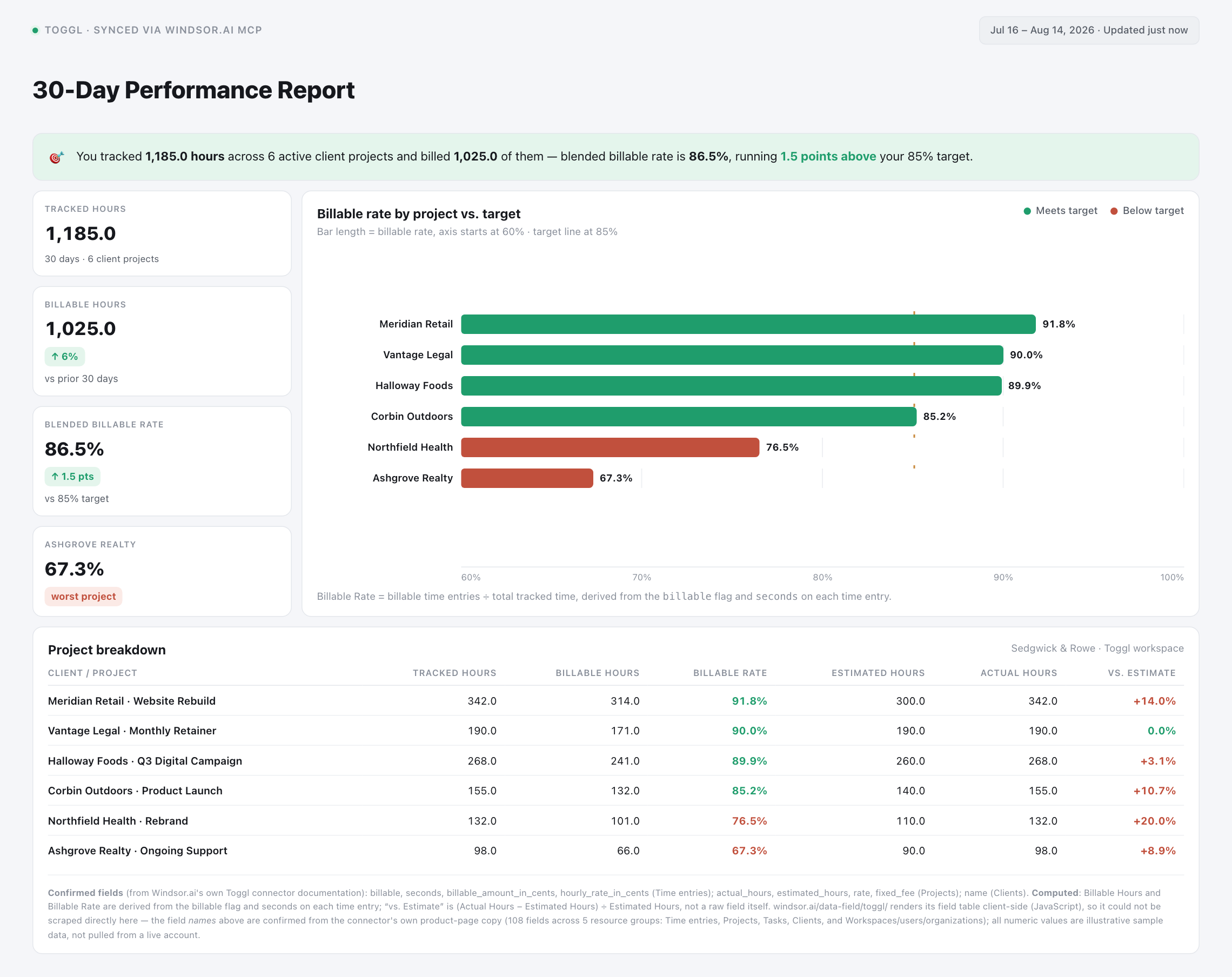
Chat with your Toggl data in plain language to see how billable hours, project profitability, and team workload look across every client, task, and timesheet.
Forget CSVs. Stop copy/paste. Connect data in minutes. No code required.
 Sign up with Google
 Free forever plan
No credit card needed
Free forever plan
No credit card needed










Get instant time-tracking insights from your Toggl data in Claude
Windsor.ai streams your live Toggl workspace into Claude, so agencies and consultancies can skip the spreadsheet cross-referencing and go straight to what matters. Explore a few key use cases:

Split billable from non-billable hours
Ask Claude to break down time entries by the billable flag to see exactly how much tracked time is billable versus internal, across every client and project.

Catch projects running over scope
Compare a project’s actual_hours against its estimated_hours (or its fixed_fee) to flag projects eating into their budget before the client notices.

Balance team workload
Cross-reference time entries by team member against workspace member counts to see who’s carrying the heaviest load and who has room for new client work.

Audit time-entry tagging
Check whether time entries carry consistent tags and descriptions, so client-facing reports don’t have gaps or mislabeled hours.
Using Windsor.ai to connect data from Toggl to Claude
Getting Toggl data into Claude usually means manual exports, timesheet cleanup, or costly time-tracking add-ons, especially when catching a project running over scope by hand. Windsor.ai removes that friction with an MCP connector that automatically collects, structures, and streams your Toggl data directly into Claude.
Connect in minutes and start asking Claude natural-language questions about billable hours, project profitability, and team workload.














How to connect Toggl to Claude with Windsor.ai
Explore a step-by-step guide to integrate your Toggl data into Claude with the Windsor.ai connector.
Select your data source
Choose Toggl as your data source and grant access to Windsor.ai.

Install the Windsor.ai connector in Claude
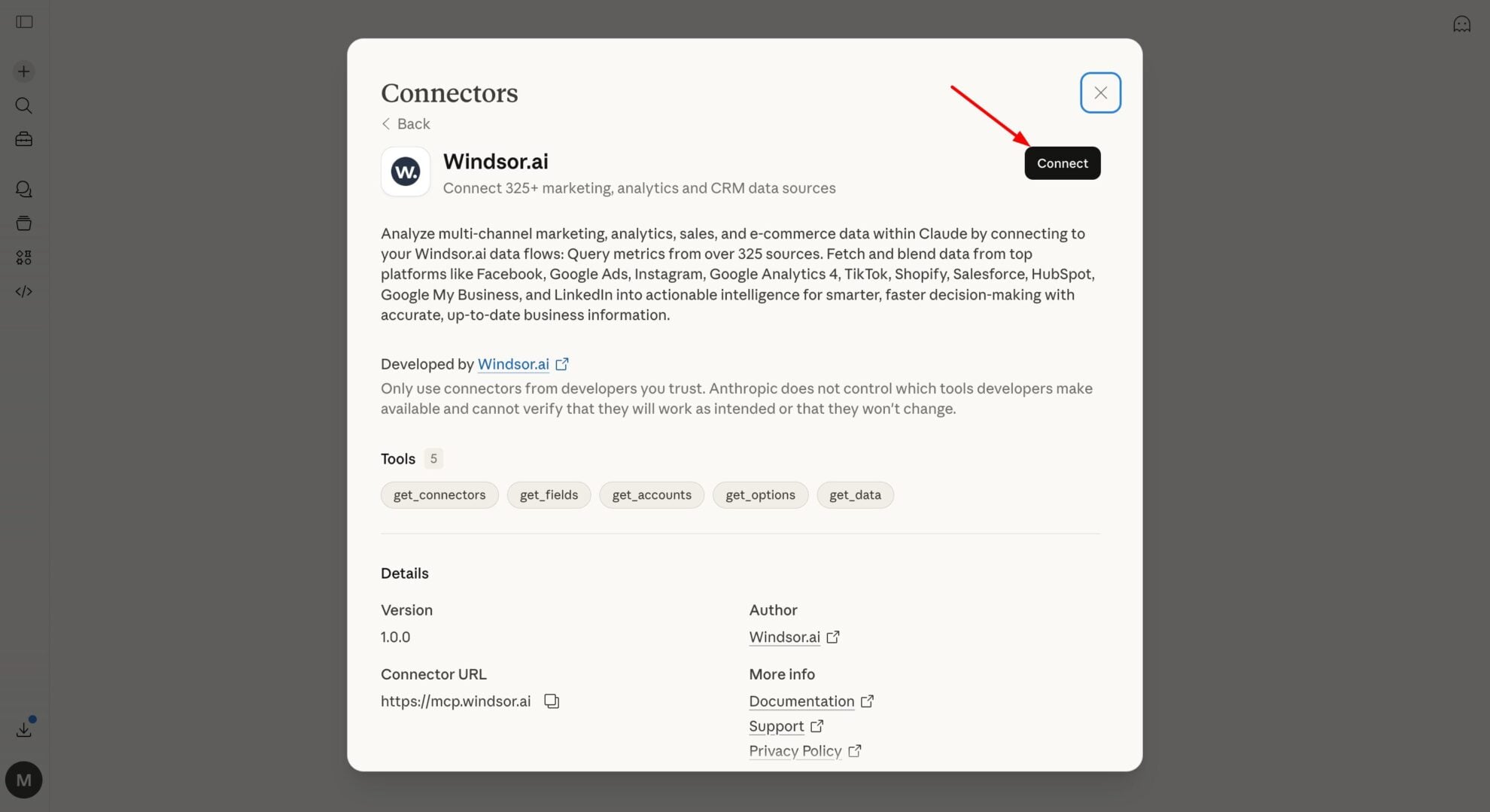
In Claude, open Customize, then Connectors, search for Windsor and click Add. Sign in to your Windsor.ai account when prompted, and the connector appears in your Connectors list. You can also open the Windsor.ai listing in the Claude directory and click Connect.
Query your data in Claude
Start a new chat and ask Claude about your Toggl performance: audit billable hours, balance workload, or run advanced analyses.
FAQs
What Toggl data can I analyze in Claude?
Windsor.ai gives Claude access to all 108 Toggl fields, organized into groups such as:
- Time entries (24 fields): billable, billable_amount_in_cents, hourly_rate_in_cents, seconds, tag_ids.
- Projects (25 fields): actual_hours, estimated_hours, rate, fixed_fee, currency.
- Tasks (11 fields): estimated_seconds, tracked_seconds.
- Clients (6 fields): name, archived.
- Workspaces, users, and organizations (37 fields): members_count, admin, owner, pricing_plan_id.
Can Claude flag rate inconsistencies across clients or projects?
Yes. Each Toggl time entry carries its own hourly_rate_in_cents, and each project has its own default rate, fixed_fee, and rate_last_updated timestamp. Ask Claude to compare the two, so you can catch time logged at an outdated or inconsistent rate before you invoice a client.
Will Windsor.ai only show me billable time, or everything I track in Toggl?
Everything. Windsor streams every time entry, whether the billable flag is true or false, along with the project, task, and client it’s tied to. Ask Claude to split billable from non-billable hours, or to total up internal, non-billable time your team is spending across projects.
Does this work for agencies managing multiple clients and workspaces?
Yes. Windsor pulls every workspace, client, and organization your Toggl account is connected to, along with the members and groups in each. Agencies can ask Claude to compare billable hours or project profitability across clients and workspaces side by side, instead of switching between Toggl reports one client at a time.
What prompts can I use to analyze Toggl data in Claude?
-
Claude, compare tracked_seconds against estimated_seconds for each task in the Marketing workspace. Which tasks are running over estimate?
-
List active projects where the rate or fixed_fee hasn't been updated in over 90 days (rate_last_updated). Are we billing any clients at a stale rate?
-
Show me time entries billed at a different hourly_rate_in_cents than their project's default rate. Where are we under- or over-charging?
-
Which archived workspace clients still have open time entries logged against them in the last 30 days?
How much does it cost to integrate Toggl into Claude using Windsor.ai?
Windsor.ai is free to start, no credit card required. Paid plans start at $19/month and scale by the number of sources and accounts. See the pricing page.
Can I combine Toggl data with other channels in Claude?
Yes. Windsor.ai supports 350+ data sources, so you can connect Toggl alongside project management or CRM tools to see billable hours next to deal value.
Do you have helpful links to get started with integrating Toggl and Claude using Windsor.ai?
Yes, we have helpful resources to help you get started. You can explore our official documentation and tutorials for seamless Toggl to Claude integration with Windsor.ai:
Tired of manual Toggl data exports? Try Windsor.ai today to automate your reporting


