Destinations
 Data sources
 AI insights
 About us
 Careers
 Security
 Customer reviews
 Contact us
 Affiliate program
 Solution partners
 Template gallery
 Looker Studio templates
 Power BI templates
 Excel templates
 Google Sheets templates
 Tableau templates
 Facebook Ads templates
 Google Ads templates
 Data fields & Metrics
 AI prompt library & Guides
 Product documentation
 API documentation
 Case studies
 Blog
 Data models
 Windsor vs Supermetrics
 Windsor vs Funnel.io
 Windsor vs Fivetran
 Windsor vs Rivery
 Windsor vs Portermetrics
 Windsor vs Coupler.io
Connect YouTube to Claude
The Windsor.ai connector gives Claude your channel’s YouTube Analytics: views, watch time, average view percentage, traffic sources and subscribers per video and per day, plus your audience’s age and gender.
Ask which videos hold attention, where views come from and which format brings subscribers, across every video at once, then put the answer next to your website, ad and CRM data in the same chat.
 Sign up with Google
 Free forever plan









What you can do with YouTube data in Claude
Through the connector, Claude gets your channel’s YouTube Analytics for every video and day at once and answers in a table you can sort, chart or compare with other sources.
Nataliia Plakhonina, who runs the Windsor.ai YouTube channel, judges a video on views, engaged views, average view duration, likes and comments together. “In YouTube Studio, I can see analytics per video, but it’s hard to compare videos side by side,” she says. With many videos, comparing them would mean a Google Sheets table updated every week. She asked Claude to rank videos by views, engagement and subscribers gained and to say what the top ones have in common.

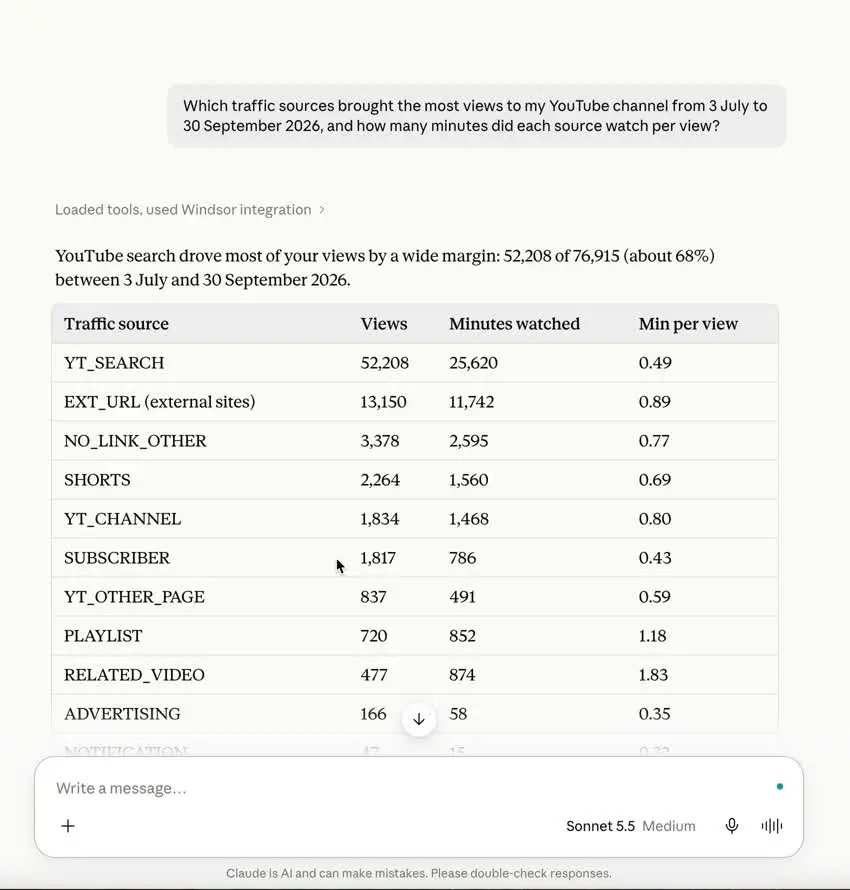
See where your views come from
Break views and watch time down by traffic source: YouTube search, suggested videos, channel pages, the Shorts feed, playlists, notifications and external sites. On our own channel over 90 days, YouTube search brought 68% of views at 29 seconds of watch time per view. Links from other websites brought 17% of views, and those viewers watched 54 seconds per view, almost twice as long. YouTube Studio splits external views by site: for the same dates, 58% of our external views came from Google Search and 21% from windsor.ai. Through the connector, external sites come as one number.

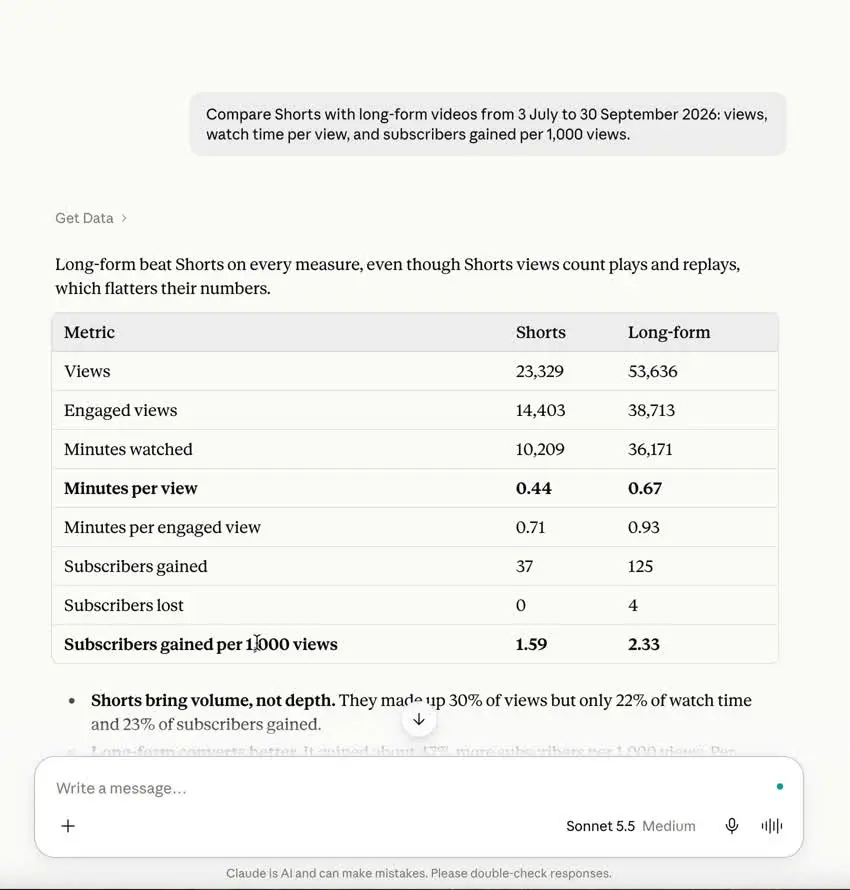
Compare Shorts with long-form
The content type field separates Shorts, regular videos, live streams and stories. Ask for views, watch time per view and subscribers per 1,000 views by format. For Shorts, ask for engaged views too: since 31 March 2025 YouTube counts every Shorts play and replay as a view, and engaged views keep the count YouTube used before.

Find the videos that hold attention
Rank videos by views, engagement, subscribers gained and average view percentage, then ask Claude what the top ones share: length, topic, title pattern, publish day. Claude gets each video’s title, description, tags and length through the connector and can compare them with the numbers. For Shorts, average view percentage can be above 100%, because replays add watch time; several of our one-minute Shorts are above 100% for July to September.
What YouTube data Claude gets through the Windsor.ai connector
The connector gets your channel’s data from the YouTube Analytics API and the YouTube Data API. You sign in with the channel owner’s Google account, or with an owner or manager of the Brand Account if the channel still uses one. People invited through YouTube Studio’s channel permissions cannot connect it, because YouTube does not give them API access.
- Performance per video and per day: views, engaged views, estimated minutes watched, average view duration, average view percentage, likes, dislikes, comments, shares, subscribers gained and lost, card and playlist activity.
- Channel: subscribers gained and lost per day, total subscribers, total views, number of public videos.
- Video details: title, description, tags, category, length, publish date, privacy status, whether captions exist, lifetime views, likes and comments.
- How viewers found you: traffic source (YouTube search, suggested videos, external sites, Shorts feed, playlists, notifications, ads).
- Audience: age group and gender as percentages of viewers.
The connector does not include the audience retention curve inside a video, device type, or the site or search term behind a view. Impressions and thumbnail click-through rate are not in the YouTube Analytics API; YouTube shows them in Studio and, since January 2026, in its bulk Reporting API, which the connector does not use. Audience data come as totals for the period, not per day.
The connector is read-only. Claude can analyze your channel and draft titles, descriptions or a publishing plan, but it cannot upload, edit or delete anything on YouTube.


How to connect YouTube to Claude with Windsor.ai
Explore our video tutorial and a step-by-step guide to integrate your data from any source into Claude with the Windsor.ai connector.
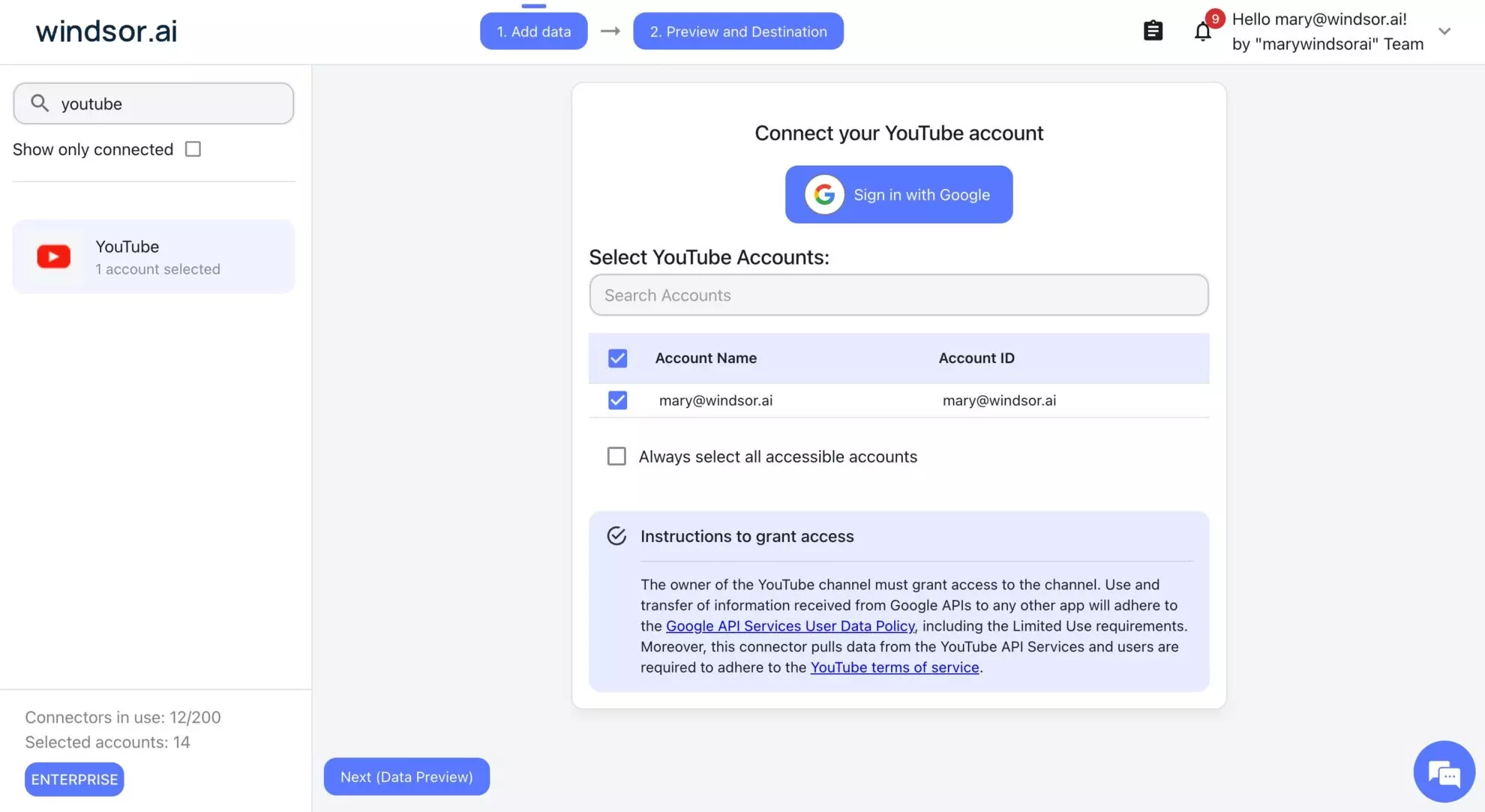
Select your data source
Choose YouTube as your data source and grant access to Windsor.ai.
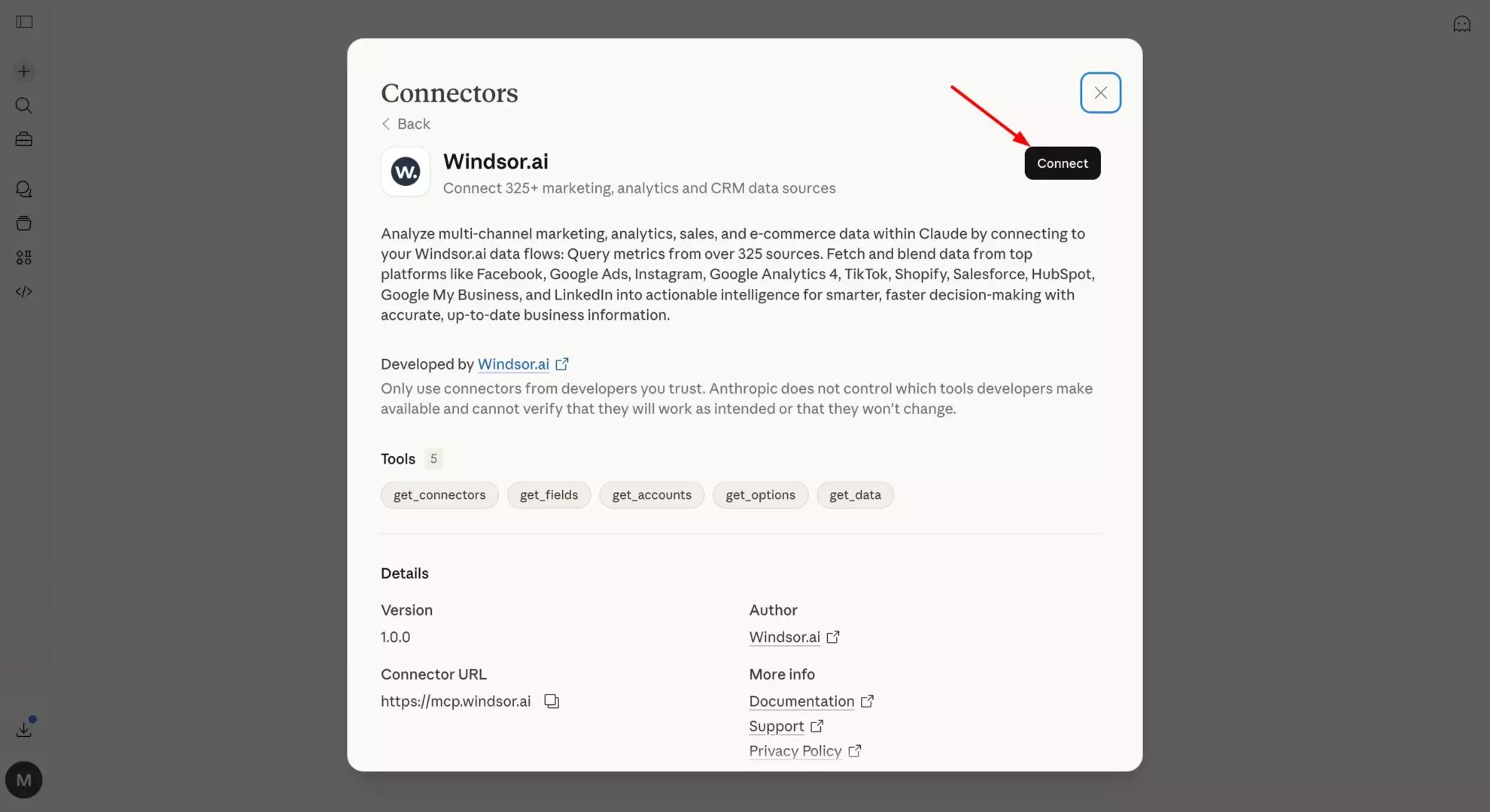
Install the Windsor.ai connector in Claude
In Claude, open Customize, then Connectors, search for Windsor and click Add. Sign in to your Windsor.ai account when prompted, and the connector appears in your Connectors list. You can also open the Windsor.ai listing in the Claude directory and click Connect.
Query your data in Claude
Start a new chat and ask about your channel, for example “Which traffic sources brought the most views last month, and how long did each one watch?”. Claude asks for permission the first time it calls the connector.
Ways to get YouTube data into Claude
There are four routes, and they answer different questions.
| Route | Windsor.ai connector | CSV export from YouTube Studio | YouTube MCP server you run yourself | Research tools with their own MCP server |
|---|---|---|---|---|
| What Claude gets | Your channel’s YouTube Analytics and video details | The columns of that report, for that period | What the project implemented, usually public video and channel data, sometimes your analytics | Public data on any channel from the tool’s own index (keywords, outlier videos, competitors, transcripts) |
| What it needs | Sign in at onboard.windsor.ai with the channel owner’s Google account, then add Windsor in Claude | Access to YouTube Studio | A Google Cloud project, OAuth credentials, API quota, and a machine to run it | An account with that tool |
| Other sources in the same chat | 350+ (GA4, Search Console, Google Ads, Meta Ads, HubSpot and more) | No | No | No |
| Claude surfaces | Web, desktop and mobile apps, and Claude Code | Any | Claude Code and Claude Desktop | Depends on the tool |
| Cost | Free forever plan for one source; paid plans from $19 a month | Free | Free, plus your time | The tool’s plan |
Use a research tool when the question is about other channels or about what is inside a video. Use the Windsor.ai connector when the question is about your own channel’s performance, or when you want YouTube next to your website and ad data. The step-by-step setup is in our guide to connecting YouTube Analytics to Claude.
FAQs
Can Claude watch my YouTube videos through Windsor.ai?
No. Through the connector, Claude gets your channel’s analytics and each video’s details (title, description, tags, length, publish date), not the picture or sound. Claude can show which videos keep viewers watching and compare their titles and descriptions. To analyze what is said or shown in a video, you need its transcript or a tool that extracts frames.
Why can't Claude open a YouTube link I paste in the chat?
Claude’s fetch of the YouTube page can fail. When we pasted a link to one of our own videos into claude.ai, the fetch hit a rate limit twice and a search on the video ID returned only unrelated pages. Claude said it could not see the title, transcript or content and would not guess. It suggested pasting the transcript (in YouTube, open the description and click “Show transcript”), trying again later, or sharing the video’s stats from YouTube Studio. The Windsor.ai connector covers the last option: it gives Claude the video’s numbers and details, but not what is said in it.
Which YouTube metrics can I analyze in Claude?
Views, engaged views, watch time, average view duration, average view percentage, likes, comments, shares and subscribers gained and lost, per video and per day; traffic sources; content type (Shorts, videos, live streams); viewer age and gender; and video details such as title, tags and length. See the YouTube field reference for every field.
Can I see where viewers drop off inside a video?
No. The connector does not include the audience retention curve. You get average view duration and average view percentage per video. The second-by-second graph is only in YouTube Studio.
Can Claude judge my thumbnails?
No, not through the connector. Impressions and thumbnail click-through rate are not in the YouTube Analytics API the connector uses, and when our channel manager asked Claude to rank our thumbnails, it could not load the images from YouTube either. YouTube shows thumbnail impressions and click-through rate in Studio and, since January 2026, in its bulk Reporting API.
Will Claude's numbers match YouTube Studio?
Yes, for the same video and dates, with a few known differences. When we compared Claude’s answers with Studio, the traffic-source shares matched to the percentage point. Check these before you treat a gap as an error:
- Data delay: YouTube says Studio data can take a few days to appear, and recent videos keep growing. Our top videos gained up to 1,000 views in the three days after one analysis.
- Date range: lifetime totals in Studio cover a longer period than the dates you asked Claude about.
- Subscribers: per-video subscriber counts add up to less than the channel total, because people also subscribe from the channel page, search results and the Shorts feed. On our channel, video watch pages brought about half of new subscribers in one 28-day period we checked.
- Average view duration: Studio’s Average view duration is not watch time divided by views. For our YouTube search traffic from 3 July to 30 September, Studio shows 0:48, while its own watch time divided by its views gives 29 seconds. Compare watch time and views instead.
- View counting: Studio notes that views are counted differently from 27 August 2026. Compare periods that are both before or both after that date.
Can I combine YouTube data with other sources?
Yes. With GA4 connected as well, you can compare your video views with the website sessions GA4 records from YouTube, or check whether a week with more views also brought more sign-ups. Each extra source counts toward your plan.
Does it work for Shorts?
Yes. The content type field separates Shorts from regular videos, live streams and stories. For Shorts, compare engaged views as well as views: since 31 March 2025 YouTube counts every Shorts play and replay as a view.
Can Claude change my videos or channel?
No. The YouTube connector is read-only: it had no write actions when we checked on 9 October 2026. Windsor.ai has write actions for some other connectors, such as Google Ads and Meta Ads, but not for YouTube. Claude can draft new titles, descriptions or a posting plan from the data, and you make the changes in YouTube Studio.
How much does it cost?
The Claude connector is included on every Windsor.ai plan. The free forever plan covers one data source with no credit card. If you want YouTube next to GA4 or your ad accounts long-term, paid plans start at $19 a month for 3 sources and $99 a month for 7, billed annually. See the pricing page.
Can I connect a Brand Account channel?
Yes. Sign in with the channel owner’s account, or as an owner or manager of the Brand Account if the channel has not moved to YouTube Studio’s channel permissions. People invited through channel permissions (Manager, Editor or Viewer) cannot connect it, because YouTube does not give them API access.
Can I connect YouTube to Gemini Enterprise too?
Yes. If your company uses Gemini Enterprise, Windsor.ai adds YouTube to it as a data store. Our guide on connecting YouTube Analytics to Gemini Enterprise walks through the setup.
Ask Claude about your YouTube channel. Try Windsor.ai free