 Destinations
 Data sources
 AI insights
 About us
 Careers
 Security
 Customer reviews
 Contact us
 Affiliate program
 Solution partners
 Template gallery
 Looker Studio templates
 Power BI templates
 Excel templates
 Google Sheets templates
 Tableau templates
 Facebook Ads templates
 Google Ads templates
 Data fields & Metrics
 AI prompt library & Guides
 Product documentation
 API documentation
 Case studies
 Blog
Blog Data models
 Windsor vs Supermetrics
 Windsor vs Funnel.io
 Windsor vs Fivetran
 Windsor vs Rivery
 Windsor vs Portermetrics
 Windsor vs Coupler.io
Connect LinkedIn Pages to Claude
Claude has no LinkedIn connector of its own. Windsor.ai’s connector links your LinkedIn Company Pages to Claude through LinkedIn’s official API, for analytics and for publishing posts.
Ask about impressions, engagement, follower growth and who your followers are by seniority, function and industry, then have Claude draft the next post and publish it to the Page when you approve.
Forget CSVs. Stop copy/paste. Connect data in minutes. No code required.
 Sign up with Google
 Free forever plan









AI analysis of your LinkedIn Pages data in Claude
Windsor.ai enables fast, conversational analysis of your LinkedIn Pages data, delivering these key benefits:

Get instant AI insights
Forget manually exporting data and running complex queries. Claude analyzes your LinkedIn Pages metrics in seconds: summarizing KPIs, identifying top-performing posts, and delivering actionable AI insights.

Improve content performance
Ask Claude to compare your content formats at scale to see whether PDF carousels, videos, or long-form text deliver your highest CTR and lead conversions.

Find your best time to post
Cross-reference follower growth, engagement, and historical timestamps to find when your niche audience is most active. Identify the exact publishing window that maximizes your first-hour engagement to trigger the LinkedIn feed algorithm.
Using Windsor.ai to connect data from LinkedIn Pages to Claude
The Windsor.ai LinkedIn Pages connector covers about 190 fields: page analytics (impressions, unique impressions, clicks, likes, comments, shares, engagement), per-post stats with the post text, type and published time, follower gains split organic and paid, follower demographics by seniority, job function, industry, region, country and company size, and page views by section and device. It signs in with LinkedIn’s official OAuth as a Page admin.
Claude can also publish to the Page through the connector: a text or link post, or a single image post, after you approve the draft. LinkedIn Ads is a separate Windsor.ai connector with its own campaign, spend and lead data and pause, enable and budget actions.
Available actions
Create Post Publish a post to a connected LinkedIn company page. Provide commentary (post text), a link (shared URL), or both - at least one is required. A link is shared as an article card, so link_title is required with a link (LinkedIn does not fetch the page title) and link_description is optional. For an image post use create_image_post instead.
Publish a post to a connected LinkedIn company page. Provide commentary (post text), a link (shared URL), or both - at least one is required. A link is shared as an article card, so link_title is required with a link (LinkedIn does not fetch the page title) and link_description is optional. For an image post use create_image_post instead.
Create Image Post Publish a single image post to a connected LinkedIn company page. Provide either a publicly accessible image URL, which is downloaded and uploaded to LinkedIn, or the image_urn returned by upload_image for a local file, plus optional commentary (post text). For a text/link-only post use create_post instead.
Publish a single image post to a connected LinkedIn company page. Provide either a publicly accessible image URL, which is downloaded and uploaded to LinkedIn, or the image_urn returned by upload_image for a local file, plus optional commentary (post text). For a text/link-only post use create_post instead.
Upload Image Upload one image file (JPEG, PNG or GIF) to a connected LinkedIn company page and return its image_urn. The image is sent as a file uploaded with the request, so it needs no public URL. Nothing is published: pass the image_urn to create_image_post to publish it.
Upload one image file (JPEG, PNG or GIF) to a connected LinkedIn company page and return its image_urn. The image is sent as a file uploaded with the request, so it needs no public URL. Nothing is published: pass the image_urn to create_image_post to publish it.














How to connect LinkedIn Pages to Claude with Windsor.ai
Explore our video tutorial and a step-by-step guide to integrate your data from any source into Claude with the Windsor.ai connector.
Select your data source
Choose LinkedIn Pages as your data source and grant access to Windsor.ai.

Install the Windsor.ai connector in Claude
In Claude, open Customize, then Connectors, search for Windsor and click Add. Sign in to your Windsor.ai account when prompted, and the connector appears in your Connectors list. You can also open the Windsor.ai listing in the Claude directory and click Connect.

Query your data in Claude
Start a new chat and ask Claude questions about your connected data: summarize KPIs, create client reporting dashboards, or run advanced analyses.

What Claude can connect to on LinkedIn, and what it cannot
Searches for a Claude LinkedIn connector usually mean one of three things, and only two of them have an official route.
| LinkedIn Company Pages | LinkedIn Ads | Personal profile, messages, Sales Navigator | |
|---|---|---|---|
| What exists | Official Community Management API for Page admins; the Windsor.ai connector uses it | Official Marketing API; the Windsor.ai LinkedIn Ads connector uses it | No public API for third parties. LinkedIn’s User Agreement bars crawlers, bots, browser plug-ins and extensions that scrape or automate activity |
| What Claude gets | About 190 fields: post and page analytics, follower demographics, page views, plus publishing posts to the Page | Campaign, campaign group and creative performance, spend and leads, plus pause, enable and budget actions | Nothing through a compliant connector. Tools that offer it run on your logged-in browser session or scrape, at your account’s risk |
| Setup | Sign in at onboard.windsor.ai as a Page admin, then add Windsor from Claude’s connector list | The same, with access to the ad account | Copy the text from LinkedIn into the chat yourself |
| Claude plans and surfaces | Every plan including Free; web, desktop and Claude Code | Same | Any |
LinkedIn Company Pages
This page. Windsor.ai signs in to LinkedIn with the official OAuth flow as an admin of the Page, then Claude can query impressions, engagement, clicks, follower gains and who the followers are by seniority, job function, industry, region, country and company size, post by post and for the Page as a whole. It can also publish a text, link or single image post to the Page after you approve the draft. The free forever plan covers one source and one account with no credit card; paid plans start at $19 a month for 3 sources.
LinkedIn Ads
A separate Windsor.ai connector, on the LinkedIn Ads to Claude page. It reads campaign group, campaign and creative performance, spend, Lead Gen Form leads, conversions and member demographics through LinkedIn’s Marketing API, and Claude can pause, enable and re-budget campaign groups, campaigns and creatives with your confirmation. Both connectors can sit in the same Claude account, so a Page’s organic results and the paid campaigns can be compared in one chat.
Your personal profile, messages and Sales Navigator
There is no API that lets a third-party tool read your profile, your inbox or your Sales Navigator lists; the consumer API returns only your own name, photo and headline, and the Sales Navigator partner program is not taking new partners. Products that promise this run on your logged-in browser session or scrape LinkedIn, which the User Agreement prohibits and which can get an account restricted. Windsor.ai does not offer it. If you want Claude’s help with a profile or a message, copy the text into the chat yourself.
LinkedIn in Claude Code
Run claude plugin install windsor-ai and sign in. The LinkedIn Pages tables, the publish actions and every other source you connected are then available in the terminal session, with the same prompts as in the Claude app.
FAQs
Can Claude access my LinkedIn account, profile or messages?
Not through any compliant connector. LinkedIn’s consumer API only returns your own name, photo and headline, there is no messaging or profile-browsing API for third parties, and the User Agreement prohibits crawlers, bots, browser plug-ins and extensions that scrape or automate the site. Tools that claim to give Claude your inbox or your connections run on your logged-in browser session, at your account’s risk. Windsor.ai connects Company Pages and LinkedIn Ads only. For help with a profile or a message, paste the text into the chat.
How do I get LinkedIn Pages data into Claude?
Four routes. The Windsor.ai connector: authorize your LinkedIn Page at onboard.windsor.ai, add Windsor from the Claude directory, and ask questions in a new chat. Free forever plan, no credit card, one source and one account included. A CSV export from LinkedIn Page analytics uploaded to a chat: free, but one period per file and separate exports for visitors, followers and updates. The LinkedIn API with Claude Code: for developers, and it needs a LinkedIn developer app with Community Management API access. An automation platform: moves single events such as a new post or comment to the Claude API, without a view of the Page’s history. The step-by-step guide compares all four.
Is a connector different from an automation platform for connecting LinkedIn to Claude?
Yes. The Windsor.ai connector gives Claude read access to your LinkedIn Page analytics inside the chat, so you can ask about impressions, engagement, follower growth or audience seniority and get the numbers back. An automation platform or a LinkedIn scheduling tool works per post: draft, schedule, publish, or send a new comment to the Claude API for a reply. Use the connector for analysis and reporting, and a workflow tool for per-event publishing tasks. Both can run on the same Page.
What is Windsor.ai's LinkedIn Pages Claude connector?
The Windsor.ai LinkedIn Pages Claude connector is a no-code solution (via Windsor MCP) to bridge your LinkedIn organic data with Claude’s AI chat. Unlike manual CSV exports, this connector creates a live pipeline, allowing Claude to analyze your LinkedIn Page metrics, including impressions, engagement, follower growth, and post-level performance, in real time. This turns your LinkedIn analytics from a static report into a conversational AI assistant.
What can I do with LinkedIn Pages data in Claude?
By connecting LinkedIn Pages to Claude, you can move beyond basic metrics to deep, qualitative analysis. You can:
- Instant organic performance analysis. Summarize daily, weekly, or monthly performance against your specific KPIs.
- Identify viral content patterns. Ask Claude to analyze which topics, tones, or post lengths correlate with your highest reach. It can even create a visual comparison of different content formats.
- Benchmark engagement. Compare your current performance against historical data. Claude can visualize these “month-over-month” changes in a clean, easy-to-read table or bar chart.
- Generate content strategies: Let Claude suggest future post ideas based on what has historically resonated with your professional audience.
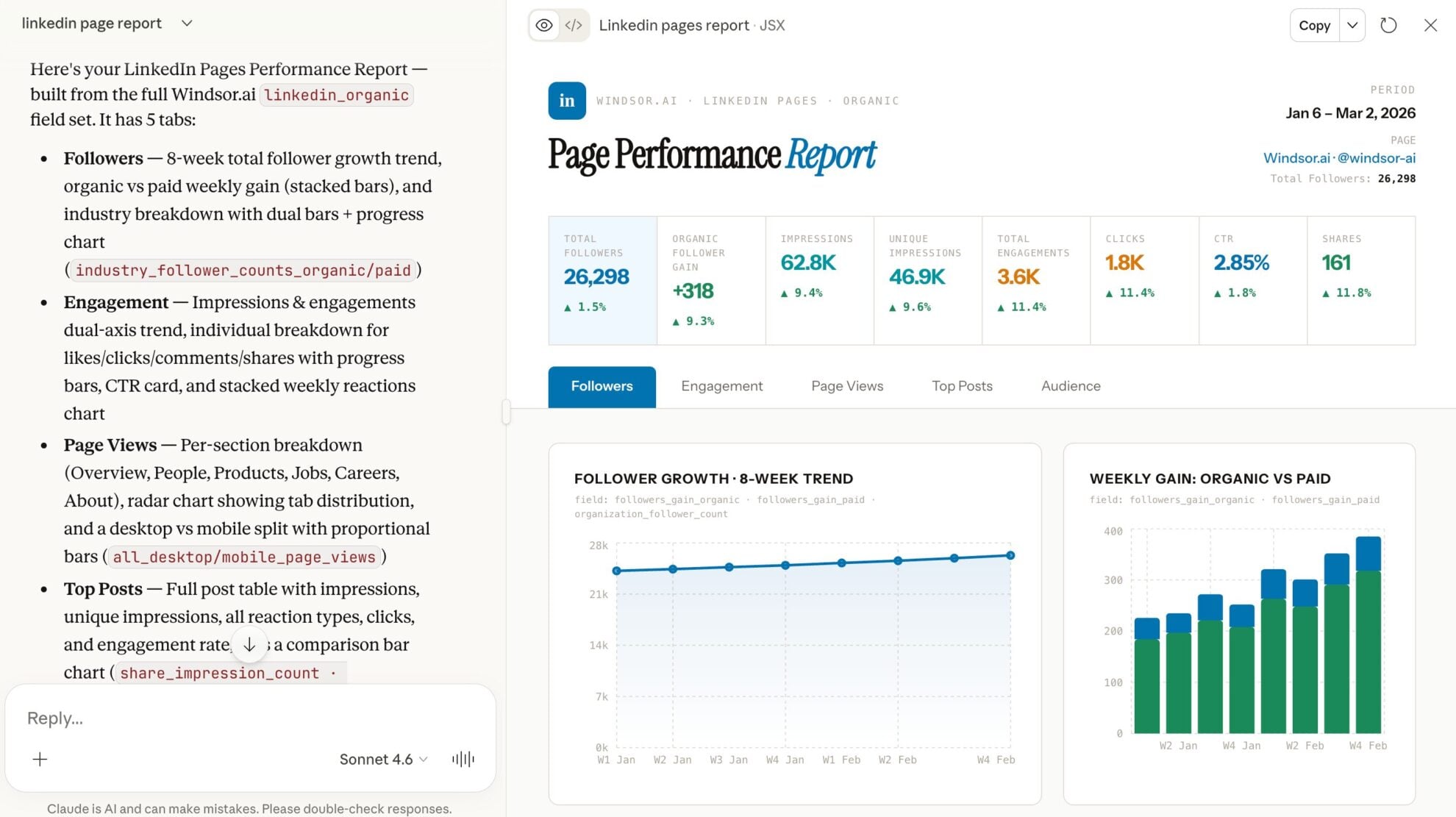
- Create visual dashboards and reports: Build visual dashboards within seconds in Claude and share them easily with your team or clients.
Find more details about Windsor MCP for Claude use cases in this guide: https://windsor.ai/how-to-use-windsor-mcp-examples-use-cases/.
What prompts can I use when analyzing LinkedIn Pages data in Claude?
To get the most out of this integration, use advanced, multi-step prompts. Here are three examples:
-
Analyze my LinkedIn Page data from the last 30 days. Create a visual dashboard showing our reach vs. engagement. Make the chart interactive so I can see the exact numbers for each day.
-
Looking at my follower growth and comment counts over the last 30 days, identify the specific 'trigger events' or posts that led to the highest spikes in new followers. What was unique about those posts?
-
Act as a B2B Social Media Strategist. Based on my engagement data, identify three 'content gaps', topics my audience interacts with but that I don't post about often enough. Draft a 1-week content calendar to fill these gaps.
Is there a LinkedIn MCP server for Claude?
Yes, third-party ones. Windsor.ai is one: an MCP server listed in Claude’s directory that covers LinkedIn Company Pages and LinkedIn Ads through LinkedIn’s official APIs, next to 350+ other sources. Other LinkedIn MCP servers target personal profiles, messaging or lead lists, and those work by driving your logged-in browser session or scraping, which LinkedIn’s User Agreement prohibits. Check how a server gets its data before you connect it.
Can I connect LinkedIn Ads to Claude?
Yes, with the separate Windsor.ai LinkedIn Ads connector: campaign group, campaign and creative performance, spend, Lead Gen Form leads, conversions and member demographics, plus pause, enable and budget actions with your confirmation. Both LinkedIn connectors can be active in the same Claude account.
Does this work in Claude Code?
Yes. Run claude plugin install windsor-ai, sign in, and the LinkedIn Pages data and publish actions are available in the terminal session, together with every other source you connected in Windsor.ai.
How much does it cost to integrate LinkedIn Pages into Claude using Windsor.ai?
The Claude connector is included on every Windsor.ai plan, including the free forever plan: one data source, one account, no credit card. Paid plans start from $19/month and add sources and accounts. See the pricing page.
How long does it take to set up the LinkedIn to Claude integration?
With Windsor.ai the integration takes a few minutes:
- Connect your LinkedIn Pages data in Windsor.ai.
- In Claude, open Customize, then Connectors, search for Windsor and click Add.
- Sign in to your Windsor.ai account when prompted and start chatting with your data.
Do you have helpful links to get started with integrating LinkedIn Pages and Claude using Windsor.ai?
Yes. These cover the LinkedIn Pages fields Windsor returns and the Claude install:
Is my LinkedIn data secure when using the Windsor.ai connector?
Windsor.ai uses LinkedIn’s official OAuth2 authentication to connect your account securely. You authorize access through LinkedIn, and the permissions granted during setup determine what data can be accessed. Windsor.ai does not store your login credentials.
Can Claude publish new posts to my LinkedIn Page?
Yes. Windsor.ai’s write actions for LinkedIn Pages let Claude publish directly to your connected Page: a text or link update, or a single image post, after you approve the draft. More LinkedIn Pages actions, like scheduling, are coming soon.
Tired of manual LinkedIn Pages data exports? Try Windsor.ai today to automate your reporting


