 Destinations
 Data sources
 AI insights
 About us
 Careers
 Security
 Customer reviews
 Contact us
 Affiliate program
 Solution partners
 Template gallery
 Looker Studio templates
 Power BI templates
 Excel templates
 Google Sheets templates
 Tableau templates
 Facebook Ads templates
 Google Ads templates
 Data fields & Metrics
 AI prompt library & Guides
 Product documentation
 API documentation
 Case studies
 Blog
Blog Data models
 Windsor vs Supermetrics
 Windsor vs Funnel.io
 Windsor vs Fivetran
 Windsor vs Rivery
 Windsor vs Portermetrics
 Windsor vs Coupler.io
 Last updated: 17 September 2026




Connect your LinkedIn Page to Claude by authorizing it at onboard.windsor.ai/app/linkedin_organic, then adding the Windsor.ai connector in Claude. That’s it. Open a new chat and ask about your Page’s performance, or ask Claude to publish a new post straight to your Page.
Claude has no LinkedIn connector of its own, and LinkedIn offers no API for personal profiles, so this guide is about Company Pages. What Claude can and cannot reach on LinkedIn, including LinkedIn Ads and personal profiles, is laid out on the LinkedIn Pages to Claude connector page.
Here’s the problem it solves: Is your LinkedIn Page driving actual business outcomes, or just “vanity” impressions?
In the world of B2B marketing, a LinkedIn Page is more than a social profile; it’s a digital storefront for decision-makers. However, LinkedIn’s native analytics often make it difficult to see the big picture. For example, it’s hard to tell which executive-level content is resonating or how your follower demographics align with your Ideal Customer Profile (ICP).
What if you could treat Claude as your fractional Head of Strategy who optimizes your LinkedIn Company Pages for maximum impact?
By connecting your LinkedIn Page data directly to Claude via the Windsor MCP (Model Context Protocol), you can move past surface-level stats. Connect in minutes and just ask Claude to analyze the professional seniority of your audience, identify the “hooks” that drive high-value comments and clicks, and automate your executive reporting, all in real-time and with no code.
🚀 Automate your LinkedIn Pages reporting in Claude today: Get started for free at Windsor.ai.
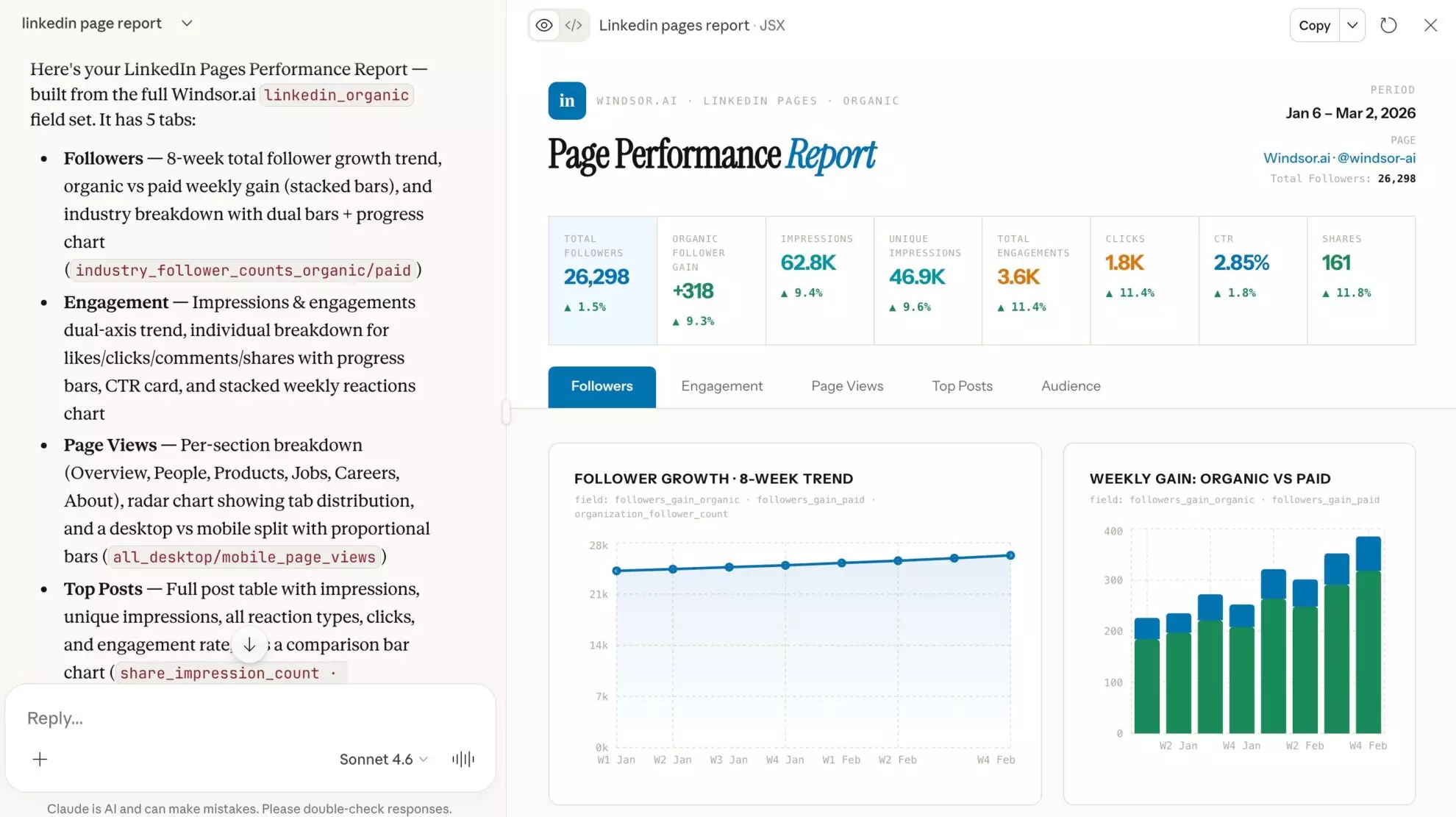
No more “downloading and cleaning” CSVs. Just a live, direct connection to your LinkedIn Organic data for deep Claude-driven insights and fantastic visual reports like on the screen below.
The connection involves three simple steps, usually covered in <60 seconds.
3 simple steps to sync LinkedIn Company Pages to Claude via Windsor MCP
Integrating LinkedIn Page analytics with Claude using Windsor.ai is a very quick and completely no-code process.
📖 Follow our step-by-step guide to automatically sync your LinkedIn Organic data to Claude.
Prerequisites
- A Windsor.ai account (Free or paid plan)
- Super Admin or Content Admin access to your LinkedIn Page
- A Claude.ai account
Step 1: Connect your LinkedIn Page to Windsor.ai
First, authorize Windsor to securely pull your professional insights from the LinkedIn API.
- Log in to onboard.windsor.ai.
- Search for and select LinkedIn Organic as your data source.
- Authenticate via LinkedIn and select the specific Company Pages you want to analyze.
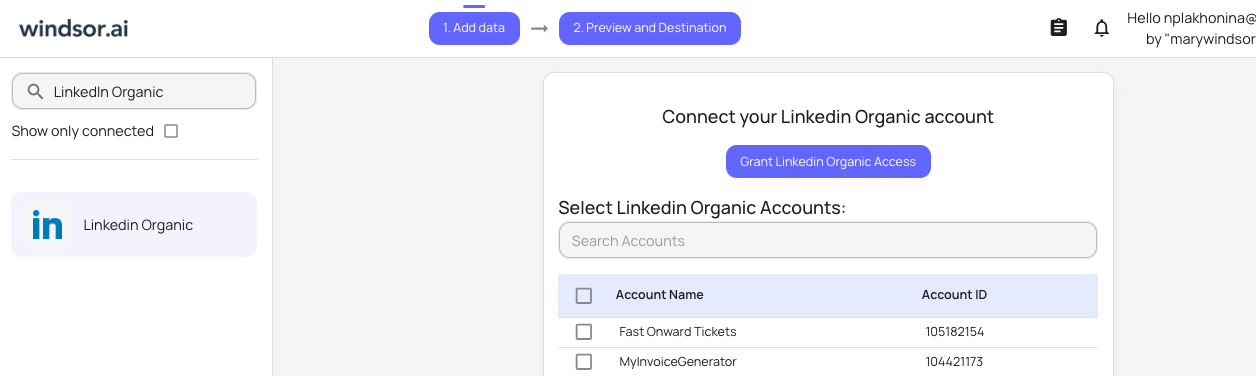
Windsor handles the API heavy lifting, organizing raw fields like seniority_follower_counts, function_follower_counts, share_engagement_rate and many others into a structured format that Claude can instantly interpret.
Step 2: Activate the Windsor.ai connector in Claude
Next, enable the bridge within the Claude interface.
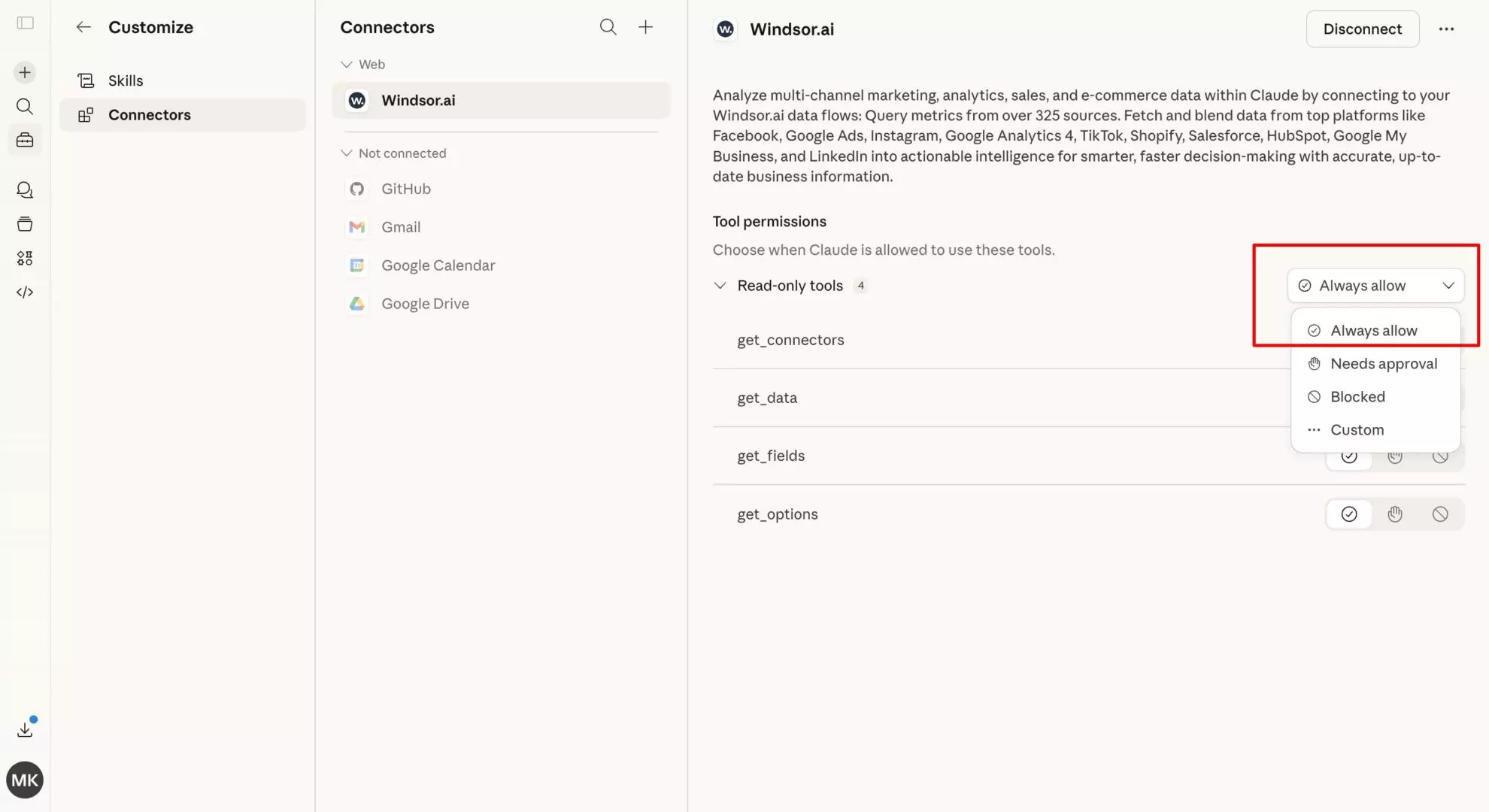
In Claude, open Customize, then Connectors, search for Windsor and click Add. Sign in to your Windsor.ai account when prompted. You can also open the Windsor.ai listing in Claude’s directory and click Connect.

💡 Quick tip: Set permissions to “Always allow” so Claude can fetch your Windsor-integrated data across any new chat without asking for permission every time.
Step 3: Query your LinkedIn data for strategic insights
Now, stop guessing which posts work. Open a new chat and talk to your LinkedIn data using natural language.
Get started with these simple LinkedIn prompts:
- “Analyze my followers by ‘Seniority’ and ‘Job Function’. Does my current audience match a C-suite ICP?”
- “Which 5 posts generated the highest ‘Comment’ rate this month? Summarize the common themes in these posts.”
- “Compare my ‘Organic Impressions’ vs. ‘Unique Visitors’. Are we attracting a new audience or just reaching the same people?”
Bonus: LinkedIn Organic analytics prompts for Claude
Claude can act as your B2B strategist, but the quality of the insights depends on the prompt. Use these templates to put the professional seniority and industry data Windsor streams into your chat to work:
ICP & audience seniority audit
Prompt:
Review my LinkedIn follower demographics via the Windsor connector. What percentage of my audience holds 'Director' level positions or higher? Suggest 3 content topics that would specifically appeal to this high-seniority group based on my industry.
“Thought Leadership” hook analysis
Prompt:
Analyze my posts from the last 60 days. Which specific opening sentences (hooks) led to the highest 'Comment' and 'Share' rates? Give me a list of the top 5 most effective hooks for a professional audience.
Content format comparison
Prompt:
Compare the performance of my LinkedIn Document (PDF) posts versus my standard Image posts. Which format generates more 'Unique Clicks' and 'Follows' per impression? Should I pivot my strategy toward more PDF carousels?
Industry discovery & reach
Prompt:
Based on my last 30 days of data, which professional industries (e.g., 'Information Technology', 'Marketing', 'Finance') are engaging most with my content? If [Target Industry] is not in the top 3, suggest how I can pivot my messaging to reach them.
Employee advocacy & viral momentum
Prompt:
Identify posts that have a high 'Viral Reach' relative to 'Organic Reach'. What common characteristics do these viral posts have (e.g., tagging people, specific hashtags, or post length)?
Multi-source reporting (LinkedIn + GA4)
Prompt:
Using both the LinkedIn and GA4 connectors, tell me if my LinkedIn 'Website Clicks' on [Date] resulted in actual 'Goal Completions' or 'Purchases' on my site. Is my LinkedIn audience high-intent or just browsing?
Publish a new post
Prompt:
Draft a LinkedIn post recapping our top 3 posts by engagement this month, written in a similar tone. Once I approve it, publish it directly to our Page.
LinkedIn Organic metrics you can stream into Claude
With about 190 LinkedIn Pages fields available, the Windsor MCP allows Claude to perform deep-dive professional audits that standard exports miss.
Here are some essential metrics and dimensions that you can send to Claude via Windsor:
High-value engagement
-
Professional interactions: Track
share_like_count,share_comment_count,share_countandshare_clicks_countper post. -
Engagement rate logic: Claude can calculate true engagement by comparing interactions against
share_impression_countorshare_unique_impressions_count, or readshare_engagement_ratedirectly, to find your most efficient content.
ICP & audience breakdown
-
Seniority & function: Access
seniority_follower_countsandfunction_follower_countsto see if you are reaching Managers or CEOs. -
Industry & company size: Analyze
industry_follower_countsandstaff_follower_rangeto ensure your content is hitting the right sectors.
Video & document performance
-
B2B video stats: Track
share_video_views,share_video_view_rateandshare_video_watch_timeto see how long professionals stay tuned. - Thought leadership: Claude can analyze post text to see if “Opinion” pieces or “How-to” documents perform better for your brand.
Four ways to get LinkedIn Pages data into Claude
The connector route above is the one most teams use. Here is how it compares with the other three.
- Windsor.ai connector. No code. Authorize your LinkedIn Page once, add Windsor from the Claude directory, and Claude reads impressions, engagement, follower growth and audience breakdowns for every post in the chat. It can also publish a text, link or single image post to the Page when you ask. Free forever plan, no credit card.
- CSV export from LinkedIn Page analytics. Free, but one period per file and separate exports for visitors, followers and updates, which you stitch together before uploading.
- LinkedIn API with Claude Code. Full control for developers, but it needs a LinkedIn developer app with Community Management API access, which LinkedIn grants on application, plus token handling and maintenance.
- An automation platform. Moves single events, such as a new post or comment, to the Claude API for per-event tasks. It does not give Claude a view of the Page’s performance history.
Connector vs automation platform: two different ways to connect LinkedIn to Claude
“Connect LinkedIn to Claude” covers two different jobs, and the tools are not interchangeable.
A data connector, such as Windsor.ai, gives Claude read access to your LinkedIn Page analytics inside the chat: you ask a question, Claude queries the Page history through the connector and answers with the numbers, next to your ads and web data if you connect those too. When you ask it to, the connector can also publish a post to the Page.
An automation platform or a LinkedIn writing and scheduling tool works per post: draft, schedule, publish, or send each new comment to the Claude API for a reply. That fits publishing workflows. It does not give Claude in the chat a view of how the Page performed, and each new question means a new workflow.
If the question is “how did my Page perform”, use the connector. If the job is “publish or react every time X happens”, use a workflow tool. Both can run on the same Page.
LinkedIn Pages to Claude: The manual way vs. The Windsor way
| Feature | Windsor MCP (automated) | Manual CSV export |
| Data freshness | Real-time API Access | Static snapshot (outdated instantly) |
| Setup time | < 1 minute | 15+ minutes per report |
| Demographics | Complex professional data | Hard to pivot in spreadsheets |
| B2B strategy | Deep ICP analysis | Siloed to basic click counts |
Conclusion
Relying on manual CSV exports for B2B reporting is a strategy of the past. A static export shows the counts; the useful part is knowing who engaged and what they responded to while the post is still live.
By bridging your LinkedIn Company Page to Claude via the Windsor MCP, you transform raw data into a strategic conversation. You stop “counting likes” and start engineering professional influence by understanding exactly who your audience is and what content drives them to take action.
🚀 Ready to lead the conversation? Start for free at Windsor.ai and turn your LinkedIn data into your most powerful B2B asset.
FAQs
Can I use Claude to analyze my LinkedIn followers' seniority and job titles?
Yes! This is a standout feature of the Windsor integration. Since Windsor streams dimensions like seniority_follower_type and function_follower_type (with matching follower-count fields), you can simply ask Claude: “What percentage of my followers are at the ‘Director’ or ‘VP’ level, and which industries do they represent?”
Why is using the Windsor MCP better than just uploading a CSV from LinkedIn?
LinkedIn data is “perishable.” A CSV is a static snapshot that is outdated the moment you download it. The Windsor MCP is a live data pipeline. When you ask Claude a question, it fetches the current metrics directly from LinkedIn, including late-breaking engagement on a post you just published an hour ago.
Can I compare my LinkedIn Organic performance with my LinkedIn Ads ROI?
Absolutely. While they are separate data sources in Windsor, you can connect both to the same Claude chat. This allows for powerful cross-channel prompts like: “Is my organic content reaching the same seniority levels as my paid ads, or is there a gap?”
Does this integration support LinkedIn Reels and Video metrics?
Yes. You can stream metrics like share_video_views, share_video_watch_time, and share_video_view_rate. LinkedIn doesn’t expose a true “completion rate” metric, so Claude works from watch time and view rate to gauge how well a video holds a professional audience.
Can I analyze multiple LinkedIn Company Pages at once?
Yes. For agencies or multi-brand enterprises, you can select multiple pages during the Windsor authorization step. You can then ask Claude to: “Compare the engagement rate across all three of our company pages and identify the top-performing content theme for each.”
Do I need to be a developer to set this up?
Not at all. The setup is 100% no-code. You simply authorize your LinkedIn account on the Windsor dashboard and add the connector within the Claude interface. If you can log in to a website, you can set this up.
Is there a limit to how much historical data Claude can see?
By default, the Windsor MCP allows you to query your historical performance. While LinkedIn’s API has certain lookback windows (usually up to 2 years for most metrics), you can ask Claude to identify long-term trends that aren’t visible in the standard 30-day view of the native dashboard.
Can Claude help me draft new LinkedIn posts based on my successful data?
Yes, this is one of the best Windsor MCP’s for LinkedIn Organic to Claude use cases. You can prompt Claude: “Analyze my top 5 posts by ‘Shares’ from the last 90 days. Based on their tone and structure, draft 3 new post ideas targeting ‘Marketing Managers’ in the B2B SaaS space.” Once you’re happy with one, Claude can publish it straight to your connected LinkedIn Page, a text or link update, or a single image post.
Is the Windsor MCP free to use with Claude?
Yes. The MCP connector is included on Windsor.ai’s free-forever plan; no credit card needed. If you need more accounts or data sources, paid plans start at $19/month.


