 Destinations
 Data sources
 AI insights
 About us
 Careers
 Security
 Customer reviews
 Contact us
 Affiliate program
 Solution partners
 Template gallery
 Looker Studio templates
 Power BI templates
 Excel templates
 Google Sheets templates
 Tableau templates
 Facebook Ads templates
 Google Ads templates
 Data fields & Metrics
 AI prompt library & Guides
 Product documentation
 API documentation
 Case studies
 Blog
Blog Data models
 Windsor vs Supermetrics
 Windsor vs Funnel.io
 Windsor vs Fivetran
 Windsor vs Rivery
 Windsor vs Portermetrics
 Windsor vs Coupler.io
 Last updated: 1 September 2026




The fastest way to see whether your LinkedIn Page content is actually reaching the audience you’re targeting is to connect it to ChatGPT with Windsor’s MCP integration, ask a question, get the breakdown by seniority, function, and industry, no exports.
Most B2B companies post on LinkedIn with a clear audience in mind: decision-makers, specific industries, and defined seniority levels. But one question usually goes unanswered: 👉 Is that audience actually engaging with your content? You see impressions and likes. What you don’t see is who those people actually are. Are your posts reaching VPs and Directors, or mostly irrelevant audiences? That gap between who you target and who you actually reach is one of the most common (and costly) problems in B2B social media.
LinkedIn’s native analytics don’t make this easy. Data is fragmented, limited, and hard to connect, so understanding whether your content matches your ICP often means manual reporting.
Here’s the solution: automate your LinkedIn pages reporting and analysis in ChatGPT through Windsor MCP.
With Windsor’s native ChatGPT app, your LinkedIn Page data (performance, audience, and engagement) is automatically aggregated and ready for AI analysis.
No exports. No guesswork.
And once you spot what’s working, you don’t have to leave the chat to act on it: ChatGPT can publish a new post straight to your connected Page too.
🚀 Connect LinkedIn Pages to ChatGPT via Windsor’s native app. Start free → onboard.windsor.ai/app/linkedin_pages.
Watch: Connect LinkedIn to ChatGPT in under 60 seconds
Once connected, you can simply start asking questions like:
- Which seniority levels engage most with our content, and does that match our target buyer?
- Which posts drive clicks, not just impressions?
- Are we attracting followers from the industries we actually sell to?
- Which formats perform best with senior audiences?
- How has our reach changed over time, and what caused the spikes?
Ready to start? It takes two steps and less than a minute.
Connecting LinkedIn Organic to ChatGPT with Windsor MCP (1-min setup)
Windsor.ai’s native app for ChatGPT connects your LinkedIn Pages data directly to the AI assistant. Install it once with a single click and get continuous access to fresh, up-to-date data.
📖 Full documentation: windsor.ai/documentation/windsor-mcp/how-to-integrate-data-into-chatgpt/.
What you’ll need
- LinkedIn Company Page (with an Admin or Analyst access)
- A Windsor.ai account (free or paid plan)
- ChatGPT account
💡 Using Claude instead of ChatGPT? Follow our guide to connect LinkedIn Pages to Claude instead.
Step 1. Connect your LinkedIn data to Windsor.ai
Go to onboard.windsor.ai/app/linkedin_organic, connect LinkedIn Pages as your data source, and sign in with the account that manages your Company Page.
Choose one or multiple pages to analyze in ChatGPT.
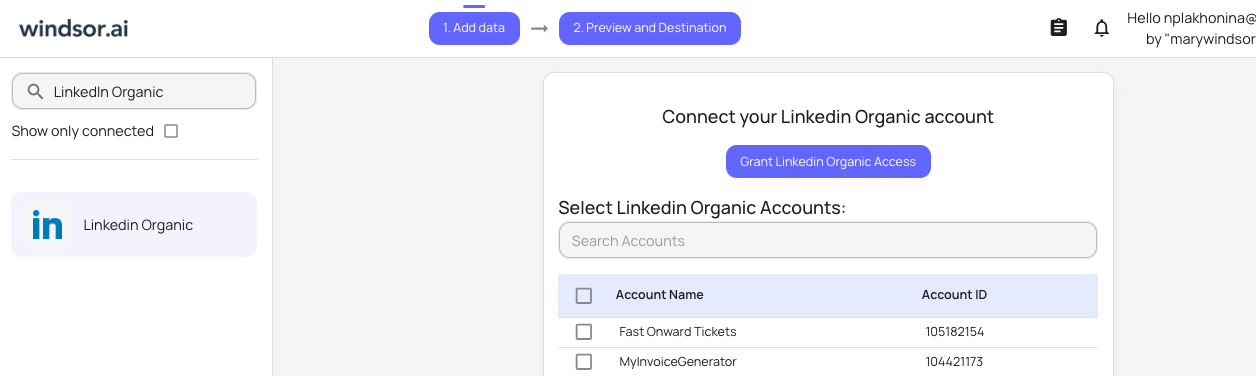
Windsor securely pulls your data via the LinkedIn API and prepares it for instant use in ChatGPT.
Step 2. Activate Windsor’s native app in ChatGPT
Open Windsor’s native ChatGPT app and click Connect. Approve access to your Windsor account.
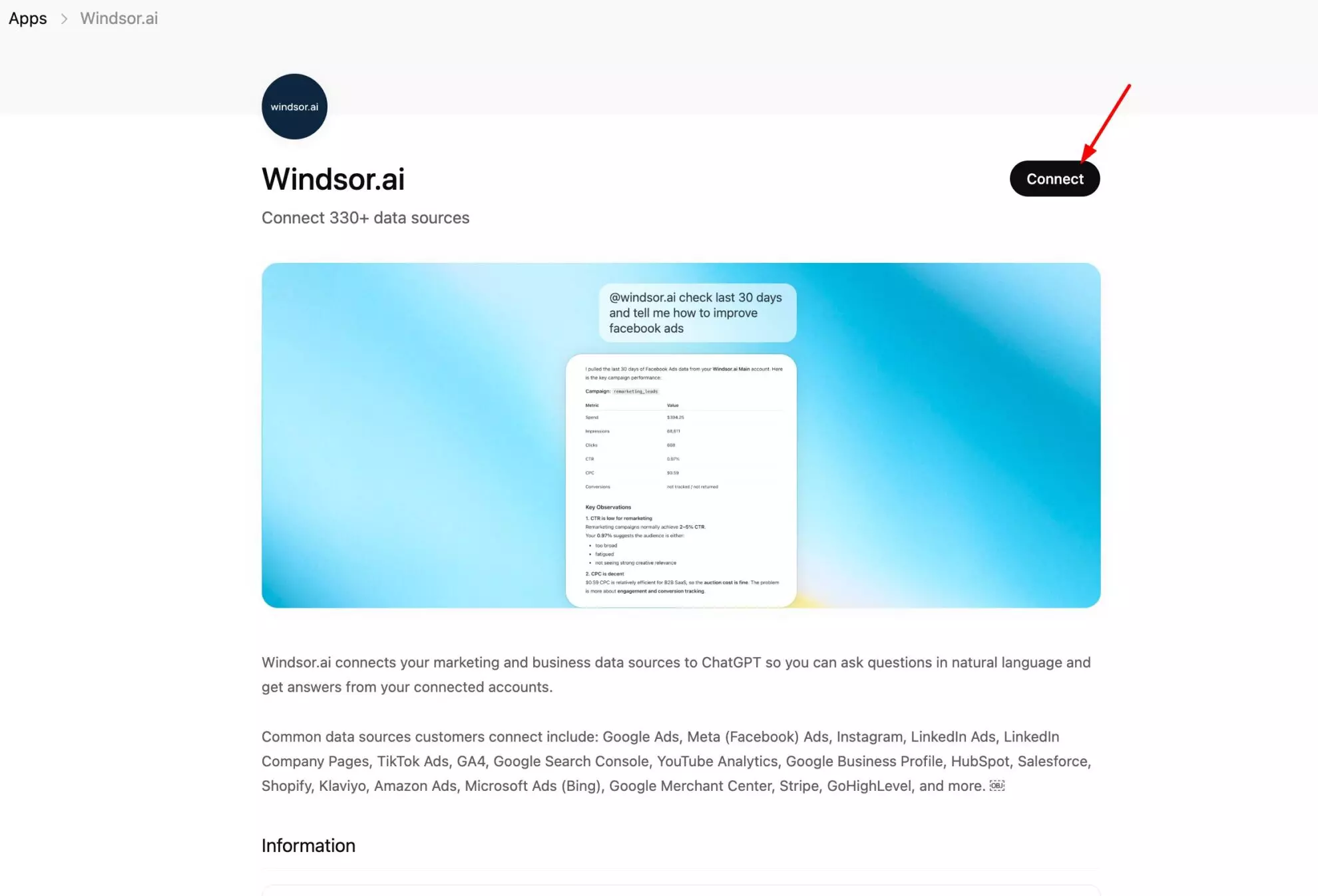
Once the app is installed, create a new chat and run a quick sanity check with this test prompt:
What LinkedIn Pages are connected to Windsor.ai?
Show me impressions and follower count by page for the last 30 days.
If the data looks correct, you’re ready to move on to more advanced questions.
Every question you ask pulls live data from LinkedIn’s API, no CSV, no delay, no stale numbers.
160+ LinkedIn data fields you can stream into ChatGPT with Windsor
Windsor pulls over 160 metrics and dimensions from the LinkedIn API. View the full list of supported LinkedIn Organic data fields.
Here are the most strategically useful fields, grouped by what they reveal about your page and your audience.
Content performance
| Field | Category | What ChatGPT can do with it |
| impressions | Post reach | How many times a post was shown, your baseline distribution metric |
| unique_impressions | Post reach | Deduplicated views, more accurate than raw impressions for understanding true audience size |
| clicks | Post engagement | Clicks on the post content, links, or company name, shows real intent, not just passive exposure |
| ctr | Post engagement | Clicks divided by impressions, the ratio that tells you whether your content earns attention or just appears |
| reactions | Post engagement | Likes, celebrates, supports, loves, insightful, curious, total positive responses to a post |
| comments | Post engagement | Conversation generated, the most algorithm-friendly engagement signal on LinkedIn |
| shares | Post engagement | Reposts and re-shares, extends your content beyond existing followers |
| post_engagement_rate | Post engagement | Engagement divided by impressions, the normalized quality metric across all your posts |
| viral_reach | Distribution | Views generated through other people sharing or interacting, content travelling beyond your direct followers |
| organic_reach | Distribution | Direct reach to your followers, the baseline before viral amplification |
Page-level metrics
| Field | Category | What ChatGPT can do with it |
| page_views | Page health | Total visits to your Company Page, split by section (Overview, Jobs, People, Careers, Products) |
| unique_visitors | Page health | Deduplicated page visitors, shows actual audience size, not repeat visits |
| follower_count | Audience growth | Total followers at a point in time, track daily for growth trend analysis |
| follower_gains | Audience growth | New followers added per period, which content or events drove growth |
| custom_button_clicks | Page conversion | Clicks on your CTA button (Visit Website, Contact Us, etc.), the closest GBP equivalent to a conversion action |
Audience demographics
| Field | Category | What ChatGPT can do with it |
| seniority_level | Who follows you | Entry-level, Senior, Manager, Director, VP, C-Suite, Owner. The ICP alignment check |
| function | Who follows you | Job function categories: Marketing, Engineering, Sales, HR, Finance, Operations, etc. |
| industry | Who follows you | The industry each follower works in, does it match the verticals you sell to? |
| company_size | Who follows you | Follower breakdown by employer size: 1–10, 11–50, 51–200, 201–500, 1k–5k, 5k–10k, 10k+ |
| region / country | Who follows you | Geographic distribution of your follower base, useful for market focus and language decisions |
Prompts worth running: real questions for practical LinkedIn analysis in ChatGPT
Jumpstart your LinkedIn analysis with these ready-to-use prompts for ChatGPT, designed to quickly uncover what’s working, what’s not, and where to focus next.
The audience analysis: are you reaching the right people?
This is the analysis LinkedIn’s native interface makes unnecessarily hard.
Your follower demographics and post engagement demographics are both available, but comparing them side-by-side, or checking whether engagement skews toward your ICP, requires jumping between views and doing the math manually.
One ChatGPT prompt handles it.
Check if your followers match your ideal customer profile
Break down my LinkedIn followers by seniority level and industry.

What percentage are at Director level or above?

Which industries make up the top 5?
Find out who’s actually engaging, not just following
Which seniority levels and job functions engage most with my posts in the last 60 days?

Is there a gap between who follows us and who actually interacts?
Spot the audience you’re not reaching
Based on my follower demographics, which industries or seniority levels are underrepresented compared to our target market?

What content shift might help reach them?
What content actually earns clicks
Impressions are easy to collect on LinkedIn. Clicks are harder.
A post that reached 200 people but led to only 3 website clicks is generating goodwill, not sales pipeline.
These prompts separate the two.
Find your highest-click posts
Which posts in the last 90 days drove the most clicks?

What do they have in common — format, topic, or length?
Calculate CTR by post type
Compare the click-through rate of my text posts, image posts, document/carousel posts, and video posts over the last 60 days.

Which format earns the most clicks per impression?
High impressions, low clicks: define what’s not converting
Which posts had more than 500 impressions but fewer than 10 clicks?

What do they have in common?

Why might they be getting seen but not acted on?
Organic reach vs. viral reach: what’s spreading beyond your followers
LinkedIn distributes content in two ways: directly to your followers, and via the activity of people who engage with your posts (viral reach).
Understanding which posts travel beyond your existing audience tells you what LinkedIn’s algorithm considers worth amplifying.
And ChatGPT helps you uncover these actionable insights.
Which posts broke out beyond your follower base
Compare viral reach vs. organic reach for my posts in the last 30 days.

Which posts had the highest viral reach relative to their organic reach?

What triggered the spread — comments, shares, or reactions?
Follower growth: what’s driving your popularity?
Show me weekly follower growth over the last 3 months.

Which weeks had the biggest gains?

What was posted during those periods?
Page activity: who visits and what they look for
Most LinkedIn Page managers focus entirely on posts. But page visits, especially to specific sections like Careers, People, or Products, reveal how visitors are using your page as a reference point.
Which page sections get the most traffic
Break down my LinkedIn Page views by section (Overview, Jobs, People, Careers, Products) for the last 30 days.

Which section gets the most visits after our main feed?
Analyze CTA button performance
How many times has our custom CTA button been clicked in the last 30 days?

Has that number been growing or declining week over week?
From data to content plan
Once ChatGPT understands your LinkedIn performance patterns, it can do the strategic work: identifying gaps, suggesting formats, and building an engaging content plan grounded in what actually worked.
Surface your repeatable content formula
Analyze my top 10 posts by engagement rate over the last 90 days.

What topics, formats, and post lengths come up most often?

What should I replicate?
Spot what your engaged audience wants more of
Based on comments and reactions, what topics generate the most engagement on our page?

Are there any specific theme or posting patterns?
Build a data-driven content plan
Based on my best-performing content, suggest a 2-week LinkedIn content plan.

Include format, topic, text, and design concept for each post.
Publish directly from the chat
Once ChatGPT has surfaced what works, you don’t need to switch tabs to act on it.
Draft and publish a new post
Draft a LinkedIn post recapping our top 3 posts by engagement this month, written in a similar tone. Once I approve it, publish it directly to our Page.
Analyze LinkedIn Organic insights alongside the rest of your marketing stack
LinkedIn data answers what’s happening on the platform. However, deeper insights that connect content performance to business outcomes need data from outside LinkedIn.
🔌 Windsor.ai lets you combine LinkedIn Company Pages data with key metrics from 350+ other platforms for cross-channel analysis. Connect all your data sources once, and query everything directly in ChatGPT through the same Windsor.ai app.
Here are some useful data blending scenarios you can try:
- LinkedIn Pages + LinkedIn Ads: Your organic content and paid campaigns most likely are targeted towards the same professional audience. Connect both and ask ChatGPT: is your organic content resonating with the same seniority levels your ads target? Are there post topics that perform well organically that haven’t been tested as sponsored content?
- LinkedIn Pages + GA4: LinkedIn clicks land on your website. GA4 tracks what those visitors do next. Connect both and ask ChatGPT: which posts drove the most website sessions, and did those sessions convert? Is LinkedIn traffic high-intent or mostly curiosity clicks?
- LinkedIn Pages + HubSpot or Salesforce: For B2B teams using LinkedIn as a top-of-funnel channel, the most valuable question is whether organic LinkedIn engagement correlates with pipeline activity. Connect your CRM alongside LinkedIn Pages and ask ChatGPT: do weeks with high LinkedIn engagement see increased inbound lead volume? Which content themes appear most often in the journey of contacts who converted?
- LinkedIn Pages + Google Ads + Meta Ads: B2B brands running multi-channel campaigns often have no view of how LinkedIn organic performance relates to paid channel efficiency. Connect all three and ask ChatGPT: on weeks when LinkedIn organic reach spikes, does paid CPC from Google or Meta decrease, a sign of brand search uplift? Where are the same audience segments being addressed organically and paid simultaneously?
Conclusion
LinkedIn gives B2B companies access to a highly targeted, professional audience.
But most teams still don’t know if they’re actually reaching it.
Are your posts seen by decision-makers, or by people outside your target market?
Are you attracting the right industries, or just growing vanity metrics?
The answers are already in your data. They’re just hard to access.
Windsor’s native app for ChatGPT changes that.
Your LinkedIn Page data becomes instantly accessible for AI-powered analysis.
No digging through tabs. No manual reports.
Just ask natural questions and see exactly:
- who engages with your content
- what drives real results
- and where your strategy needs to shift
Ready to turn raw LinkedIn Organic data into actionable insights?
🚀 Connect LinkedIn Pages to ChatGPT in less than a minute and start making data-driven content optimization decisions in minutes. Try it for free now.
FAQs
What is the fastest way to connect LinkedIn Pages to ChatGPT?
The fastest way is to use a native app for LinkedIn Pages to ChatGPT integration like Windsor.ai. Windsor syncs your LinkedIn Pages to ChatGPT in just two steps: connect your LinkedIn account in Windsor, then install the Windsor.ai app in ChatGPT. The entire setup takes less than a minute and requires no technical skills.
What LinkedIn data does Windsor pull into ChatGPT?
Windsor gives ChatGPT access to 160+ LinkedIn organic metrics and dimensions. This includes post-level data (impressions, unique impressions, clicks, CTR, reactions, comments, shares, engagement rate, viral reach, organic reach), page-level data (page views by section, unique visitors, follower count, follower gains, CTA button clicks), and audience demographics (seniority level, job function, industry, company size, country/region). The demographic fields are available both for your follower base and, to an extent, for post engagement audiences.
Does this connector cover LinkedIn Ads as well?
No, this connector is specifically for LinkedIn Company Page organic performance. LinkedIn Ads data (campaign spend, ad impressions, cost per click, lead generation forms) is a separate Windsor connector. You can connect both to Windsor and use them together in the same ChatGPT conversation, which makes it possible to compare organic and paid performance side by side, including whether the same seniority levels and industries are being reached through both channels.
Do I need Admin access to connect a LinkedIn Company Page?
Yes. Windsor connects to the LinkedIn API using the permissions associated with the account you authenticate with. Admin or Analyst access to the Company Page is required to pull analytics data. Super Admin access is not required; Analyst-level access is sufficient for the metrics Windsor pulls.
Can I connect multiple LinkedIn Company Pages?
Yes. Connect each page to Windsor separately and all of them are available in the same ChatGPT conversation. For agencies managing multiple client pages, or enterprises with regional or product pages, this enables direct cross-page comparison: which page has the highest engagement rate, which is growing fastest in target industries, which content types perform differently across pages.
How is this different from LinkedIn's built-in analytics?
LinkedIn’s native analytics show you good data, but spread across multiple tabs, fragmented by time period, and with no way to cross-reference post performance against audience demographics in a single view. To understand whether your content is reaching senior decision-makers, you’d need to manually compare the Content tab, the Followers tab, and the Visitors tab, then build the comparison yourself. Windsor brings all of that into one ChatGPT conversation where you can ask cross-dimensional questions in plain language and get immediate answers.
Can ChatGPT tell me whether my content is reaching my ICP on LinkedIn?
Yes, and this is one of the most powerful things you can do with LinkedIn data in ChatGPT. Because Windsor pulls both post engagement metrics and audience demographic fields (seniority_level, function, industry), ChatGPT can cross-reference them to tell you whether the people engaging with your content match the professional profile of your ideal customer. You can ask whether Director-and-above engagement is growing or shrinking, which industries are most active on your page, and whether your follower composition is shifting toward or away from your target market.
Can I blend LinkedIn Pages data with my CRM in ChatGPT?
Yes. Connect LinkedIn Pages alongside HubSpot, Salesforce, or any of Windsor’s 350+ supported data sources, and all of them are queryable in the same ChatGPT conversation. A common and powerful combination for B2B teams is LinkedIn Pages + CRM: asking ChatGPT whether periods of high LinkedIn engagement correlate with increased inbound lead volume, or which content themes appear most often in the journey of contacts who eventually converted.
Can I publish LinkedIn posts from ChatGPT, or just analyze data?
Both. ChatGPT can publish new posts directly to your connected LinkedIn Page, a text or link update, or a single image post, without leaving the chat. Support for more LinkedIn Pages write actions, like scheduling, is on our roadmap.


