 Destinations
 Data sources
 AI insights
 About us
 Careers
 Security
 Customer reviews
 Contact us
 Affiliate program
 Solution partners
 Template gallery
 Looker Studio templates
 Power BI templates
 Excel templates
 Google Sheets templates
 Tableau templates
 Facebook Ads templates
 Google Ads templates
 Data fields & Metrics
 AI prompt library & Guides
 Product documentation
 API documentation
 Case studies
 Blog
Blog Data models
 Windsor vs Supermetrics
 Windsor vs Funnel.io
 Windsor vs Fivetran
 Windsor vs Rivery
 Windsor vs Portermetrics
 Windsor vs Coupler.io
Connect Gravity Forms to Claude
Automatically sync your Gravity Forms data to Claude using the Windsor.ai connector.
Turn Gravity Forms submissions into actionable insights in Claude so you can prioritize high-value leads, fix conversion leaks, and understand what drives revenue.
Forget CSVs. Stop copy/paste. Connect data in minutes. No code required.
 Sign up with Google
 Free forever plan
No credit card needed
Free forever plan
No credit card needed









Make the most out of your data with Gravity Forms to Claude integration
Connect Gravity Forms to Claude with Windsor MCP and replace manual analysis with instant, AI-powered insights. Explore key benefits and use cases below:

Prioritize high-value leads
Claude filters all Entry Is Starred items and sorts them by the highest Entry Payment Amount from the last 7 days. This allows your sales team to bypass administrative inquiries and focus immediately on the most lucrative hot leads.

Detect payment and conversion issues
Claude analyzes the Entry Payment Status across different Entry Submitter User Agents to find patterns in failed or cancelled transactions. It identifies if a specific browser or mobile device is causing payment drops, so you can fix the technical bottleneck.

Find top-performing pages and forms
By grouping entries by their Entry Source URL, Claude highlights which specific blog posts or landing pages are driving “One-Time” vs. “Subscription” Transaction Types. You can then see exactly which content is better at converting long-term recurring revenue.

Get AI-powered recommendations
Claude not only surfaces insights but interprets your metrics and explains what’s driving changes. It also provides clear next-step actions to help you optimize leads, conversions, and revenue.
Using Windsor.ai to connect data from Gravity Forms to Claude
Forget spreadsheets, data preparation, and complex setups. Windsor MCP automatically pulls, cleans, and streams your Gravity Forms data into Claude, ready for advanced AI analysis.
Connect in minutes and use natural language prompts to qualify leads, identify high-value customers, and summarize submissions.
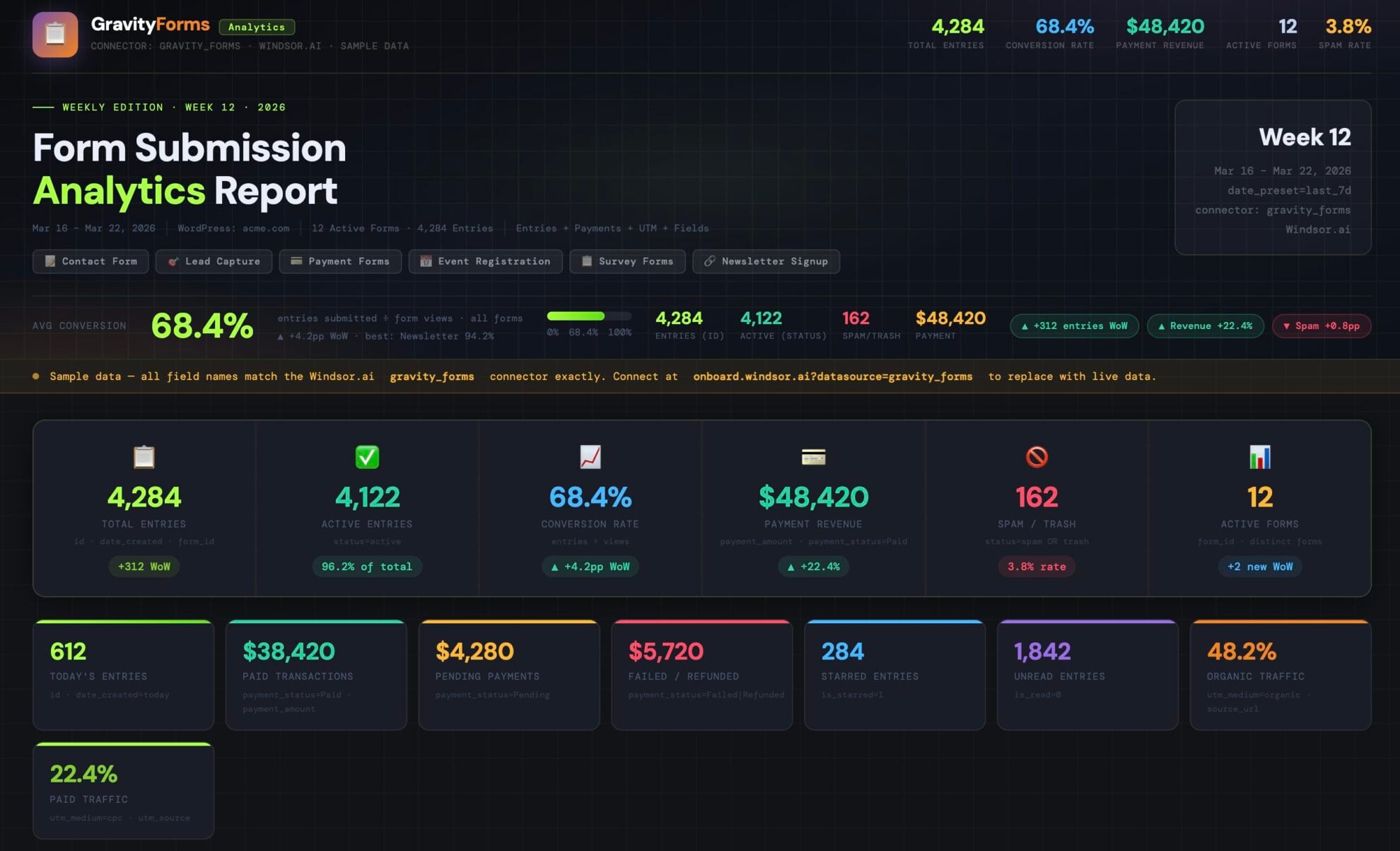














How to connect Gravity Forms to Claude with Windsor.ai
Explore our video tutorial and a step-by-step guide to integrate your data from any source into Claude with the Windsor.ai connector.
Select your data source
Choose Gravity Forms as your data source and grant access to Windsor.ai.

Install the Windsor.ai connector in Claude
In Claude, open Customize, then Connectors, search for Windsor and click Add. Sign in to your Windsor.ai account when prompted, and the connector appears in your Connectors list. You can also open the Windsor.ai listing in the Claude directory and click Connect.

Query your data in Claude
Start a new chat and ask Claude questions about your connected data: summarize KPIs, create client reporting dashboards, or run advanced analyses.
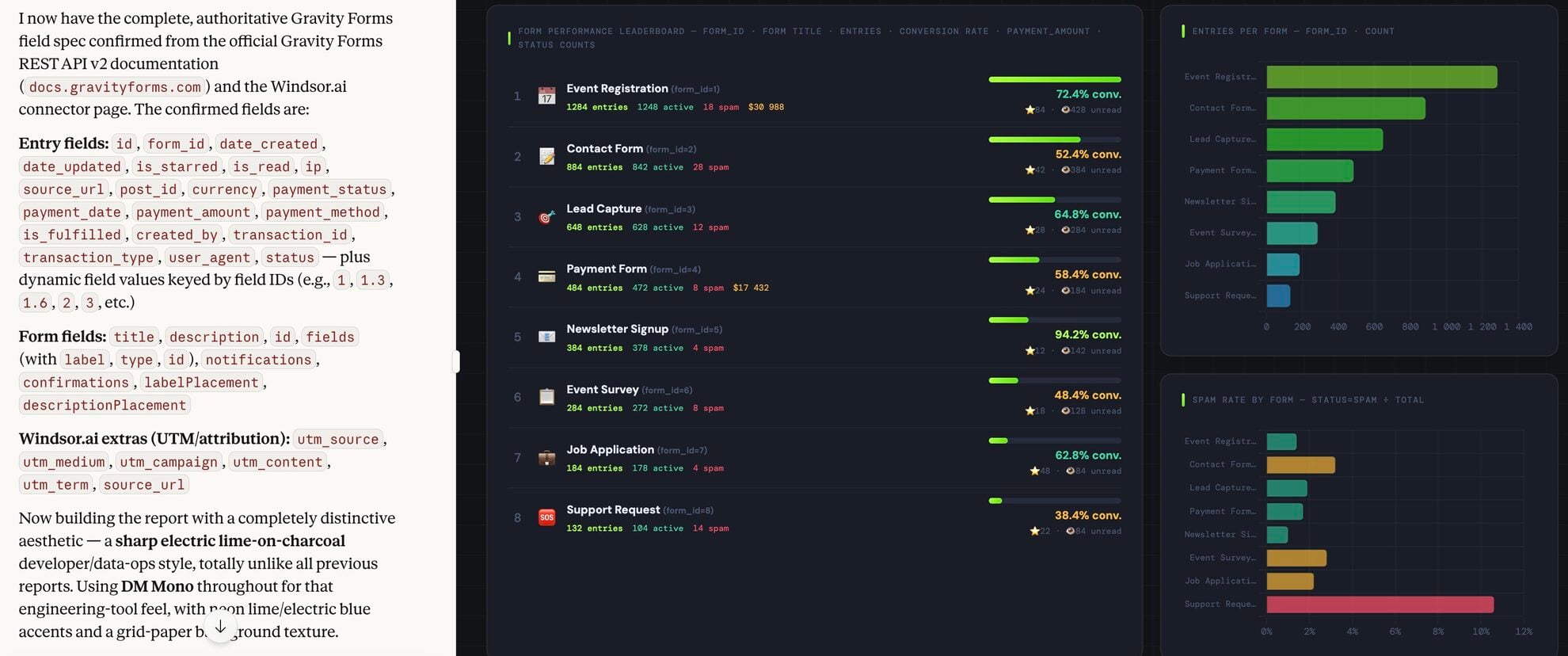
FAQs
What can I do with Gravity Forms data in Claude?
Once your Gravity Forms data is in Claude, you can:
- Analyze lead performance. Ask Claude which forms and pages generate the most submissions, and where conversions drop.
- Track revenue and payments. Summarize which forms generate the most revenue and surface failed or pending transactions.
- Identify funnel bottlenecks. Find submissions that are not fulfilled or followed up on, and uncover gaps in your conversion process.
- Optimize form conversion rates. Detect patterns in form structure (e.g., required fields or complexity) that may reduce submissions.
- Evaluate page and content performance. See which pages drive the most submissions and which ones convert into paying users.
- Run cross-channel analysis. Combine form data with GA4, CRM, or ad platforms (if connected) to identify which channels drive more conversions, revenue, and high-quality leads.
Find more details about Windsor MCP for Claude use cases in this guide: https://windsor.ai/how-to-use-windsor-mcp-examples-use-cases/.
Can Claude compare performance between two different forms?
Yes. You can prompt, ‘Compare the submission volume and lead quality between ‘Form A’ and ‘Form B’ to see which landing page is more effective.’
Can I connect Gravity Forms data with other platforms for deeper analysis?
Absolutely. With Windsor MCP, combine Gravity Forms with GA4, CRM, or Google Ads in one Claude session to see which channels drive not just leads, but actual revenue.
What prompts can I use when analyzing Gravity Forms data in Claude?
Use more advanced, specific prompts to extract deeper insights from your Gravity Forms data. For example:
-
Compare spam vs active submissions by IP address. Identify which sources generate the most spam and whether any of them have ever produced valuable leads.
-
Match the Entry Source URL (containing ad tracking tags) with the Entry Is Starred metric. Tell me which Google Ads campaign is bringing high-quality leads, not just filling the form.
-
Compare one-time payments vs subscriptions over time. Show how much revenue comes from each and how subscriptions contribute to monthly growth.
-
Compare the Email addresses from our Gravity Forms leads with our Shopify Customer List. Identify how many people who filled out a 'Pre-Sales' form ended up purchasing within 14 days.
How much does it cost to integrate Gravity Forms into Claude using Windsor.ai?
Windsor.ai’s pricing for Claude data integration varies depending on the number of connected accounts and data sources. We offer absolutely transparent pricing plans for diversified business needs and budgets.
How long does it take to connect Gravity Forms to Claude?
With Windsor.ai’s easy-to-use connector, the integration process takes just a few minutes. No technical expertise is needed; syncing Gravity Forms to Claude is simple, straightforward, and completely code-free.
Do you have helpful links to get started with integrating Gravity Forms and Claude using Windsor.ai?
Yes, we have helpful resources to help you get started. You can explore our official documentation and tutorials for seamless Gravity Forms to Claude integration with Windsor.ai:
Tired of manual Gravity Forms data exports? Try Windsor.ai today to automate your reporting


