 Destinations
 Data sources
 AI insights
 About us
 Careers
 Security
 Customer reviews
 Contact us
 Affiliate program
 Solution partners
 Template gallery
 Looker Studio templates
 Power BI templates
 Excel templates
 Google Sheets templates
 Tableau templates
 Facebook Ads templates
 Google Ads templates
 Data fields & Metrics
 AI prompt library & Guides
 Product documentation
 API documentation
 Case studies
 Blog
 Data models
 Windsor vs Supermetrics
 Windsor vs Funnel.io
 Windsor vs Fivetran
 Windsor vs Rivery
 Windsor vs Portermetrics
 Windsor vs Coupler.io
Connect Google Merchant Center to Claude
Automatically sync your Google Merchant Center data to Claude using Windsor MCP.
Leverage Windsor.ai to stream live GMC metrics, from feed health to item-level conversions, directly into your AI workspace. Generate actionable reports that optimize your Google network presence and scale your business.
Forget CSVs. Stop copy/paste. Connect data in minutes. No code required.
 Sign up with Google
 Free forever plan










Streamline analytics with Google Merchant Center to Claude integration
Send your Google Merchant Center data to Claude via Windsor.ai to analyze product performance with conversational AI, unlocking these key benefits:

Natural language prompts
Ask Claude questions in plain English, like “What are the top-selling products by category in the past 90 days?” or “Which products generated the most revenue last month?“ Receive clear, structured answers from your Google Merchant data without SQL, spreadsheets, or dashboards.

Instant AI insights
Claude processes and interprets your Google Merchant Center product and campaign data in seconds. It delivers instant summaries, visual charts, and AI recommendations, helping you spot trends, identify top-performing items, and uncover optimization opportunities.

Unified view across channels
Combine Google Merchant Center with 350+ sources, including Google Ads, Meta Ads, Mailchimp, Shopify, and more. Gain a complete view of your business performance and optimize strategy across marketing, pricing, and inventory for sustainable growth.

Feed integrity audits
Claude audits your product catalog to identify missing mandatory attributes and technical feed errors that lead to disapprovals. It provides a prioritized list of fixes, ensuring your products are fully visible and compliant.

Boost low-performing products
Claude can identify products with high visibility but a CTR below 1%. Analyze their titles and descriptions, and ask Claude to suggest three adjustments to improve relevance and click-through rates.
Using Windsor.ai to connect data from Google Merchant Center to Claude
Pull your Google Merchant Center data into Claude without manual exports, complex setups, or expensive tools. Windsor.ai’s connector automatically collects, cleans, and streams your product and campaign data directly into Claude.
Connect in minutes and uncover AI-powered insights across products, pricing, inventory, promotions, and ad performance.

Available actions
Insert Product
Add a product to an API data source of the connected Merchant Center account. If the data source already has an entry with the same product_id, content_language and feed_label, the new entry replaces it. data_source is the data_source_id or data_source_name of an API data source (Data Sources table, or create one with create_data_source). In a primary data source, give the attributes that Google needs to show the product, for example title, link, image_link, price, currency and availability. Merchant Center shows the change after a few minutes. Remove the product with delete_product.
Update Product
Change the given attributes of a product in an API data source of the connected Merchant Center account. Attributes that are not given keep their values. product_id, content_language and feed_label come from the product_id, product_content_language and product_feed_label fields. data_source is the data_source_id or data_source_name of an API data source: the product's primary data source (product_data_source) if its input is API, otherwise a supplemental API data source that is linked to that primary data source (create one with create_data_source and link_to_primary_data_source). Values of a supplemental data source that comes before the feed in the feed's default rule (as create_data_source links it) override the feed values until delete_product removes them from the supplemental data source. clear_attributes deletes attributes from the product in data_source: in a supplemental data source the product then shows the feed value again. pause ADS or ALL pauses the product, NONE ends the pause. Merchant Center shows the change after a few minutes.
Delete Product
Delete a product from an API data source of the connected Merchant Center account. From a primary data source this removes the whole product, including its supplemental values: only insert_product with all attributes adds it again. From a supplemental data source this removes only the values of that data source, and the product keeps its primary values. data_source is the data_source_id or data_source_name of the API data source.
Create Data Source
Create an API product data source in the connected Merchant Center account. A primary data source holds products that insert_product adds. A supplemental data source holds values that update_product writes for products from a file feed, an app or the Merchant Center UI. Merchant Center applies them only to products of the primary data sources that the supplemental data source is linked to. link_to_primary_data_source (data_source_id or data_source_name) puts the new supplemental data source first in the default rule of that primary data source, so its values override the feed, and keeps the sources the rule already uses. The user removes the link in Merchant Center (the Attribute rules of the primary data source). Give content_language and feed_label together to accept only products with them, or leave both out to accept every product. countries is for a primary data source only. Each call creates a new data source: list the existing ones in the Data Sources table first.


How to connect Google Merchant Center to Claude with Windsor.ai
Explore our video tutorial and a step-by-step guide to integrate your data from any source into Claude with the Windsor.ai connector.
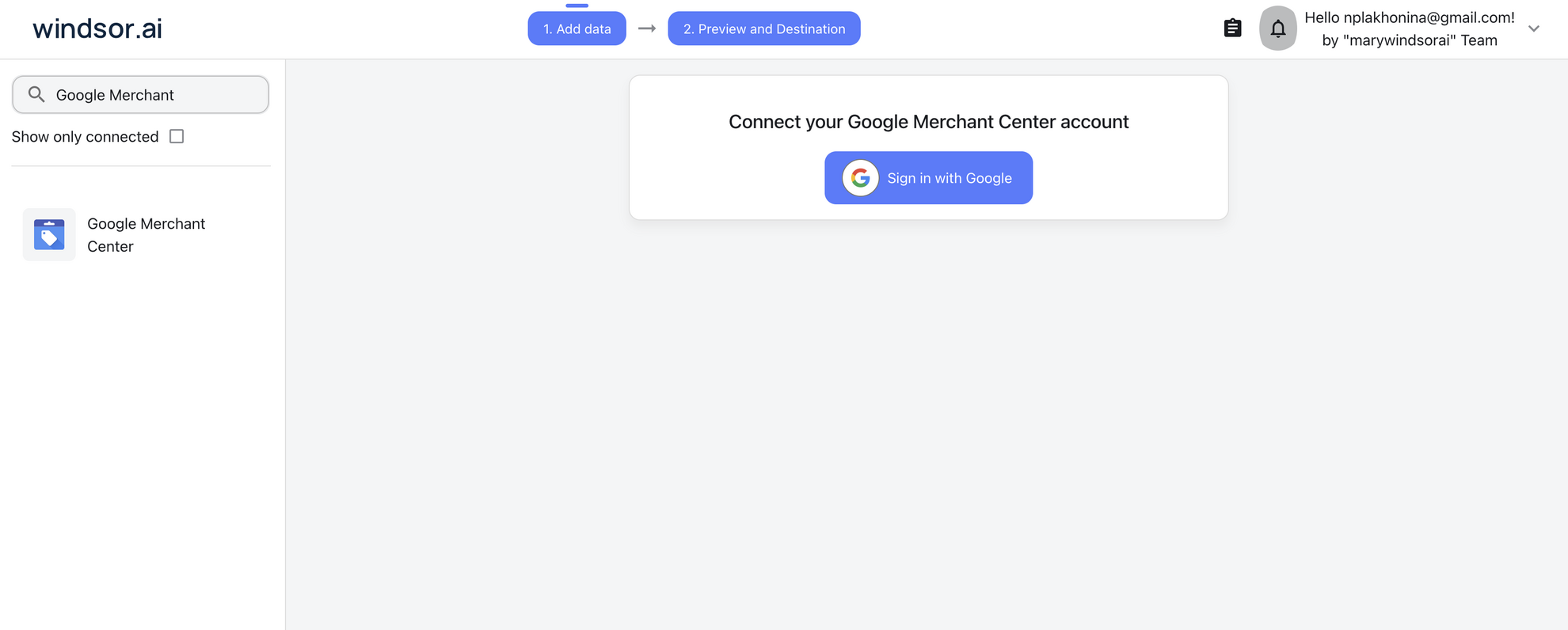
Select your data source
Choose Google Merchant Center as your data source and grant access to Windsor.ai.
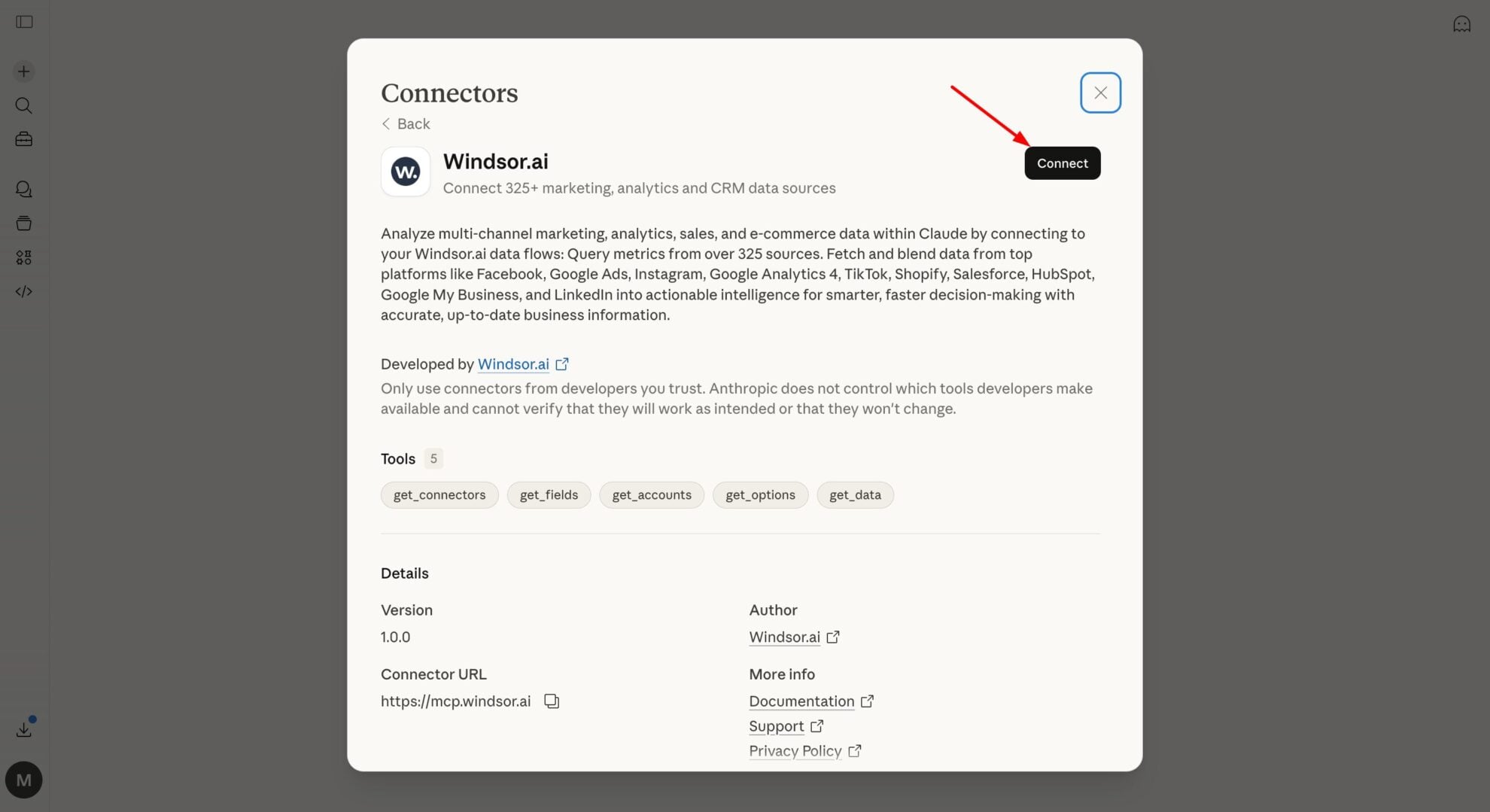
Install the Windsor.ai connector in Claude
In Claude, open Customize, then Connectors, search for Windsor and click Add. Sign in to your Windsor.ai account when prompted, and the connector appears in your Connectors list. You can also open the Windsor.ai listing in the Claude directory and click Connect.
Query your data in Claude
Start a new chat and ask Claude questions about your connected data: summarize KPIs, create client reporting dashboards, or run advanced analyses.

FAQs
What specific Google Merchant Center metrics can I analyze in Claude with Windsor MCP?
Here are the key metric categories you can explore:
- Price dynamics. Compare your Product Price against Benchmark and Suggested Prices to identify items where your pricing may be uncompetitive.
- Performance uplift. Use Product Click/Conversion Uplift and Product Click Potential to forecast exactly how much traffic you gain by adopting Google’s price suggestions.
- Traffic quality. Evaluate Product Clicks, Impressions, and Product CTR alongside Product Conversion Rate to pinpoint which items attract shoppers but fail to sell.
- Feed integrity. Audit Product Availability and mandatory attributes like Color, Size, and GTIN to resolve disapprovals and ensure your feed is technically optimized for ranking.
Find more details about Windsor MCP for Claude use cases in this guide: https://windsor.ai/how-to-use-windsor-mcp-examples-use-cases/.
What prompts can I use when analyzing Google Merchant Center data in Claude?
Use advanced prompts in Claude to uncover actionable insights and optimize your product and pricing strategy. Here are some examples:
-
Identify products where our pricing is higher than the market benchmark, but the product has high potential. Suggest which prices we should adjust to get a bigger boost in traffic and sales.
-
Find products that are being seen by shoppers but aren't being clicked. Check if key attributes like color, material, or size are missing.
-
Rank our product categories by their predicted performance increase. Highlight items with the highest potential conversion uplift from Google’s pricing suggestions.
-
Find items that are in stock but receiving no traffic. Analyze why these products are stalling and suggest a plan to improve their visibility and effectiveness.
How much does it cost to integrate Google Merchant Center into Claude using Windsor.ai?
Windsor.ai’s pricing for Claude data integration varies depending on the number of connected accounts and data sources. We offer absolutely transparent pricing plans for diversified business needs and budgets.
How long does it take to connect Google Merchant Center to Claude?
With Windsor.ai’s intuitive connector, the integration process takes just a few minutes. No technical expertise is required; connecting Google Merchant Center to Claude is simple, straightforward, and completely code-free.
Do you have helpful links to get started with integrating Google Merchant Center and Claude using Windsor.ai?
Yes, we have helpful resources to help you get started. You can explore our official documentation and tutorials for seamless Google Merchant Center to Claude integration with Windsor.ai:
Can Claude help optimize my product titles for SEO?
Absolutely. By analyzing your existing titles and the categories they belong to, Claude can suggest new titles that include high-value keywords, brand names, and key attributes (like size or material) in the specific order that Google’s algorithm prefers.
Can Claude help me prepare for seasonal sales like Black Friday?
Yes. Claude dives deep into historical performance, pricing trends, and product demand to forecast which items are likely to perform best during seasonal events. It can also identify inventory gaps, suggest price adjustments, and highlight high-potential products to maximize traffic, conversions, and revenue.
Can I combine Google Merchant Center with other data sources in Claude?
Yes. One of the key benefits of this integration is cross-channel analysis. Windsor.ai supports 350+ data sources, allowing you to merge GMC data with Google Ads to uncover wasted spend or with GA4 to understand why high-traffic products aren’t converting on your landing pages.
Tired of manual Google Merchant Center data exports? Try Windsor.ai today to automate your reporting


