 Destinations
 Data sources
 AI insights
 About us
 Careers
 Security
 Customer reviews
 Contact us
 Affiliate program
 Solution partners
 Template gallery
 Looker Studio templates
 Power BI templates
 Excel templates
 Google Sheets templates
 Tableau templates
 Facebook Ads templates
 Google Ads templates
 Data fields & Metrics
 AI prompt library & Guides
 Product documentation
 API documentation
 Case studies
 Blog
Blog Data models
 Windsor vs Supermetrics
 Windsor vs Funnel.io
 Windsor vs Fivetran
 Windsor vs Rivery
 Windsor vs Portermetrics
 Windsor vs Coupler.io
Connect Trello to Claude
Automatically sync your Trello data to Claude using the Windsor.ai connector.
Spot bottlenecks, rebalance team workloads, and improve delivery speed by analyzing Trello tasks and activity through a simple AI conversation in Claude.
Forget CSVs. Stop copy/paste. Connect data in minutes. No code required.
 Sign up with Google
 Free forever plan
No credit card needed
Free forever plan
No credit card needed










Optimize team workflows with Trello to Claude integration
Get quick insights into tasks, workflows, and team activity by asking Claude questions in natural language. Explore key use cases below:

Stalled task detection
Claude analyzes the last activity date on your cards to find tasks that haven’t moved in over a week. It then summarizes the last comment so you can see exactly where the project hit a snag.

Resource overload check
Ask Claude to count the number of active cards assigned to each member and flag anyone with more than five high-priority tasks. It helps you redistribute the workload before your team hits a burnout point.

Executive milestone summary
Ask Claude to synthesize all activity across a Workspace into a high-level narrative for leadership. It transforms technical card updates into a 200-word summary of project wins and upcoming milestones.

Complexity vs. speed insight
Compare how long tasks stay in progress against their difficulty (based on labels or custom fields). Reveal when simpler tasks take too long, signaling workflow inefficiencies or bottlenecks.
Using Windsor.ai to connect data from Trello to Claude
Syncing Trello data with Claude can be time-consuming and technically challenging. Windsor MCP simplifies this process with a connector that automatically streams your Trello boards’ data directly into Claude.
Connect in minutes to unlock deep insights into your team’s workload, sprint progress, and delivery timelines without leaving the chat interface.















How to connect Trello to Claude with Windsor.ai
Explore our video tutorial and a step-by-step guide to integrate your data from any source into Claude with the Windsor.ai connector.
Select your data source
Choose Trello as your data source and grant access to Windsor.ai.
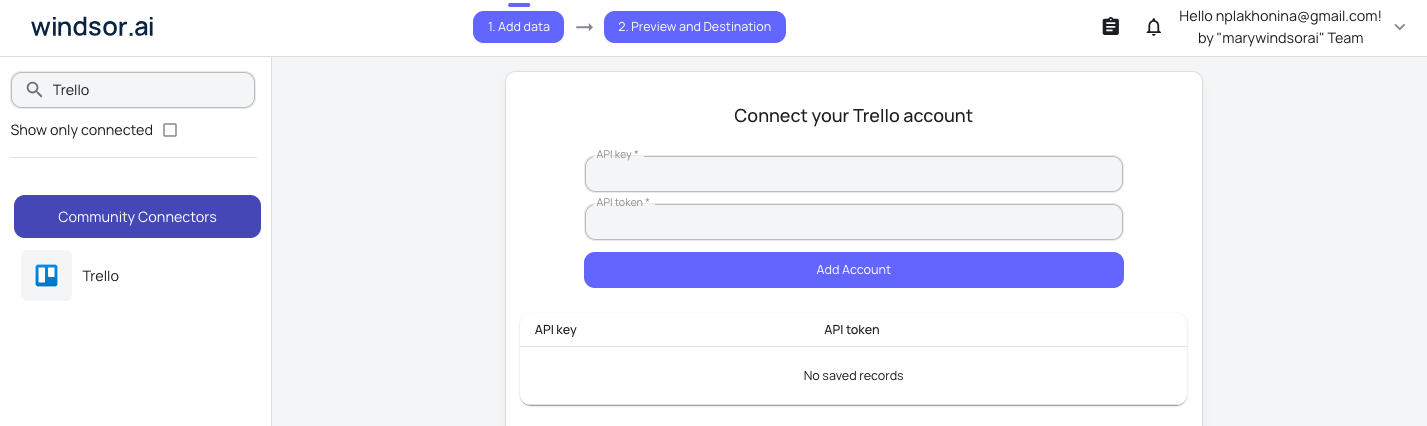
Install the Windsor.ai connector in Claude
In Claude, open Customize, then Connectors, search for Windsor and click Add. Sign in to your Windsor.ai account when prompted, and the connector appears in your Connectors list. You can also open the Windsor.ai listing in the Claude directory and click Connect.

Query your data in Claude
Start a new chat and ask Claude questions about your connected data: summarize KPIs, create client reporting dashboards, or run advanced analyses.

FAQs
Which Trello elements can Claude analyze?
Claude can analyze all key Trello components:
- Boards: structure, activity, and usage trends.
- Cards & lists: task status, progress, due dates, and ownership.
- Checklists: completion rates and task breakdowns.
- Team members: workload distribution and collaboration patterns.
- Actions & activity logs: updates, movements, and timeline of changes.
How can I use Claude to identify project bottlenecks?
Ask Claude to analyze your in-progress tasks and highlight cards that have been in the same stage the longest. It uses activity and update history to surface stalled tasks, so you can take action and keep projects moving.
Can I connect multiple Trello Workspaces?
Yes. You can connect multiple Trello Workspaces and analyze tasks, workflows, and team activity across all of them in a single Claude conversation.
Is my Trello data secure?
Windsor.ai uses official Trello OAuth2 for authentication. Your data is accessed with ‘read-only’ permissions by default, meaning Claude can analyze your boards but cannot delete or move your cards without your permission.
What prompts can I use when analyzing Trello data in Claude?
Use more specific prompts to extract deeper insights from your Trello data. For example:
-
Analyze the time elapsed between a card being created and being moved to 'Done.' Correlate this with the Labels or Custom Fields for 'Story Points/Complexity.' Identify if our 'Medium' complexity tasks are taking longer than 'High' complexity ones, and theorize why.
-
Based on the number of cards we moved to 'Done' over the last 3 weeks and the current number of cards in the 'Backlog,' predict if we will complete the 'Q3 Roadmap' by its current deadline. Identify the top 3 cards most likely to cause a delay.
-
Review the descriptions and comments across the 'Product' and 'Engineering' boards. Identify any cards that mention the same feature or task but aren't linked. Flag potential duplicated efforts or dependencies that haven't been formally tracked.
How much does it cost to integrate Trello into Claude using Windsor.ai?
Windsor.ai’s pricing for Claude data integration varies depending on the number of connected accounts and data sources. We offer absolutely transparent pricing plans for diversified business needs and budgets.
How long does it take to connect Trello to Claude?
With Windsor.ai’s easy-to-use connector, the integration process takes just a few minutes. No technical expertise is needed; syncing Trello to Claude is simple, straightforward, and completely code-free.
Do you have helpful links to get started with integrating Trello and Claude using Windsor.ai?
Yes, we have helpful resources to help you get started. You can explore our official documentation and tutorials for seamless Trello to Claude integration with Windsor.ai:
Tired of manual Trello data exports? Try Windsor.ai today to automate your reporting


