Destinations
 Data sources
 AI insights
 About us
 Careers
 Security
 Customer reviews
 Contact us
 Affiliate program
 Solution partners
 Template gallery
 Looker Studio templates
 Power BI templates
 Excel templates
 Google Sheets templates
 Tableau templates
 Facebook Ads templates
 Google Ads templates
 Data fields & Metrics
 AI prompt library & Guides
 Product documentation
 API documentation
 Case studies
 Blog
Blog Data models
 Windsor vs Supermetrics
 Windsor vs Funnel.io
 Windsor vs Fivetran
 Windsor vs Rivery
 Windsor vs Portermetrics
 Windsor vs Coupler.io
Connect Amazon Seller Central to Perplexity
Automatically sync your Amazon Seller Central data to Perplexity using the Windsor.ai connector.
Connect your Amazon Seller Central data to Perplexity and ask why a product’s conversion rate is dropping, which ASINs are eroding your margins, or where your next restock should go. Get answers from your own data, enriched with live market context.
Forget CSVs. Stop copy/paste. Connect in minutes. No code required.
 Sign up with Google
 Free forever plan
No credit card needed
Free forever plan
No credit card needed









Grow revenue and protect margins with Amazon Seller Central data in Perplexity
Quickly send ASC data to Perplexity with Windsor MCP to skip manual analysis and go straight to answers. Key use cases include:

Stay on top of inventory health
Stay on top of inventory health
Get an instant snapshot of which SKUs need restocking, which are aging, and what your long-term storage fee exposure looks like before the next charge date. Never get caught with a stockout or an unexpected fee again.

Protect your margins
Protect your margins
Ask Perplexity to calculate fee-to-revenue ratio by ASIN and surface exactly where FBA fees, returns, and refunds are eating into your profitability. Know which products are worth scaling and which are costing you more than they make.
Fix conversion drop-offs
Fix conversion drop-offs
Cross-reference sessions, Buy Box percentage, and unit session percentage by ASIN to pinpoint exactly where conversions are dropping, and get Perplexity to recommend what to fix first.

Run cross-channel analysis
Run cross-channel analysis
Connect Amazon Ads and Amazon Seller Central (or 350+ other business platforms) in the same Perplexity conversation to see exactly which campaigns are generating revenue, where budget is being wasted, and which ASINs are worth scaling.
Using Windsor.ai to connect data from Amazon Seller Central to Perplexity
Most ways to get your Amazon Seller Central data into an AI tool involve manual exports, data cleanup, and complex API work. Windsor.ai eliminates all of that with an MCP connector that automatically streams your orders, inventory, fees, and refunds data into Perplexity.
Connect in minutes and get AI-driven insights to improve your e-commerce performance.















How to connect Amazon Seller Central to Perplexity with Windsor.ai
Explore our video tutorial and a step-by-step guide to integrate your data from any source into Perplexity with the Windsor.ai connector.
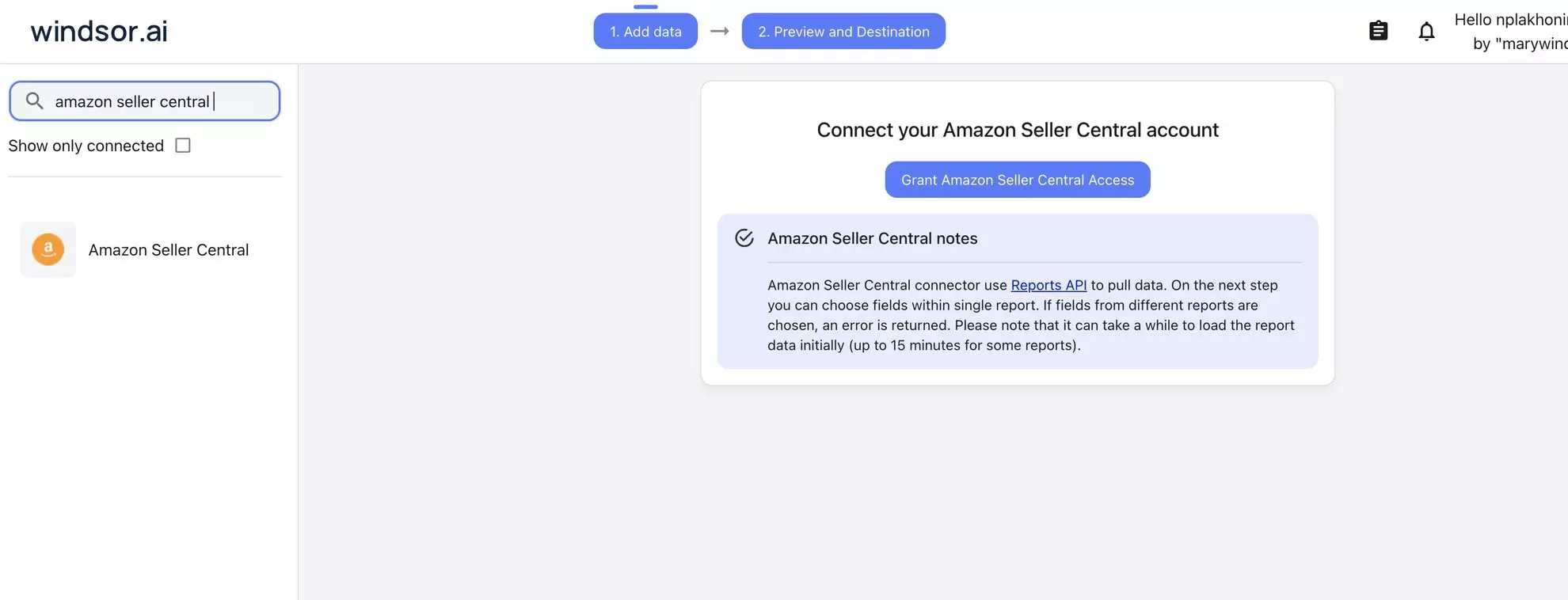
Connect data source in Windsor.ai dashboard
Connect your Amazon Seller Central to Windsor.ai. Select the necessary account(s) you want to pull data from and click “Next.”
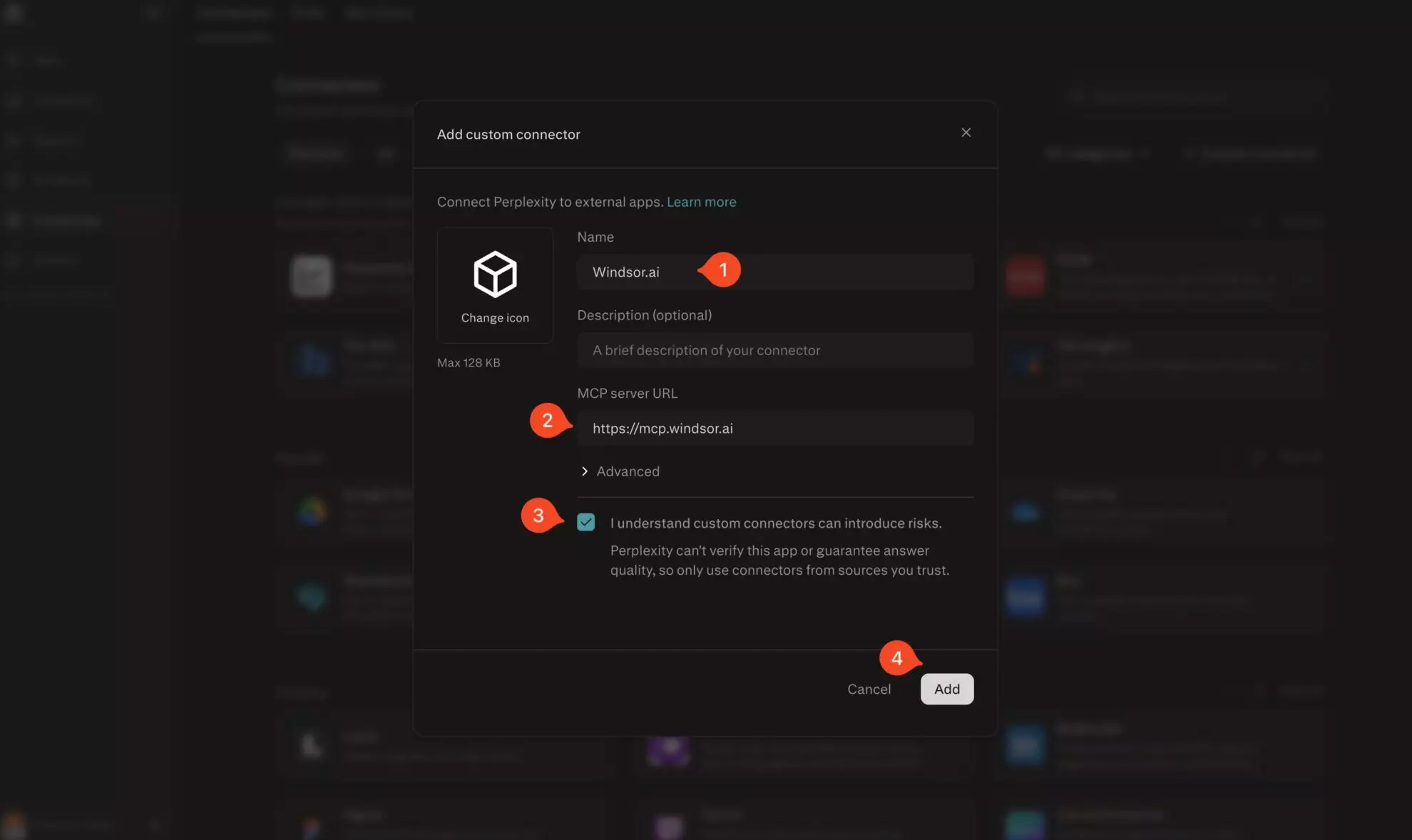
Add Windsor.ai as a custom connector
Go to perplexity.ai/computer/connectors and click + Custom connector. Fill in the details:
- Name: Windsor.ai
- MCP server URL: https://mcp.windsor.ai
Tick ‘I understand custom connectors can introduce risks’ and click Add.
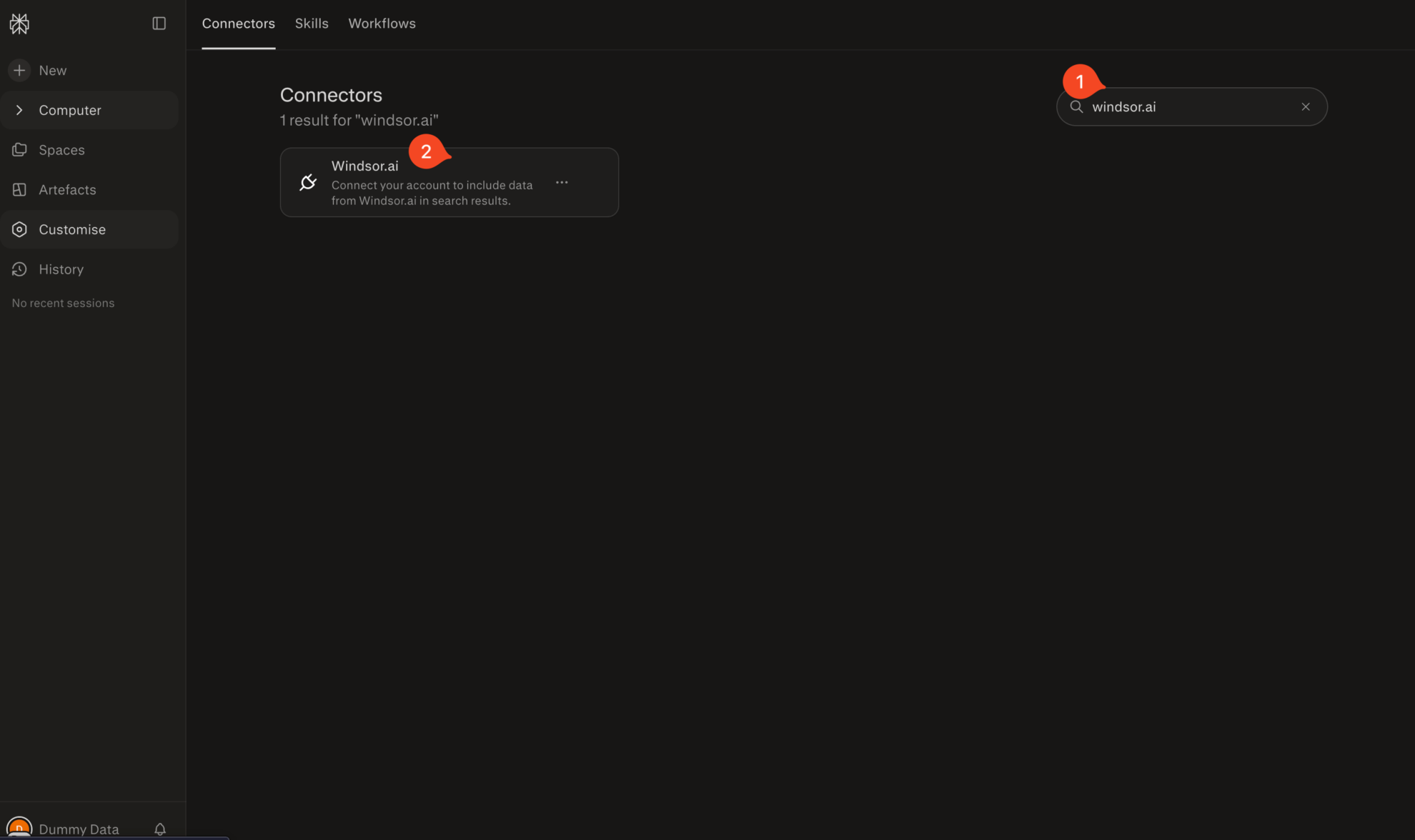
Install the connector
Search for Windsor.ai in the connectors list, click the card, then click Add connector.
Confirm by clicking Allow Access in the pop-up.
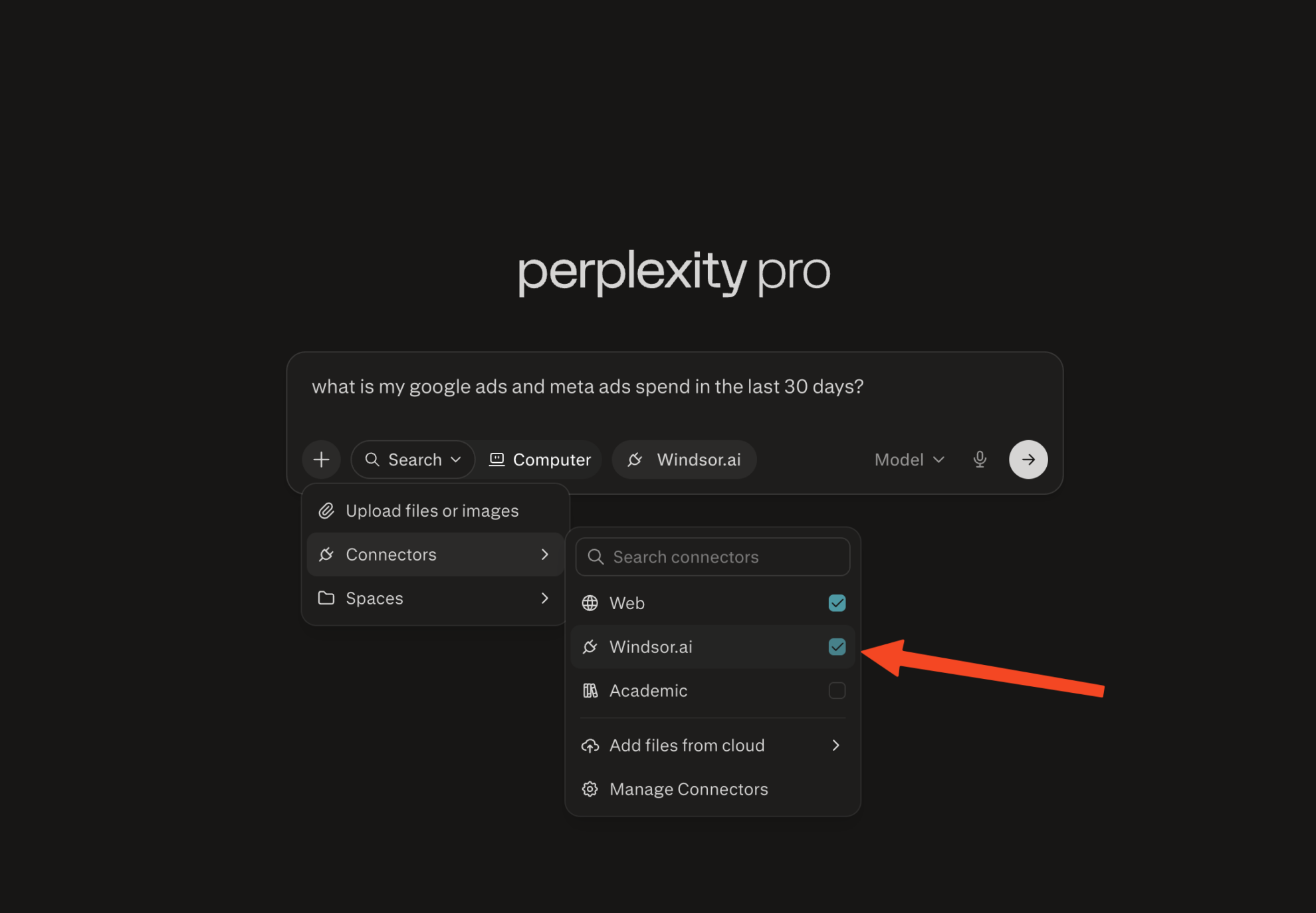
Enable Windsor.ai in your chat
In a new chat, click +, choose Connectors, and check Windsor.ai.
Start querying your data
You can now ask questions about your integrated Windsor.ai data.

FAQs
Can Windsor.ai pull data from multiple Amazon Seller Central accounts?
Yes. Windsor.ai supports multiple Amazon Seller Central accounts. You can query data from a specific storefront or across all of them in one conversation, which is useful for brands operating across regions or agencies managing multiple sellers.
What Amazon Seller Central metrics can I analyze in Perplexity through Windsor.ai?
Windsor.ai gives you access to a wide range of Amazon Seller Central metrics and dimensions, including:
- Revenue & orders: item price, quantity shipped, shipping price, gift wrap price, item tax, promotion discounts, and order-level detail including purchase date, sales channel, and fulfillment type (FBA vs. merchant-fulfilled).
- FBA fees: estimated referral fee, fulfillment fee, and weight handling fee per unit, plus total estimated fee per ASIN and product size tier classification.
- Inventory health: sellable and unsellable quantity, days of supply, weeks of cover (7, 30, 90, and 180-day trailing), inventory age bands, projected long-term storage fee charges at 6 and 12 months, recommended restock quantity, and sell-through rate.
- Sales & traffic: units ordered, ordered product sales, sessions, page views, unit session percentage (conversion rate), Buy Box percentage, and refund rate (available at both date level and ASIN level).
- Returns: return quantity, return reason, detailed item disposition (sellable, damaged, customer-damaged), and customer comments, where provided.
- Reimbursements: reimbursement amount per unit, total reimbursement, quantity reimbursed in cash vs. inventory, and reason (e.g., lost, damaged in warehouse).
Can Perplexity search the web alongside my Amazon Seller Central data?
Yes. Perplexity’s live web search works in the same conversation as your Windsor-connected seller data. You can ask questions that combine your operational metrics with live market context, for example: ‘My return rate for ASIN X jumped 40% last month. Are there recent reviews or competitor listings that explain this?’ or ‘Which of my slow-moving ASINs are in categories showing declining search demand on Amazon right now?’
What prompts can I use when analyzing Amazon Seller Central data in Perplexity?
Use these prompts for deeper analysis of your Amazon Seller Central data, uncovering patterns and strategic opportunities:
Cross-reference my Buy Box percentage and unit session percentage by ASIN. Where am I winning traffic but losing the Buy Box, and what is the estimated revenue impact?
Which ASINs have received reimbursements for warehouse damage or loss more than twice in the last 6 months? Show total reimbursement value and flag any where the pattern suggests a systemic fulfillment center issue.
Break down my last three settlement periods by transaction type: product sales, FBA fees, refunds, promotions, and adjustments. Where is the biggest variance between gross revenue and net payout?
Identify ASINs where sessions are growing month over month, but units ordered are flat or declining. What is the conversion drop-off costing me in revenue, and which of these ASINs also have a high return rate?
How much does it cost to connect Amazon Seller Central to Perplexity?
You can start with Windsor.ai’s free forever plan and upgrade to paid plans starting at $19/month if you need more data sources and accounts. Adding custom MCP connectors requires a Perplexity Pro subscription on your Perplexity account.
Do you have helpful links to get started with integrating Amazon Seller Central and Perplexity using Windsor.ai?
Yes, we have helpful resources to help you get started. You can explore our official documentation and tutorials for seamless Amazon Seller Central to Perplexity integration with Windsor.ai:
Tired of manual Amazon Seller Central data exports? Try Windsor.ai today to automate your reporting