 Destinations
 Data sources
 AI insights
 About us
 Careers
 Security
 Customer reviews
 Contact us
 Affiliate program
 Solution partners
 Template gallery
 Looker Studio templates
 Power BI templates
 Excel templates
 Google Sheets templates
 Tableau templates
 Facebook Ads templates
 Google Ads templates
 Data fields & Metrics
 AI prompt library & Guides
 Product documentation
 API documentation
 Case studies
 Blog
Blog Data models
 Windsor vs Supermetrics
 Windsor vs Funnel.io
 Windsor vs Fivetran
 Windsor vs Rivery
 Windsor vs Portermetrics
 Windsor vs Coupler.io
Connect BigQuery to ChatGPT
Automatically sync your BigQuery data to ChatGPT using the Windsor.ai connector.
Turn your BigQuery data into instant, actionable insights in ChatGPT, helping teams make faster, smarter business decisions without technical bottlenecks.
Forget CSVs. Stop copy/paste. Connect data in 2 minutes. No code required.
 Sign up with Google
 Free forever plan
No credit card needed
Free forever plan
No credit card needed









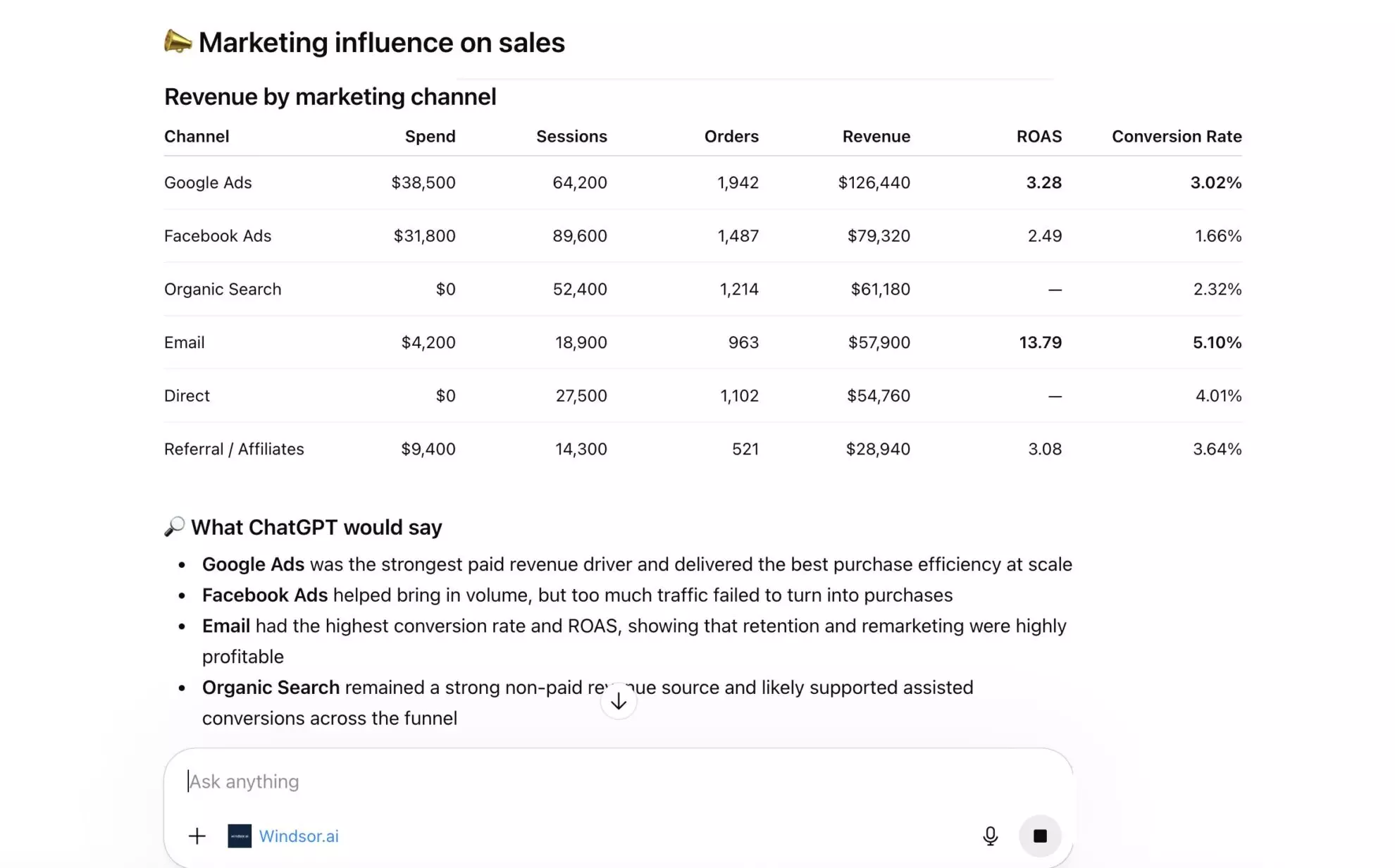
Streamline analytics with BigQuery to ChatGPT integration
Use Windsor MCP to connect BigQuery with ChatGPT, enabling instant data exploration, faster insights, and narrative explanations of performance shifts. Key benefits of this integration include:

Natural language data exploration
You no longer need to be a data engineer or write SQL to extract value from BigQuery. Simply ask questions in plain language, and the AI delivers insights, allowing marketing managers, sales teams, and executives to explore data independently without waiting on technical requests.

Narrative and 'Why' analysis
BigQuery shows what happened (for example, a 10% drop in revenue). ChatGPT helps uncover why it may have happened by joining the dots across multiple datasets. It can analyze query results, highlight anomalies, and surface correlations that are often hard to detect in traditional dashboards.

Strategic action plans
ChatGPT doesn’t just interpret your BigQuery data; it turns insights into action. It can generate proactive recommendations, such as reallocating budget, adjusting campaign targeting, or optimizing performance to improve overall efficiency.

Cross-channel insights
With Windsor MCP, you can combine internal sales data from BigQuery with marketing data from platforms like Meta Ads or Google Ads. This enables true ROI analysis by connecting ad spend directly to revenue and showing how campaigns impact business performance.
Using Windsor.ai to connect data from BigQuery to ChatGPT
Getting your Google BigQuery data into ChatGPT often requires manual exports, data preparation, or complex technical setups. Windsor.ai automates this process by streaming BigQuery directly to ChatGPT for instant AI-powered analysis.
Uncover trends, performance gaps, and growth opportunities across your entire data warehouse.














How to connect BigQuery to ChatGPT data with Windsor.ai
Explore our video tutorial and a step-by-step guide to seamlessly integrate your data from any source into ChatGPT with the Windsor.ai connector.
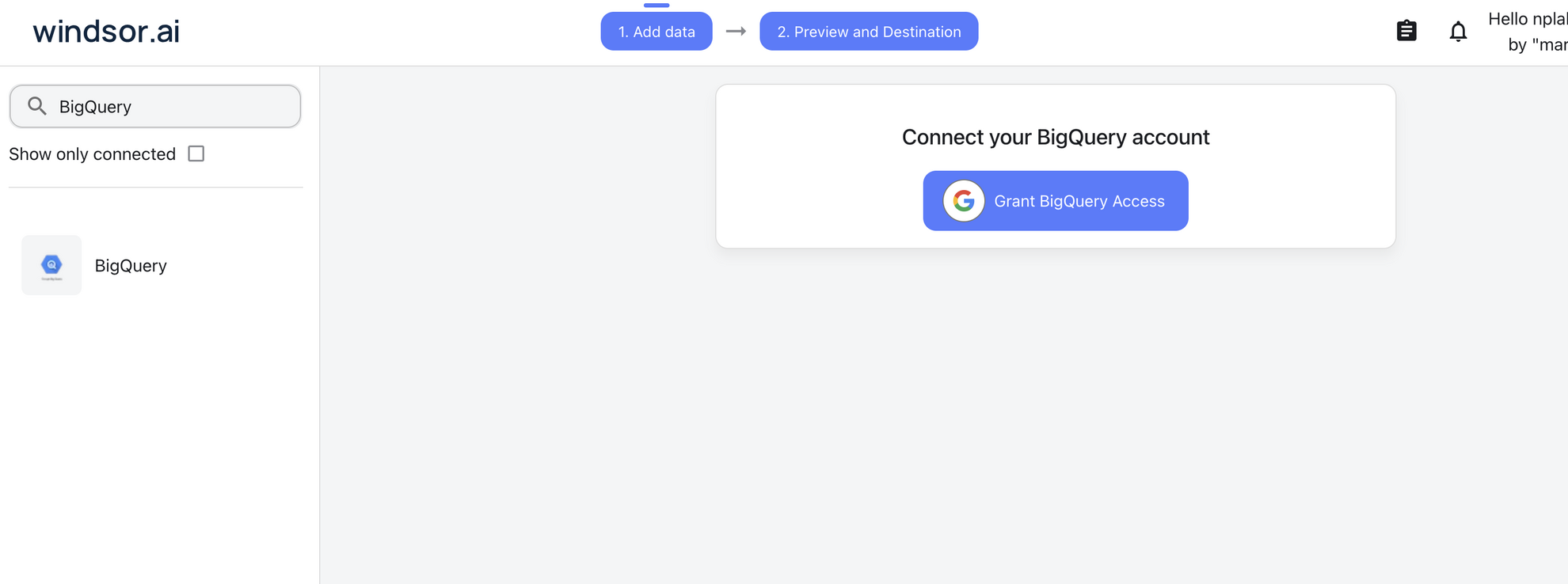
Select your data source
Choose BigQuery as your data source and grant access to Windsor.ai.
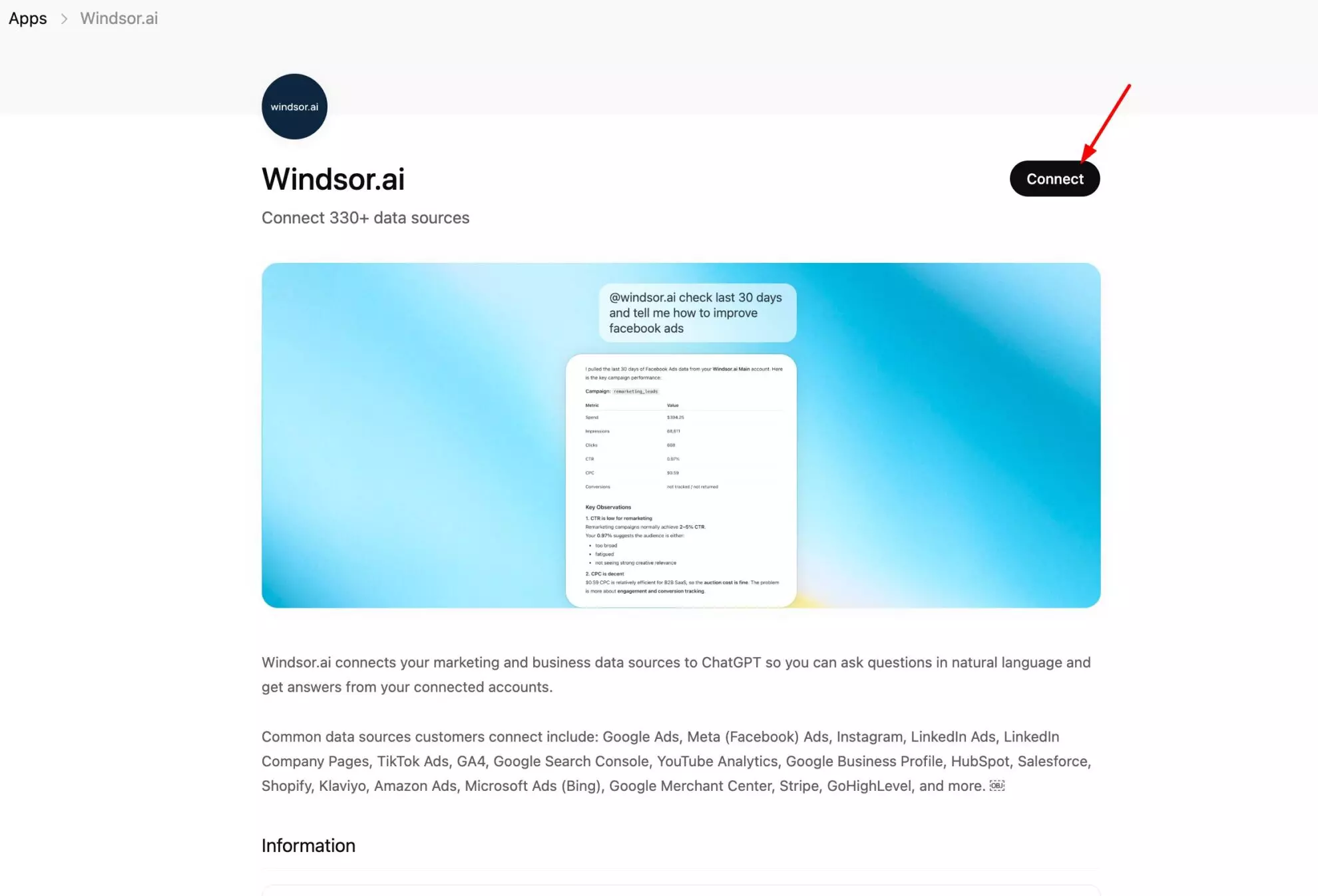
Install the Windsor.ai connector
Log in to your ChatGPT account and open this Windsor.ai connector page.
Click Connect, then authorize access.
Query your BigQuery data in ChatGPT
Open a new chat and start asking questions about your connected BigQuery data using natural language.
Make sure that the Windsor.ai connector is enabled (click the + sign → More → Windsor.ai.)
FAQs
Can I blend BigQuery data with other sources like Google Ads or Salesforce?
Yes. If you have multiple sources connected via Windsor.ai, you can ask ChatGPT to compare your BigQuery warehouse data with live marketing or CRM data for a full 360-degree view of your business. This helps you move beyond siloed reporting and, for example, link ad spend to revenue, track campaign performance against pipeline, or identify which channels drive your highest-value customers.
Can ChatGPT help me find errors or anomalies in my BigQuery tables?
Absolutely. You can ask questions like, ‘Are there any unusual drops in my data over the last week?’ and ChatGPT can help analyze your BigQuery data to surface potential anomalies or performance changes.
Is my BigQuery data secure with Windsor.ai and ChatGPT?
Absolutely. Windsor.ai uses enterprise-grade encryption and read-only access, so ChatGPT can analyze your data without modifying or deleting anything in your BigQuery tables.
Does this integration work with large datasets?
Yes. Windsor MCP efficiently fetches the specific summaries or data points needed to answer your chat queries without hitting performance limits.
What prompts can I use when analyzing BigQuery data in ChatGPT?
Here are some examples of advanced prompts you can use to uncover high-level strategic insights:
Predictive churn analysis
Analyze customer activity logs in BigQuery for the last 90 days. Identify users who have decreased their login frequency by 50% or more and list them as 'High Churn Risk' along with their total lifetime value (LTV).
Cohort analysis and LTV
Segment all users in BigQuery into monthly cohorts based on their sign-up date. Compare the 3-month retention rate and average spend of the January cohort versus the February cohort.
Inventory vs. demand forecasting
Combine our BigQuery inventory levels with our historical sales data for this time last year. Identify any products that are likely to stock out in the next 14 days if current sales trends continue.
True ROI analysis
Calculate true ROAS by combining BigQuery sales data with Google Ads spend over the last 90 days. Attribute revenue to the campaigns that generated it and compare total ad spend against actual revenue to measure true return on investment at the campaign level.
How much does it cost to integrate BigQuery into ChatGPT using Windsor.ai?
Windsor.ai is free to start, no credit card required. Paid plans start at $19/month and scale by the number of sources and accounts. See all options on the pricing page.
How long does it take to connect BigQuery to ChatGPT?
With Windsor.ai’s intuitive connector, the integration process takes just a few minutes. No technical expertise is required; connecting BigQuery to ChatGPT is simple, straightforward, and completely code-free.
Do you have helpful links to get started with integrating BigQuery and ChatGPT using Windsor.ai?
Yes, we have helpful resources to help you get started. You can explore our official documentation and tutorials for seamless BigQuery to ChatGPT integration with Windsor.ai:
Tired of manual BigQuery data exports? Try Windsor.ai today to automate your reporting


