 Destinations
 Data sources
 AI insights
 About us
 Careers
 Security
 Customer reviews
 Contact us
 Affiliate program
 Solution partners
 Template gallery
 Looker Studio templates
 Power BI templates
 Excel templates
 Google Sheets templates
 Tableau templates
 Facebook Ads templates
 Google Ads templates
 Data fields & Metrics
 AI prompt library & Guides
 Product documentation
 API documentation
 Case studies
 Blog
Blog Data models
 Windsor vs Supermetrics
 Windsor vs Funnel.io
 Windsor vs Fivetran
 Windsor vs Rivery
 Windsor vs Portermetrics
 Windsor vs Coupler.io
Connect Bing Ads to Perplexity
Automatically sync your Bing Ads data to Perplexity using the Windsor.ai connector.
Analyze Bing Ads data in Perplexity to find your best-performing keywords and campaigns in seconds. Cut wasted spend, fix low quality scores, and win back impression share you’re losing to budget or rank.
Forget CSVs. Stop copy/paste. Connect in minutes. No code required.
 Sign up with Google
 Free forever plan









Get instant AI insights from your Bing Ads account in Perplexity
Windsor MCP streams your live Microsoft Advertising data into Perplexity, so you skip the manual exports and go straight to what’s converting and what’s wasting budget. Explore key use cases:

Connect ads to business outcomes
Blend Bing Ads with GA4, your CRM, or e-commerce data like Shopify and Magento to see which campaigns and keywords actually lead to website sessions, leads, or sales. Fund the campaigns proving real business impact, not just traffic.

Cut wasted spend
See which keywords and campaigns are spending heavily with a high cost per conversion and a low quality score. Pause them, or fix the ad and landing page behind them, before they keep draining budget that converting keywords could use instead.

Benchmark Shopping products
Ask Perplexity to compare your Shopping campaign products by clicks, spend, and benchmark CTR against similar listings. Reprice or refresh the listings falling behind the benchmark before they drain budget.

Mine search queries for keywords
Perplexity highlights which Dynamic Search Ad queries are already converting well without a dedicated keyword. Turn the strongest ones into standalone keywords and ads for tighter control over bids and copy.
Using Windsor.ai to connect data from Bing Ads to Perplexity
Most methods to stream your Microsoft Ads data into AI require manual CSV exports, data cleanup, or expensive tools. Windsor.ai’s MCP connector removes this friction by automatically syncing Bing Ads data into Perplexity in just a few minutes.
Set up once and use natural‑language prompts to analyze your advertising performance.

Available actions
Enable Campaign Activate a paused Bing Ads campaign. Provide either campaign_id or campaign_name. Reversible via pause_campaign.
Activate a paused Bing Ads campaign. Provide either campaign_id or campaign_name. Reversible via pause_campaign.
Pause Campaign Pause an active Bing Ads campaign. Provide either campaign_id or campaign_name. Reversible via enable_campaign.
Pause an active Bing Ads campaign. Provide either campaign_id or campaign_name. Reversible via enable_campaign.
Set Campaign Budget Set the daily budget of a Bing Ads campaign. Provide either campaign_id or campaign_name. The amount is in the account currency major unit (e.g. 50.00 means 50.00 USD on a USD account). Bing Ads only supports daily budgets at the campaign level. If the campaign uses a shared budget, the change is rejected unless apply_to_shared_budget is set to true, because it would affect every campaign sharing that budget.
Set the daily budget of a Bing Ads campaign. Provide either campaign_id or campaign_name. The amount is in the account currency major unit (e.g. 50.00 means 50.00 USD on a USD account). Bing Ads only supports daily budgets at the campaign level. If the campaign uses a shared budget, the change is rejected unless apply_to_shared_budget is set to true, because it would affect every campaign sharing that budget.
Enable Ad Group Activate a paused Bing Ads ad group. Provide either ad_group_id or ad_group_name, plus the parent campaign as campaign_id or campaign_name. Reversible via pause_ad_group.
Activate a paused Bing Ads ad group. Provide either ad_group_id or ad_group_name, plus the parent campaign as campaign_id or campaign_name. Reversible via pause_ad_group.
Pause Ad Group Pause an active Bing Ads ad group. Provide either ad_group_id or ad_group_name, plus the parent campaign as campaign_id or campaign_name. Reversible via enable_ad_group.
Pause an active Bing Ads ad group. Provide either ad_group_id or ad_group_name, plus the parent campaign as campaign_id or campaign_name. Reversible via enable_ad_group.














How to connect Bing Ads to Perplexity with Windsor.ai
Explore our video tutorial and a step-by-step guide to integrate your Bing Ads data into Perplexity with the Windsor.ai connector.
Connect data source in Windsor.ai dashboard
Connect your Bing Ads to Windsor.ai. Select the necessary account(s) you want to pull data from and click “Next.”

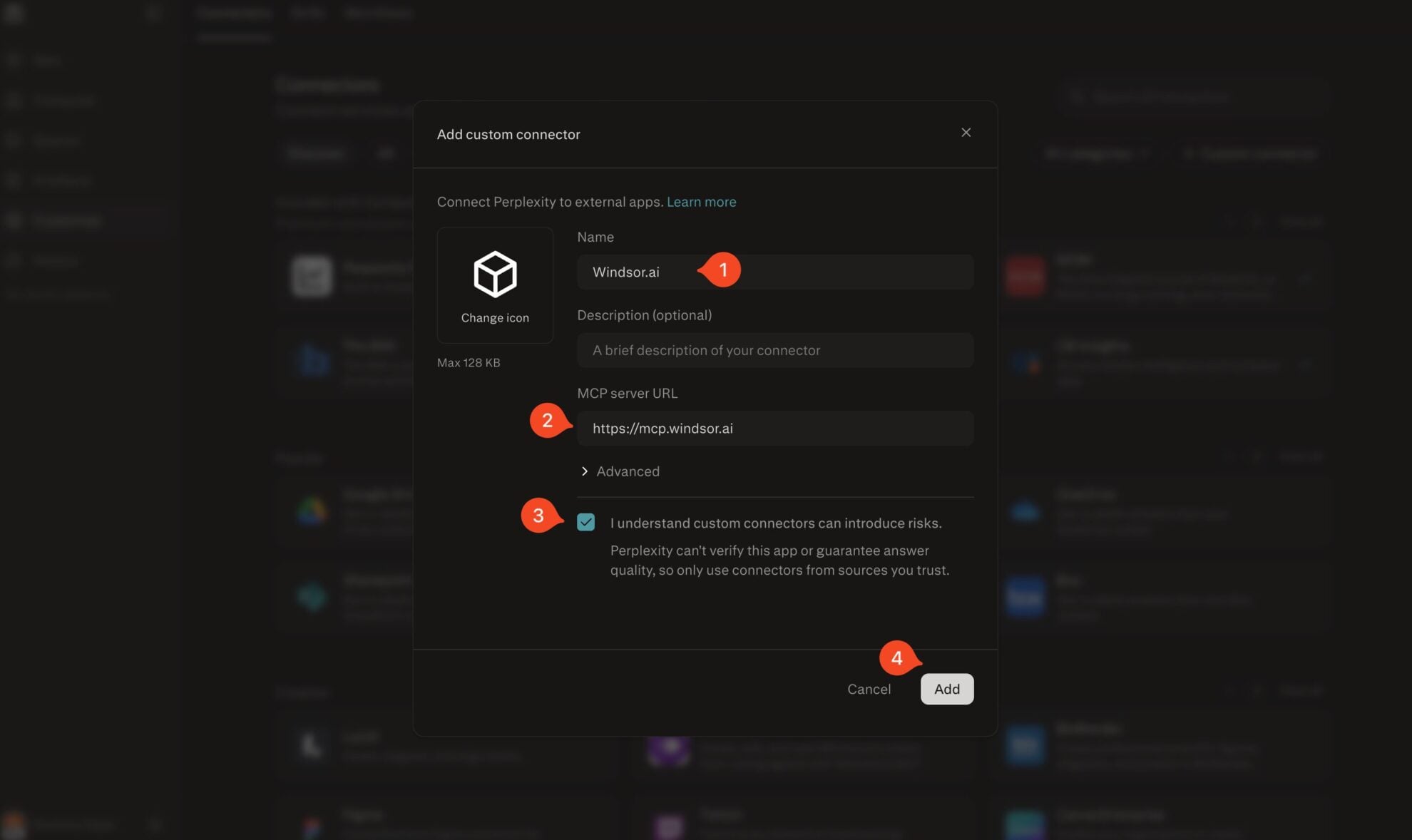
Add Windsor.ai as a custom connector
Go to perplexity.ai/computer/connectors and click + Custom connector. Fill in the details:
- Name: Windsor.ai
- MCP server URL: https://mcp.windsor.ai
Tick ‘I understand custom connectors can introduce risks’ and click Add.
Install the connector
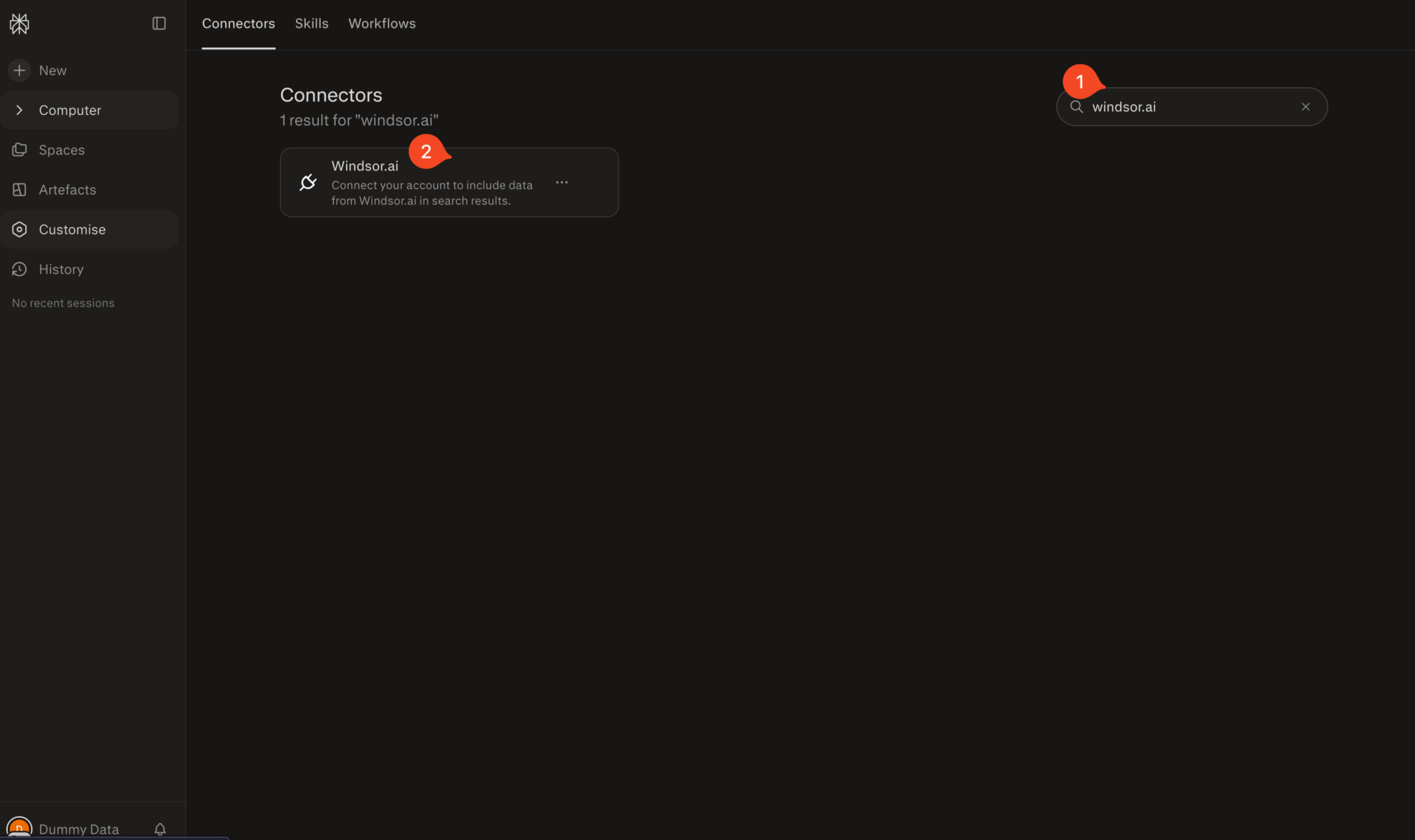
Search for Windsor.ai in the connectors list, click the card, then click Add connector.
Confirm by clicking Allow Access in the pop-up.
Enable Windsor.ai in your chat
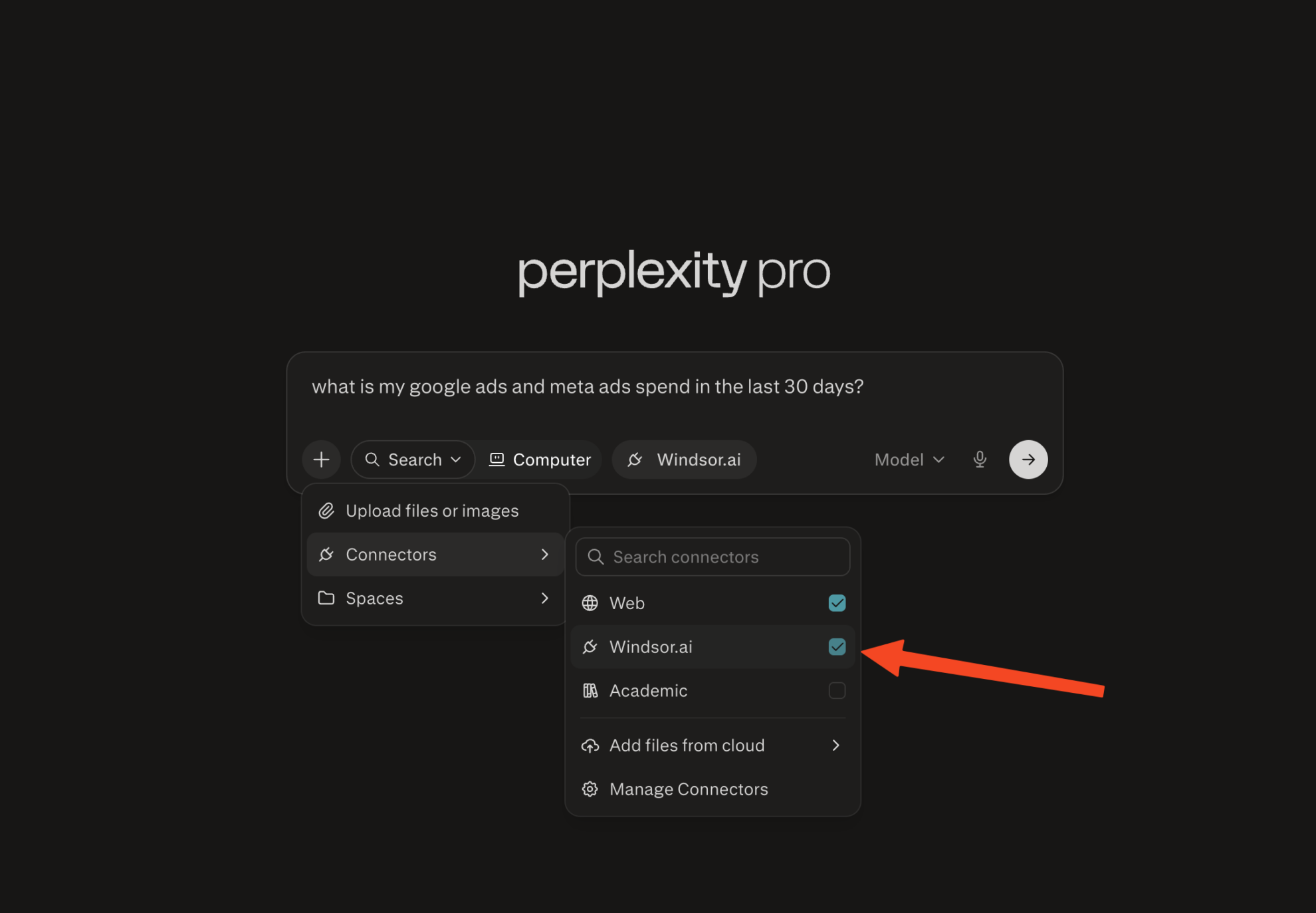
In a new chat, click +, choose Connectors, and check Windsor.ai.
Start querying your data
You can now ask questions about your integrated Windsor.ai data.

FAQs
Do I need a Perplexity Pro subscription to connect Bing Ads?
Yes. Custom MCP connectors are available on Perplexity Pro, Max, and Enterprise plans. On the Windsor.ai side, you can start on the free forever plan, no credit card needed.
What can I do with Bing Ads data in Perplexity?
Once your Bing Ads data is in Perplexity, you can:
- Find where budget is wasted: See which campaigns and keywords are losing impression share to rank or budget, and which ones are actually converting.
- Audit keyword quality: Check quality score, ad relevance, and landing page experience to see which keywords are dragging down your account.
- Track Shopping and product ad performance: Compare products by clicks, spend, and benchmark CTR to see which listings are competitive and which are underpriced or under-optimized.
- Mine Dynamic Search Ads for new keywords: See which search queries are triggering your DSA ads and converting, so you can add them as dedicated keywords.
- Break down performance by audience: Compare results by age group, gender, device, and remarketing list to see who’s actually responding to your ads.
- Combine Bing Ads with other channels: Connect Bing Ads alongside Google Ads or Meta Ads to see which platform delivers a better cost per conversion and ROAS for the same period.
- Monitor budget pacing: Check daily spend, month-to-date spend, and budget amount to catch campaigns that are over- or under-pacing before the month ends.
Can Perplexity help me find where I'm losing impression share?
Yes. Ask Perplexity to break down impression share lost to budget versus lost to rank, by campaign or ad group. That tells you whether you’re missing impressions because of spend caps or because your ads aren’t competitive enough.
Can Perplexity help me audit keyword quality score?
Yes. Ask Perplexity to pull quality score, ad relevance, expected CTR, and landing page experience by keyword. That surfaces which keywords are dragging your account average down, and which specific sub-score is causing it.
Can I analyze Microsoft Shopping campaigns and product-level performance in Perplexity?
Yes. Windsor.ai tracks product brand, category, price, GTIN, MPN, benchmark CTR, and quantity bought from Shopping campaigns, so you can ask Perplexity which products are converting and which are priced or positioned out of the market.
What prompts can I use when analyzing Bing Ads data in Perplexity?
-
Analyze Dynamic Search Ad search queries from the last 60 days. Which queries are converting well enough that I should add them as standalone keywords with dedicated ads?
-
Compare quality score components, expected CTR, ad relevance, and landing page experience, across my lowest-performing keywords. Which sub-score is most responsible for the low quality score, and is it consistent across campaigns?
-
Pull my Microsoft Advertising and Google Ads performance for the last 30 days side by side. Which platform is delivering a lower cost per conversion for similar keyword themes, and where should I shift budget?
-
Analyze my remarketing list performance by bid adjustment and targeting setting over the last 90 days. Which audiences are converting at a rate that justifies a higher bid adjustment?
-
Break down performance by network, Bing and Yahoo search, syndicated search partners, and the Audience network, for the last 90 days. Is my spend distributed toward the networks that actually convert, or is a low-performing network eating budget?
Do you have helpful links to get started with integrating Bing Ads and Perplexity using Windsor.ai?
Yes, we have helpful resources to help you get started. You can explore our official documentation and tutorials for seamless Bing Ads to Perplexity integration with Windsor.ai:
Can Perplexity help me compare Microsoft Advertising to Google Ads?
Yes. Windsor.ai supports 350+ data sources, including Google Ads, TikTok Ads, Meta Ads, Klaviyo, Mailchimp, and more. Connect both alongside Microsoft Advertising to ask Perplexity to compare cost per conversion, ROAS, and CTR side by side for the same period.
Tired of manual Bing Ads data exports? Try Windsor.ai today to automate your reporting


