 Destinations
 Data sources
 AI insights
 About us
 Careers
 Security
 Customer reviews
 Contact us
 Affiliate program
 Solution partners
 Template gallery
 Looker Studio templates
 Power BI templates
 Excel templates
 Google Sheets templates
 Tableau templates
 Facebook Ads templates
 Google Ads templates
 Data fields & Metrics
 AI prompt library & Guides
 Product documentation
 API documentation
 Case studies
 Blog
Blog Data models
 Windsor vs Supermetrics
 Windsor vs Funnel.io
 Windsor vs Fivetran
 Windsor vs Rivery
 Windsor vs Portermetrics
 Windsor vs Coupler.io
Connect Branch to ChatGPT
Automatically sync your Branch attribution, install, and engagement data to ChatGPT using the Windsor.ai connector.
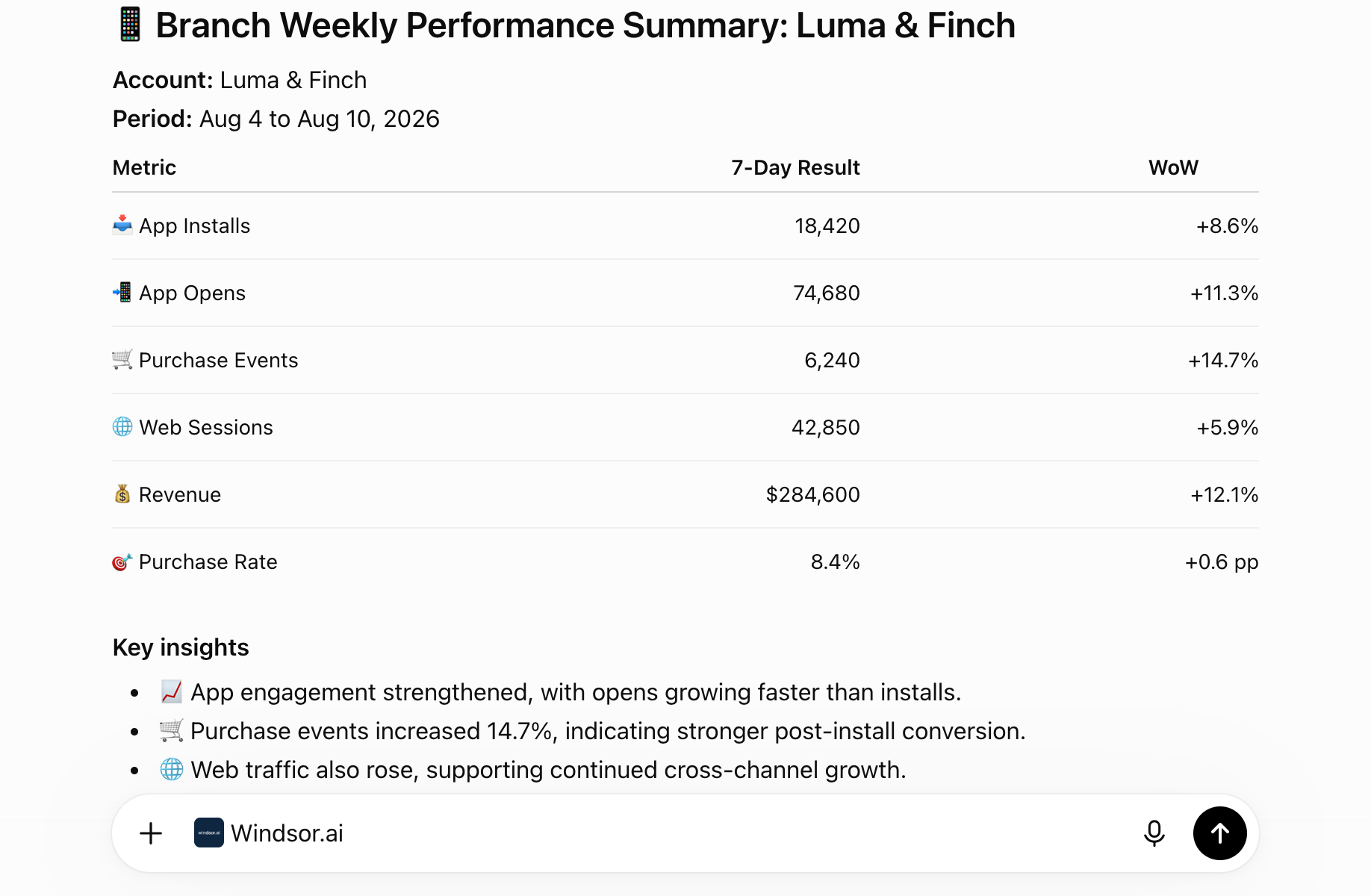
Get AI-powered insights into installs, in-app events, and last-touch attribution by asking ChatGPT plain-English questions, so you can check app growth without opening the Branch dashboard.
Forget CSVs. Stop copy/paste. Connect in minutes. No code required.
 Sign up with Google
 Free forever plan
No credit card needed
Free forever plan
No credit card needed










Get instant AI insights from your Branch attribution data in ChatGPT
Windsor MCP streams your live Branch installs, in-app events, and last-touch attribution into ChatGPT, so growth checks happen in one prompt instead of a dashboard export. Explore key use cases:

Spot which channels drive the most installs
Ask ChatGPT to break down App Installs and App Opens by last-touch channel and campaign to see which ad partner is actually driving app growth.

Track in-app purchases by campaign
Surface PURCHASE and INITIATE_PURCHASE commerce events alongside last-attributed-touch campaign names to connect ad spend to real in-app revenue.

Compare organic vs. attributed activity
Ask ChatGPT to compare attributed vs. unattributed app opens and page views to separate genuine paid impact from organic activity.

Segment engagement by platform and region
Break down web sessions and app opens by user OS, platform, and country to see where engagement is concentrated.
Using Windsor.ai to connect data from Branch to ChatGPT
Pulling Branch data into ChatGPT usually means manual exports, data cleanup, or costly attribution add-ons, especially when trying to line up install, event, and last-touch attribution data by hand. Windsor.ai removes that friction with an MCP connector that automatically collects, structures, and streams your Branch data directly into ChatGPT.
Connect in minutes and start asking natural-language questions about installs, in-app events, and attributed engagement.














How to connect Branch to ChatGPT with Windsor.ai
Explore a step-by-step guide to integrate your Branch data into ChatGPT with the Windsor.ai connector.
Connect Branch in the Windsor.ai dashboard
Choose Branch as your data source and grant access to Windsor.ai.

Install the Windsor.ai connector
Log in to your ChatGPT account and open this Windsor.ai connector page.
Click Connect, then authorize access.

Query your Branch data in ChatGPT
Open a new chat and start asking questions about your connected Branch data using natural language.
Make sure that the Windsor.ai connector is enabled (click the + sign → More → Windsor.ai).
FAQs
What Branch data can I analyze in ChatGPT?
Windsor.ai gives ChatGPT access to all 140 Branch fields, organized by category:
- Last-touch attribution data (53 fields): Last Attributed Touch Data Tilde Campaign, Ad Name, Creative Name, Channel; Last Cta View Data Tilde Ad Set Name.
- Engagement and event summary fields (30 fields): App Installs, App Opens, Page Views, Web Sessions, Clicks, Impressions, Cost.
- Date/time dimensions (19 fields): Date, Week, Month, Year, Day of month.
- User dimensions (11 fields): User country, User OS, User platform, User language, User DMA code.
- Commerce events (10 fields): ADD_TO_CART, PURCHASE, INITIATE_PURCHASE, VIEW_CART.
- Lifecycle events (8 fields): LOGIN, SUBSCRIBE, COMPLETE_REGISTRATION, START_TRIAL.
- Content events (7 fields): VIEW_ITEM, SEARCH, SHARE, COMPLETE_STREAM.
- Account fields (2 fields): Account ID, Account name.
Can ChatGPT break down reinstalls separately from first-time installs in Branch?
Yes. Windsor.ai streams App Installs and App Reinstalls as separate fields, so ChatGPT can report new-user growth and reinstall volume independently instead of a single blended install count.
What prompts can I use to analyze Branch data in ChatGPT?
-
Break down App Opens by user country and DMA code for the last 7 days.
-
Which last-attributed-touch ad set had the highest number of ADD_TO_CART events?
-
Show deep-linked sessions versus non-deep-linked sessions by platform this month.
-
Summarize SUBSCRIBE and START_TRIAL lifecycle events by day this week.
How much does it cost to integrate Branch into ChatGPT using Windsor.ai?
Windsor.ai is free to start, no credit card required. Paid plans start at $19/month and scale by the number of sources and accounts. See the pricing page.
Can I combine Branch data with other channels in ChatGPT?
Yes. Windsor.ai supports 350+ data sources, so you can connect Branch alongside tools like Facebook Ads or Google Ads for a fuller view of how ad spend connects to attributed installs and in-app events.
Does connecting Branch to ChatGPT require any coding?
No. Windsor.ai’s MCP connector is fully no-code: authorize your Branch account once in the Windsor.ai dashboard, install the Windsor.ai app in ChatGPT, and start asking questions in plain English.
Does Windsor.ai support Branch's custom events?
Yes. Windsor.ai streams Branch’s Custom Event Name and Custom Event Count fields alongside the standard commerce, content, and lifecycle events, so ChatGPT can reference events specific to your app’s own tracking setup.
Can ChatGPT identify which advertising partner is driving the most CTA views in Branch?
Yes. Windsor.ai streams the Last Cta View Data Tilde Advertising Partner Name and Secondary Publisher fields, so ChatGPT can rank partners and publishers by CTA view volume.
Do you have helpful links to get started with integrating Branch and ChatGPT using Windsor.ai?
Yes, we have helpful resources to help you get started. You can explore our official documentation for seamless Branch to ChatGPT integration with Windsor.ai:
Tired of manual Branch data exports? Try Windsor.ai today to automate your reporting


