 Destinations
 Data sources
 AI insights
 About us
 Careers
 Security
 Customer reviews
 Contact us
 Affiliate program
 Solution partners
 Template gallery
 Looker Studio templates
 Power BI templates
 Excel templates
 Google Sheets templates
 Tableau templates
 Facebook Ads templates
 Google Ads templates
 Data fields & Metrics
 AI prompt library & Guides
 Product documentation
 API documentation
 Case studies
 Blog
Blog Data models
 Windsor vs Supermetrics
 Windsor vs Funnel.io
 Windsor vs Fivetran
 Windsor vs Rivery
 Windsor vs Portermetrics
 Windsor vs Coupler.io
Connect ClickUp to ChatGPT
Automatically sync your ClickUp data to ChatGPT using the Windsor.ai connector.
Use AI to identify hidden bottlenecks, balance team workloads, and predict delivery risks before they impact deadlines.
Forget CSVs. Stop copy/paste. Connect data in 2 minutes. No code required.
 Sign up with Google
 Free forever plan
No credit card needed
Free forever plan
No credit card needed









Accelerate project delivery with ClickUp to ChatGPT integration
By connecting ClickUp to ChatGPT via Windsor MCP, you can identify delivery risks early and keep projects on track. Explore key use cases:

Analyze time estimation accuracy
Ask ChatGPT to compare the ‘Time Estimated’ against ‘Time Spent’ across all completed tasks to pinpoint which project phases are consistently underestimated. This helps you adjust future project timelines and improve quoting accuracy for clients.

Identify workflow stalls
Track how long tasks sit in specific status categories like ‘In Review’ or ‘Awaiting Feedback’ to spot hidden bottlenecks. ChatGPT can highlight exactly which stage of your workflow is slowing down your total time-to-completion.

Correlate task volume with project health
Monitor the ratio of new tasks created versus tasks closed using ‘Date Created’ and ‘Status’ fields over a specific period. This helps you see scope creep in real-time, if the backlog is growing faster than the team can complete work.

Predict potential deadline risks
Analyze historical velocity against the number of remaining open tasks in a Folder or Space. ChatGPT can calculate the probability of hitting your target date based on the team’s current pace.
Using Windsor.ai to connect data from ClickUp to ChatGPT
Eliminate the friction of manual exports, messy spreadsheets, and complex API configurations. Windsor.ai automates the entire process by streaming your ClickUp data directly into ChatGPT.
Connect your workspace in minutes to identify project blockers, optimize team workload, and boost delivery speed through AI-powered insights.
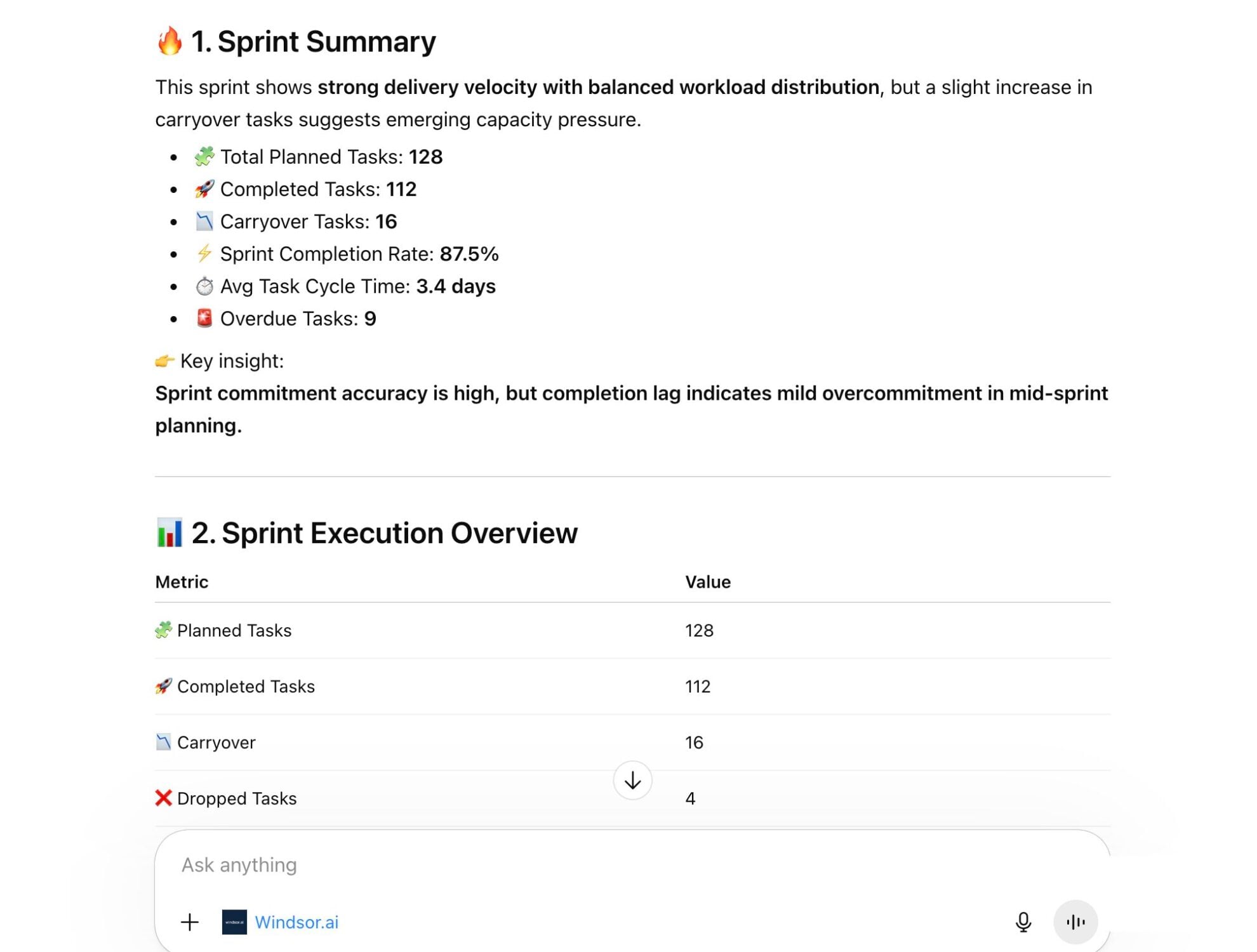














How to connect ClickUp to ChatGPT data with Windsor.ai
Explore our video tutorial and a step-by-step guide to seamlessly integrate your data from any source into ChatGPT with the Windsor.ai connector.
Select your data source
Choose ClickUp as your data source and grant access to Windsor.ai.

Install the Windsor.ai connector
Log in to your ChatGPT account and open this Windsor.ai connector page.
Click Connect, then authorize access.

Query your ClickUp data in ChatGPT
Open a new chat and start asking questions about your connected ClickUp data using natural language.
Make sure that the Windsor.ai connector is enabled (click the + sign → More → Windsor.ai.)
FAQs
What ClickUp metrics can I analyze in ChatGPT with Windsor.ai?
With Windsor.ai, you can analyze 120+ metrics and dimensions, including:
- Task performance: Task ID, task name, status, priority, start date, due date, created date, updated date, completed date.
- Work progress: Tasks completed, tasks in progress, task lifecycle stages, list task count, folder task count.
- Time tracking: Time spent on tasks, time estimates, tracked time intervals, user who logged time.
- Workload: Task assignees, task creator, team members, list assignee, usernames.
- Project structure: Spaces, folders, lists, and how tasks are distributed across them.
- Custom business data: Custom fields like status labels, priorities, categories, or any other fields you track in your ClickUp lists.
- Collaboration and activity: Task comments, comment replies, activity updates, and engagement on tasks.
- Goals and tags: Team goals progress, completion percentage, due dates, tags used across projects.
Can ChatGPT help me identify project bottlenecks?
Yes. By looking at metrics like ‘Time in Status,’ ChatGPT can identify where tasks are getting stuck. It can highlight if a specific department is overloaded or if the approval process is consistently delaying project completion.
Can ChatGPT detect potential project delays in advance?
Yes. By analyzing historical task completion rates (velocity) and comparing them with the remaining workload and due dates, ChatGPT can estimate whether a project is on track or at risk of delay.
What prompts can I use when analyzing ClickUp data in ChatGPT?
Explore deeper insights from your ClickUp data by using more advanced prompts. For example:
-
Analyze the comment history and status transitions for the [Name] project. Based on the frequency of status reverts (e.g., from 'Review' back to 'In Progress'), identify which stage of our workflow is causing the most friction or confusion.
-
Compare our historical completion rate (velocity) for the past 4 weeks against the remaining tasks in the [Quarterly Roadmap]. Based on this data, what is the estimated probability that we will hit our final deadline, and which 3 tasks are the biggest threat to that date?
-
Compare
task__time_spentvstask__time_estimatefor all tasks completed in the last month. Group results by list or category. Identify which group consistently exceeds estimates and calculate the average overrun percentage per group. -
Act as a Project Management Consultant. Review the end-to-end task lifecycle of our last three completed projects. Identify the 'Dead Time', where tasks sit unassigned or in 'Pending', and propose a revised workflow in ClickUp to reduce our total project lead time by 15%.
How much does it cost to integrate ClickUp into ChatGPT using Windsor.ai?
Windsor.ai is free to start, no credit card required. Paid plans start at $19/month and scale by the number of sources and accounts. See all options on the pricing page.
How long does it take to connect ClickUp to ChatGPT?
With Windsor.ai’s intuitive connector, the integration process takes just a few minutes. No technical expertise is required; connecting ClickUp to ChatGPT is simple, straightforward, and completely code-free.
Do you have helpful links to get started with integrating ClickUp and ChatGPT using Windsor.ai?
Yes, we have helpful resources to help you get started. You can explore our official documentation and tutorials for seamless ClickUp to ChatGPT integration with Windsor.ai:
Tired of manual ClickUp data exports? Try Windsor.ai today to automate your reporting


