 Destinations
 Data sources
 AI insights
 About us
 Careers
 Security
 Customer reviews
 Contact us
 Affiliate program
 Solution partners
 Template gallery
 Looker Studio templates
 Power BI templates
 Excel templates
 Google Sheets templates
 Tableau templates
 Facebook Ads templates
 Google Ads templates
 Data fields & Metrics
 AI prompt library & Guides
 Product documentation
 API documentation
 Case studies
 Blog
Blog Data models
 Windsor vs Supermetrics
 Windsor vs Funnel.io
 Windsor vs Fivetran
 Windsor vs Rivery
 Windsor vs Portermetrics
 Windsor vs Coupler.io
Connect Datadog to ChatGPT
Automatically sync your Datadog data to ChatGPT using the Windsor.ai connector.
Query your monitors, SLOs, incidents, and synthetic tests in plain language, and get instant AI-driven insights without building a single dashboard.
Forget CSVs. Stop copy/paste. Connect data in minutes. No code required.
 Sign up with Google
 Free forever plan
No credit card needed
Free forever plan
No credit card needed










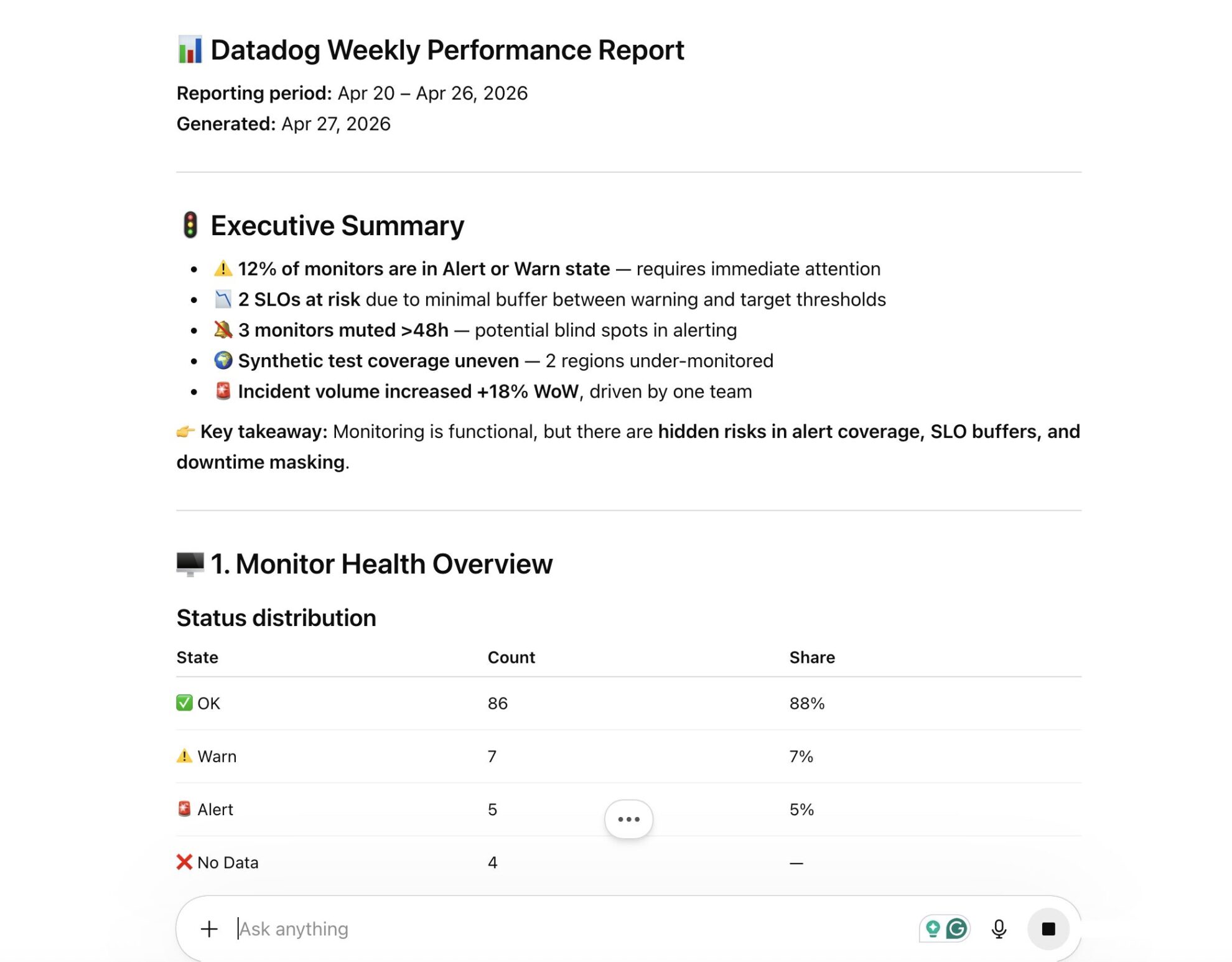
Stay on top of system reliability with Datadog to ChatGPT integration
Instead of digging through monitors, downtimes, and audit logs manually, ask ChatGPT to surface exactly what needs your attention in seconds. Here’s what you can do:

Spot alerting monitors
Ask ChatGPT to list every monitor currently in an Alert or Warn state, grouped by priority. Get a clear picture of what needs immediate attention without opening a single Datadog dashboard.

Identify SLO breach risks
ChatGPT flags SLOs where the current target threshold is dangerously close to the warning threshold, helping you catch compliance risks before they become actual breaches.

Audit monitor configuration gaps
Prompt ChatGPT to identify high-priority monitors with missing tags, no linked downtime schedule, or a No Data state. It can surface misconfigured or neglected monitors before they cause blind spots.

Monitor recurring downtime patterns
Spot monitors that have been muted repeatedly through recurring downtimes. Uncover chronic problem areas that are being suppressed rather than fixed and prioritize them for a proper resolution before they impact your SLOs.
Using Windsor.ai to connect data from Datadog to ChatGPT
Getting Datadog data into ChatGPT typically requires manual exports, custom scripts, or costly middleware. Windsor.ai removes that friction entirely. It automatically collects, organizes, and streams your Datadog monitors, SLOs, incidents, synthetic tests, and audit logs directly into ChatGPT.
Set up in minutes, and start querying your monitoring data through natural language.














How to connect Datadog to ChatGPT data with Windsor.ai
Explore our video tutorial and a step-by-step guide to seamlessly integrate your data from any source into ChatGPT with the Windsor.ai connector.
Select your data source
Choose Datadog as your data source and grant access to Windsor.ai.

Install the Windsor.ai connector
Log in to your ChatGPT account and open this Windsor.ai connector page.
Click Connect, then authorize access.

Query your Datadog data in ChatGPT
Open a new chat and start asking questions about your connected Datadog data using natural language.
Make sure that the Windsor.ai connector is enabled (click the + sign → More → Windsor.ai.)
FAQs
What Datadog data can I analyze in ChatGPT with Windsor.ai?
Windsor.ai gives ChatGPT access to data across 8 Datadog report types, covering your monitoring setup, incident management, and service reliability configuration:
- Monitors: monitor names, types, overall state, priority, query definitions, and tags.
- Downtimes: scheduled downtime windows, status, scope, duration, recurrence, and linked monitor IDs.
- Service Level Objectives (SLOs): SLO names, target and warning thresholds, timeframes, monitor tags, and group breakdowns.
- Incidents: incident records, team assignments, attributes, and relationships.
- Synthetic tests: test names, types (API vs. browser), status, locations, steps, and configuration.
- Logs: log entries with attributes, type, and sync timestamps.
- Audit logs: audit trail entries with attributes and timestamps.
- Dashboards: titles, descriptions, layout type, author, and creation/modification timestamps.
Can ChatGPT help with root-cause analysis using Datadog data?
Yes. You can cross-reference metrics, traces, and error rates in a single conversation. Ask ChatGPT to correlate a spike in response times with a specific deployment window, compare error rates across services, or identify which upstream dependency is most likely causing a slowdown.
Can ChatGPT detect performance anomalies in my Datadog data?
Yes. Once your Datadog data is connected, you can ask ChatGPT to scan monitor states, SLO thresholds, and downtime records to surface problems that need attention. For example: ‘Which services had error rates above 2% in the last 7 days?’ or ‘Which hosts showed CPU spikes that correlated with latency increases last week?’.
Is my Datadog data secure when using this integration?
Yes. Windsor.ai follows industry-standard security practices. ChatGPT only accesses the specific Datadog data you explicitly connect through Windsor.ai, and all access is read-only. Windsor.ai does not store raw data beyond what is needed to process your queries.
What prompts can I use to analyze Datadog data in ChatGPT?
Use advanced prompts in ChatGPT to uncover deeper insights from your Datadog data. For example:
-
Audit all monitors of type 'service check' or 'metric alert' that have a priority of 1 or 2. For each, show the name, query, overall state, tags, and whether they have any matching downtimes currently active. Flag monitors with no recent state change, which may indicate stale or inactive checks.
-
For each SLO, compare the target_threshold against the warning_threshold and calculate the gap between them. Which SLOs have a gap of less than 0.5 percentage points between target and warning, meaning there is almost no buffer before a breach? List them with their monitor_ids, timeframe, and tags so I can prioritize review.
-
Cross-reference all downtimes with their monitor_ids. Are there any monitors that have been muted for more than 48 hours? List those monitors by name and org_id, and flag any where mute_first_recovery_notification is also true, as these may be silently missing recovery alerts.
-
List all synthetic tests grouped by locations. Which locations have the fewest tests assigned? For each test, show its name, subtype, status, and the number of steps defined. Identify any tests that have no steps configured or that are missing tags.
How much does it cost to integrate Datadog into ChatGPT using Windsor.ai?
Windsor.ai’s pricing for ChatGPT data integration varies depending on the number of connected accounts and data sources. We offer absolutely transparent pricing plans for diversified business needs and budgets, along with a free forever plan that covers 1 data source, so you can connect Datadog without a credit card.
How long does it take to connect Datadog to ChatGPT?
With Windsor.ai’s intuitive connector, the integration process takes just a few minutes. No technical expertise is required; connecting Datadog to ChatGPT is simple, straightforward, and completely code-free.
Do you have helpful links to get started with integrating Datadog and ChatGPT using Windsor.ai?
Yes, we have helpful resources to help you get started. You can explore our official documentation and tutorials for seamless Datadog to ChatGPT integration with Windsor.ai:
Tired of manual Datadog data exports? Try Windsor.ai today to automate your reporting


