 Destinations
 Data sources
 AI insights
 About us
 Careers
 Security
 Customer reviews
 Contact us
 Affiliate program
 Solution partners
 Template gallery
 Looker Studio templates
 Power BI templates
 Excel templates
 Google Sheets templates
 Tableau templates
 Facebook Ads templates
 Google Ads templates
 Data fields & Metrics
 AI prompt library & Guides
 Product documentation
 API documentation
 Case studies
 Blog
Blog Data models
 Windsor vs Supermetrics
 Windsor vs Funnel.io
 Windsor vs Fivetran
 Windsor vs Rivery
 Windsor vs Portermetrics
 Windsor vs Coupler.io
Connect eBay to ChatGPT
Automatically sync your eBay orders, listing traffic, and Promoted Listings data to ChatGPT using the Windsor.ai connector.
Ask ChatGPT plain-English questions about sales, fees, refunds, and ad performance, and get answers without opening Seller Hub.
Forget CSVs. Stop copy/paste. Connect in minutes. No code required.
 Sign up with Google
 Free forever plan
No credit card needed
Free forever plan
No credit card needed










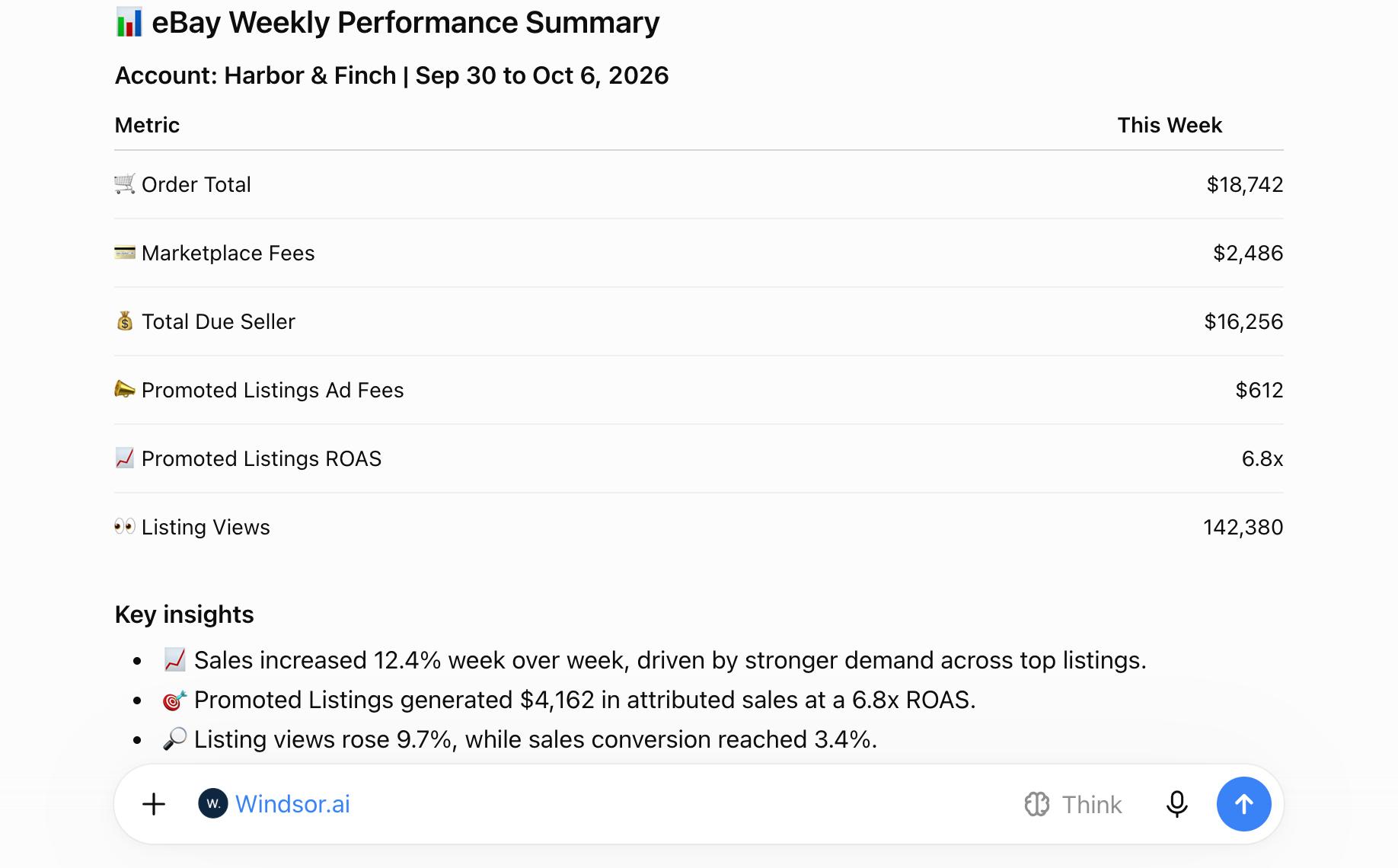
Get instant AI insights from your eBay sales data in ChatGPT
Windsor MCP delivers your live eBay orders, listing traffic, and Promoted Listings performance to ChatGPT, so checking how your store is doing takes one prompt instead of a Seller Hub export. Explore key use cases:

See where fees go
Break down marketplace fees, delivery cost, and tax per order to see how much you receive from each sale after eBay fees.

Judge Promoted Listings spend
Compare ad fees, clicks, and ROAS by campaign and ad group to find the campaigns that return more than they cost.

Turn views into sales
Compare listing impressions, listing views, and sales conversion rate over time to see whether more visibility leads to more transactions.

Track refunds and cancellations
Review refund amounts by SKU and item title, and cancellation status by order, to find the products that cause the most returns.
Using Windsor.ai to connect data from eBay to ChatGPT
Without Windsor.ai, getting eBay data into ChatGPT means downloading reports from Seller Hub and uploading the files for each question. Windsor.ai’s MCP connector collects, structures, and delivers your eBay orders, listing traffic, and Promoted Listings data to ChatGPT automatically.
Connect in minutes and start asking plain-English questions about sales, fees, and ad performance.














How to connect eBay to ChatGPT with Windsor.ai
Explore a step-by-step guide to integrate your eBay data into ChatGPT with the Windsor.ai connector.
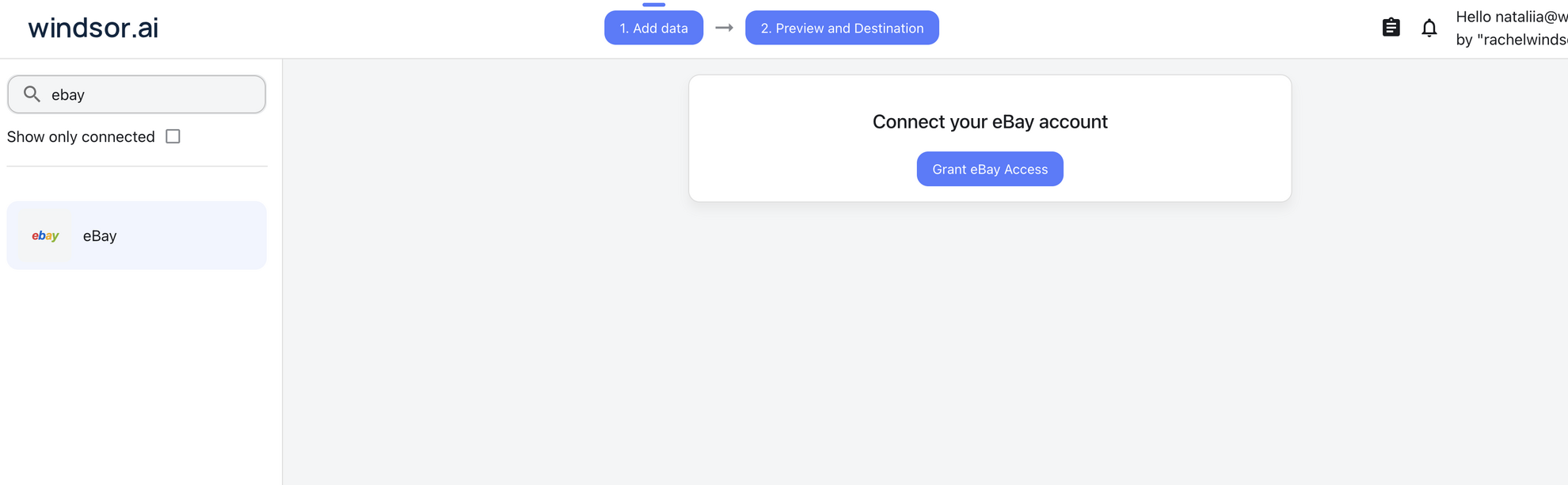
Connect eBay in the Windsor.ai dashboard
Choose eBay as your data source and grant access to Windsor.ai.
Install the Windsor.ai connector
Log in to your ChatGPT account and open this Windsor.ai connector page.
Click Connect, then authorize access.

Query your eBay data in ChatGPT
Open a new chat and start asking questions about your connected eBay data using natural language.
Make sure that the Windsor.ai connector is enabled (click the + sign → More → Windsor.ai).
FAQs
What eBay data can I analyze in ChatGPT?
Windsor.ai gives ChatGPT access to your eBay data in six groups. These are some of the fields in each; the eBay field reference lists all of them:
- Orders: Order Total, Price Subtotal, Delivery Cost, Order Fee, Total Marketplace Fee, Total Due Seller, Order Payment Status, Order Fulfillment Status, Buyer Country, Refund Count, Cancel State.
- Order line items: Item Title, SKU, Line Item Quantity Ordered, Line Item Total, Line Item Refund Amount, Sold Format, Sold Via Ad Campaign.
- Traffic: Listing Impressions Total, Listing Views Total, Listing Views From Search Results Page, Listing Views From Off eBay, Click Through Rate, Sales Conversion Rate, Transactions.
- Campaigns: Campaign Name, Campaign Status, Campaign Daily Budget, Bid Percentage, Campaign Channel, Funding Model.
- Campaign performance: Promoted Listings Ad Fees, Promoted Listings Clicks, Promoted Listings Impressions, Promoted Listings CTR, Promoted Listings Sales, Promoted Listings Sale Amount, Promoted Listings ROAS.
- Date and account fields: Date, Week, Month, Year, Account ID, Account Name.
Can ChatGPT show how much I pay in eBay fees?
Yes. Windsor.ai streams Order Fee, Total Marketplace Fee, and Total Due Seller for each order, so ChatGPT can calculate what you receive after fees and show how fees change over time.
Can I analyze Promoted Listings performance in ChatGPT?
Yes. Windsor.ai streams Promoted Listings ad fees, impressions, clicks, CTR, sales, sale amount, ROAS, and average cost per sale, alongside campaign status, daily budget, and bid percentage. ChatGPT can compare campaigns and ad groups on any of them.
Can ChatGPT change my eBay listings or campaigns?
No. The eBay connector is read-only. ChatGPT can analyze your eBay data, but it cannot edit listings, campaigns, or orders.
What prompts can I use to analyze eBay data in ChatGPT?
Beyond basic summaries, you can use more specific prompts. For example:
-
For the last 30 days, list every order with its order total, marketplace fee, and delivery cost. Calculate fees as a percentage of order total by week and flag weeks where the percentage rose more than 2 points.
-
Rank my Promoted Listings campaigns by ROAS for the last 30 days. For each campaign show ad fees, sales, sale amount, and average cost per sale, and flag campaigns where ad fees exceed 15% of sale amount.
-
Compare listing impressions, total listing views, and transactions by week for the last 12 weeks. Show where the drop from impressions to views and from views to transactions is largest.
-
Show refund amounts by SKU for the last 90 days, with item title and units ordered. Rank SKUs by refund amount as a share of line item total.
How much does it cost to integrate eBay with ChatGPT using Windsor.ai?
The free forever plan covers 1 data source, so connecting eBay on its own costs nothing and needs no credit card. Combining eBay with other sources, such as Google Ads or Shopify, needs a paid plan: $19/month for 3 sources or $99/month for 7. See the pricing page.
Can I combine eBay data with other sources in ChatGPT?
Yes. Windsor.ai supports 350+ data sources, so you can connect eBay alongside tools such as Google Ads, Facebook Ads, or Shopify. For example, you can compare ad spend with eBay’s Listing Views From Off eBay, or compare eBay sales with sales from your own online store.
Does connecting eBay to ChatGPT require any coding?
No. Windsor.ai’s MCP connector is fully no-code: authorize your eBay account once in the Windsor.ai dashboard, install the Windsor.ai app in ChatGPT, and start asking questions in plain English.
Do you have helpful links to get started with integrating eBay and ChatGPT using Windsor.ai?
Yes, we have helpful resources to help you get started. You can explore our official documentation for eBay to ChatGPT integration with Windsor.ai:
Tired of manual eBay data exports? Try Windsor.ai today to automate your reporting


