 Destinations
 Data sources
 AI insights
 About us
 Careers
 Security
 Customer reviews
 Contact us
 Affiliate program
 Solution partners
 Template gallery
 Looker Studio templates
 Power BI templates
 Excel templates
 Google Sheets templates
 Tableau templates
 Facebook Ads templates
 Google Ads templates
 Data fields & Metrics
 AI prompt library & Guides
 Product documentation
 API documentation
 Case studies
 Blog
Blog Data models
 Windsor vs Supermetrics
 Windsor vs Funnel.io
 Windsor vs Fivetran
 Windsor vs Rivery
 Windsor vs Portermetrics
 Windsor vs Coupler.io
Connect Everhour to ChatGPT
Automatically sync your Everhour data to ChatGPT using the Windsor.ai connector.
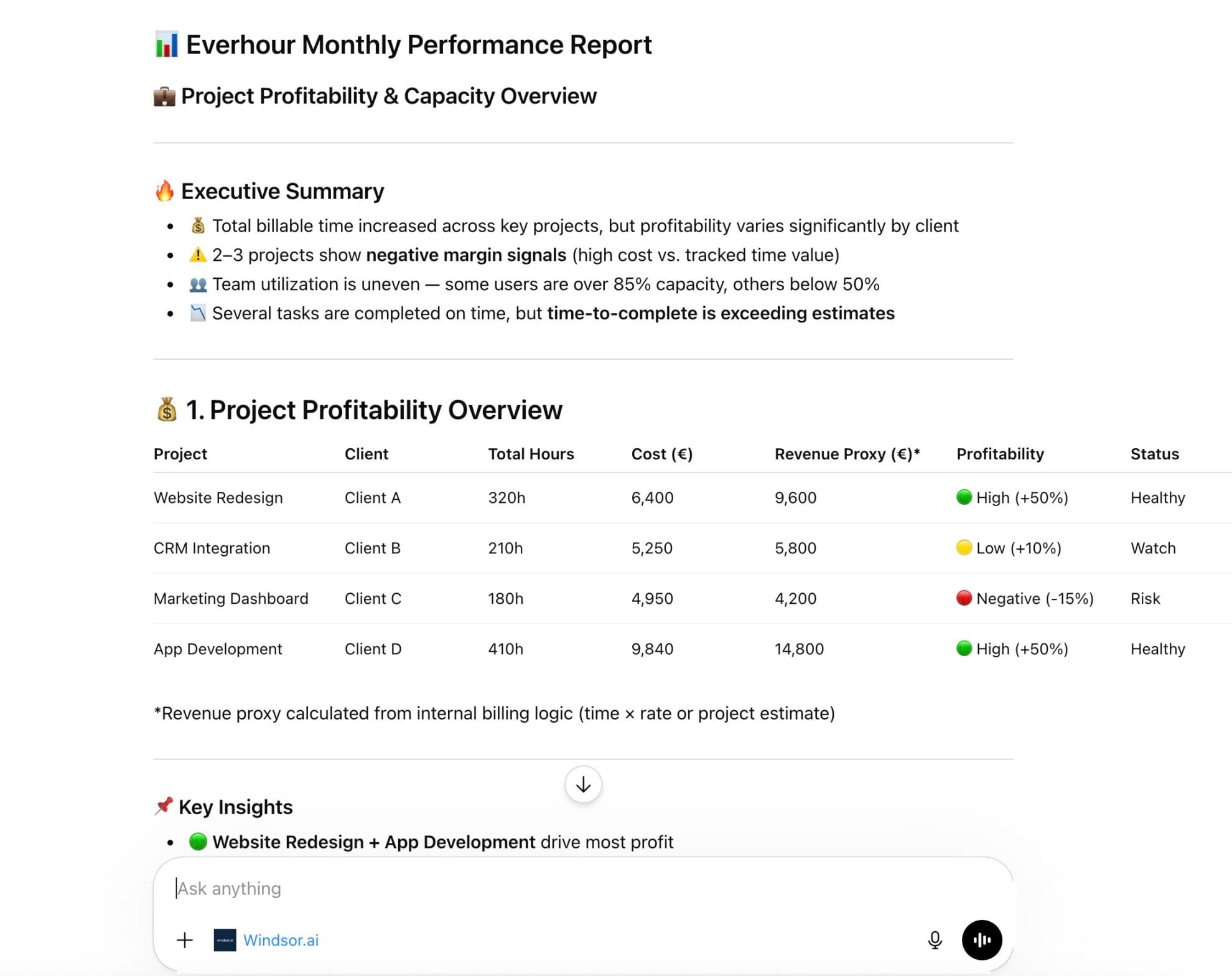
Analyze time entries, project costs, team workload, and task progress in ChatGPT and generate AI-powered insights that help you stay on budget and run projects more efficiently.
Forget CSVs. Stop copy/paste. Connect data in minutes. No code required.
 Sign up with Google
 Free forever plan
No credit card needed
Free forever plan
No credit card needed










Streamline analytics with Everhour to ChatGPT integration
With Everhour data in ChatGPT, you can skip manual analysis and jump straight to insights into your project performance. Explore key use cases:

Catch budget overruns early
ChatGPT can compare total time cost per project against your expected budget and flag projects that are burning through hours faster than planned, before the overrun shows up on an invoice.

Analyze task completion velocity
Using task start and completion timestamps, ChatGPT calculates average delivery time per project or assignee, revealing which teams deliver fastest and where consistent bottlenecks occur.

Balance team workload
Match Everhour time logs with user capacity to identify overload and underutilization across your team. ChatGPT automatically ranks utilization levels and highlights where the workload should be rebalanced.
Using Windsor.ai to connect data from Everhour to ChatGPT
Syncing Everhour data to ChatGPT typically requires manual exports, data preparation, or costly tools. Windsor MCP removes this complexity by automatically streaming Everhour data directly into ChatGPT.
Connect your account in one minute and start analyzing project profitability and team performance with simple prompts.














How to connect Everhour to ChatGPT data with Windsor.ai
Explore our video tutorial and a step-by-step guide to seamlessly integrate your data from any source into ChatGPT with the Windsor.ai connector.
Select your data source
Choose Everhour as your data source and grant access to Windsor.ai.

Install the Windsor.ai connector
Log in to your ChatGPT account and open this Windsor.ai connector page.
Click Connect, then authorize access.

Query your Everhour data in ChatGPT
Open a new chat and start asking questions about your connected Everhour data using natural language.
Make sure that the Windsor.ai connector is enabled (click the + sign → More → Windsor.ai.)
FAQs
What Everhour metrics can I analyze in ChatGPT via Windsor.ai?
Using the Windsor.ai Everhour connector, ChatGPT can analyze all 14 metrics and 70 dimensions from your account, including:
- Time entries: hours logged, cost per entry, cost rate, date, associated task, assigned user, and lock status.
- Time records: logged duration, date, assigned user, and linked task (an additional layer of time tracking data for granular analysis).
- Projects: project name, status, creation date, estimate type, platform, workspace name, privacy settings, and assigned users.
- Tasks: task name, status, completion state, completion date, due date, assignees, labels, iteration, type, and logged time (everything you need to track progress and spot overdue work).
- Users: name, email, role, status, type, capacity, billable rate, internal cost, cost history, groups, and resource planner settings.
- Clients: client name, status, creation date, payment due days, business details, associated projects, and invoicing preferences.
Can ChatGPT help me identify unprofitable projects?
Yes. ChatGPT can aggregate total cost and hours logged per project, compare them against the billable rate for each assigned team member, and calculate whether a project’s internal cost is exceeding what you can reasonably bill. It can rank your projects from most to least profitable and flag those that need immediate attention.
Can ChatGPT help with project planning?
Yes. By analyzing historical task completion data (specifically when tasks were created and when they were completed), ChatGPT estimates how long similar tasks take your team on average. This helps you set more realistic timelines for future projects based on actual performance rather than guesswork.
What prompts can I use to analyze Everhour data in ChatGPT?
Use advanced prompts in ChatGPT to uncover deeper insights from your Everhour data. For example:
-
Build a profitability analysis for each active project. Compare total hours logged and internal cost against each team member's billable rate. Tell me which projects are at risk of costing more than we can bill, and rank them by how close they are to becoming unprofitable.
-
Analyze how long tasks typically take to complete across all projects over the last 3 months. Break it down by project and by team member. Show me who consistently finishes tasks faster than average and where the bottlenecks are.
-
Audit my team's time tracking habits over the last month. Are people logging time consistently throughout the week, or are some team members entering everything on a single day? Flag anyone whose daily logging pattern suggests they're backfilling from memory rather than tracking in real time.
-
Create a client dependency report for the last quarter. Show me total hours and cost per client, and flag any client that represents more than 30% of our total team capacity. I want to see where we're too dependent on a single client.
Can I see which clients take the most resources?
Yes. ChatGPT analyzes total hours logged and cost by client name to show which clients consume the most team time. It can calculate each client’s share of your total capacity, flag any client that represents a disproportionately large share, and help you make informed decisions about pricing or resource allocation.
Do you have helpful links to get started with integrating Everhour and ChatGPT using Windsor.ai?
Yes, we have helpful resources to help you get started. You can explore our official documentation and tutorials for seamless Everhour to ChatGPT integration with Windsor.ai:
How much does it cost to integrate Everhour into ChatGPT using Windsor.ai?
Windsor.ai is free to start, no credit card required. Paid plans start at $19/month and scale by the number of sources and accounts. See the pricing page.
Tired of manual Everhour data exports? Try Windsor.ai today to automate your reporting


