 Destinations
 Data sources
 AI insights
 About us
 Careers
 Security
 Customer reviews
 Contact us
 Affiliate program
 Solution partners
 Template gallery
 Looker Studio templates
 Power BI templates
 Excel templates
 Google Sheets templates
 Tableau templates
 Facebook Ads templates
 Google Ads templates
 Data fields & Metrics
 AI prompt library & Guides
 Product documentation
 API documentation
 Case studies
 Blog
Blog Data models
 Windsor vs Supermetrics
 Windsor vs Funnel.io
 Windsor vs Fivetran
 Windsor vs Rivery
 Windsor vs Portermetrics
 Windsor vs Coupler.io
Connect Freshservice to ChatGPT
Automatically sync your Freshservice IT service data to ChatGPT using the Windsor.ai connector.
Chat with your tickets, assets, changes, and problems in plain language to catch SLA risk, stalled change approvals, and aging hardware before they turn into downtime, no manual exports required.
Forget CSVs. Stop copy/paste. Connect in minutes. No code required.
 Sign up with Google
 Free forever plan
No credit card needed
Free forever plan
No credit card needed










Get ahead of IT service problems with Freshservice to ChatGPT integration
Windsor MCP streams your live Freshservice data into ChatGPT, so you catch service risk before it turns into downtime. Explore key use cases:

Flag SLA breach risk
Cross-reference ticket due_by and fr_due_by timestamps against priority and status to surface tickets approaching or already past their SLA deadline.

Track asset lifecycle
Use asset end_of_life, usage_type, and assigned_on fields to flag hardware nearing retirement or sitting idle across locations.

Spot change approval bottlenecks
Cross-reference approval_status, risk, and planned_start_date on change requests to see which ones are stuck before their maintenance window.

Connect workload to satisfaction
Compare ticket volume per agent against satisfaction_survey_responses overall_rating to catch overload before scores drop.
Using Windsor.ai to connect data from Freshservice to ChatGPT
Moving Freshservice data into ChatGPT usually means manual exports, data cleanup, or costly ITSM reporting add-ons, especially when checking separate modules for SLA breach risk or a stalled change approval. Windsor.ai removes that friction with an MCP connector that automatically collects, structures, and streams your Freshservice data directly into ChatGPT.
Connect in minutes and start asking natural-language questions about SLA risk, asset lifecycle, and approval bottlenecks.
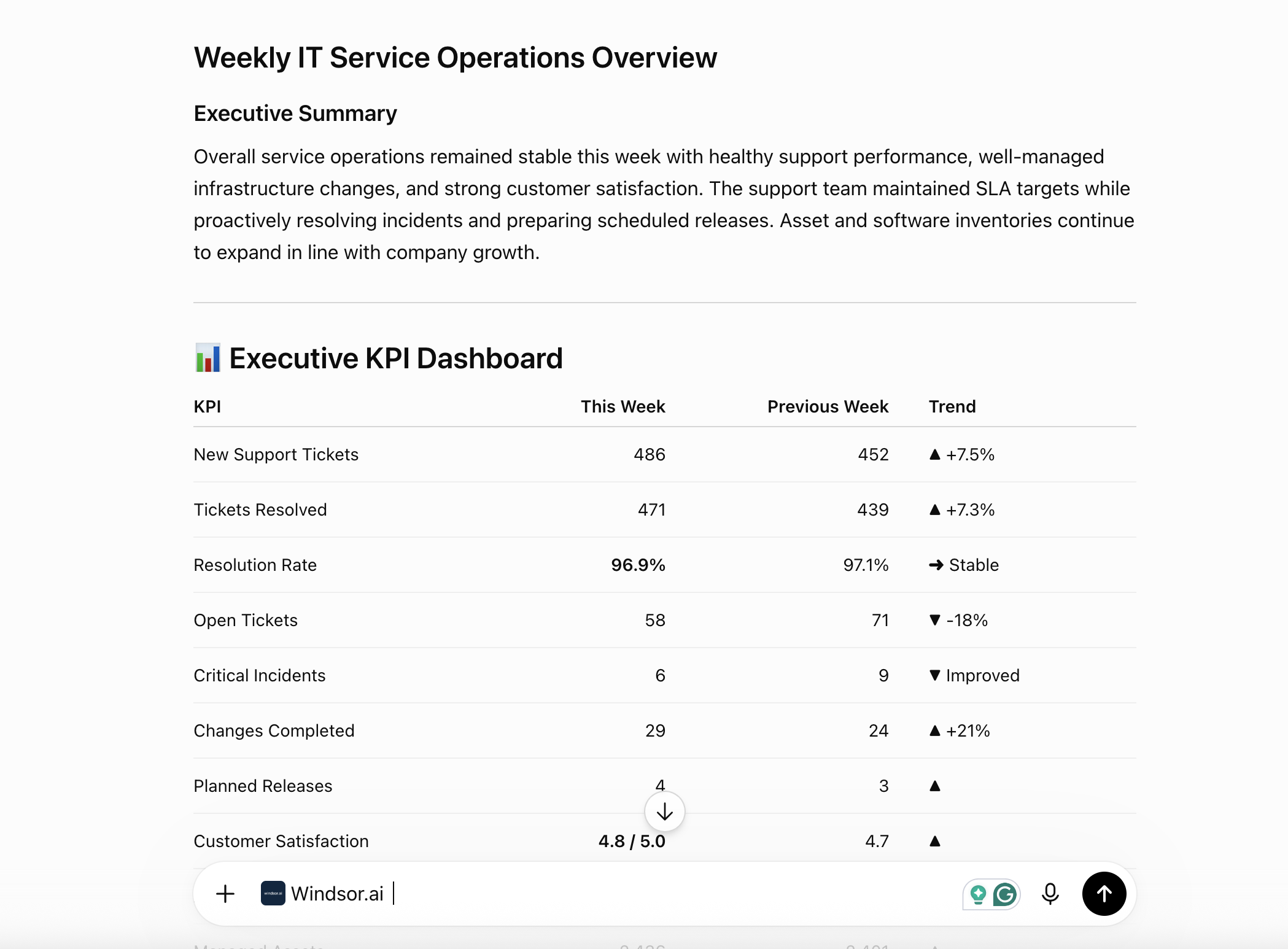














How to connect Freshservice to ChatGPT with Windsor.ai
Explore our video tutorial and a step-by-step guide to integrate your Freshservice data into ChatGPT with the Windsor.ai connector.
Connect Freshservice in the Windsor.ai dashboard
Choose Freshservice as your data source and grant access to Windsor.ai.

Install the Windsor.ai connector
Log in to your ChatGPT account and open this Windsor.ai connector page.
Click Connect, then authorize access.

Query your Freshservice data in ChatGPT
Open a new chat and start asking questions about your connected Freshservice data using natural language.
Make sure that the Windsor.ai connector is enabled (click the + sign → More → Windsor.ai).
FAQs
What Freshservice data can I analyze in ChatGPT?
Windsor.ai gives ChatGPT access to all 327 Freshservice fields, organized into groups such as:
- Tickets (38 fields): status, priority, urgency, due_by, fr_due_by, is_escalated, category.
- Assets (19 fields): asset_tag, end_of_life, usage_type, location_id, assigned_on.
- Changes (30 fields): approval_status, risk, planned_start_date, blackout_window.
- Problems (27 fields): known_error, priority, associated_change, status.
- Agents and requesters (49 and 29 fields): ticket_scope, department_ids, vip_user, last_login_at.
- Satisfaction surveys (7 fields): overall_rating, questionnaire_responses.
Can ChatGPT flag tickets at risk of breaching SLA?
Yes. Windsor.ai streams due_by and fr_due_by timestamps alongside priority and status, so ChatGPT can identify tickets approaching or already past their SLA deadline.
Can ChatGPT track which IT assets are nearing end of life?
Yes. Asset fields like end_of_life, usage_type, and location_id let ChatGPT flag hardware that’s aging out or sitting idle, broken down by location or department.
Can ChatGPT identify change requests stuck in approval?
Yes. Windsor.ai streams approval_status, risk, and planned_start_date for every change request, so ChatGPT can flag changes still pending approval as their maintenance window approaches.
Does this cover the full ITSM workflow, or just tickets?
The full workflow. Beyond tickets, Windsor.ai also streams assets, changes, problems, releases, purchase orders, and vendor data, so ChatGPT can reason across incident management, change management, and asset management in one conversation.
What prompts can I use to analyze Freshservice data in ChatGPT?
-
Which vendors have the highest total purchase order cost in the last 90 days? List by vendor name.
-
Which requested_items are stuck in the same stage for more than 14 days? What's their total cost_per_request times quantity exposure?
-
Rank agents by scoreboard_points and cross-reference with their ticket_scope. Are top scorers handling company-wide tickets or just their own department?
-
Which change requests have a planned_start_date that falls inside a blackout_window? Flag these as scheduling conflicts.
How much does it cost to integrate Freshservice into ChatGPT using Windsor.ai?
Windsor.ai is free to start, no credit card required. Paid plans start at $19/month and scale by the number of sources and accounts. See the pricing page.
Do you have helpful links to get started with integrating Freshservice and ChatGPT using Windsor.ai?
Yes, we have helpful resources to help you get started. You can explore our official documentation for seamless Freshservice to ChatGPT integration with Windsor.ai:
Tired of manual Freshservice data exports? Try Windsor.ai today to automate your reporting


