 Destinations
 Data sources
 AI insights
 About us
 Careers
 Security
 Customer reviews
 Contact us
 Affiliate program
 Solution partners
 Template gallery
 Looker Studio templates
 Power BI templates
 Excel templates
 Google Sheets templates
 Tableau templates
 Facebook Ads templates
 Google Ads templates
 Data fields & Metrics
 AI prompt library & Guides
 Product documentation
 API documentation
 Case studies
 Blog
Blog Data models
 Windsor vs Supermetrics
 Windsor vs Funnel.io
 Windsor vs Fivetran
 Windsor vs Rivery
 Windsor vs Portermetrics
 Windsor vs Coupler.io
Connect Instagram to Perplexity
Automatically sync your Instagram data to Perplexity using the Windsor.ai connector.
Chat with your Instagram data in Perplexity to find which content formats drive reach, spot what your audience saves and shares, and understand follower growth.
Forget CSVs. Stop copy/paste. Connect in minutes. No code required.
 Sign up with Google
 Free forever plan
No credit card needed
Free forever plan
No credit card needed










Get instant AI insights from your Instagram content performance
Windsor MCP streams Instagram data into Perplexity, helping you analyze your social media performance without manual exports or complex dashboards. Key use cases include:

Identify your best content
Ask Perplexity to rank your posts by media_reach, media_saved, and media_shares to find the content that drives real audience growth, not just likes. Optimize your future content and double down on what resonates the most with your audience.
Diagnose story drop-offs
Analyze story_taps_forward, story_taps_back, and story_exits per story to find exactly where viewers skip or disengage. Identify which story frames hold attention and which cause viewers to leave before the end.

Analyze Reels performance
Ask Perplexity to rank your Reels by media_reel_avg_watch_time, reach, and shares to find which ones hold attention and which lose viewers early. Use the patterns to improve hook strength, length, and topic choice in future Reels.

Unify data across channels
With Windsor.ai, you can merge Instagram Insights with 350+ data sources, like Google Ads, TikTok, Shopify, Mailchimp, and more, to understand how your organic content influences sales, drives signups, or generates leads across the full customer journey.
Using Windsor.ai to connect data from Instagram to Perplexity
Most ways to send Instagram data to AI require manual exports, data prep, or complex technical setups. Windsor.ai makes the process effortless with an MCP connector that automatically syncs your social media data into Perplexity in minutes.
Set up once and start generating AI-driven insights using natural language prompts.















How to connect Instagram to Perplexity with Windsor.ai
Explore our video tutorial and a step-by-step guide to integrate your Instagram data into Perplexity with the Windsor.ai connector.
Connect data source in Windsor.ai dashboard
Connect your Instagram to Windsor.ai. Select the necessary account(s) you want to pull data from and click “Next.”

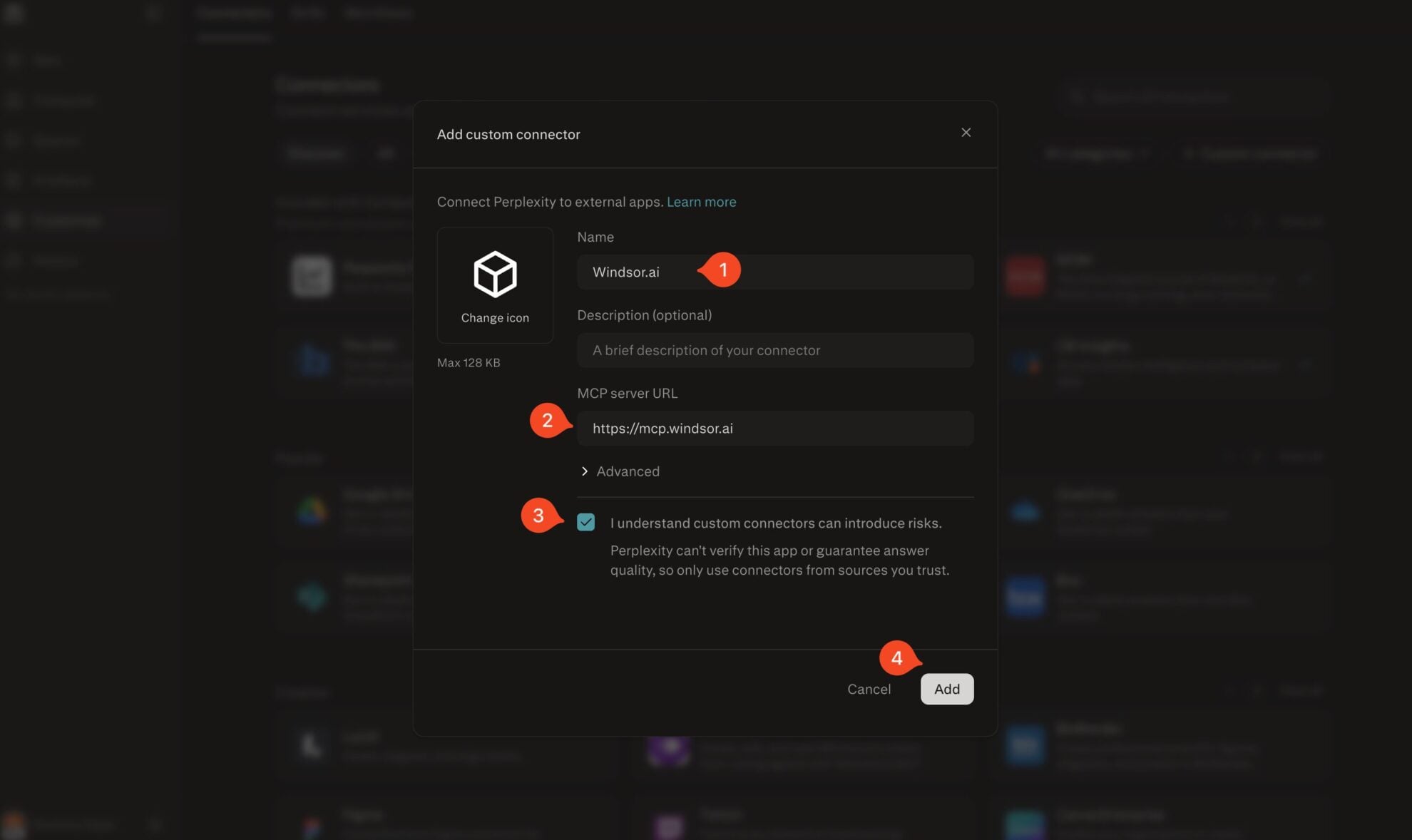
Add Windsor.ai as a custom connector
Go to perplexity.ai/computer/connectors and click + Custom connector. Fill in the details:
- Name: Windsor.ai
- MCP server URL: https://mcp.windsor.ai
Tick ‘I understand custom connectors can introduce risks’ and click Add.
Install the connector
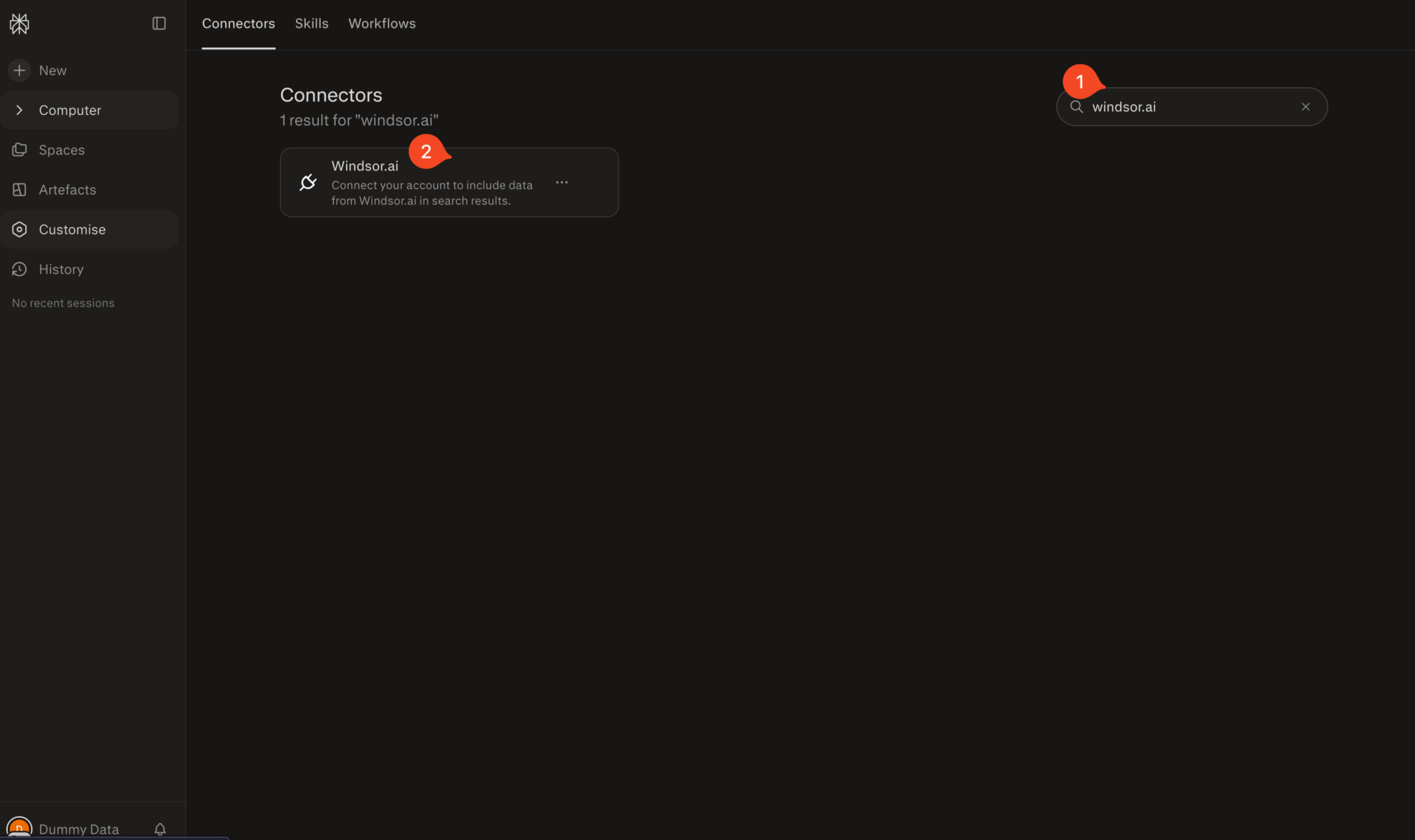
Search for Windsor.ai in the connectors list, click the card, then click Add connector.
Confirm by clicking Allow Access in the pop-up.
Enable Windsor.ai in your chat
In a new chat, click +, choose Connectors, and check Windsor.ai.
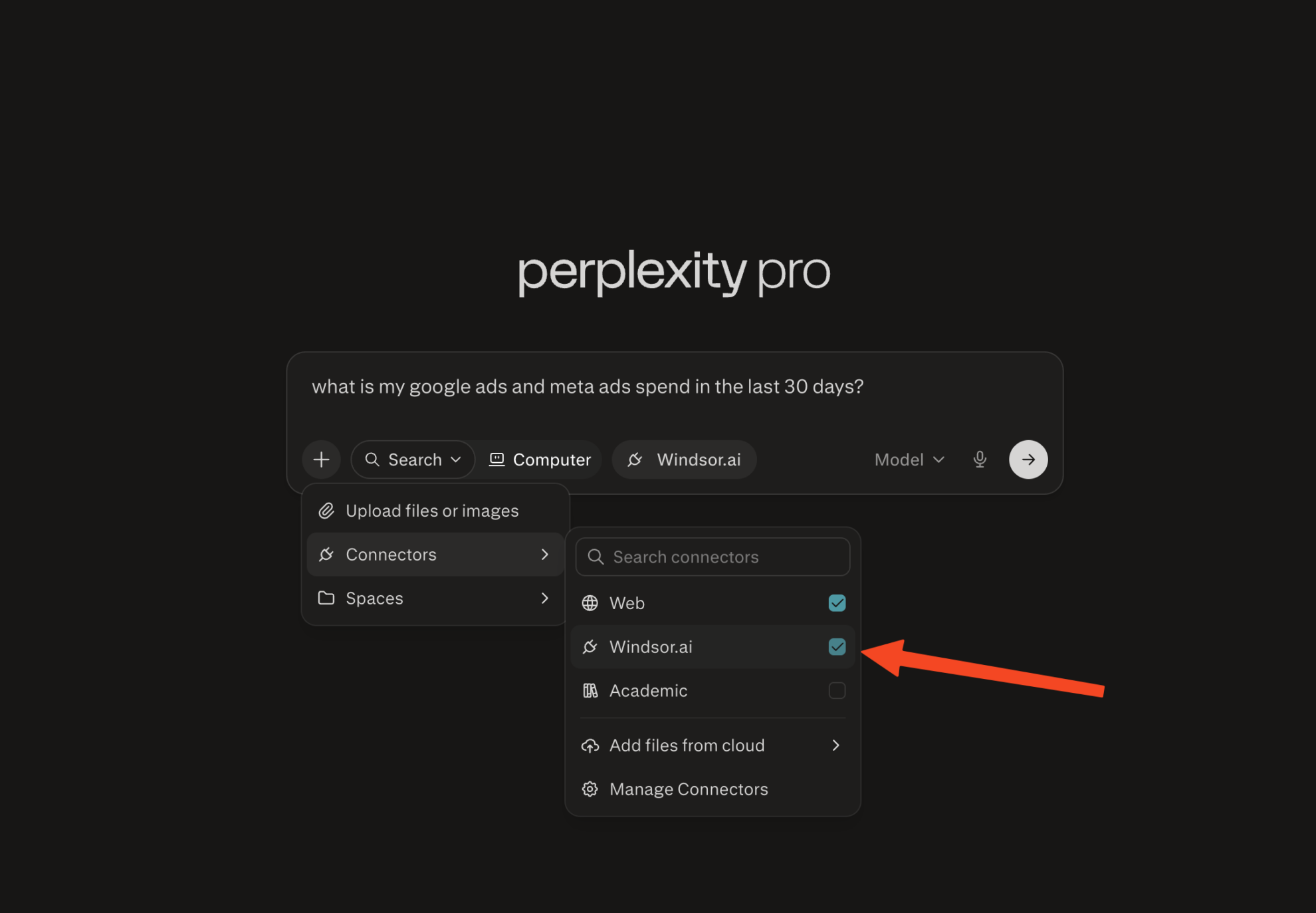
Start querying your data
You can now ask questions about your integrated Windsor.ai data.

FAQs
What Instagram data can I analyze in Perplexity?
Windsor.ai gives you access to 50 metrics and 48 dimensions from Instagram Insights, including:
- Posts and Reels: reach, views, engagement, saves, shares, comments, likes, and average watch time per Reel.
- Stories: reach, views, exits, taps forward and back, replies, and shares per story
- Account performance: daily reach, new followers, total interactions, profile link taps, and follows/unfollows.
- Audience demographics: follower breakdown by age group, gender, country, and city.
Can I use Perplexity to generate new content ideas?
Yes. Perplexity identifies your most engaging content and helps you generate new ideas based on what has already worked, improving your overall social media performance.
Can Perplexity help me understand my follower growth?
Yes. Ask Perplexity to correlate follower_count_1d and follows_and_unfollows with your posting activity over any time period. You can identify which content types and cadences drove the strongest growth, and flag periods where posting frequency or format changes coincided with a slowdown.
How much does Windsor.ai cost?
Windsor.ai offers a free forever plan (1 data source, 1 account, and 1 user) and paid plans starting at $19/month. All plans include access to Windsor MCP for AI analysis in Perplexity. See the full pricing page for details.
Can I analyze Instagram ads in Perplexity?
Windsor.ai’s Instagram connector covers organic content only: posts, Reels, Stories, and audience data from Instagram Insights. For paid campaigns, Windsor.ai has a separate Facebook (Meta) Ads connector that gives you full access to your ad performance data in Perplexity. You can connect both and analyze organic and paid performance side by side.
What prompts can I use when analyzing Instagram data in Perplexity?
Use these prompts to uncover in-depth insights into your social media performance:
-
Calculate average reach, saves rate (saves divided by reach), and shares for each media type (REEL, CAROUSEL_ALBUM, IMAGE) over the last 90 days. Rank by save rate and list the top 3 posts in the best-performing format.
-
For each week over the last 6 months, show total reach, new followers, and total saves. Flag weeks where reach was high but follower growth was flat, and weeks where follower growth outpaced reach. What content was posted in each scenario?
-
For my last 30 stories, show reach, exits, taps forward, and taps back for each. Calculate the exit rate (exits divided by reach) per story and rank from highest to lowest. Identify which position in the story sequence has the highest average exit rate.
-
List all posts from the last 90 days where saves exceed 200, but comments are below 10. What do they have in common in terms of media type, caption length, or posting time?
Do you have helpful links to get started with integrating Instagram and Perplexity using Windsor.ai?
Yes, we have helpful resources to help you get started. You can explore our official documentation and tutorials for seamless Instagram to Perplexity integration with Windsor.ai:
Tired of manual Instagram data exports? Try Windsor.ai today to automate your reporting


