 Destinations
 Data sources
 AI insights
 About us
 Careers
 Security
 Customer reviews
 Contact us
 Affiliate program
 Solution partners
 Template gallery
 Looker Studio templates
 Power BI templates
 Excel templates
 Google Sheets templates
 Tableau templates
 Facebook Ads templates
 Google Ads templates
 Data fields & Metrics
 AI prompt library & Guides
 Product documentation
 API documentation
 Case studies
 Blog
Blog Data models
 Windsor vs Supermetrics
 Windsor vs Funnel.io
 Windsor vs Fivetran
 Windsor vs Rivery
 Windsor vs Portermetrics
 Windsor vs Coupler.io
Connect Intercom to ChatGPT
Automatically sync your Intercom data to ChatGPT using the Windsor.ai connector.
Generate AI-powered insights that help you reduce churn, prioritize outreach, and improve customer engagement.
Forget CSVs. Stop copy/paste. Connect data in minutes. No code required.
 Sign up with Google
 Free forever plan
No credit card needed
Free forever plan
No credit card needed










Strengthen customer relationships with Intercom to ChatGPT integration
Windsor MCP allows you to skip the manual work and go straight to analyzing your user data in ChatGPT. Discover key use cases below:

Find overlooked outreach opportunities
ChatGPT cross-references last seen and last contacted dates to identify users who are still active but haven’t been reached out to in weeks. Turns a blind spot in your communication cadence into a prioritized list of warm contacts worth engaging.

Detect onboarding drop-off patterns
Ask ChatGPT to compare users who stayed engaged beyond their first two weeks against those who went quiet, looking for shared patterns in location, browser, or device. Find out whether early churn is caused by a specific technical environment or geographic segment.

Spot product-email disconnect
Surface users who are regularly active in the product but haven’t opened or clicked an email in 60 days or more. This signals a disconnect between your email messaging and what those users actually care about, so you can revisit content or frequency.
Using Windsor.ai to connect data from Intercom to ChatGPT
Syncing Intercom data into ChatGPT typically requires manual exports and time-consuming data prep. Windsor.ai’s connector automates the entire process by collecting, normalizing, and streaming your Intecom data directly into ChatGPT.
Set up once and use natural language prompts to analyze engagement trends, churn signals, and email performance.















How to connect Intercom to ChatGPT data with Windsor.ai
Explore our video tutorial and a step-by-step guide to seamlessly integrate your data from any source into ChatGPT with the Windsor.ai connector.
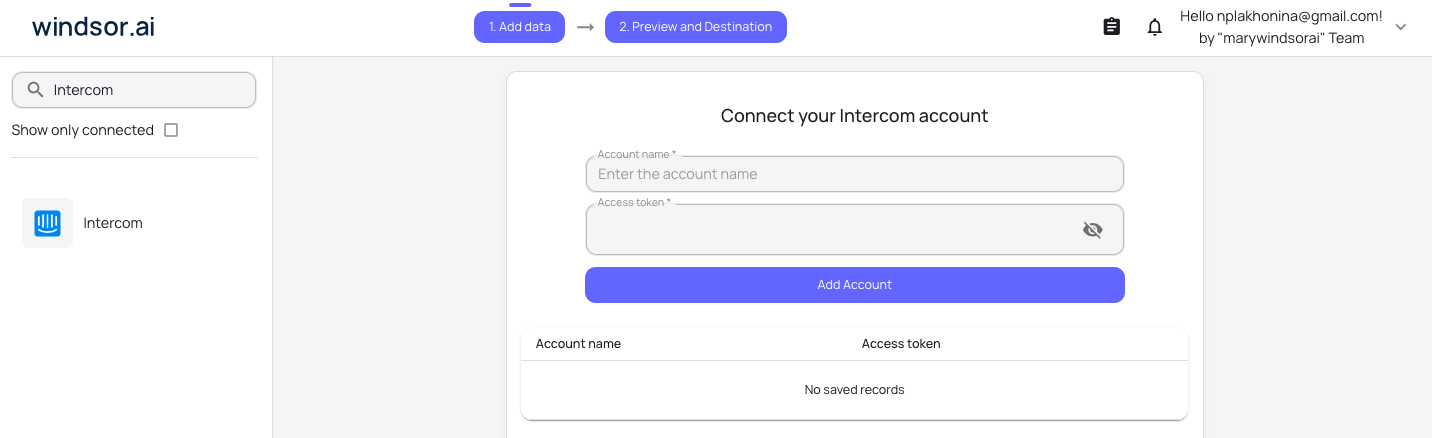
Select your data source
Choose Intercom as your data source and grant access to Windsor.ai.
Install the Windsor.ai connector
Log in to your ChatGPT account and open this Windsor.ai connector page.
Click Connect, then authorize access.

Query your Intercom data in ChatGPT
Open a new chat and start asking questions about your connected Intercom data using natural language.
Make sure that the Windsor.ai connector is enabled (click the + sign → More → Windsor.ai.)
FAQs
What can I do with Intercom data in ChatGPT?
Once your Intercom data is in ChatGPT, here’s what you can explore:
- User engagement: Understand when users were last active, when they last replied, and how recently they were contacted.
- Email activity: See which users are opening, clicking, unsubscribing from, or marking your emails as spam to understand the health of your email communication.
- Churn and drop-off signals: Identify users who signed up but stopped engaging shortly after, and look for patterns in their device, location, or browser that could point to onboarding issues.
- Location and device insights: Analyze where your users are based and what devices and browsers they use to spot technical barriers or geographic patterns in engagement.
- Contact and outreach gaps: Find users who have been active recently but haven’t been contacted in a while, a useful signal for teams to prioritize re-engagement.
Can I analyze Intercom data alongside other business sources in ChatGPT?
Yes. Windsor supports integration with 350+ data sources. You can blend your Intercom data with tools like Meta Ads, HubSpot, or GA4 to get a complete picture of the customer journey
Can ChatGPT help track the health of email communications over time?
Yes. By analyzing email clicks, opens, unsubscribes, and spam data over time, ChatGPT can show whether email engagement is improving or declining and flag any sudden spikes in unsubscribes or bounces.
What prompts can I use to analyze Intercom data in ChatGPT?
Use advanced prompts in ChatGPT to uncover deeper insights from your Intercom data. For example:
-
For users who signed up in the last 90 days and became inactive within 2 weeks, analyze browser, OS (including Android/iOS versions where applicable), and device type (web, iOS, Android). Identify any technical environment that is overrepresented by more than 2x compared to the overall user base.
-
Among users who were highly active 60–90 days ago but have since become inactive, rank the top 20 by a combination of recency and time since last contact. Which of these represents the strongest re-engagement opportunities?
-
Compare users who went inactive within 7 days of signing up against those who stayed engaged beyond 30 days. Highlight the top 3 differences between the two groups across location, device, browser, and OS, and suggest what onboarding friction these patterns might indicate.
-
Find users who haven't opened or clicked an email in 60 days but are still active in the product. How large is this segment? How long has the disconnect been growing, and what does this suggest about the relevance of current email messaging?
How much does it cost to integrate Intercom into ChatGPT using Windsor.ai?
Windsor.ai’s pricing for ChatGPT data integration varies depending on the number of connected accounts and data sources. We offer absolutely transparent pricing plans for diversified business needs and budgets.
How long does it take to connect Intercom to ChatGPT?
With Windsor.ai’s intuitive connector, the integration process takes just a few minutes. No technical expertise is required; connecting Intercom to ChatGPT is simple, straightforward, and completely code-free.
Do you have helpful links to get started with integrating Intercom and ChatGPT using Windsor.ai?
Yes, we have helpful resources to help you get started. You can explore our official documentation and tutorials for seamless Intercom to ChatGPT integration with Windsor.ai:
Tired of manual Intercom data exports? Try Windsor.ai today to automate your reporting


