 Destinations
 Data sources
 AI insights
 About us
 Careers
 Security
 Customer reviews
 Contact us
 Affiliate program
 Solution partners
 Template gallery
 Looker Studio templates
 Power BI templates
 Excel templates
 Google Sheets templates
 Tableau templates
 Facebook Ads templates
 Google Ads templates
 Data fields & Metrics
 AI prompt library & Guides
 Product documentation
 API documentation
 Case studies
 Blog
Blog Data models
 Windsor vs Supermetrics
 Windsor vs Funnel.io
 Windsor vs Fivetran
 Windsor vs Rivery
 Windsor vs Portermetrics
 Windsor vs Coupler.io
Connect Magento to Perplexity
Automatically sync your Magento data to Perplexity using the Windsor.ai connector.
Analyze Magento data in Perplexity to find your most profitable products and loyal repeat customers in seconds. Use these insights to double down on winners and cut what’s not working.
Forget CSVs. Stop copy/paste. Connect in minutes. No code required.
 Sign up with Google
 Free forever plan
No credit card needed
Free forever plan
No credit card needed










Improve your store's profitability with Magento to Perplexity integration
Once your Magento store is connected, Perplexity turns e-commerce data into decisions about which products to scale, which promotions to cut, and where margin is leaking. Here’s what you can do:

Rank product profitability
See which SKUs actually generate the most profit once item cost and discounts are factored in, not just the ones with the highest sales volume. Shift ad spend, homepage placement, and reorder priority toward the genuinely profitable products.

Flag low-margin promotions
Perplexity spot coupon codes and discount rules that drive orders but quietly erase your margin once refunds are factored in. Cut or redesign the promotions that cost more than they earn back.

Blend orders with ad spend
Combine your Magento orders with Google Ads, Facebook Ads, or TikTok Ads data to see which channel drives orders with the best margin, not just the most orders. Shift budget toward the channel that’s actually paying for itself.

Surface repeat-purchase customers
Ask Perplexity to group orders by customer email to see who’s buying more than once and how often. Build retention campaigns around customers with a proven repeat-purchase history.
Using Windsor.ai to connect data from Magento to Perplexity
Most methods to stream your Magento data into AI require manual CSV exports, data cleanup, or costly tools. Windsor.ai’s MCP connector removes these barriers by automatically syncing Magento data into Perplexity in just a few minutes.
Once it’s set up, use natural‑language prompts to analyze your e-commerce store’s performance.















How to connect Magento to Perplexity with Windsor.ai
Explore our video tutorial and a step-by-step guide to integrate your Magento data into Perplexity with the Windsor.ai connector.
Connect data source in Windsor.ai dashboard
Connect your Magento to Windsor.ai. Select the necessary account(s) you want to pull data from and click “Next.”

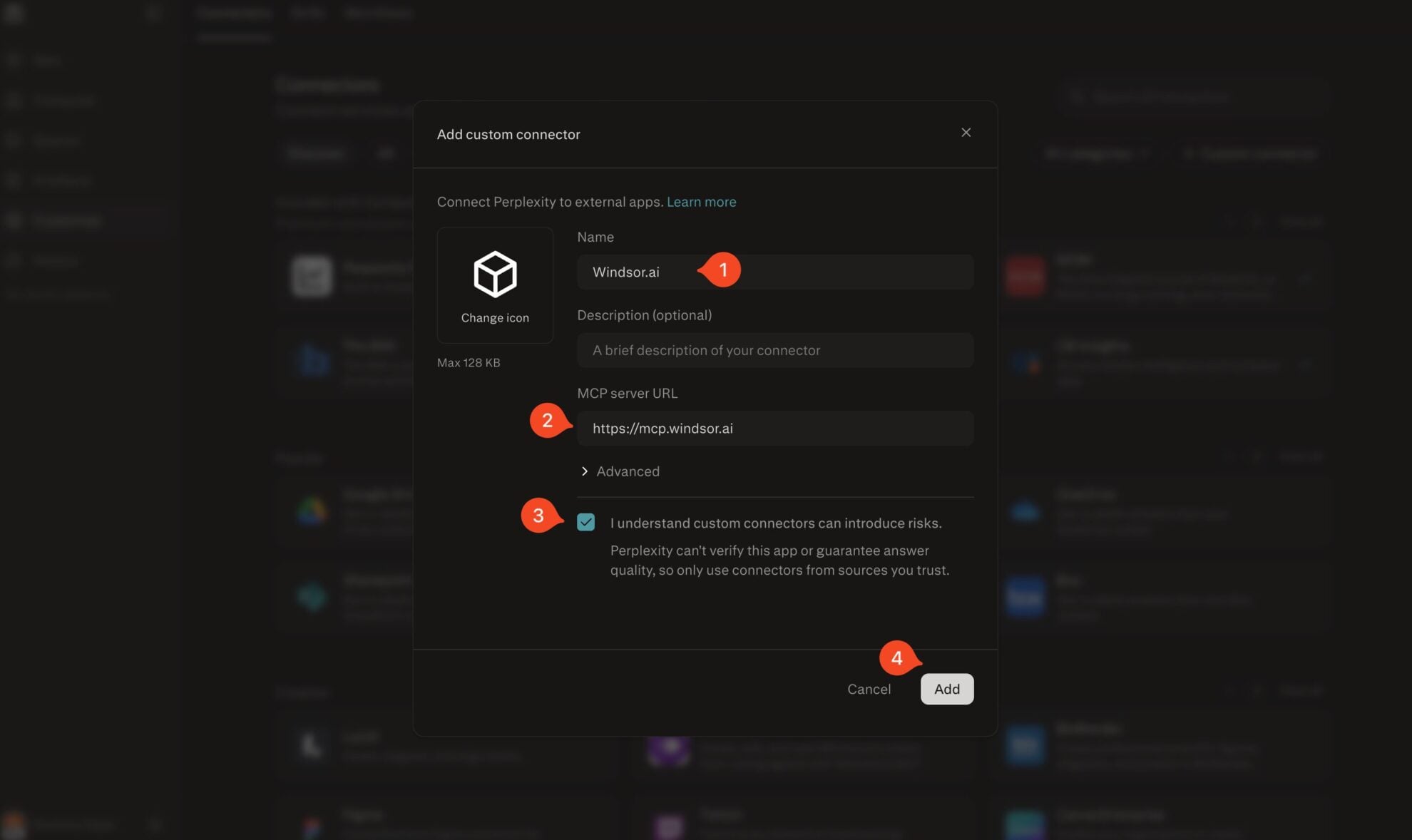
Add Windsor.ai as a custom connector
Go to perplexity.ai/computer/connectors and click + Custom connector. Fill in the details:
- Name: Windsor.ai
- MCP server URL: https://mcp.windsor.ai
Tick ‘I understand custom connectors can introduce risks’ and click Add.
Install the connector
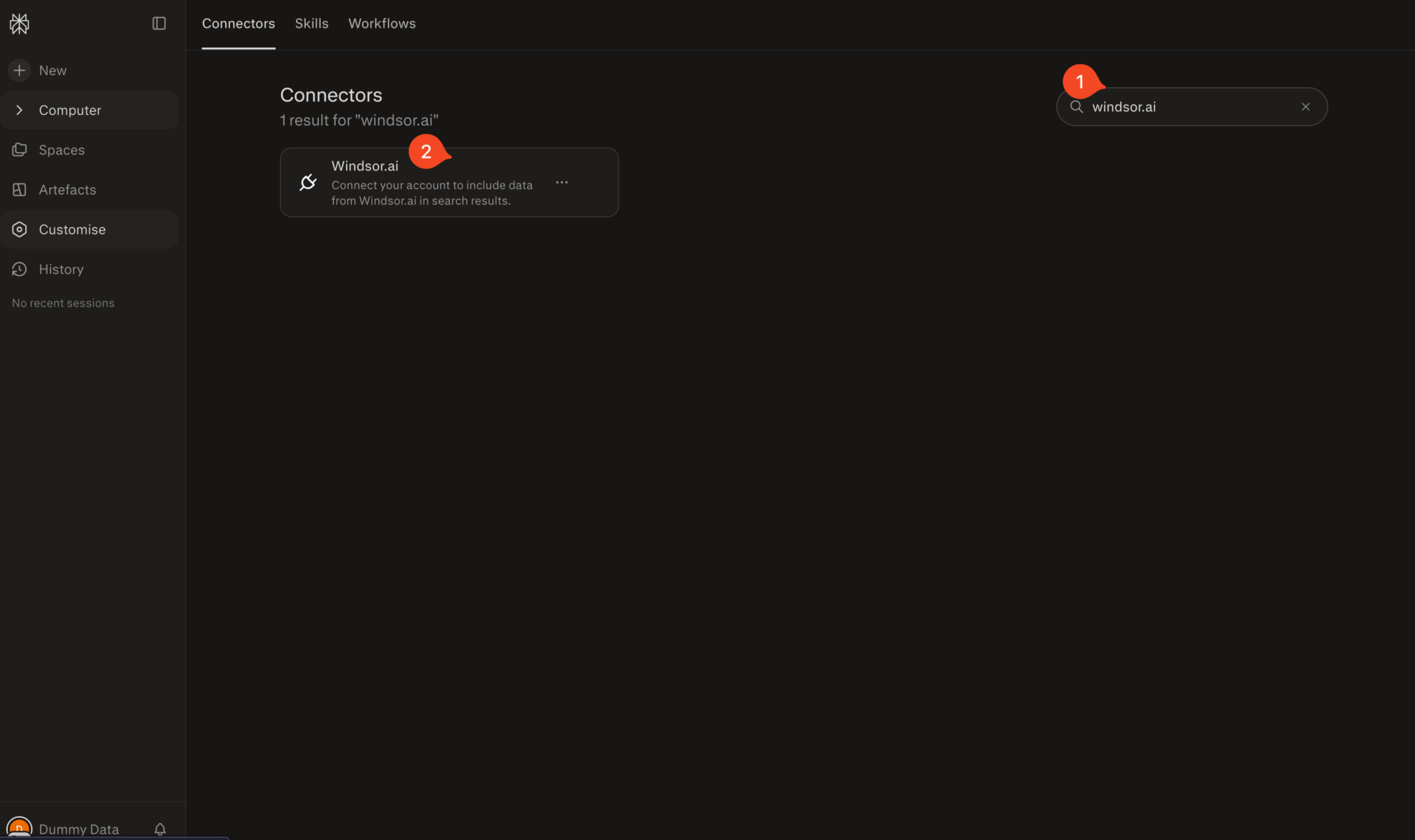
Search for Windsor.ai in the connectors list, click the card, then click Add connector.
Confirm by clicking Allow Access in the pop-up.
Enable Windsor.ai in your chat
In a new chat, click +, choose Connectors, and check Windsor.ai.
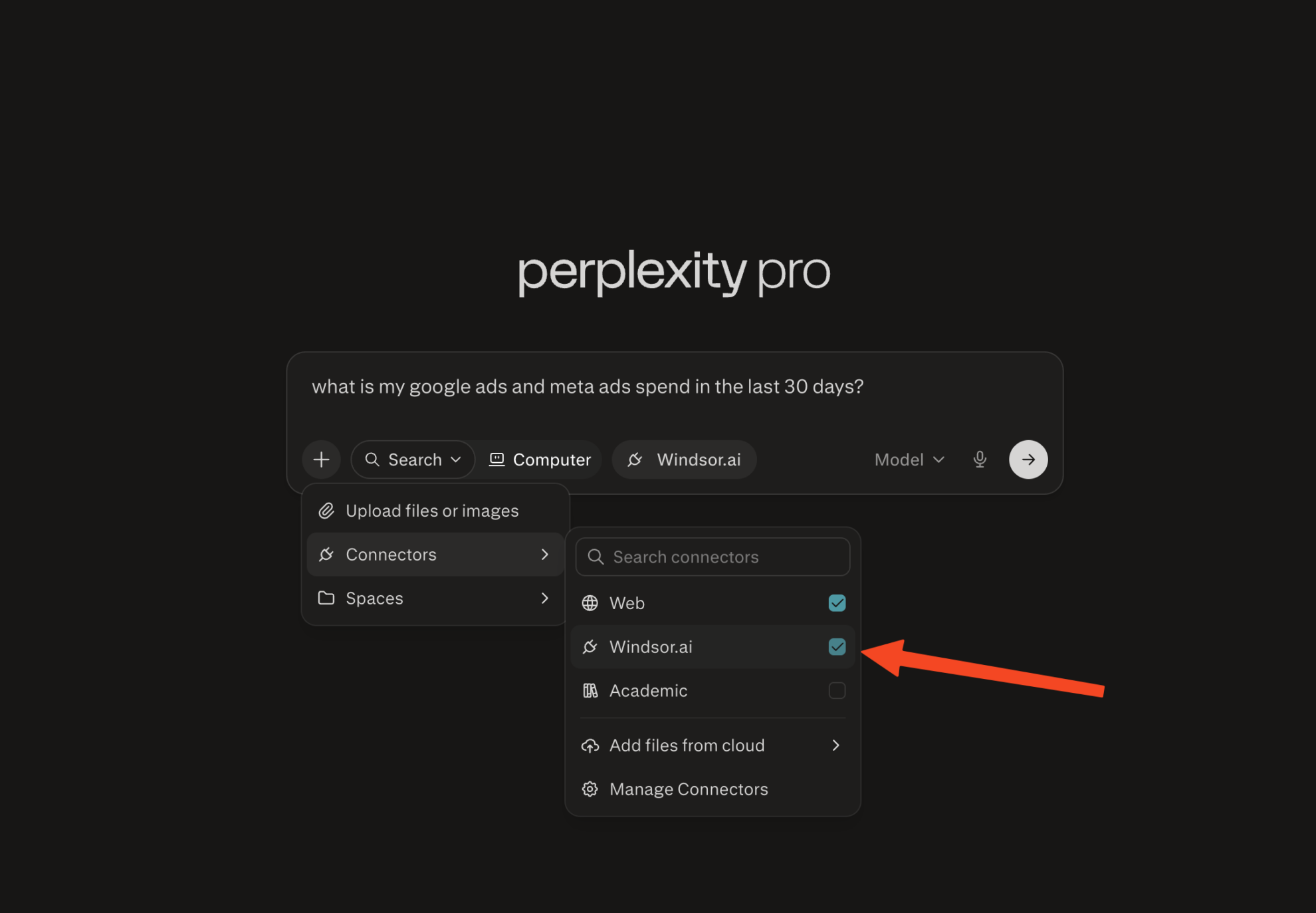
Start querying your data
You can now ask questions about your integrated Windsor.ai data.

FAQs
Do I need a Perplexity Pro subscription to connect Magento?
Yes. Adding custom MCP connectors in Perplexity requires a Perplexity Pro subscription. On the Windsor.ai side, you can start on the free forever plan, no credit card needed.
What Magento metrics can I analyze in Perplexity via Windsor.ai?
Windsor.ai gives you access to 150+ Magento metrics and dimensions, including:
- Revenue and order totals: grand total, subtotal, discount amount, shipping amount, tax amount, total paid, total due, and total invoiced, in both store and base currency.
- Product/item-level data: SKU, product name, quantity ordered, invoiced, shipped, canceled, and refunded, plus item price, item cost, and item discount.
- Discounts and promotions: coupon code, discount description, applied rule IDs, and discount amounts at both the order and item level.
- Refunds and returns: refunded amounts, refunded tax, refunded shipping, and refunded quantity, at the order and item level.
- Customer and fulfillment data: customer email, guest vs. registered status, billing address, order status, order state, and store ID.
Can Windsor.ai connect multiple Magento stores to Perplexity at once?
Yes. Windsor.ai supports multiple Magento stores under one connection. Query a single store or compare performance across all of them in the same Perplexity chat, useful for agencies or brands running several storefronts.
Can Perplexity help me find my most profitable products?
Yes. Ask Perplexity to rank products by revenue, quantity ordered, and item-level price and cost. That surfaces which SKUs are actually contributing profit, not just the ones selling the most units.
Can Perplexity help with shipping cost analysis?
Yes. Windsor.ai tracks shipping amount, shipping tax, shipping discounts, and shipping refunds at the order level, so you can see whether shipping costs or shipping promotions are cutting into your margin.
What prompts can I use when analyzing Magento data in Perplexity?
-
Analyze the relationship between coupon codes and refund rates over the last 90 days. Which promotions generate strong order volume but also unusually high refunds, discounts, or cancellations?
-
Using order item price and order item cost, calculate true margin by product for the last quarter. Which SKUs look good on revenue but are actually low-margin once cost and discounts are factored in?
-
Group orders by customer email over the last 6 months and calculate the percentage of customers who placed more than one order. Which products or stores have the highest repeat-purchase rate?
-
Compare average order value, discount rate, and refund rate across my Magento stores or currencies for the last quarter. Which store is performing best once refunds and discounts are accounted for?
-
Pull my Magento orders alongside my Google Ads and Facebook Ads spend for the last 30 days. Which channel is driving orders with the best margin, not just the most orders?
Do you have helpful links to get started with integrating Magento and Perplexity using Windsor.ai?
Yes, we have helpful resources to help you get started. You can explore our official documentation and tutorials for seamless Magento to Perplexity integration with Windsor.ai:
Can I combine Magento sales data with my ad spend in Perplexity?
Yes. Windsor.ai supports 350+ data sources, including Google Ads, Facebook Ads, and TikTok. Connect Magento alongside them to ask cross-channel questions like ‘Which campaigns are driving profitable orders, not just clicks?’
Tired of manual Magento data exports? Try Windsor.ai today to automate your reporting


