 Destinations
 Data sources
 AI insights
 About us
 Careers
 Security
 Customer reviews
 Contact us
 Affiliate program
 Solution partners
 Template gallery
 Looker Studio templates
 Power BI templates
 Excel templates
 Google Sheets templates
 Tableau templates
 Facebook Ads templates
 Google Ads templates
 Data fields & Metrics
 AI prompt library & Guides
 Product documentation
 API documentation
 Case studies
 Blog
Blog Data models
 Windsor vs Supermetrics
 Windsor vs Funnel.io
 Windsor vs Fivetran
 Windsor vs Rivery
 Windsor vs Portermetrics
 Windsor vs Coupler.io
Connect Omnisend to ChatGPT
Automatically sync your Omnisend email, cart, and order data to ChatGPT using the Windsor.ai connector.
Get AI-driven insights on campaign deliverability, abandoned carts, and order economics by asking ChatGPT plain-English questions, so you can see what’s actually driving revenue instead of tab-hopping through Omnisend’s dashboard.
Forget CSVs. Stop copy/paste. Connect in minutes. No code required.
 Sign up with Google
 Free forever plan
No credit card needed
Free forever plan
No credit card needed










Connect email activity to revenue with Omnisend to ChatGPT integration
Windsor MCP streams your live Omnisend data into ChatGPT, so you skip the dashboard and go straight to what’s driving or costing you sales. Explore key use cases:

Recover abandoned carts smarter
Use cart sum and recovery URL data to prioritize which abandoned carts are actually worth a follow-up push.

Audit campaign deliverability health
Compare bounced and complained counts against sent to catch list-health problems before they hurt your sender reputation.

Connect engagement to real orders
Cross-reference contact-level opens and clicks with order sum to see which engaged subscribers are actually buying.

Break down order economics
Compare discount sum, shipping sum, and tax sum against order sum to see true net revenue per order.
Using Windsor.ai to connect data from Omnisend to ChatGPT
Deciding which abandoned cart is worth chasing, or which campaign is quietly damaging your sender score, usually means digging through Omnisend’s dashboard tab by tab. Windsor MCP surfaces all of it at once, streaming campaign, cart, and order data directly into ChatGPT.
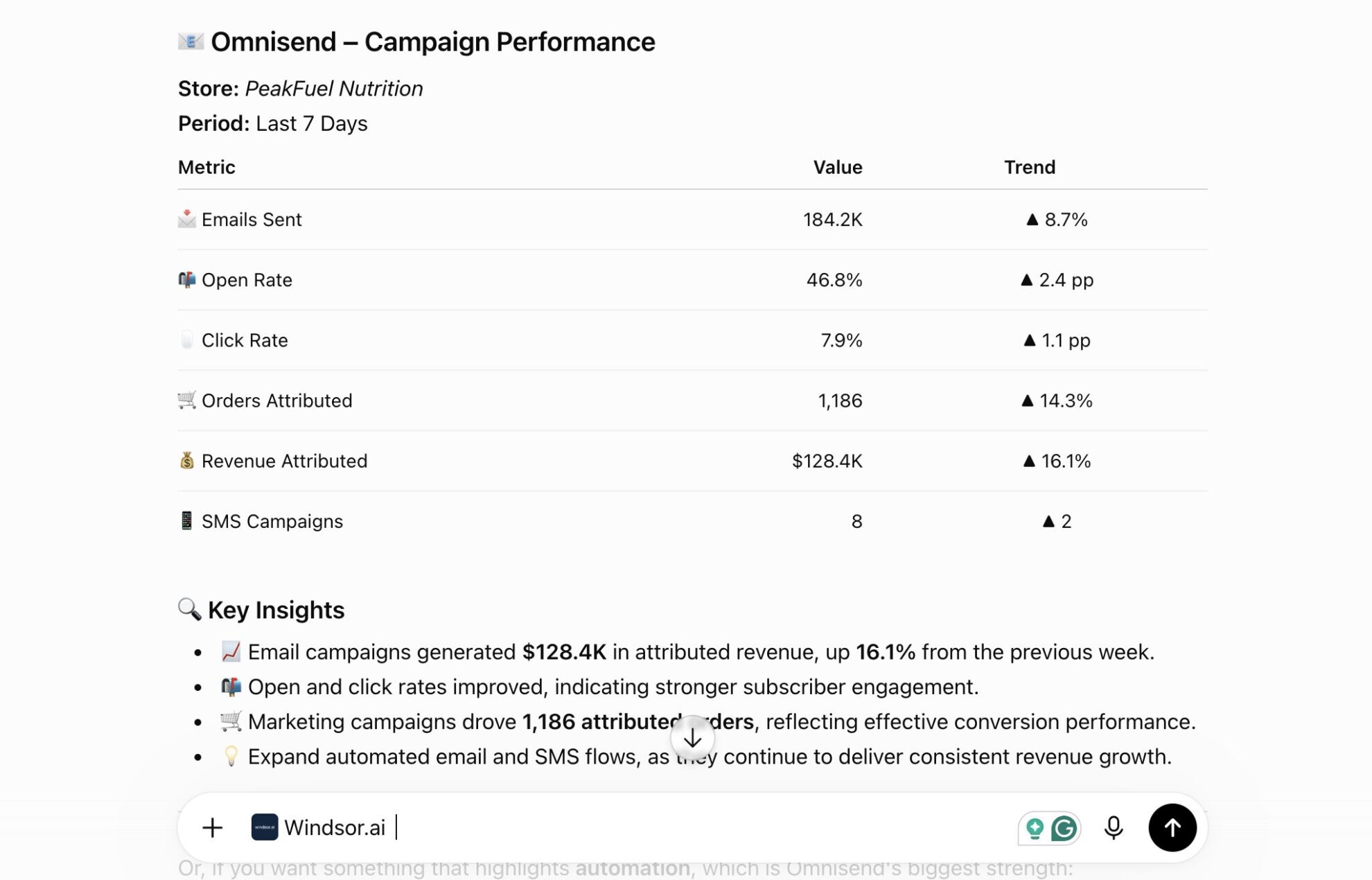
Connect once and start asking questions about deliverability, abandoned carts, and order economics in plain English.














How to connect Omnisend to ChatGPT with Windsor.ai
Explore our video tutorial and a step-by-step guide to integrate your Omnisend data into ChatGPT with the Windsor.ai connector.
Connect Omnisend in the Windsor.ai dashboard
Choose Omnisend as your data source and grant access to Windsor.ai using your Omnisend API key.

Install the Windsor.ai connector
Log in to your ChatGPT account and open this Windsor.ai connector page.
Click Connect, then authorize access.

Query your Omnisend data in ChatGPT
Open a new chat and start asking questions about your connected Omnisend data using natural language.
Make sure that the Windsor.ai connector is enabled (click the + sign → More → Windsor.ai).
FAQs
What Omnisend data can I analyze in ChatGPT?
Windsor.ai gives ChatGPT access to all 121 Omnisend fields (17 metrics, 86 dimensions), organized into groups such as:
- Campaigns (19 fields): sent, opened, clicked, bounced, complained, unsubscribed, segments.
- Carts (10 fields): cart sum, recovery URL, products, contact ID.
- Contacts (24 fields): engagement status, location, birthdate, gender.
- Orders (33 fields): order sum, discount sum, shipping sum, tax sum, billing address.
- Products (14 fields): category, status, tags.
Can ChatGPT tell me which campaigns are hurting my sender reputation?
Yes. Windsor.ai streams bounced, complained, and unsubscribed counts alongside sent for every campaign, so ChatGPT can flag campaigns with deliverability rates that could put your sender reputation at risk.
Can ChatGPT prioritize which abandoned carts are worth following up on?
Yes. Windsor.ai streams cart sum and recovery URL together, so ChatGPT can rank abandoned carts by value and point you to the ones with the highest revenue potential.
Can ChatGPT connect email engagement to actual purchase behavior?
Yes. Windsor.ai streams contact-level opens and clicks alongside order data, so ChatGPT can show whether your most engaged subscribers are actually converting into paying customers.
What prompts can I use to analyze Omnisend data in ChatGPT?
-
Rank my campaigns by unsubscribe rate relative to sent for the last 30 days. Which campaigns are driving list churn?
-
Find contacts who clicked a campaign but have no order in the following 14 days. What might be blocking conversion?
-
Compare average cart sum for recovered versus unrecovered abandoned carts over the last 30 days.
-
Break down order sum by product category for the last 30 days. Which categories are driving the most revenue after discounts?
How much does it cost to integrate Omnisend into ChatGPT using Windsor.ai?
Windsor.ai is free to start, no credit card required. Paid plans start at $19/month and scale by the number of sources and accounts. See the pricing page.
Can I combine Omnisend data with other channels in ChatGPT?
Yes. Windsor.ai supports 350+ data sources, so you can connect Omnisend alongside Google Ads or Meta Ads to see how paid acquisition relates to email engagement and order value.
Do you have helpful links to get started with integrating Omnisend and ChatGPT using Windsor.ai?
Yes, we have helpful resources to help you get started. You can explore our official documentation for seamless Omnisend to ChatGPT integration with Windsor.ai:
Tired of manual Omnisend data exports? Try Windsor.ai today to automate your reporting


