 Destinations
 Data sources
 AI insights
 About us
 Careers
 Security
 Customer reviews
 Contact us
 Affiliate program
 Solution partners
 Template gallery
 Looker Studio templates
 Power BI templates
 Excel templates
 Google Sheets templates
 Tableau templates
 Facebook Ads templates
 Google Ads templates
 Data fields & Metrics
 AI prompt library & Guides
 Product documentation
 API documentation
 Case studies
 Blog
Blog Data models
 Windsor vs Supermetrics
 Windsor vs Funnel.io
 Windsor vs Fivetran
 Windsor vs Rivery
 Windsor vs Portermetrics
 Windsor vs Coupler.io
Connect Piwik PRO to ChatGPT
Automatically sync your Piwik PRO analytics data, including sessions, page views, traffic sources, and goal conversions, to ChatGPT using the Windsor.ai connector.
Ask ChatGPT plain-English questions about traffic, pages, and conversions, and get answers without opening Piwik PRO.
Forget CSVs. Stop copy/paste. Connect in minutes. No code required.
 Sign up with Google
 Free forever plan
No credit card needed
Free forever plan
No credit card needed









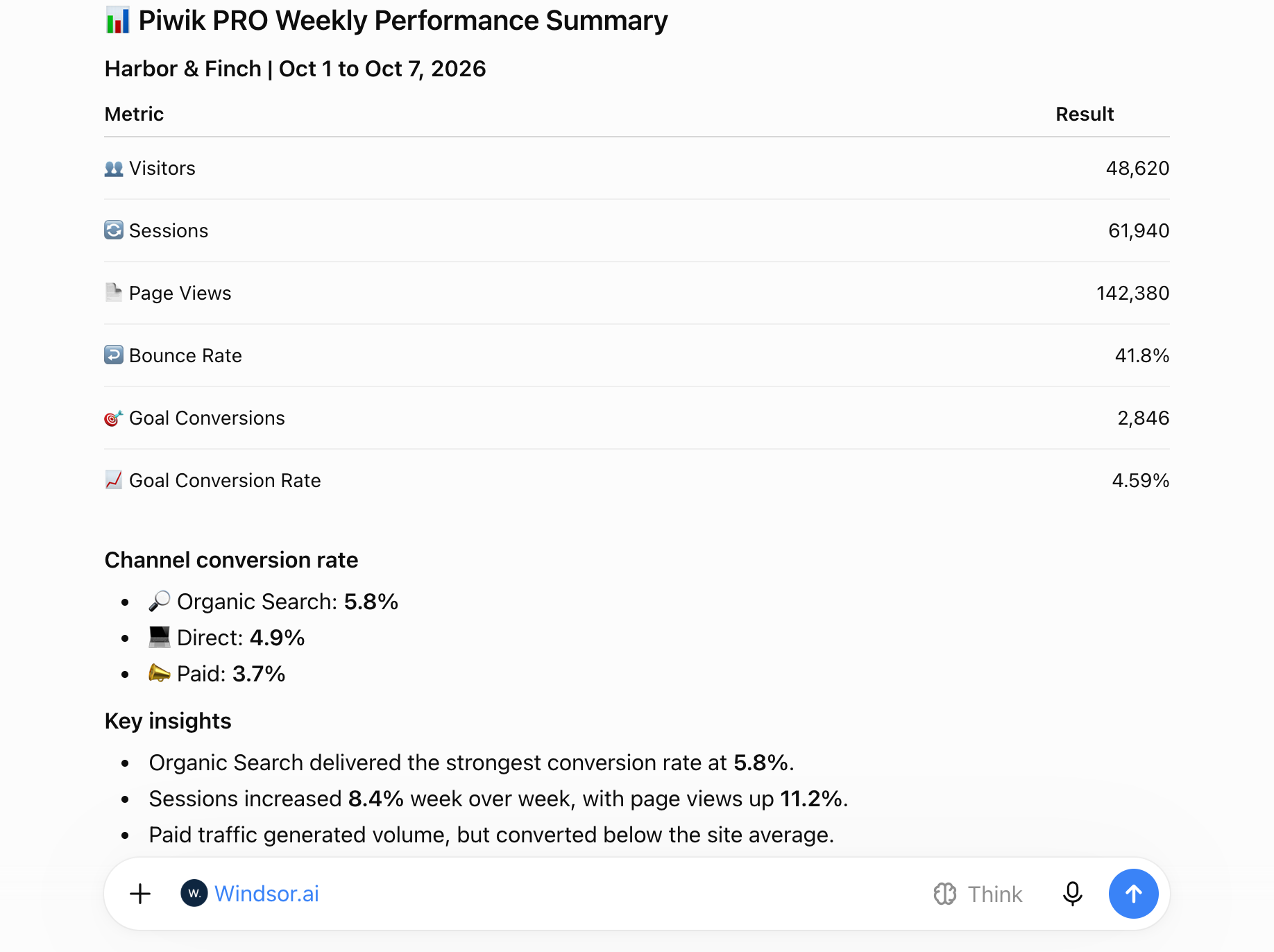
Get instant AI insights from your Piwik PRO analytics data in ChatGPT
Windsor MCP delivers your live Piwik PRO sessions, page views, traffic sources, and goal conversions to ChatGPT, so checking how your site is doing takes one prompt instead of a dashboard export. Explore key use cases:

See where visitors come from
Compare sessions, visitors, and goal conversions by source, medium, channel, and campaign name to find the traffic that matters.

Find your strongest pages
Review page views, unique page views, and average time on page by page URL and page title.

Measure goal conversions
Track goal conversions and goal conversion rate by source, campaign, and country over time.

Spot where visitors leave
Compare entries, exits, and bounce rate by page to find the pages that lose visitors early.
Using Windsor.ai to connect data from Piwik PRO to ChatGPT
Without Windsor.ai, getting Piwik PRO data into ChatGPT means exporting reports from Piwik PRO and uploading the files for each question. Windsor.ai’s MCP connector collects, structures, and delivers Piwik PRO sessions, visitors, page views, traffic sources, and goal conversions to ChatGPT automatically.
Connect in minutes and start asking plain-English questions about traffic, pages, and conversions.














How to connect Piwik PRO to ChatGPT with Windsor.ai
Explore a step-by-step guide to integrate your Piwik PRO data into ChatGPT with the Windsor.ai connector.
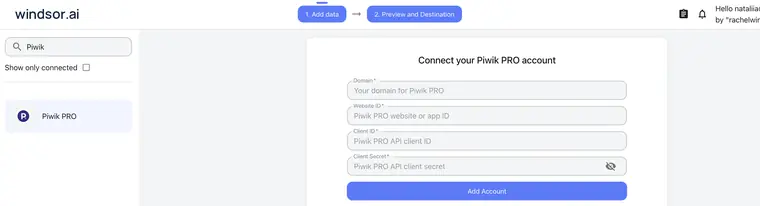
Connect Piwik PRO in the Windsor.ai dashboard
Choose Piwik PRO as your data source, enter your Piwik PRO domain (without http:// or https://), website ID, client ID, and client secret, then click Add Account.
Install the Windsor.ai connector
Log in to your ChatGPT account and open this Windsor.ai connector page.
Click Connect, then authorize access.

Query your Piwik PRO data in ChatGPT
Open a new chat and start asking questions about your connected Piwik PRO data using natural language.
Make sure that the Windsor.ai connector is enabled (click the + sign → More → Windsor.ai).
FAQs
What Piwik PRO data can I analyze in ChatGPT?
Windsor.ai gives ChatGPT access to your Piwik PRO data in six groups. These are some of the fields in each; the Piwik PRO field reference lists all of them:
- Traffic: Sessions, Visitors, Bounce Rate, Entries, Exits.
- Pages: Page URL, Page Title, Page Views, Unique Page Views, Average Time On Page, Session Entry URL.
- Traffic sources: Source, Medium, Source / Medium, Channel, Campaign Name, Referrer URL.
- Goals and events: Goal Conversions, Goal Conversion Rate (Sessions), Custom Event Category, Custom Event Action, Custom Event Name.
- Location: Country, City.
- Date and account fields: Date, Week, Month, Year, Account ID, Account Name.
Can ChatGPT show which traffic sources bring conversions?
Yes. Windsor.ai streams Sessions, Visitors, Goal Conversions, and Goal Conversion Rate by Source, Medium, Channel, and Campaign Name, so ChatGPT can show which traffic sources convert and how that changes over time.
Can I analyze page performance in ChatGPT?
Yes. Windsor.ai streams Page Views, Unique Page Views, Average Time On Page, Entries, Exits, and Bounce Rate by Page URL and Page Title. ChatGPT can rank pages on any of them and compare periods.
Can ChatGPT change my Piwik PRO tracking or settings?
No. The Piwik PRO connector is read-only. ChatGPT can analyze your Piwik PRO data, but it cannot edit your tracking, tags, goals, or account settings.
What prompts can I use to analyze Piwik PRO data in ChatGPT?
Beyond basic summaries, you can use more specific prompts. For example:
-
For the last 30 days, show sessions, visitors, bounce rate, and goal conversions by channel. Flag channels where bounce rate is above 60% and sessions are above the channel average.
-
List my top 20 pages by page views for the last 30 days, with unique page views and average time on page. Flag pages where average time on page is under 20 seconds.
-
Compare goal conversions and goal conversion rate by campaign name and source / medium for the last 90 days. Rank campaigns by goal conversions.
-
Show entries and exits by page for the last 8 weeks, with bounce rate. Which pages lose the most visitors, and how did that change week over week?
How much does it cost to integrate Piwik PRO with ChatGPT using Windsor.ai?
The free forever plan covers 1 data source, so connecting Piwik PRO on its own costs nothing and needs no credit card. Combining Piwik PRO with other sources, such as Google Ads or HubSpot, needs a paid plan: $19/month for 3 sources or $99/month for 7. See the pricing page.
Can I combine Piwik PRO data with other sources in ChatGPT?
Yes. Windsor.ai supports 350+ data sources, so you can connect Piwik PRO alongside tools such as Google Ads, Facebook Ads, or HubSpot. For example, you can compare ad spend with Piwik PRO goal conversions by campaign name, or compare Piwik PRO sessions with leads in your CRM.
Does connecting Piwik PRO to ChatGPT require any coding?
No. Windsor.ai’s MCP connector is fully no-code: enter your Piwik PRO credentials once in the Windsor.ai dashboard, install the Windsor.ai app in ChatGPT, and start asking questions in plain English.
Do you have helpful links to get started with integrating Piwik PRO and ChatGPT using Windsor.ai?
Yes, we have helpful resources to help you get started. You can explore our official documentation for Piwik PRO to ChatGPT integration with Windsor.ai:
Tired of manual Piwik PRO data exports? Try Windsor.ai today to automate your reporting


