 Destinations
 Data sources
 AI insights
 About us
 Careers
 Security
 Customer reviews
 Contact us
 Affiliate program
 Solution partners
 Template gallery
 Looker Studio templates
 Power BI templates
 Excel templates
 Google Sheets templates
 Tableau templates
 Facebook Ads templates
 Google Ads templates
 Data fields & Metrics
 AI prompt library & Guides
 Product documentation
 API documentation
 Case studies
 Blog
Blog Data models
 Windsor vs Supermetrics
 Windsor vs Funnel.io
 Windsor vs Fivetran
 Windsor vs Rivery
 Windsor vs Portermetrics
 Windsor vs Coupler.io
Connect Salesforce to Perplexity
Automatically sync your Salesforce data to Perplexity using the Windsor.ai connector.
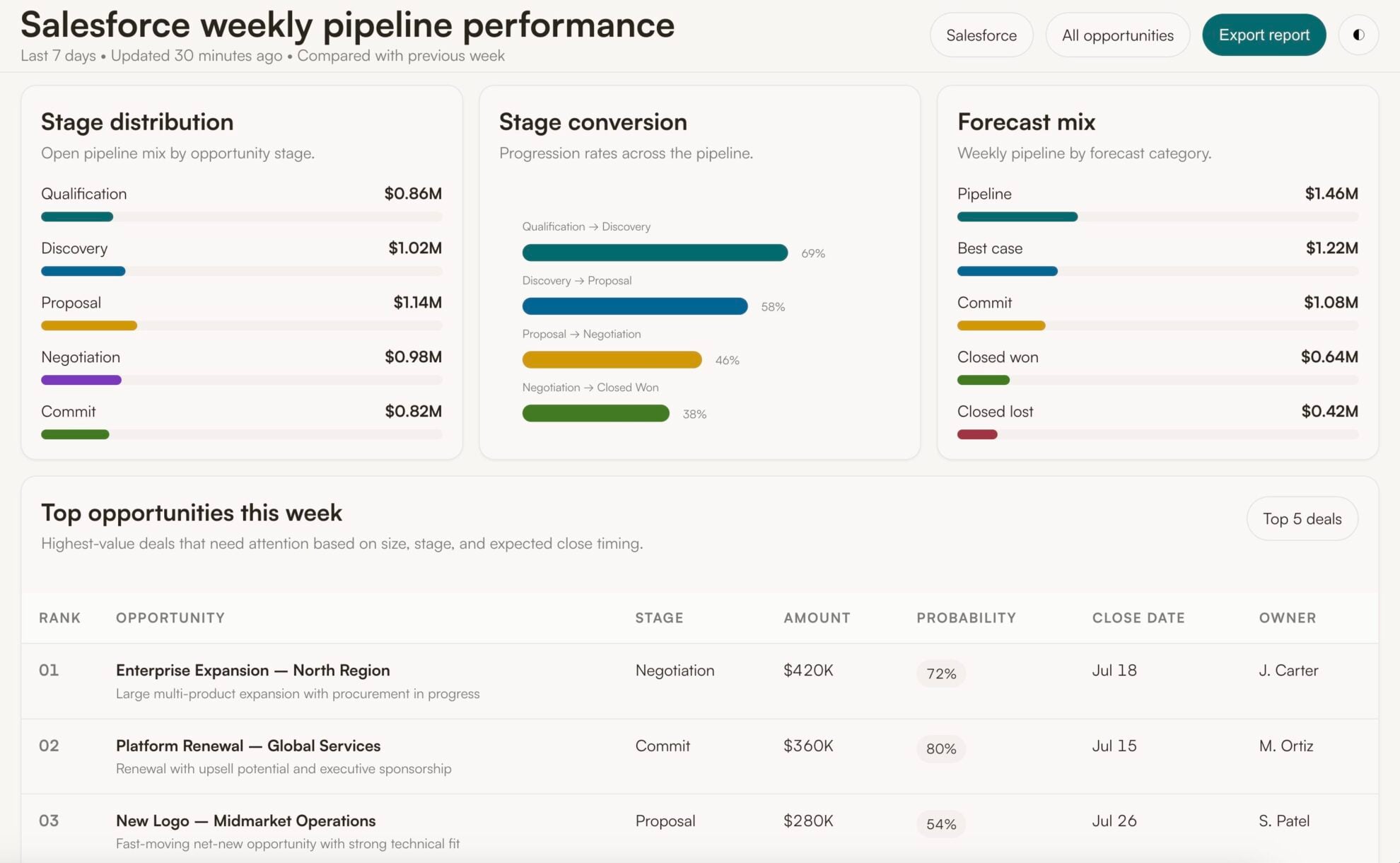
Analyze Salesforce data in Perplexity to instantly find stalled deals, prioritize leads, and understand which campaigns drive closed revenue.
Forget CSVs. Stop copy/paste. Connect in minutes. No code required.
 Sign up with Google
 Free forever plan









Close deals faster and boost revenue with Salesforce to Perplexity integration
Connect your Salesforce data to Perplexity via Windsor MCP and turn raw pipeline, lead, and campaign numbers into instant AI-powered insights and recommendations. Key use cases:

Forecast realistic revenue
Analyze historical opportunity data, stage, probability, and close date, to forecast how much revenue is likely to close this quarter. Get a number grounded in your team’s actual patterns, not a naive sum of the pipeline.

Diagnose win-loss patterns
Perplexity scans hundreds of closed-won and closed-lost opportunities in seconds to surface patterns in lead source, deal size, and stage history. Understand what helps reps close deals and what’s driving the losses.

Connect ad spend to closed revenue
Combine Salesforce closed-won revenue with Google Ads and Meta Ads spend for the same period. Reallocate budget toward the campaigns that drive revenue, not just leads.

Surface stalled deals
See which opportunities have no next step, no recent activity, or an overdue task. Push reps to re-engage those deals now, before they age out of the pipeline unnoticed.
Using Windsor.ai to connect data from Salesforce to Perplexity
Most methods to stream your Salesforce data into AI require manual CSV exports, data cleanup, or expensive tools. Windsor.ai’s MCP connector removes this friction by automatically syncing Salesforce data into Perplexity in just a few minutes.
Set up once and use natural‑language prompts to analyze your sales performance.
Available actions
Update Object Update field values on a Salesforce record of any object type (Opportunity, Lead, Contact, Account, Case, custom objects, ...). Only the provided fields are changed. Use field API names (e.g. StageName, Amount, My_Field__c) and pass null as a value to clear a field.
Update field values on a Salesforce record of any object type (Opportunity, Lead, Contact, Account, Case, custom objects, ...). Only the provided fields are changed. Use field API names (e.g. StageName, Amount, My_Field__c) and pass null as a value to clear a field.
Create Object Create a new Salesforce record of any object type (Opportunity, Lead, Contact, Account, Case, custom objects, ...). Use field API names (e.g. LastName, Company, Amount, My_Field__c); the required fields depend on the object type. Returns the id of the new record, which update_object and delete_object can then use.
Create a new Salesforce record of any object type (Opportunity, Lead, Contact, Account, Case, custom objects, ...). Use field API names (e.g. LastName, Company, Amount, My_Field__c); the required fields depend on the object type. Returns the id of the new record, which update_object and delete_object can then use.
Delete Object Permanently delete a Salesforce record of any object type (Opportunity, Lead, Contact, Account, Case, custom objects, ...) by id. Salesforce moves the record to the Recycle Bin for 15 days, from where a user can restore it in the Salesforce UI but not through Windsor. Tell the user this is permanent before you ask them to confirm.
Permanently delete a Salesforce record of any object type (Opportunity, Lead, Contact, Account, Case, custom objects, ...) by id. Salesforce moves the record to the Recycle Bin for 15 days, from where a user can restore it in the Salesforce UI but not through Windsor. Tell the user this is permanent before you ask them to confirm.














How to connect Salesforce to Perplexity with Windsor.ai
Explore our video tutorial and a step-by-step guide to integrate your Salesforce data into Perplexity with the Windsor.ai connector.
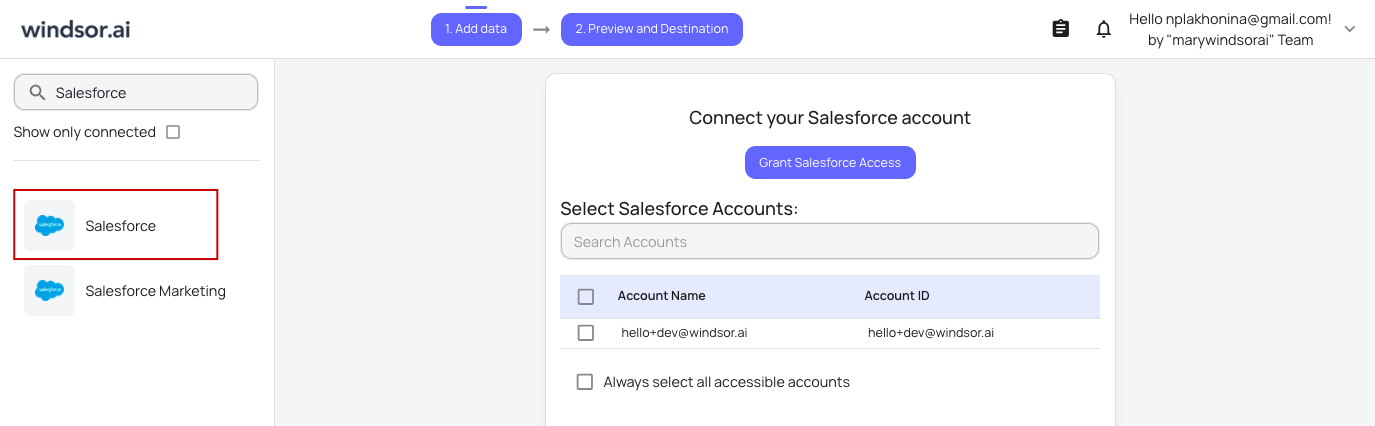
Connect data source in Windsor.ai dashboard
Connect your Salesforce to Windsor.ai. Select the necessary account(s) you want to pull data from and click “Next.”
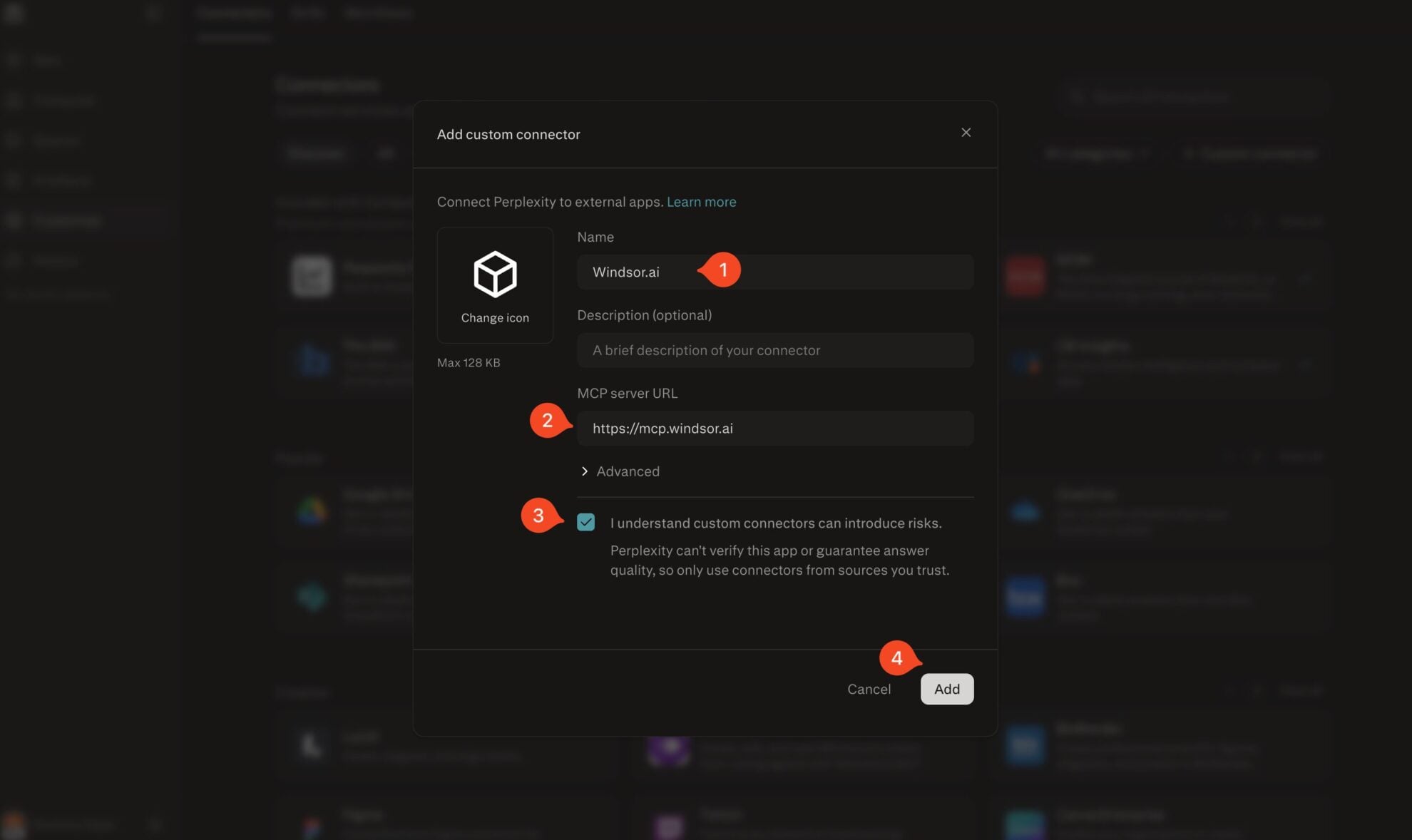
Add Windsor.ai as a custom connector
Go to perplexity.ai/computer/connectors and click + Custom connector. Fill in the details:
- Name: Windsor.ai
- MCP server URL: https://mcp.windsor.ai
Tick ‘I understand custom connectors can introduce risks’ and click Add.
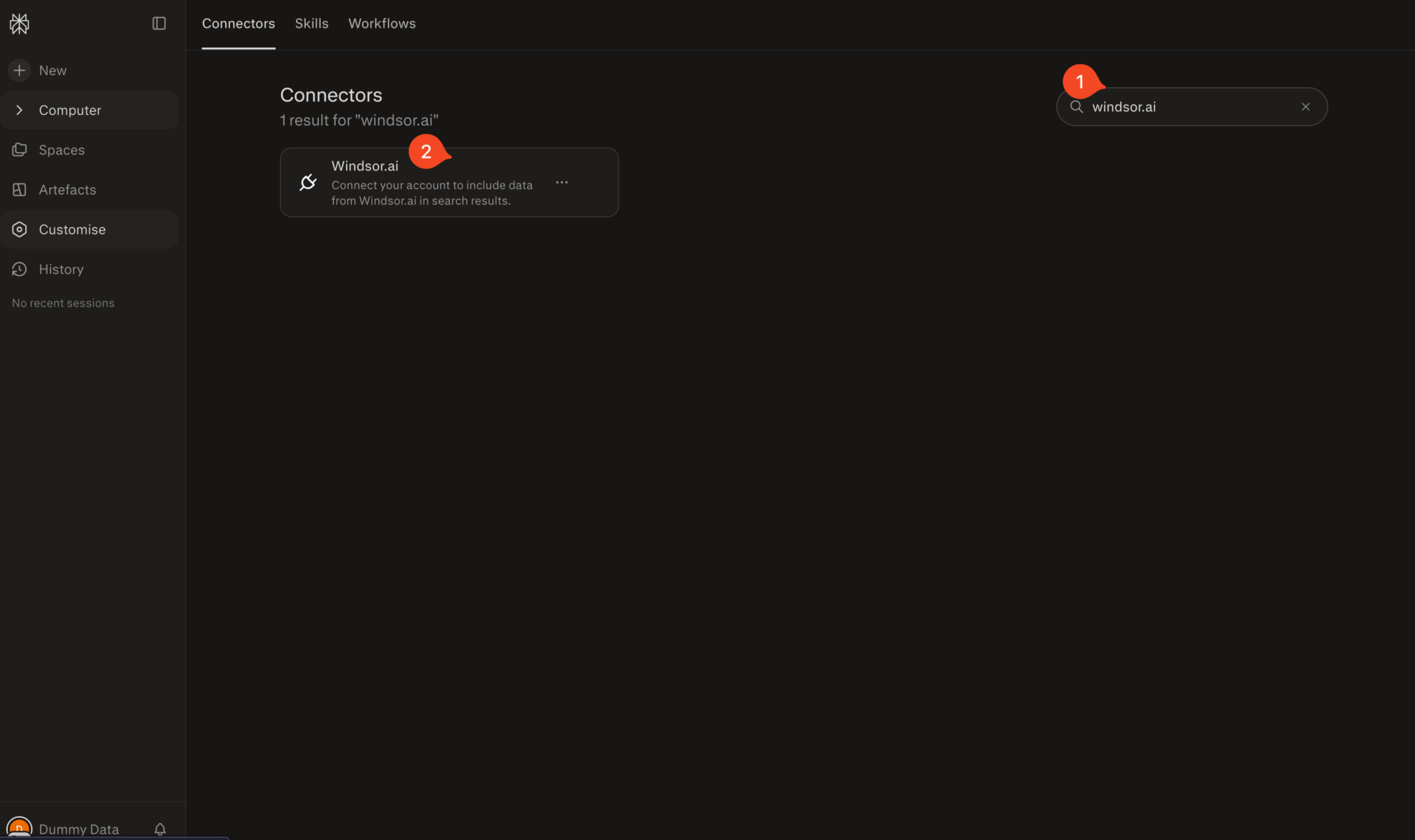
Install the connector
Search for Windsor.ai in the connectors list, click the card, then click Add connector.
Confirm by clicking Allow Access in the pop-up.
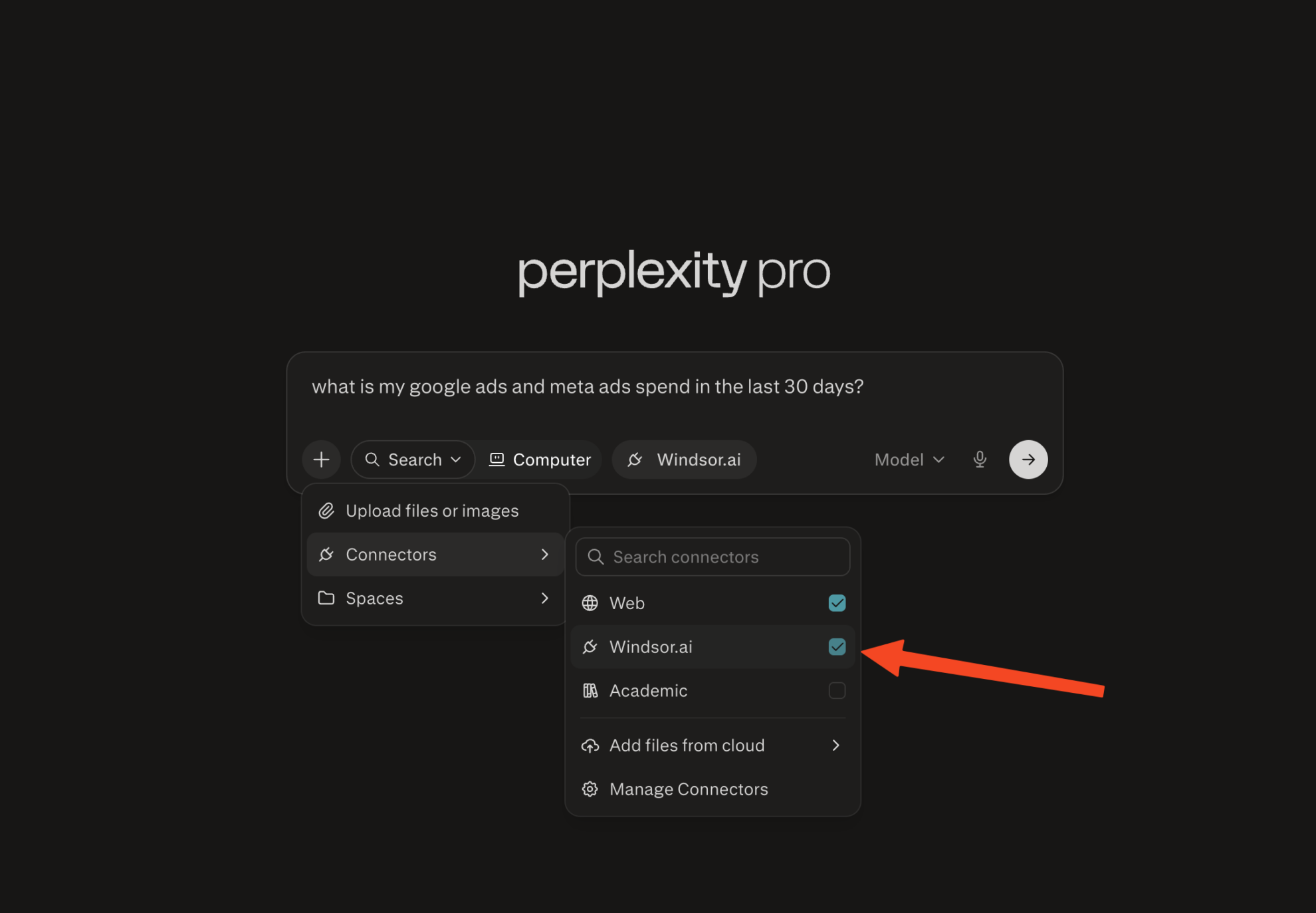
Enable Windsor.ai in your chat
In a new chat, click +, choose Connectors, and check Windsor.ai.
Start querying your data
You can now ask questions about your integrated Windsor.ai data.

FAQs
Do I need a Perplexity Pro subscription to connect Salesforce?
Yes. Custom MCP connectors are available on Perplexity Pro, Max, and Enterprise plans. On the Windsor.ai side, you can start on the free forever plan, no credit card needed.
What Salesforce data can I analyze in Perplexity via Windsor.ai?
Windsor.ai gives access to 300+ Salesforce metrics and dimensions, including:
- Pipeline and opportunities: amount, stage, probability, close date, forecast category, lead source, and won/lost status for every opportunity.
- Leads: status, rating, source, industry, company size, and conversion date.
- Accounts: industry, annual revenue, employee count, billing location, and account type.
- Campaigns: actual and budgeted cost, and the number of leads, responses, opportunities, and won opportunities generated per campaign.
- Activity: tasks and calls, including status, priority, call duration, and outcome, logged per rep.
- Deal history: prior amount, prior close date, and stage changes over time for every opportunity, from Opportunity History.
Custom fields and custom objects are also available once you connect your account.
Can Perplexity help me find stalled deals or at-risk opportunities?
Yes. Ask Perplexity to list open opportunities with no next step, no activity in the last X days, or an overdue task. It helps you surface deals that are stalling before they fall out of the pipeline unnoticed.
Can Perplexity help me prioritize leads?
Yes. Ask Perplexity to rank open leads by rating, source, industry, or company size. In seconds, you get a prioritized list, so your team knows exactly who to call first, instead of working leads top to bottom.
Can I track sales rep activity and performance in Perplexity?
Absolutely. Perplexity summarizes tasks and calls logged per rep, including call duration and outcome, and compares that activity against deals won, helping you identify who’s converting effort into results.
What prompts can I use when analyzing Salesforce data in Perplexity?
-
Analyze Closed-Lost opportunities from the last 90 days. Group them by lead source and deal size, and identify any pattern in why they were lost, based on the stage history before the loss.
-
Using Opportunity History, find deals where the amount decreased or the close date was pushed back more than once. How many of those eventually closed, and how many are still open?
-
Compare campaign cost against the total amount of won opportunities generated by each campaign over the last 6 months. Which campaigns have the best cost-to-revenue ratio, and which are underperforming?
-
Calculate the average number of days a lead takes to convert to an opportunity, broken down by lead source. Which sources convert fastest, and which take the longest to move?
-
Pull my Salesforce closed-won revenue alongside my Google Ads and Meta Ads spend for the same period. Which campaigns are tied to opportunities that actually closed, not just leads that were created?
Do you have helpful links to get started with integrating Salesforce and Perplexity using Windsor.ai?
Yes, we have helpful resources to help you get started. You can explore our official documentation and tutorials for seamless Salesforce to Perplexity integration with Windsor.ai:
Can I combine Salesforce with my ad platforms in Perplexity?
Yes. Windsor.ai supports 350+ data sources, including Google Ads, Meta Ads, TikTok Ads, and GA4. Connect Salesforce alongside them to see which campaigns and channels are actually producing pipeline and closed revenue, not just leads or clicks.
How fresh is my CRM data in Perplexity?
Windsor.ai connects to Salesforce through a live API link. Each time you ask Perplexity a question, it pulls the latest available CRM data at that moment, not a cached export from earlier in the day.
Tired of manual Salesforce data exports? Try Windsor.ai today to automate your reporting


