 Destinations
 Data sources
 AI insights
 About us
 Careers
 Security
 Customer reviews
 Contact us
 Affiliate program
 Solution partners
 Template gallery
 Looker Studio templates
 Power BI templates
 Excel templates
 Google Sheets templates
 Tableau templates
 Facebook Ads templates
 Google Ads templates
 Data fields & Metrics
 AI prompt library & Guides
 Product documentation
 API documentation
 Case studies
 Blog
Blog Data models
 Windsor vs Supermetrics
 Windsor vs Funnel.io
 Windsor vs Fivetran
 Windsor vs Rivery
 Windsor vs Portermetrics
 Windsor vs Coupler.io
Connect Square to ChatGPT
Automatically sync your Square data to ChatGPT using the Windsor.ai connector.
Analyze your Square data in ChatGPT to increase revenue, optimize operations, and improve customer retention with AI-powered insights.
Forget CSVs. Stop copy/paste. Connect data in minutes. No code required.
 Sign up with Google
 Free forever plan
No credit card needed
Free forever plan
No credit card needed










Turn Point-of-Sale data into business decisions with Square to ChatGPT integration
Replace hours of manual reporting with instant AI answers on your Square orders, payments, and customers. Explore key use cases below:

Track staff revenue contribution
Understand exactly which team members drive the most sales per shift. ChatGPT cross-references ‘Payments Employee ID’ with ‘Shift Start At’, ‘End At’, and ‘Wage’ to calculate revenue generated per hour worked, so you can reward top performers and optimize scheduling.

Re-engage lapsing loyalty members
Identify high-value customers who haven’t visited recently before they churn. Analyze ‘Loyalty Lifetime Points’ and ‘Order’ activity to surface at-risk customers, and act with targeted win-back campaigns or personalized offers.

Monitor discount impact
See how much discounts are actually costing you versus driving volume. Ask ChatGPT to analyze ‘Orders Total Discount Money’ against ‘Total Money’ by location and time period, revealing whether your discounts are growing revenue or simply shrinking margin.
Using Windsor.ai to connect data from Square to ChatGPT
Bringing Square data into ChatGPT usually requires manual exports, time-consuming data prep, or costly tools. Windsor.ai simplifies the process by automatically streaming your orders, payments, and customer data straight into ChatGPT.
Connect in minutes and start analyzing revenue, refunds, and staff performance via plain language.
















How to connect Square to ChatGPT data with Windsor.ai
Explore our video tutorial and a step-by-step guide to seamlessly integrate your data from any source into ChatGPT with the Windsor.ai connector.
Select your data source
Choose Square as your data source and grant access to Windsor.ai.
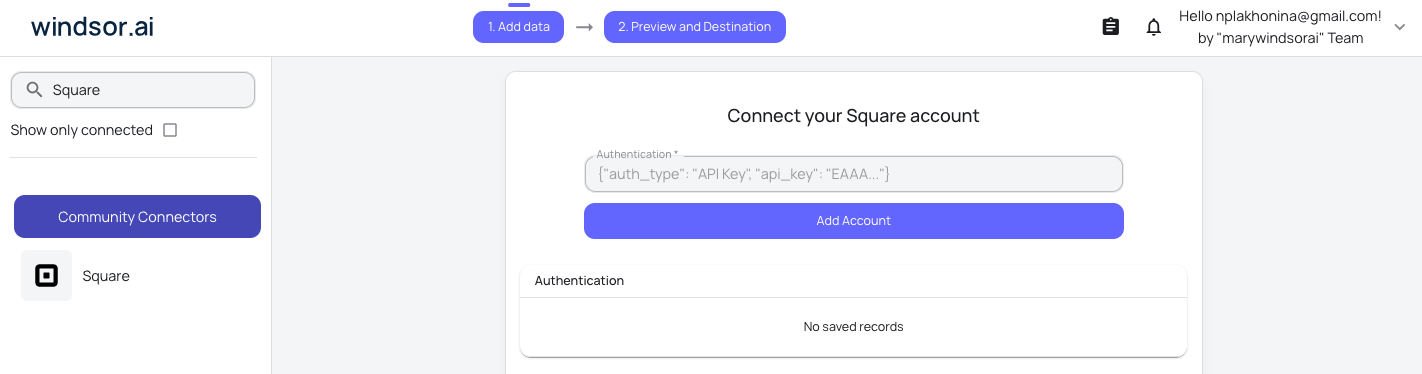
Install the Windsor.ai connector
Log in to your ChatGPT account and open this Windsor.ai connector page.
Click Connect, then authorize access.

Query your Square data in ChatGPT
Open a new chat and start asking questions about your connected Square data using natural language.
Make sure that the Windsor.ai connector is enabled (click the + sign → More → Windsor.ai.)
FAQs
What Square data can I access in ChatGPT through Windsor.ai?
Windsor.ai’s connector for Square supports 15 metrics and 197 dimensions, including:
- Orders: Order ID, Customer ID, Location ID, State, Created At, Closed At, Total Money, Total Tip Money, Total Tax Money, Total Discount Money, Total Service Charge Money, Line Items, Fulfillments, Refunds.
- Payments: Payment ID, Amount Money, Approved Money, Total Money, Refunded Money, Status, Source Type, Employee ID, Processing Fee, Risk Evaluation, Receipt Number.
- Refunds: Refund ID, Order ID, Payment ID, Amount Money, Reason, Status, Processing Fee, Location ID.
- Inventory: Catalog Object ID, Location ID, Quantity, State, Calculated At.
- Shifts and team: Employee ID, Team Member ID, Start At, End At, Status, Wage, Breaks, Hourly Rate, Title.
- Cash drawers: Opened At, Closed At, Opened Cash Money, Closed Cash Money, Expected Cash Money, State.
Can ChatGPT help analyze staff performance using Square Shifts data?
Yes. ChatGPT combines shifts and payments data to calculate revenue generated per employee per shift. Identify top-performing team members, overstaffed periods, and shifts when labor costs exceed revenue.
Can I use ChatGPT to monitor loyalty program performance in Square?
Yes. Analyze your loyalty data to uncover top customers, track point accumulation trends, and surface high-value members who haven’t made a recent purchase. Use these insights to trigger targeted re-engagement campaigns.
How often is my Square data refreshed in ChatGPT?
Each time you run a query in ChatGPT, Windsor.ai retrieves the latest available data from the Square API, so your insights reflect recent orders, payments, and inventory.
What prompts can I use to analyze Square data in ChatGPT?
Use advanced prompts in ChatGPT to uncover deeper insights from your Square data. For example:
-
Summarize total revenue from orders this month, broken down by Location. Show Total Money, Total Tip Money, Total Discount Money, and Total Tax Money per location and identify the highest and lowest performers.
-
Analyze Payments by Source Type in the last 30 days. What percentage of total revenue comes from card, cash, and other payment methods? Flag any source type with an unusually high refund rate.
-
List the top 20 customers by total Order value. For each, show their Creation Source, Loyalty Balance, and Lifetime Points. Which customers are most at risk of lapsing based on their last order date?
-
Compare shift hours and wage costs per team member this week against their associated payment volume. Which team members are generating the most revenue per hour worked?
How much does it cost to integrate Square into ChatGPT using Windsor.ai?
Windsor.ai’s pricing for ChatGPT data integration varies depending on the number of connected accounts and data sources. We offer absolutely transparent pricing plans for diversified business needs and budgets.
How long does it take to connect Square to ChatGPT?
With Windsor.ai’s intuitive connector, the integration process takes just a few minutes. No technical expertise is required; connecting Square to ChatGPT is simple, straightforward, and completely code-free.
Do you have helpful links to get started with integrating Square and ChatGPT using Windsor.ai?
Yes, we have helpful resources to help you get started. You can explore our official documentation and tutorials for seamless Square to ChatGPT integration with Windsor.ai:
Tired of manual Square data exports? Try Windsor.ai today to automate your reporting


