 Destinations
 Data sources
 AI insights
 About us
 Careers
 Security
 Customer reviews
 Contact us
 Affiliate program
 Solution partners
 Template gallery
 Looker Studio templates
 Power BI templates
 Excel templates
 Google Sheets templates
 Tableau templates
 Facebook Ads templates
 Google Ads templates
 Data fields & Metrics
 AI prompt library & Guides
 Product documentation
 API documentation
 Case studies
 Blog
Blog Data models
 Windsor vs Supermetrics
 Windsor vs Funnel.io
 Windsor vs Fivetran
 Windsor vs Rivery
 Windsor vs Portermetrics
 Windsor vs Coupler.io
Connect StackAdapt to ChatGPT
Automatically sync your StackAdapt programmatic advertising data to ChatGPT using the Windsor.ai connector.
Get AI-powered insights across native, video, audio, and connected TV campaigns by asking ChatGPT plain-English questions, so you can see which formats and creatives are actually converting without digging through StackAdapt’s dashboard.
Forget CSVs. Stop copy/paste. Connect in minutes. No code required.
 Sign up with Google
 Free forever plan
No credit card needed
Free forever plan
No credit card needed










Get instant cross-format insights with StackAdapt to ChatGPT integration
Windsor MCP streams your live StackAdapt campaign, creative, and completion-rate data into ChatGPT, so you skip the tab-by-tab comparison across native, video, audio, and CTV placements. Explore key use cases:

Compare performance across ad formats
Ask ChatGPT to compare CTR, spend, and ECPA between native, video, audio, and CTV campaigns in one view.

Judge video and audio completion
See which CTV and podcast placements hold attention longest using real video and audio completion-rate fields.

Audit creative-level performance
Break down clicks and conversions by individual creative name, heading, and call-to-action text to spot which assets are pulling their weight.

Keep frequency capping and pacing on track
Check campaign frequency caps and daily pacing against actual delivery so budgets don’t overspend or underspend.
Using Windsor.ai to connect data from StackAdapt to ChatGPT
Wiring StackAdapt data into ChatGPT usually means manual exports, data prep, or costly cross-format reporting tools, especially when comparing which format is actually converting. Windsor.ai removes that friction with an MCP connector that automatically collects, structures, and streams your StackAdapt data directly into ChatGPT.
Connect in minutes and start asking natural-language questions about cross-format performance, creative results, and pacing.
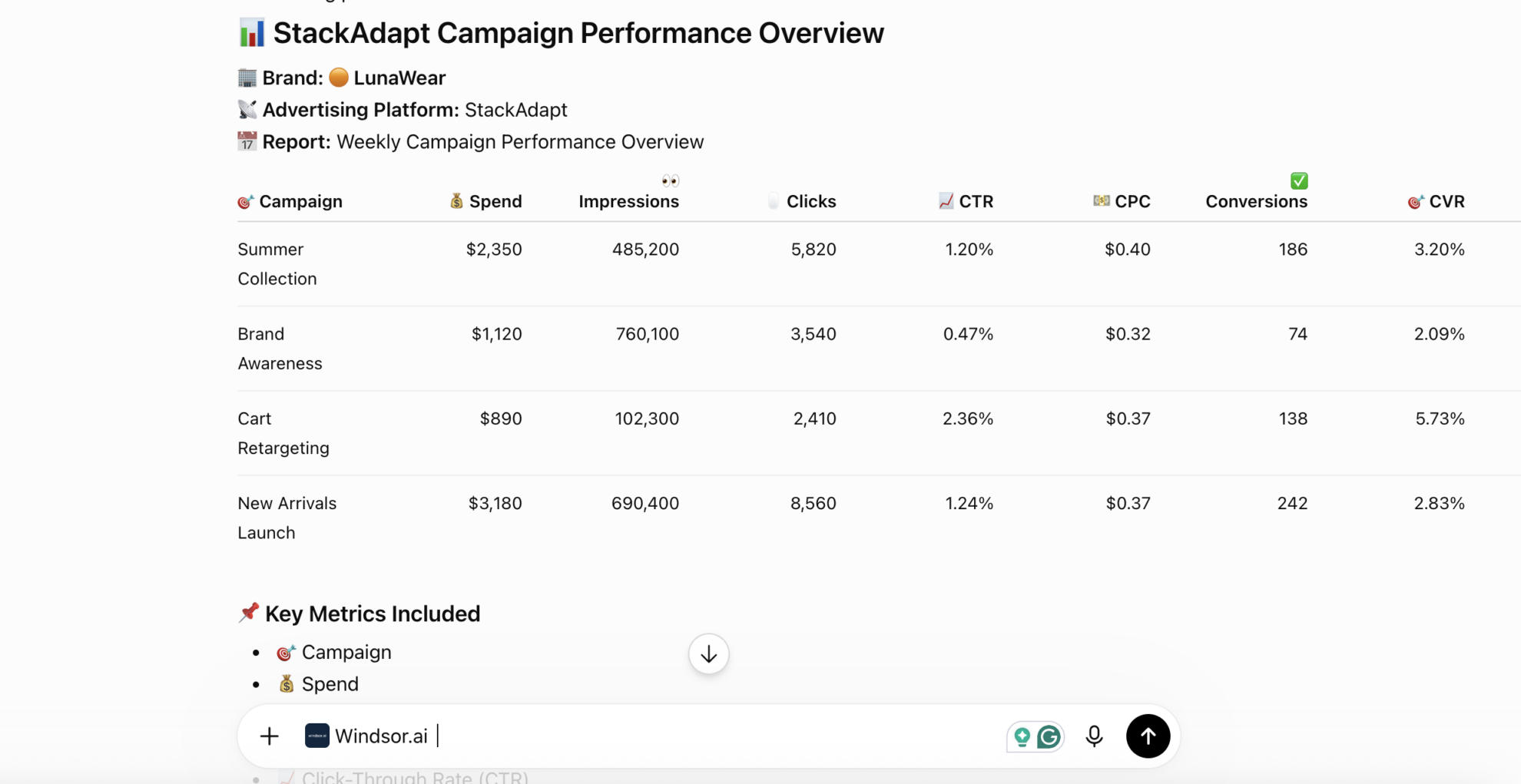














How to connect StackAdapt to ChatGPT with Windsor.ai
Explore a step-by-step guide to integrate your StackAdapt data into ChatGPT with the Windsor.ai connector.
Connect StackAdapt in the Windsor.ai dashboard
Choose StackAdapt as your data source and grant access to Windsor.ai.

Install the Windsor.ai connector
Log in to your ChatGPT account and open this Windsor.ai connector page.
Click Connect, then authorize access.

Query your StackAdapt data in ChatGPT
Open a new chat and start asking questions about your connected StackAdapt data using natural language.
Make sure that the Windsor.ai connector is enabled (click the + sign → More → Windsor.ai).
FAQs
What StackAdapt data can I analyze in ChatGPT?
Windsor.ai gives ChatGPT access to all 145 StackAdapt fields (64 metrics, 81 dimensions), organized by category:
- Performance metrics (38 fields): Impressions, Clicks, CTR, Spend, Conversions, ECPA, Revenue.
- Video and audio completion (8 fields): Vcomp Rate, Vcomp 95, Audio Completion Rate, Audio Completed.
- Creative details (23 fields): Creative Name, Creative Heading, Creative Tagline, Creative CTA Text.
- Campaign setup, budget, and frequency capping (48 fields): Campaign Freq Cap Limit, Campaign Pacing Daily Spend Needed, Campaign Goal, Campaign Tactic Type.
- Conversion tracking (7 fields) and account/date dimensions (21 fields).
Can ChatGPT compare performance across native, video, audio, and CTV campaigns?
Yes. Windsor.ai streams impressions, clicks, spend, and ECPA for every format using consistent field names, so ChatGPT can compare native, video, audio, and CTV performance side by side.
Can ChatGPT analyze creative-level performance for StackAdapt?
Yes. The Creative table streams creative name, heading, tagline, CTA text, and status for every ad unit, so ChatGPT can identify which specific creatives and messages are driving clicks and conversions.
What prompts can I use to analyze StackAdapt data in ChatGPT?
-
Which campaigns are within 10% of hitting their frequency cap limit this week?
-
Compare audio completion rate against video completion rate across all active campaigns this month.
-
Break down total spend and ECPM by domain for the last quarter.
-
Which conversion trackers show the highest page starts and average time on site this month?
How much does it cost to integrate StackAdapt into ChatGPT using Windsor.ai?
Windsor.ai is free to start, no credit card required. Paid plans start at $19/month and scale by the number of sources and accounts. See the pricing page.
Can I combine StackAdapt data with other channels in ChatGPT?
Yes. Windsor.ai supports 350+ data sources, so you can connect StackAdapt alongside Meta Ads or Google Ads for a true omnichannel view of your programmatic and paid social performance.
Does connecting StackAdapt to ChatGPT require any coding?
No. Windsor.ai’s MCP connector is fully no-code: authorize your StackAdapt account once in the Windsor.ai dashboard, install the Windsor.ai app in ChatGPT, and start asking questions in plain English.
Do you have helpful links to get started with integrating StackAdapt and ChatGPT using Windsor.ai?
Yes, we have helpful resources to help you get started. You can explore our official documentation for seamless StackAdapt to ChatGPT integration with Windsor.ai:
Tired of manual StackAdapt data exports? Try Windsor.ai today to automate your reporting


