Destinations
 Data sources
 AI insights
 About us
 Careers
 Security
 Customer reviews
 Contact us
 Affiliate program
 Solution partners
 Template gallery
 Looker Studio templates
 Power BI templates
 Excel templates
 Google Sheets templates
 Tableau templates
 Facebook Ads templates
 Google Ads templates
 Data fields & Metrics
 AI prompt library & Guides
 Product documentation
 API documentation
 Case studies
 Blog
Blog Data models
 Windsor vs Supermetrics
 Windsor vs Funnel.io
 Windsor vs Fivetran
 Windsor vs Rivery
 Windsor vs Portermetrics
 Windsor vs Coupler.io
Connect Strava to ChatGPT
Automatically sync your Strava activity and athlete data to ChatGPT using the Windsor.ai connector.
Chat with your Strava data in plain language to see how your branded club, ambassador program, or event challenges are actually performing. Kudos, comments, distance, and elevation gain across every logged activity.
Forget CSVs. Stop copy/paste. Connect in minutes. No code required.
 Sign up with Google
 Free forever plan
No credit card needed
Free forever plan
No credit card needed










Get instant activity and engagement insights from Strava in ChatGPT
Windsor MCP streams your Strava activity and athlete data into ChatGPT, so you skip manual exports and go straight to what matters. Explore key use cases:

Track club engagement
Ask ChatGPT to rank activities by kudos_count and comment_count to see which posts from your branded Strava account or ambassador program actually get noticed.

Measure group activity turnout
Compare athlete_count across your branded group rides and runs to see which sessions actually draw a crowd, then check total distance covered together.

Spot standout performances
Surface activities with the highest achievement_count and pr_count to flag personal records worth featuring in your next newsletter or social post.

Map where activity happens
Break down activities by location_city and location_country to see where your ambassadors or club members are actually training.

Benchmark effort over time
Track total_elevation_gain, moving_time, and average_speed by month to see whether training volume is climbing or flattening out.
Using Windsor.ai to connect data from Strava to ChatGPT
Routing Strava data into ChatGPT usually means manual exports, spreadsheet cleanup, or costly social-analytics tools, especially when checking how a branded club or ambassador program is really performing account by account. Windsor.ai removes that friction with an MCP connector that automatically collects, structures, and streams your Strava data directly into ChatGPT.
Connect in minutes and start asking natural-language questions about kudos, engagement, and season totals.
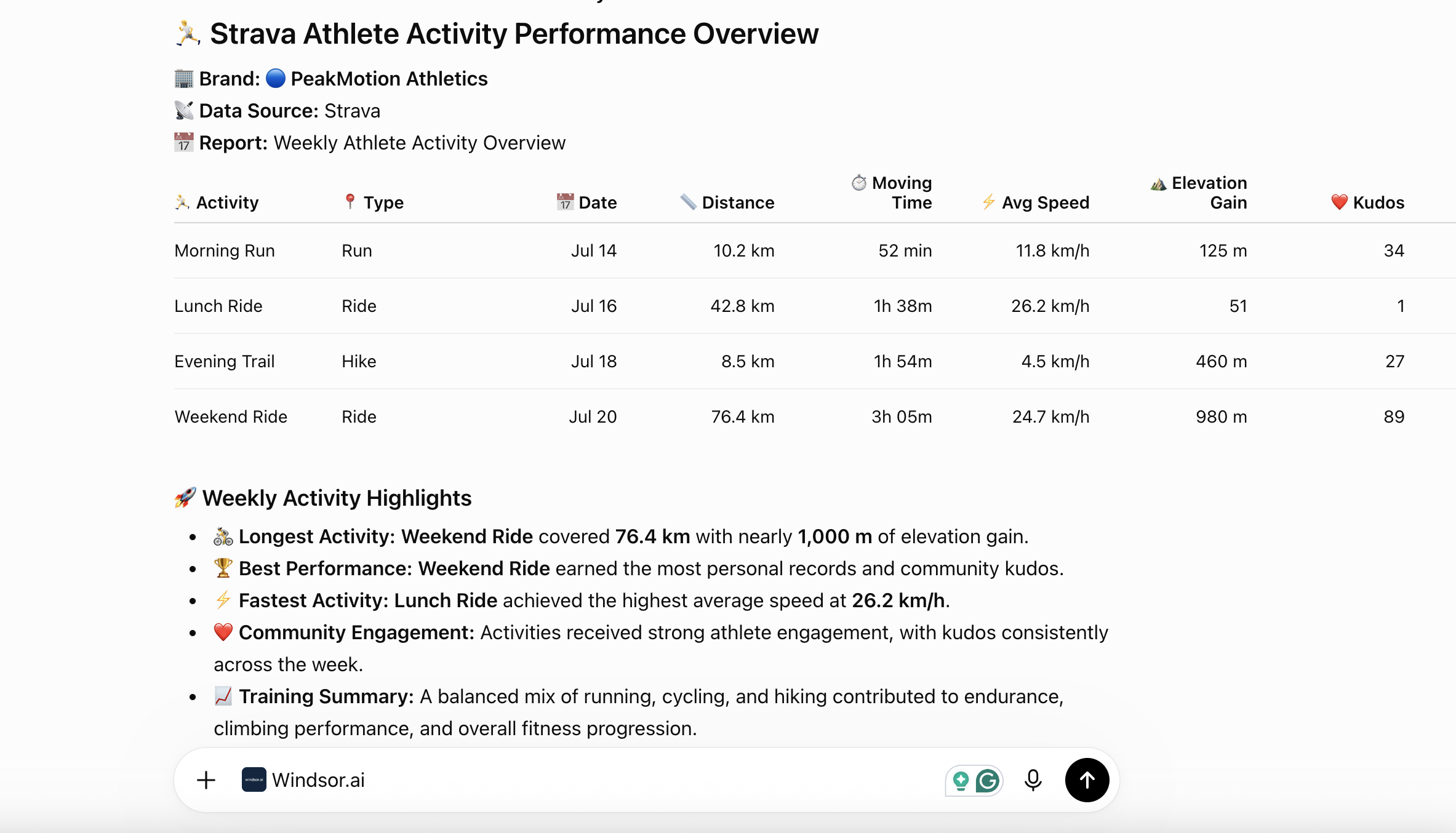














How to connect Strava to ChatGPT with Windsor.ai
Explore our video tutorial and a step-by-step guide to integrate your Strava data into ChatGPT with the Windsor.ai connector.
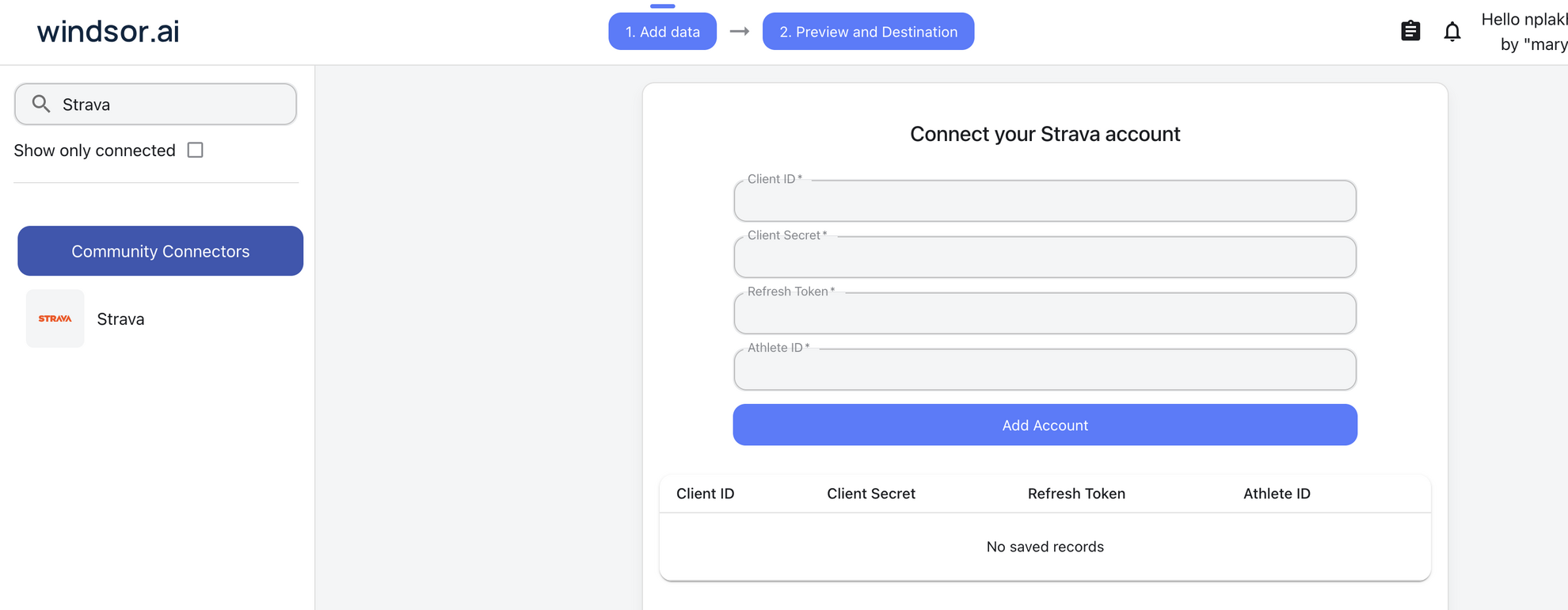
Connect Strava in the Windsor.ai dashboard
Choose Strava as your data source and authorize access to your connected account.
Install the Windsor.ai connector
Log in to your ChatGPT account and open this Windsor.ai connector page.
Click Connect, then authorize access.

Query your Strava data in ChatGPT
Open a new chat and start asking questions about your connected Strava data using natural language.
Make sure that the Windsor.ai connector is enabled (click the + sign → More → Windsor.ai).
FAQs
What Strava data can I analyze in ChatGPT?
Windsor.ai gives ChatGPT access to all 70 Strava fields (29 metrics, 41 dimensions), organized into groups such as:
- Engagement and social proof (8 fields): kudos_count, comment_count, achievement_count, pr_count.
- Performance and effort (16 fields): distance, moving_time, average_speed, total_elevation_gain, average_watts.
- Activity context and location (20 fields): type, gear_id, commute, location_city, start_latlng.
- Visibility and sync metadata (15 fields): private, visibility, flagged, resource_state, upload_id.
- Athlete season totals (11 fields): ytd_run_totals, ytd_ride_totals, biggest_ride_distance, biggest_climb_elevation_gain.
Can I see which gear shows up most in our best-performing activities?
Yes. Windsor.ai streams gear_id alongside kudos_count and pr_count, so ChatGPT can cross-reference which shoes or bikes logged in Strava show up most often in your highest-engagement or record-setting activities.
Can ChatGPT separate commute activities from training or event activities?
Yes. The commute field flags whether an activity was logged as a commute, so ChatGPT can split out day-to-day commuting from dedicated training rides, runs, or event activities before comparing distance and elevation gain.
What prompts can I use to analyze Strava data in ChatGPT?
-
Compare ytd_run_totals and ytd_ride_totals across our connected ambassador accounts to see which discipline drives the most volume this year.
-
Find activities where commute is true versus false - how much of our logged distance is recreational training versus daily commuting?
-
Group activities by type and gear_id to see which gear shows up most often in our highest-kudos activities.
-
Break down biggest_ride_distance and biggest_climb_elevation_gain by athlete to identify who to spotlight next.
How much does it cost to integrate Strava into ChatGPT using Windsor.ai?
Windsor.ai is free to start, no credit card required. Paid plans start at $19/month and scale by the number of sources and accounts. See the pricing page.
Can I compare season-long totals like year-to-date mileage across connected athlete accounts?
Yes. Windsor.ai streams each connected account’s ytd_run_totals, ytd_ride_totals, ytd_swim_totals, and all-time totals, so ChatGPT can compare season-long mileage and elevation across every athlete account you’ve connected to your Strava integration.
Do you have helpful links to get started with integrating Strava and ChatGPT using Windsor.ai?
Yes, we have helpful resources to help you get started. You can explore our official documentation for seamless Strava to ChatGPT integration with Windsor.ai:
Tired of manual Strava data exports? Try Windsor.ai today to automate your reporting