 Destinations
 Data sources
 AI insights
 About us
 Careers
 Security
 Customer reviews
 Contact us
 Affiliate program
 Solution partners
 Template gallery
 Looker Studio templates
 Power BI templates
 Excel templates
 Google Sheets templates
 Tableau templates
 Facebook Ads templates
 Google Ads templates
 Data fields & Metrics
 AI prompt library & Guides
 Product documentation
 API documentation
 Case studies
 Blog
Blog Data models
 Windsor vs Supermetrics
 Windsor vs Funnel.io
 Windsor vs Fivetran
 Windsor vs Rivery
 Windsor vs Portermetrics
 Windsor vs Coupler.io
Connect Stripe to ChatGPT
Automatically sync your Stripe data to ChatGPT using the Windsor.ai connector.
Chat with your Stripe data for instant insights on recurring revenue, churn and forecasting, then set up a new customer and subscription without leaving the chat.
Forget CSVs. Stop copy/paste. Connect data in minutes. No code required.
 Sign up with Google
 Free forever plan









Grow recurring revenue with Stripe to ChatGPT integration
Connect Stripe to ChatGPT via Windsor MCP to skip manual analysis and uncover AI-powered insights into your financial performance in seconds. Explore key use cases below:

Uncover your true net revenue
See exactly how much processing fees are eating into your revenue across every transaction type. ChatGPT breaks down gross revenue, fees, and net amounts by transaction category so you know what actually lands in your account, and which payment types cost the most to run.

Improve trial-to-paid conversion
Uncover which trials are about to expire without converting before they quietly lapse. Ask ChatGPT to track every trial through its start and end window, flag the ones running out of time, and identify which cohorts have the highest drop-off so your team can reach out at the right moment.

Link revenue to e-commerce orders
Find out which customer segments generate the most combined subscription and order revenue by connecting Stripe payment data with Shopify or WooCommerce orders. Understand which segments drive the highest lifetime value, and which carry the most refunds.

Identify at-risk subscriptions
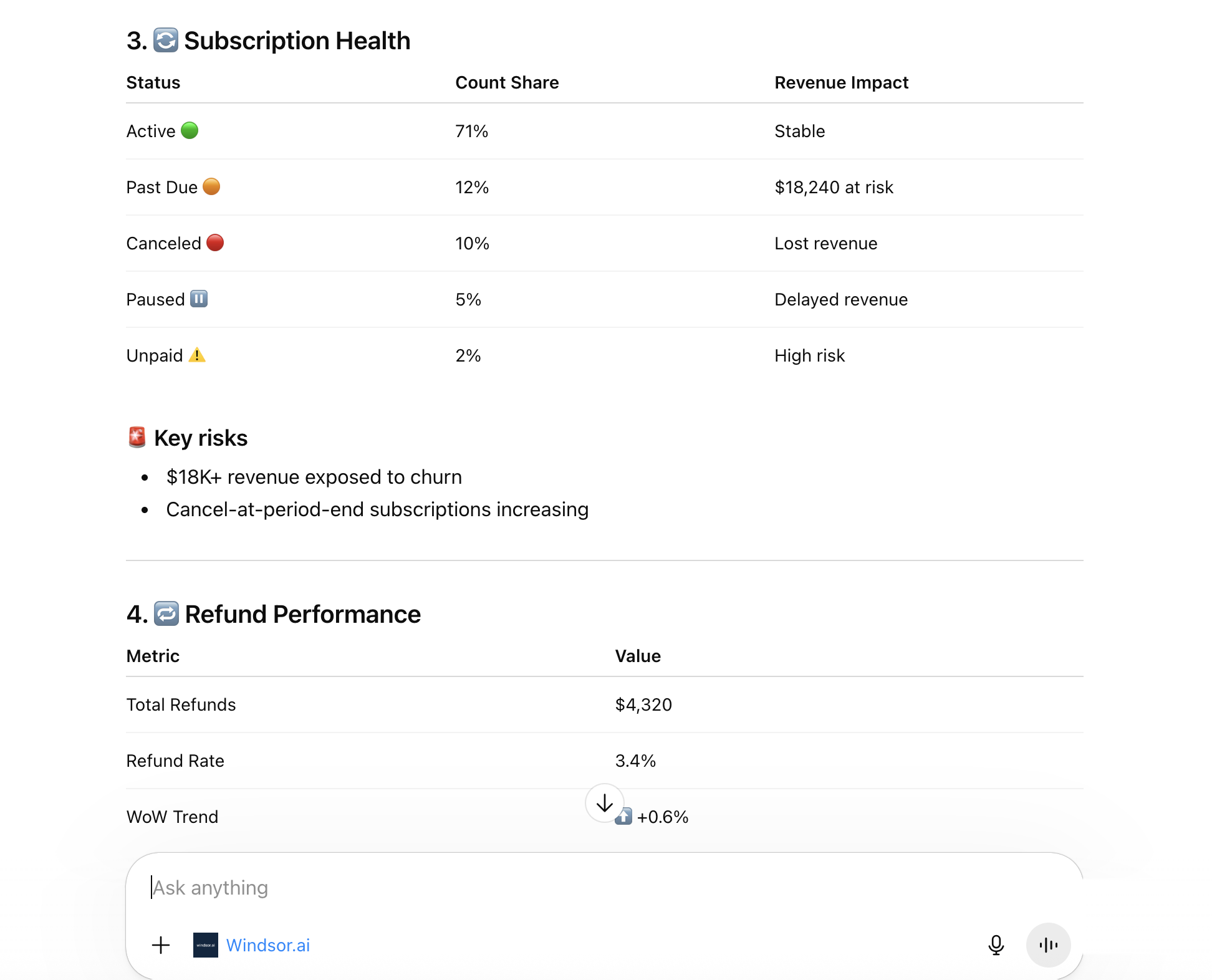
Ask AI to spot subscriptions showing early churn signals such as failed payments, past_due status, or upcoming cancellations, helping your team prioritize the customers most likely to churn and recover revenue while there’s still time.
Using Windsor.ai to connect data from Stripe to ChatGPT
Bringing Stripe data into ChatGPT usually requires manual exports, time-consuming data prep, or costly tools. Windsor.ai simplifies the process by automatically streaming your subscription, transaction, and refund data straight into ChatGPT.
Connect in minutes and start asking questions about MRR, churn, and at-risk subscriptions via plain language.
Available actions
Create Customer Create a new Stripe customer and return its id (cus_...), which create_subscription then uses to start a subscription. Provide at least an email or a name.
Create a new Stripe customer and return its id (cus_...), which create_subscription then uses to start a subscription. Provide at least an email or a name.
Create Subscription Create a recurring Stripe subscription for an existing customer, billing a fixed amount each interval (e.g. an opportunity or contract value from a CRM). amount is in the currency's minor unit (e.g. cents: 5000 means 50.00). A price is created inline for that amount; set product to bill against an existing product, otherwise product_name names a new product (defaults to "Subscription"). collection_method defaults to send_invoice, which emails the customer an invoice; days_until_due sets how many days they have to pay (defaults to 0, due on receipt). Use charge_automatically to charge the customer's saved payment method instead.
Create a recurring Stripe subscription for an existing customer, billing a fixed amount each interval (e.g. an opportunity or contract value from a CRM). amount is in the currency's minor unit (e.g. cents: 5000 means 50.00). A price is created inline for that amount; set product to bill against an existing product, otherwise product_name names a new product (defaults to "Subscription"). collection_method defaults to send_invoice, which emails the customer an invoice; days_until_due sets how many days they have to pay (defaults to 0, due on receipt). Use charge_automatically to charge the customer's saved payment method instead.














How to connect Stripe to ChatGPT data with Windsor.ai
Explore our video tutorial and a step-by-step guide to seamlessly integrate your data from any source into ChatGPT with the Windsor.ai connector.
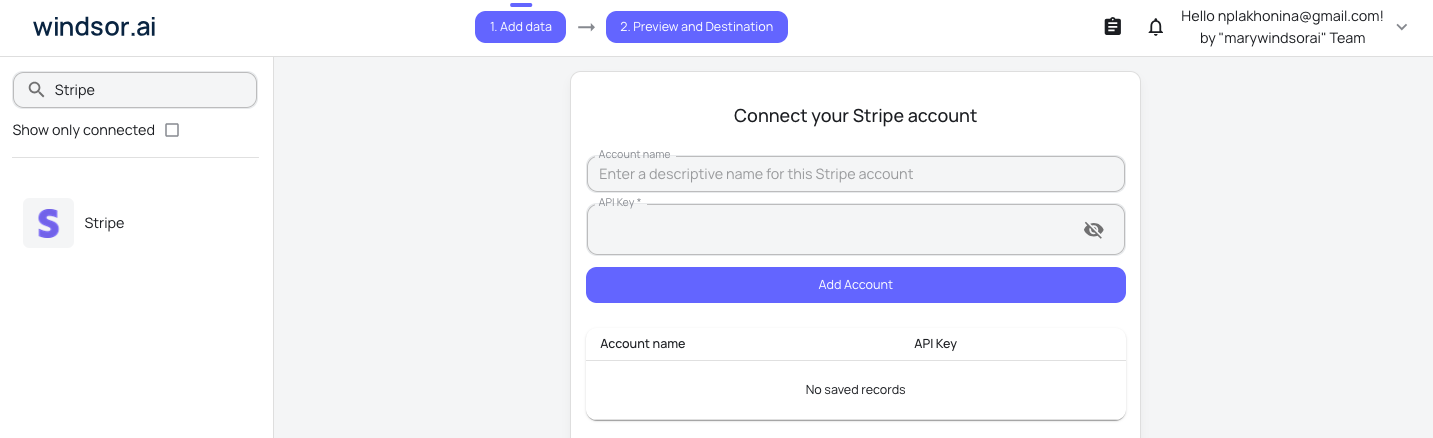
Select your data source
Choose Stripe as your data source and grant access to Windsor.ai.
Install the Windsor.ai connector
Log in to your ChatGPT account and open this Windsor.ai connector page.
Click Connect, then authorize access.

Query your Stripe data in ChatGPT
Open a new chat and start asking questions about your connected Stripe data using natural language.
Make sure that the Windsor.ai connector is enabled (click the + sign → More → Windsor.ai.)
FAQs
What can I do with Stripe data in ChatGPT?
Once Stripe is connected to ChatGPT, you can:
- Analyze revenue with breakdowns of transaction Amount, Net Amount, and Fee by time period, currency, or customer.
- Monitor subscription health by tracking active, trialing, past_due, paused, and canceled subscriptions in real time.
- Understand churn by analyzing Cancellation Reason, Feedback, and Comment fields to identify why customers leave.
- Start new recurring revenue by creating a customer and a subscription directly from the chat, which is handy when a deal closes and the billing needs to follow.
- Track refunds by grouping Refund Reason and Amount to identify patterns affecting your bottom line.
- Forecast revenue using current subscription statuses and billing cycle data to project upcoming MRR.
- Monitor payouts by tracking Payout Status and Arrival Date to ensure funds land on schedule.
Can ChatGPT change anything in my Stripe account?
Only two things, and both are additions rather than edits: creating a customer, and starting a recurring subscription for an existing customer. Nothing can move money that already exists, so charges, refunds, payouts, price changes and cancellations all stay inside Stripe. ChatGPT confirms the exact record with you before it creates it, and the Available actions list above is fetched live from the Windsor.ai API.
Can I combine Stripe with other data sources in ChatGPT?
Yes. Windsor.ai supports 350+ data sources, so you can analyze Stripe alongside marketing (Google Ads, Meta Ads, Mailchimp), sales (Zoho CRM, HubSpot), and e-commerce (Shopify, WooCommerce, Magento) sources in ChatGPT for a complete view of your business performance.
Can ChatGPT help identify at-risk subscriptions in Stripe?
Yes. ChatGPT identifies subscriptions with past due, unpaid, or paused status and ranks them by revenue at risk using Price Unit Amount and Current Period End. It also surfaces subscriptions with cancel_at_period_end set to true, so you can act before churn happens.
What prompts can I use to analyze Stripe data in ChatGPT?
Use advanced prompts in ChatGPT to uncover deeper insights from your Stripe data. For example:
-
Analyze all subscriptions with a status of past_due or unpaid this month. Show the total at-risk revenue by summing their subscription item Price Unit Amount, and suggest a prioritized outreach list ranked by subscription value.
-
Group canceled subscriptions by Cancellation Reason and Cancellation Feedback over the last 90 days. Identify the top 3 reasons customers are churning and quantify the monthly revenue lost per reason.
-
Compare active subscriptions on monthly versus annual Recurring Intervals. Show the total revenue, average subscription value, and churn rate for each billing frequency to identify which interval retains customers better.
-
Analyze transaction Fee amounts relative to Net Amount by Reporting Category over the last 30 days. Identify which transaction types carry the highest fee burden and calculate the true net revenue after fees.
Can ChatGPT help forecast MRR and ARR?
Yes. ChatGPT calculates your current MRR and projects ARR using your active subscription and pricing data. It can also model the impact of churn by factoring in at-risk and canceled subscriptions, giving you a realistic forward-looking revenue picture rather than just a snapshot of today.
How much does it cost to integrate Stripe into ChatGPT using Windsor.ai?
Windsor.ai’s pricing for ChatGPT data integration varies depending on the number of connected accounts and data sources. We offer absolutely transparent pricing plans for diversified business needs and budgets.
How long does it take to connect Stripe to ChatGPT?
With Windsor.ai’s intuitive connector, the integration process takes just a few minutes. No technical expertise is required; connecting Stripe to ChatGPT is simple, straightforward, and completely code-free.
Do you have helpful links to get started with integrating Stripe and ChatGPT using Windsor.ai?
Yes, we have helpful resources to help you get started. You can explore our official documentation and tutorials for seamless Stripe to ChatGPT integration with Windsor.ai:
Tired of manual Stripe data exports? Try Windsor.ai today to automate your reporting


